1. Киришүү
This manual provides detailed instructions for the APEXEL WS-SQB641 2-in-1 Extendable Selfie Stick Monopod Tripod Stand. This versatile device combines the functionality of a selfie stick with a stable tripod, designed for capturing photos and videos with your smartphone. It features an extendable body, a rotatable phone holder, and a wireless remote shutter for convenient operation.
2. Пакеттин мазмуну
- APEXEL Selfie Stick & Tripod (Model WS-SQB641) ×1
- Wireless Remote Shutter (battery included) ×1
- Charging Cable (Micro USB) ×1

3. Орнотуу нускамалары
3.1. Bluetooth Remote Pairing
- Long press the button on the remote until it flashes quickly.
- Turn on Bluetooth on your smartphone (compatible with Android 4.3 or above, iOS 5.1 or above).
- Find and select the device (e.g., 'APEXEL' or 'WS-SQB641') to pair with it.
3.2. Attaching Your Phone
- Gently pull apart the phone holder clamps.
- Insert your smartphone into the holder, ensuring it is securely gripped by the silicone pads. The holder supports devices under 6 inches in width.
3.3. Deploying the Tripod
- Gently unfold the three legs from the base of the selfie stick.
- Ensure the center leg of the tripod is pushed up to fully extend and stabilize the tripod.

Видео 1: Продукт бүттүview and Setup. This video demonstrates the APEXEL 2-in-1 Extendable Selfie Stick Monopod Tripod Stand, showcasing its compact design, extension capabilities, and how to set it up for use as both a selfie stick and a tripod.
4. Иштөө нускамалары
4.1. Selfie Stick Mode
- тутканы бекем кармаңыз.
- Extend the aluminum alloy rod to your desired length (up to 26.6 inches).
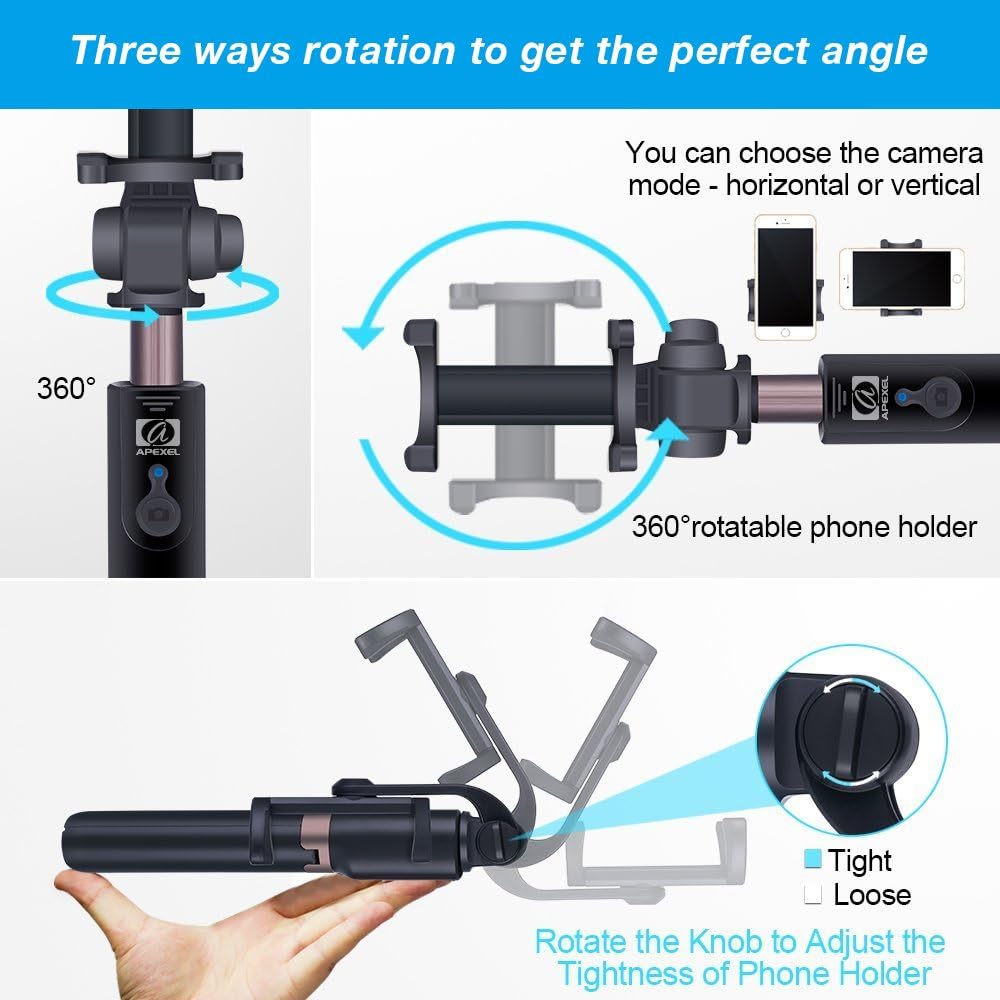
- Adjust the phone holder's angle using the 225° rotation knob and the 360° rotatable head to achieve the perfect shot.
- Use the wireless remote shutter to capture photos or start/stop video recording.
4.2. Tripod Mode
- Ensure the tripod legs are fully spread and stable on a flat surface.
- Extend the rod to your desired height.
- Adjust the phone holder's angle as needed.
- Use the wireless remote shutter to capture photos or start/stop video recording from a distance.
Video 2: Bluetooth Remote and Tripod Demonstration. This video highlights the functionality of the detachable Bluetooth remote and the stability of the tripod stand, demonstrating how to use it for hands-free photography and videography.
Video 3: 360-Degree Rotation Feature. This video demonstrates the 360-degree rotation capability of the phone holder, allowing users to easily switch between landscape and portrait orientations.
5. Өзгөчөлүктөрү
- 2-ин-1 Дизайн: Functions as both an extendable selfie stick and a stable tripod stand.
- Зымсыз алыстан жапкыч: Detachable Bluetooth remote allows for remote photo and video capture.
- Extendable & Portable: Compact 7.9-inch folded size, extends up to 26.6 inches, weighing 5.47 oz for easy portability.
- Жөнгө салынуучу бурчтар: Features a 225° rotation clamp with an adjustable knob, a 360° rotatable phone holder, and a 360° rotation head for optimal shooting angles.
- Кеңири шайкештик: Universal cell phone holder compatible with various iPhone models (16, 15, 14, 13, 12, 11, X, XS Pro Max Plus), Samsung Galaxy models (S24, S23, S22, S21, S20 Ultra), Pixel, and OnePlus smartphones.





6. Техникалык тейлөө
- Аппаратты таза, жумшак, кургак чүпүрөк менен сүртүңүз.
- Аппаратты экстремалдык температурага же нымдуулукка дуушар кылуудан алыс болуңуз.
- Store the selfie stick in its carrying pouch when not in use to prevent scratches and damage.
- Charge the wireless remote shutter regularly to ensure it is ready for use.
7. Кыйынчылыктарды
7.1. Bluetooth туташуу маселелери
- Ensure the remote is charged and powered on (flashing light).
- Смартфонуңузда Bluetooth иштетилгенин текшериңиз.
- Unpair and re-pair the device in your phone's Bluetooth settings.
- Restart both your phone and the remote.
7.2. Tripod Stability Issues
- Ensure all three tripod legs are fully extended and locked into place.
- Verify that the center leg of the tripod is pushed up to provide maximum stability.
- Штативди тегиз, туруктуу бетке коюңуз.
For any further issues with Bluetooth connectivity or recharging, please contact our customer service for assistance.
8. Техникалык шарттар
- Продукциянын өлчөмдөрү: 1.4 x 1.4 x 6 дюйм (бүктөлгөн)
- Элемент Салмагы: 5.2 унция (147 грамм)
- Максималдуу бийиктиги: 26.6 дюйм
- Материал: Aluminum alloy (rod), ABS + PC (phone holder, tripod)
- Батарея: 1 Lithium Metal battery (included) for remote
- Шайкеш түзмөктөр: iPhone (16, 15, 14, 13, 12, 11, X, XS Pro Max Plus), Samsung Galaxy (S24, S23, S22, S21, S20 Ultra), Pixel, OnePlus, and most smartphones.
- Өзгөчөлүктөр: Lightweight, Remote Control, Portable
- Модель номери: WS-SQB641
9. Кепилдик жана колдоо
The APEXEL WS-SQB641 comes with a 30-Days Money Back Guarantee and a worry-free 12-Month Warranty. For any product-related inquiries or support, please contact our friendly customer service team.


