1. Киришүү
The iHome iBT232 is a versatile Bluetooth dual alarm FM clock radio designed to enhance your daily routine. It features wireless audio streaming, a built-in speakerphone with echo noise cancellation, dual alarms, FM radio with presets, and a convenient USB charging port. This manual provides detailed instructions for setting up and operating your device to ensure optimal performance.
2. Маанилүү коопсуздук нускамалары
- Бул көрсөтмөлөрдү жакшылап окуп чыгыңыз.
- Бул нускамаларды келечектеги маалымат үчүн сактаңыз.
- Бардык эскертүүлөргө кулак сал.
- Бардык нускамаларды аткарыңыз.
- Бул аппаратты суунун жанында колдонбоңуз.
- Кургак чүпүрөк менен гана тазалаңыз.
- Эч кандай желдетүүчү тешиктерди жаап албаңыз. Өндүрүүчүнүн көрсөтмөлөрүнө ылайык орнотуу.
- Радиаторлор, жылуулук регистрлери, мештер же башка аппараттар (анын ичинде) сыяктуу жылуулук булактарынын жанына орнотпоңуз ampкөтөргүчтөр) жылуулукту пайда кылуучу.
- Өндүрүүчү тарабынан көрсөтүлгөн тиркемелерди/аксессуарларды гана колдонуңуз.
- Бардык тейлөөлөрдү квалификациялуу тейлөө кызматкерлерине тапшырыңыз. Аппарат кандайдыр бир зыянга учураганда, мисалы, кубат берүүчү шнур же сайгыч бузулганда, суюктук төгүлгөндө же аппараттын ичине нерселер түшкөндө, аппарат жамгырга же нымдуулукка дуушар болгондо, нормалдуу иштебей калганда тейлөө талап кылынат. , же түшүрүлгөн.
3. Пакеттин мазмуну
Please check the contents of your package carefully. If any items are missing or damaged, contact your retailer immediately.
- iHome iBT232 Unit
- Universal AC адаптери
- FM антенна зымы
4. Башкаруу каражаттары жана көрсөткүчтөр
Familiarize yourself with the buttons and ports on your iBT232 unit.
Жогорку панелдин башкаруу элементтери

Top panel controls of the iHome iBT232 unit, showing power, Bluetooth, FM presets, Aux, Sleep, Alarm 1, Alarm 2, volume, call, voice assistant, and snooze/dimmer buttons.
- Кубат баскычы: Аппаратты КҮЙГҮЗҮП/ӨЧҮРӨТ.
- Bluetooth баскычы: Bluetooth жупташтыруу режимин баштайт.
- FM Presets Button: Cycles through saved FM radio stations.
- Көмөкчү баскыч: Selects Aux-in audio source.
- Уйку баскычы: Уйку таймерин иштетет.
- 1 жана 2-сигнализация баскычтары: Ойготкуч 1 жана Ойготкуч 2ди орнотот жана иштетет.
- Volume -/+ Buttons: Үн деңгээлин тууралайт.
- Чалууга жооп берүү/аяктоо баскычтары: Телефон чалууларды башкарат.
- Voice Assistant/Play/Pause Button: Activates voice assistant or controls media playback.
- Тындыргыч/Күнкүртүүчү баскычы: Snoozes active alarm or adjusts display brightness.
Арткы панелдин порттору

Rear panel of the iHome iBT232, displaying the Aux-in port, DST switch, Time Set button, USB charging port, and DC power input.
- Aux-in Jack: Тышкы аудио түзмөктөрдү туташтырат.
- DST которгуч: Toggles Daylight Saving Time.
- Убакытты коюу баскычы: Used for manual time adjustment.
- USB кубаттоо порту: Provides power for charging external devices.
- Туруктуу кубат киргизүү: Connects the AC adapter for main power.
5. Орнотуу
5.1 Кубат туташтыруу
- Plug the supplied AC adapter into the DC power input jack on the back of the iBT232 unit.
- Plug the other end of the AC adapter into a working wall outlet.
- Түзмөк күйүп, дисплей күйөт.
5.2 Батареянын резервдик көчүрмөсүн орнотуу
The iBT232 includes a battery backup system to maintain time and alarm settings during a power outage.
- Аппараттын астындагы батарея бөлүкчөсүнүн капкагын ачыңыз.
- Insert 2 'AA' batteries (not included) into the compartment, ensuring correct polarity (+/-).
- Батарея уясынын капкагын бекем жабыңыз.
5.3 Убакытты коюу
- басып, кармап туруңуз Убакыт коюу button located on the rear panel until the time display flashes.
- колдонуу Көлөмү -/+ buttons on the top panel to adjust the hours. Press Убакыт коюу ырастоо үчүн дагы.
- колдонуу Көлөмү -/+ мүнөттөрдү жөндөө үчүн баскычтарды басыңыз. Убакыт коюу ырастоо жана убакыт орнотуу режиминен чыгуу үчүн кайра.
5.4 Daylight Saving Time (DST) Switch
жылдырыңыз DST switch on the rear panel to adjust the time for Daylight Saving Time. Set to +1 for DST or -1 for standard time.
6. Иштөө нускамалары
6.1 FM радиосунун иштеши

The iHome iBT232 unit showcasing its FM Radio capability with digital tuning and 6 station presets.
- Extend the FM antenna wire for optimal reception.
- басыңыз Күч баскычты басуу менен
- басыңыз FM алдын ала орнотуулар FM радио режимине өтүү үчүн баскыч.
- колдонуу Көлөмү -/+ buttons to manually tune to a desired station or press and hold to auto-scan for the next available station.
- Алдын ала орнотууну сактоо үчүн басып, кармап туруңуз FM алдын ала орнотуулар баскычты алдын ала коюлган сан жарк этмейинче басыңыз. колдонуу Көлөмү -/+ buttons to select a preset number (1-6) and press FM алдын ала орнотуулар ырастоо үчүн дагы.
6.2 Bluetooth жупташтыруу

A person using a smartphone to stream audio wirelessly to the iHome iBT232 Bluetooth Dual Alarm FM Clock Radio.
- басыңыз Күч баскычты басуу менен
- басып, кармап туруңуз Bluetooth button until the Bluetooth indicator on the display flashes, indicating pairing mode.
- On your Bluetooth-enabled device, enable Bluetooth and select 'iHome iBT232' from the list of available devices.
- Жупташтырылгандан кийин, Bluetooth көрсөткүчү катуу күйөт жана сиз аудиону зымсыз агылта аласыз.
6.3 Aux-in Mode
Connect an external audio device (e.g., MP3 player) using a 3.5mm audio cable (not included) to the Aux-in jack on the rear of the unit. Press the Көмөкчү button on the top panel to switch to Aux-in mode.
6.4 Сигнал орнотуу
iBT232 эки көз карандысыз ойготкучту камтыйт.
- Же баскычын басып туруңуз Ойготкуч 1 or Ойготкуч 2 ойготкуч убактысы жаркылдаганга чейин баскычты басыңыз.
- колдонуу Көлөмү -/+ ойготкуч саатын тууралоо үчүн баскычтарды басыңыз, анан тиешелүү баскычты басыңыз Ойготкуч ырастоо үчүн баскыч.
- мүнөткө кайталаъыз.
- Select your desired alarm source (Bluetooth, FM Radio, or Tone) using the Көлөмү -/+ баскычтарын басып, анан басыңыз Ойготкуч ырастоо үчүн баскыч.
- Сигналдын үнүн төмөнкү менен тууралаңыз Көлөмү -/+ баскычтарын басып, анан басыңыз Ойготкуч button to confirm and activate the alarm. The alarm indicator will appear on the display.
6.5 Snooze and Dimmer Function
Ойготкуч чыкканда, басыңыз Тындыруу/Диммер button to temporarily silence it for a preset duration. When no alarm is active, press the Тындыруу/Диммер button repeatedly to cycle through display brightness levels (High, Medium, Low, Off).
6.6 Спикерфондун иштеши

The iHome iBT232 Bluetooth Dual Alarm FM Clock Radio in a home setting, illustrating its use as a speakerphone.
When your phone is paired via Bluetooth, you can use the iBT232 as a speakerphone.
- Чалууга жооп берүү: басыңыз Чакырууга жооп баскычы чалуу келгенде.
- Чалууну аяктоо: басыңыз Чакырууну бүтүрүү button to disconnect a call.
- The built-in microphone and echo noise cancellation ensure clear communication.
6.7 USB кубаттоо порту
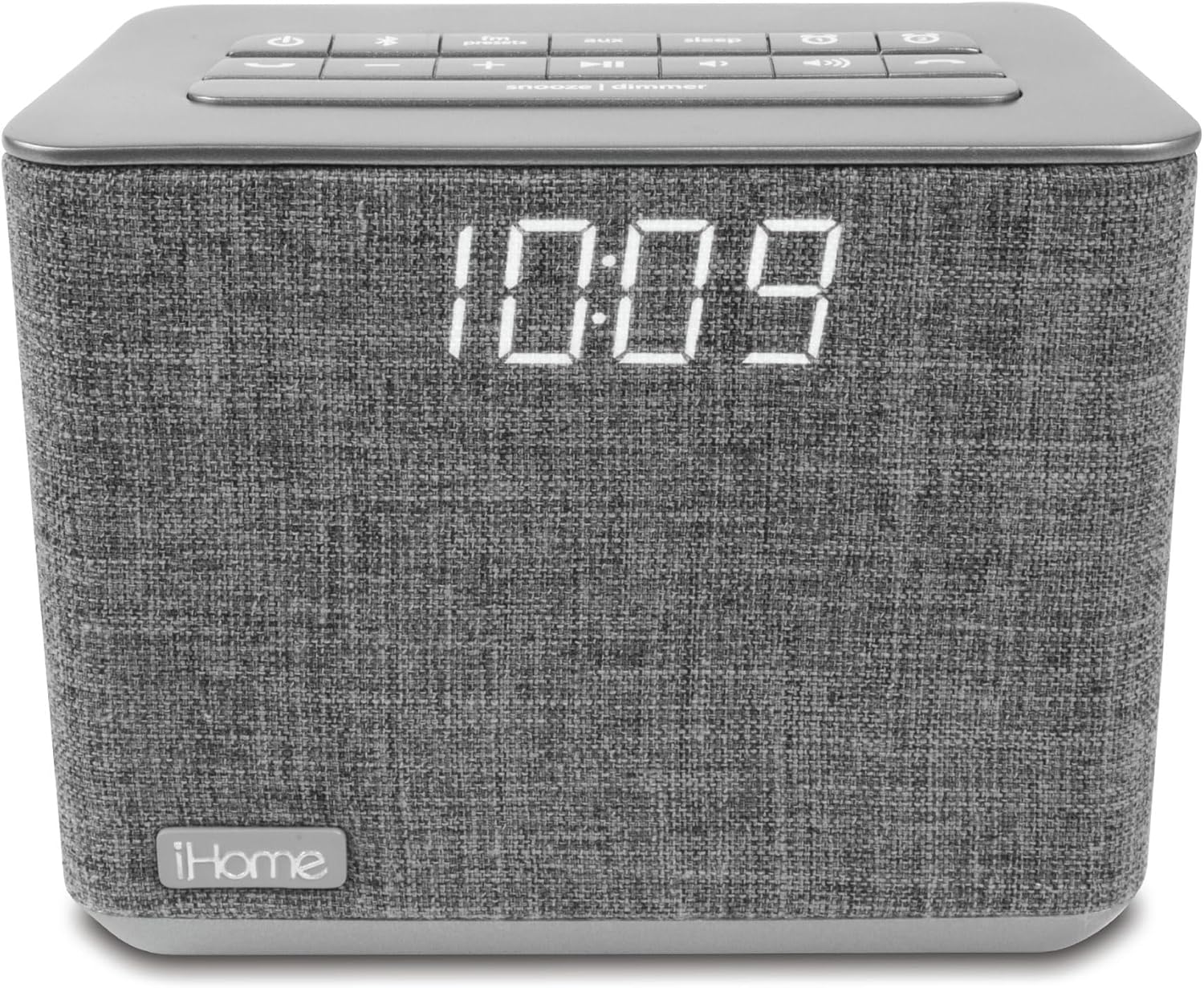
Фронт view of the iHome iBT232 Bluetooth Dual Alarm FM Clock Radio in gray, displaying the time and connected to a smartphone for USB charging.
Connect your USB charging cable (not included) to the USB charging port on the rear of the unit to charge your smartphone or other USB-powered devices.
6.8 Үн менен башкаруу (Siri/Google Жардамчысы)

A person interacting with the iHome iBT232 using voice commands for Siri or Google Assistant.
When your Bluetooth-paired device is connected, press the Үн жардамчысы button to activate Siri or Google Assistant. You can then use voice commands for various functions like making calls, listening to music, setting reminders, and checking the weather.
7. Техникалык тейлөө
To keep your iBT232 in optimal condition:
- Агрегатты жумшак, кургак чүпүрөк менен тазалаңыз. Суюк тазалагычтарды же абразивдүү материалдарды колдонбоңуз.
- Keep the unit away from direct sunlight, excessive heat, or moisture.
- Эч кандай тешиктерди тоспостон, туура желдетүүнү камсыз кылыңыз.
8. Кыйынчылыктарды
If you encounter issues with your iBT232, refer to the following common problems and solutions:
- Түзмөк күйбөйт: Ensure the AC adapter is securely connected to both the unit and a working wall outlet. Check if the outlet has power.
- Clock display is not visible: басыңыз Тындыруу/Диммер button to adjust the display brightness. Ensure the unit is powered on.
- Bluetooth жупташтыруу ишке ашпай калды: Make sure the unit is in Bluetooth pairing mode (flashing indicator). Ensure your device's Bluetooth is enabled and within range. Try unpairing and re-pairing the device.
- No audio from FM radio: Extend the FM antenna wire fully. Try tuning to different stations. Adjust the volume.
- Ойготкуч угулбайт: Verify that the alarm is set and activated (alarm indicator visible). Check the alarm volume. Ensure the alarm time is correctly set.
Пайдалуу видеолор
Every Feature on the iHome Bluetooth Alarm Clock
Бул видеодо толук маалымат берилетview of all features available on the iHome iBT232 Bluetooth Alarm Clock, including its various buttons and functionalities.
Top Features You Need to See!
A concise video highlighting the most important and useful features of the iHome iBT232, demonstrating its practical applications.
Продукт Review and Demo After Years of Use
This video offers a long-term review and demonstration of the iHome iBT232, providing insights into its durability and performance after extended use.
Чынчыл жоопview of Bluetooth USB Dual Alarm Clock
An unbiased review of the iHome iBT232 Bluetooth USB Dual Alarm Clock, discussing its strengths and weaknesses from a user's perspective.
9. Техникалык шарттар
| Бренд | iHome |
| Модель номери | iBT232 |
| Түс | Боз |
| Дисплей түрү | Санарип |
| Продукциянын өлчөмдөрү | 5.39"W x 4.88"H |
| Power Source | Электр зымдары |
| Материал | Пластик, кездеме |
| Элемент Салмагы | 1.1 фунт (0.5 килограмм) |
| Батареялардын саны | 2 AA batteries required (for backup) |
| Ойготкуч саат | Yes (Dual Alarms) |
| Байланыш технологиясы | Bluetooth, USB |
| Өндүрүүчү | МЕН ҮЙ |
| Биринчи жеткиликтүү күн | 29-апрель, 2017-жыл |
10. Кепилдик жана колдоо
iHome products are manufactured to the highest quality standards. For specific warranty information and customer support, please refer to the warranty card included with your product or visit the official iHome webсайт. Сатып алуу квитанциясын кепилдик дооматтары үчүн сатып алуунун далили катары сактаңыз.


