1. Киришүү
This manual provides essential information for setting up, operating, maintaining, and troubleshooting your Microsoft Surface Pro Model 1796. The Surface Pro is a versatile 2-in-1 device designed to function as both a high-performance laptop and a portable tablet. Please read these instructions carefully to ensure optimal use and longevity of your device.
2. Продукт бүтүп калдыview
The Microsoft Surface Pro Model 1796 features a 12.3-inch PixelSense multi-touch display, an Intel Core i5 processor, 4GB of RAM, and a 128GB SSD. It operates on Windows 10 Pro, offering a full desktop experience in a portable form factor. The device supports a detachable keyboard (Surface Pro Signature Type Cover) and a digital pen (Surface Pen), both sold separately, to enhance its functionality.

Figure 2.1: Microsoft Surface Pro in tablet mode, displaying the lock screen.
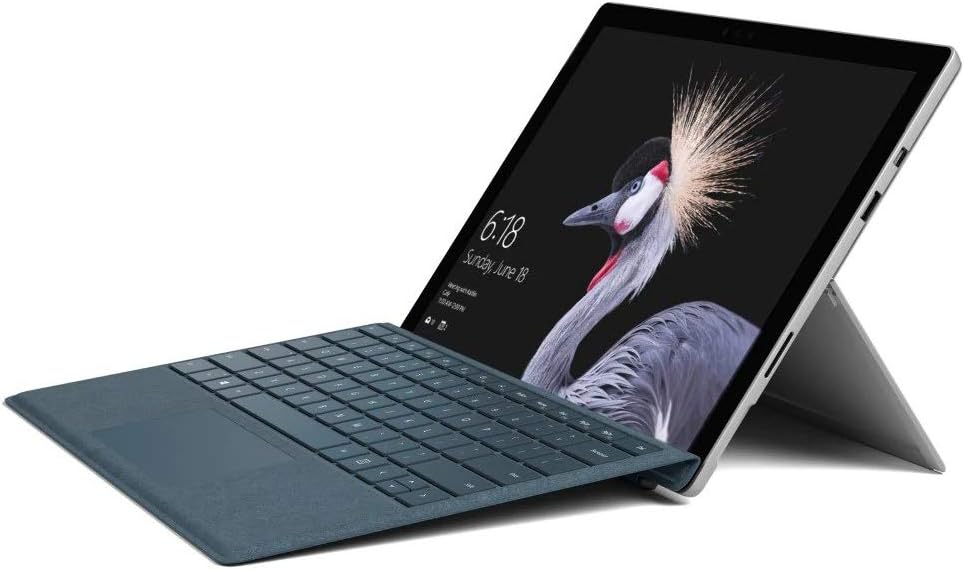
Figure 2.2: Microsoft Surface Pro with Signature Type Cover attached, configured as a laptop.

Figure 2.3: Microsoft Surface Pro tablet and detached Signature Type Cover.
3. Орнотуу
3.1 Баштапкы күйгүзүү
- Connect the power supply to the Surface Pro and a power outlet.
- Түзмөктүн жогорку четинде жайгашкан кубат баскычын басыңыз.
- Windows 10 Pro баштапкы орнотуусун аяктоо үчүн экрандагы көрсөтмөлөрдү аткарыңыз, анын ичинде тилди тандоо, тармакка туташуу жана колдонуучу аккаунтун түзүү.
3.2 Аксессуарларды туташтыруу
- Surface Pro Signature Type Cover: Align the Type Cover with the magnetic connector along the bottom edge of the Surface Pro until it clicks into place.
- Беттик калем: The Surface Pen connects via Bluetooth. Go to Орнотуулар > Түзмөктөр > Bluetooth жана башка түзмөктөр to pair the pen.
3.3 Аппаратты заряддоо
Use the provided power adapter to charge your Surface Pro. The charging port is located on the right side of the device. A full charge provides approximately 13 hours of typical device usage.
4. Иштөө нускамалары
4.1 Негизги навигация
- тийүү: Use multi-touch gestures on the PixelSense display for navigation, zooming, and scrolling.
- Мукабанын түрү: Utilize the keyboard and trackpad for traditional laptop input.
- Беттик калем: Write, draw, and annotate directly on the screen.
4.2 Windows 10 Pro өзгөчөлүктөрү
Your Surface Pro comes with Windows 10 Pro, offering features such as:
- Windows Hello: For fast, secure, password-free sign-in using facial recognition.
- Кортана: Your personal digital assistant.
- Microsoft Edge: Демейки web браузер.
- Планшет режими: Automatically or manually switch to a touch-optimized interface when the Type Cover is detached.
4.3 Дисплей орнотуулары
The 12.3-inch PixelSense display has a resolution of 2736 x 1824 pixels. You can adjust display settings such as brightness, resolution, and scaling through Орнотуулар > Система > Дисплей.
5. Техникалык тейлөө
5.1 Аппаратты тазалоо
- Жумшак, түксүз кездемени колдонуңуз dampened with water or an approved screen cleaner to clean the display.
- For the device body, use a soft, dry cloth. Avoid harsh chemicals or abrasive materials.
5.2 Программалык камсыздоо жаңыртуулары
Regularly check for and install Windows updates to ensure your device has the latest security patches and features. Go to Орнотуулар > Жаңыртуу жана Коопсуздук > Windows Жаңыртуу.
5.3 Батареяга кам көрүү
- Ашыкча температурадан качыңыз, алар батареянын иштөө мөөнөтүн начарлатышы мүмкүн.
- Батареяны оптималдуу ден соолук үчүн, батареяны ырааттуу түрдө толугу менен зарядсыздандырбаңыз же аны узак убакыт бою 100% зарядда кармап туруңуз.
6. Кыйынчылыктарды
6.1 Жалпы маселелер
- Түзмөк күйбөй жатат: Ensure the device is charged. Try holding the power button for 10-15 seconds to perform a force restart.
- Экран жооп бербей жатат: Restart the device. If the issue persists, check for driver updates.
- Аткаруу маселелери: Close unnecessary applications, check for Windows updates, or run a disk cleanup.
6.2 Колдоо кызматы менен байланышуу
For more complex issues or technical assistance, please visit the official Microsoft Support website or contact their customer service. Have your device's model number (FJU-00001) and serial number ready.
7. Техникалык шарттар
| Өзгөчөлүк | Спецификация |
|---|---|
| Модель аты | FJU-00001 |
| Дисплей өлчөмү | 12.3 дюйм |
| Screen Resolution | 2736 x 1824 пиксель |
| Процессор | Intel Core i5 (2.6 ГГц) |
| RAM | 4 ГБ DDR3 |
| Сактагыч | 128 ГБ SSD |
| Графикалык сопроцессор | Intel HD Graphics 620 |
| Операция системасы | Windows 10 Pro |
| Зымсыз түрү | 802.11b, 802.11g, 802.11n |
| Батареянын орточо иштөө мөөнөтү | 13 саат |
| Элемент Салмагы | 1.7 фунт |
| Продукциянын өлчөмдөрү | 11.5 x 0.33 x 7.93 дюйм |
| Арткы Webcam Resolution | 5 депутат |
8. Кепилдик жана колдоо
Your Microsoft Surface Pro Model 1796 is covered by a limited hardware warranty provided by Microsoft. For detailed warranty terms and conditions, please refer to the documentation included with your purchase or visit the official Microsoft support webсайт. Кепилдик дооматтар үчүн сатып алганыңыздын далилин сактаңыз.
For technical support, driver downloads, and service information, please visit support.microsoft.com. You may need to provide your device's serial number and model information.