1. Киришүү
This manual provides essential information for the safe and efficient operation of your Neewer NW801H 8-inch TFT-LCD Monitor. Please read this manual thoroughly before using the product and retain it for future reference. The NW801H monitor is designed for versatile applications, including use with DSLRs, PCs, CCTV cameras, DVD players, and car backup camera systems. It features a 4:3 aspect ratio, 1024x768 resolution, and multiple input options.
2. Коопсуздук маалыматы
- Өрткө же электр тогуна урунбоо үчүн мониторду жамгырдын же нымдуулуктун таасирине дуушар кылбаңыз.
- Мониторду ачпаңыз casinг. Бардык тейлөөлөрдү квалификациялуу кызматкерлерге тапшырыңыз.
- Берилген кубат менен камсыздоону гана колдонуңуз.
- Ашыкча ысып кетүүнүн алдын алуу үчүн туура желдетүүнү камсыз кылыңыз.
- Мониторду күн тийген жерге же жылуулук булактарынын жанына коюудан алыс болуңуз.
- Clean the screen with a soft, dry cloth. Avoid harsh chemicals.
- Балдар жетпеген жерде сактаңыз.
3. Пакеттин мазмуну
Төмөндө көрсөтүлгөн бардык буюмдар таңгагыңызда бар экенин текшериңиз. Эгерде кандайдыр бир буюмдар жок болсо же бузулуп калса, сатуучуңузга кайрылыңыз.
- 1x Neewer NW801H Monitor
- 1x Power Supply (PSE Listed)
- 1x BNC кабели
- 1x Пайдалануу боюнча колдонмо (бул документ)
- 1x Mount (stand)

Image 3.1: The Neewer NW801H monitor shown with its included accessories: power adapter, BNC cable, and desktop stand.
4. Продукт бүтүп калдыview
4.1 алдыңкы панели

Сүрөт 4.1: Алдыңкы view of the Neewer NW801H monitor, displaying the screen and control buttons located below the display.
The front panel features the 8-inch TFT-LCD display and a row of control buttons for navigating the monitor's settings and input selection.
4.2 Арткы панель жана байланыштар
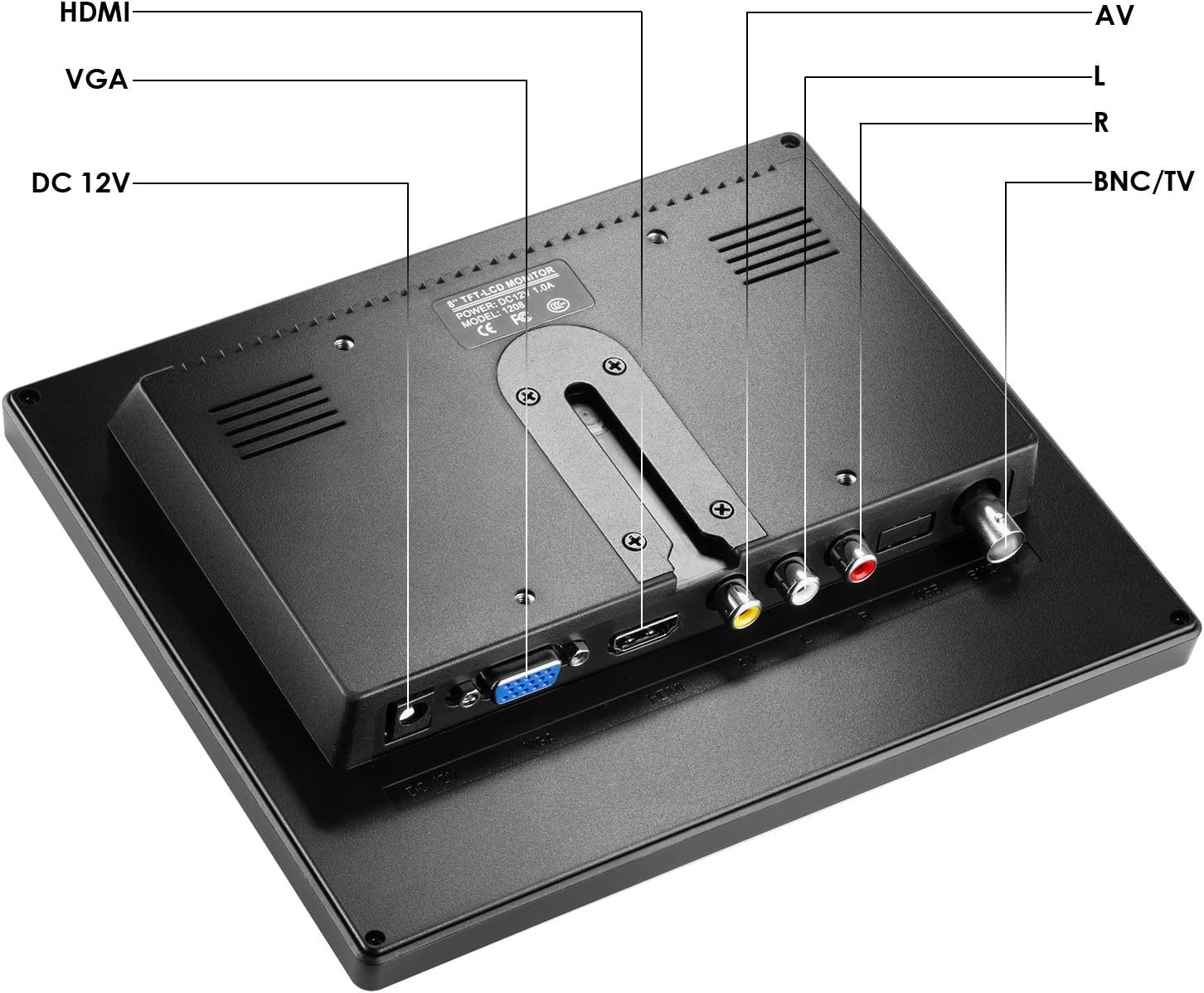
Сүрөт 4.2: Арткы view of the Neewer NW801H monitor, highlighting the various input ports and power connection.
- DC 12V: Power input port for the included 12V power adapter.
- HDMI: High-Definition Multimedia Interface input for digital video and audio signals.
- VGA: Video Graphics Array input for analog video signals.
- AV (L/R): Audio/Video input for composite video and stereo analog audio signals.
- BNC/TV: BNC input for composite video signals, commonly used with CCTV systems.
5. Орнотуу нускамалары
5.1 Монитордун стендди чогултуу
- Insert the stand's neck into the base.
- Secure the neck to the base using the provided screw and a screwdriver.
- Attach the assembled stand to the back of the monitor by aligning the mounting points and securing it.
- Ensure the monitor is firmly attached to the stand.

Image 5.1: Visual guide demonstrating the four steps to assemble the monitor stand and attach it to the display unit.
5.2 Кубат туташтыруу
Connect the provided 12V power adapter to the "DC 12V" input port on the rear of the monitor. Plug the power adapter into a standard electrical outlet.
5.3 Киргизүү түзүлүштөрүн туташтыруу
The monitor supports multiple input types. Choose the appropriate cable for your device and connect it to the corresponding port on the monitor's rear panel.
- HDMI: For devices like DSLRs, PCs, or DVD players with HDMI output.
- VGA: For PCs or other devices with VGA output.
- OF: For devices with composite video (yellow RCA) and stereo audio (red/white RCA) outputs, such as older DVD players or some cameras.
- BNC: For CCTV cameras or other surveillance equipment with BNC video output.

Image 5.2: Illustrates the monitor's compatibility with various devices including DSLR cameras, DVRs, PCs, CCD cameras, CCTV cameras, and DVD players.
6. Иштөө нускамалары
6.1 Күйгүзүү/өчүрүү
Press the power button (usually marked with a circle and vertical line symbol) on the front panel to turn the monitor on or off.
6.2 Киргизүүнү тандоо
Use the "Input" or "Source" button on the front panel to cycle through the available input sources (HDMI, VGA, AV, BNC) until your desired input is displayed.
6.3 Меню Навигациясы
The monitor features an On-Screen Display (OSD) menu for adjusting various settings.
- Экрандык дисплейди ачуу үчүн "Меню" баскычын басыңыз.
- Use the arrow buttons (often labeled with left/right or up/down arrows) to navigate through menu options.
- Параметрди тандоо же жөндөөнү ырастоо үчүн "Enter" же "OK" баскычын басыңыз.
- Use the "Exit" or "Menu" button again to close the OSD.
Common Menu Settings:
- Жарыктык/Контраст: Дисплейдин жарыктыгын жана контраст деңгээлдерин тууралаңыз.
- Түс жөндөөлөрү: Түс температурасын, өңүн жана каныккандыгын өзгөртүү.
- Аспект катышы: Select between 4:3 or other available aspect ratios (if applicable).
- Аудио: Adjust volume for the built-in speaker.
7. Техникалык тейлөө
- Экранды тазалоо: Экранды жумшак, түксүз чүпүрөк менен акырын сүртүңүз. өжөр белгилери үчүн, бир аз гampкездемени суу же экранга арналган тазалоочу эритме менен сүртүңүз. Суюктукту түз экранга чачпаңыз.
- Тазалоо Casing: Мониторду сүртүү үчүн жумшак, кургак чүпүрөктү колдонуңуз casinг. Абразивдүү тазалагычтардан же эриткичтерден качыңыз.
- Сактагыч: Узак мөөнөткө пайдаланылбаганда, мониторду салкын, кургак жерде, тике күн нурунан жана экстремалдык температурадан алыс сактаңыз.
8. Кыйынчылыктарды
| Көйгөй | Мүмкүн себеп | Чечим |
|---|---|---|
| Экранда сүрөт жок | No power; Incorrect input selected; Loose cable connection. | Check power connection; Select correct input source; Ensure cables are securely connected. |
| Сүрөт бурмаланган же бүдөмүк | Incorrect resolution setting on source device; Cable quality; Monitor settings. | Adjust source device resolution to 1024x768; Try a different cable; Adjust monitor's brightness/contrast/sharpness. |
| Аудио жок | Volume too low; Audio cable not connected (for AV/VGA); Source device audio output issue. | Increase monitor volume; Ensure audio cables are connected (if using AV/VGA); Check audio settings on source device. |
| Monitor turns off unexpectedly | Power supply issue; Overheating. | Check power connection and adapter; Ensure adequate ventilation around the monitor. |
9. Техникалык шарттар
| Өзгөчөлүк | Спецификация |
|---|---|
| Дисплей панели | TFT-LCD |
| Screen Size | 8.0 дюйм |
| Резолюция | 1024x768 |
| Экран катышы | 4:3 |
| Жарыктык | 300cd/m2 |
| Контраст | 500:1 |
| View Бурч | 160 degrees (80/80 degrees) |
| Жаңыртуу ылдамдыгы | 60-75 Гц |
| Арткы жарык | LED |
| сигнал киргизүү | HDMI/VGA/AV/BNC |
| Power Voltage | 12V 1A (100V-220V) |
| Иштөө температурасы | -10~60 ℃ |
| Продукциянын өлчөмдөрү | 13 x 10.5 x 2.9 дюйм |
| Элемент Салмагы | 1 фунт |
10. Кепилдик жана колдоо
For warranty information and technical support, please refer to the warranty card included with your product or visit the official Neewer webсайт. Сатып алганыңыздын далили катары сатып алуу дүмүрчөгүңүздү сактаңыз.
Өндүрүүчү: Newer
Модель номери: 10089910


