1. Киришүү
The Kaito KA768 is a versatile LED lantern designed for both indoor and outdoor use. It features twin adjustable LED panels, a built-in flashlight, and multiple charging options including solar and AC power. This manual provides essential information for the safe and effective operation and maintenance of your KA768 lantern.

1-сүрөт: Kaito KA768 Multi-functional Twin-Panel Rechargeable & Portable Solar LED Lantern.
2. Коопсуздук нускамалары
- Фонарды өтө жогорку температурага же түз жалынга тийгизбеңиз.
- Avoid disassembling the unit, as this may void the warranty and cause damage.
- Балдар жетпеген жерде сактаңыз.
- Ensure the AC power cord is properly connected to a suitable power outlet during charging.
- Do not immerse the lantern in water. It is water-resistant, not waterproof.
- Regularly charge the battery, even when not in use, to maintain battery health. A full charge every three months is recommended.
3. Пакеттин мазмуну
- Kaito KA768 LED Lantern
- AC Power Cord
4. Продукт бүтүп калдыview
The KA768 lantern features several key components for its multi-functional operation:
- Twin LED Panels: Each panel contains 21 SMD LEDs, providing bright illumination. They are adjustable with 180-degree tilt and 270-degree swivel capabilities.
- Камтылган кол чырак: Located at the base of the unit for focused illumination.
- Күн панели: Integrated on one of the LED panels for convenient solar charging.
- Башкаруу которгучтары: For power, LED panel selection (single/dual), and flashlight activation.
- Заряддоо порттору: AC input for wall charging and a USB output port for charging external devices.
- Ташуу туткасы: Жөнөкөй көчүрүү үчүн.

2-сүрөт: Фронт view of the Kaito KA768, highlighting the solar panel and control area.
5. Орнотуу
5.1 Алгачкы заряддоо
Before first use, fully charge the lantern's internal battery. This can be done via AC power or solar power.
- AC заряддоо: Connect the included AC power cord to the lantern's AC input port and plug the other end into a standard wall outlet (90-240V, 50/60 Hz). The charging indicator light will illuminate. Allow approximately 8-10 hours for a full charge.
- Күн кубаты: Place the lantern with the solar panel facing direct sunlight. The solar panel is located on one of the LED panels. Solar charging is slower than AC charging and its effectiveness depends on sunlight intensity.
It is recommended to perform an initial full AC charge for optimal battery performance.
6. Иштөө нускамалары
6.1 Powering On/Off and LED Panel Operation
The main control switch is located on the front of the lantern.
- Которуштургучту жылдырыңыз "КҮЙҮК" to activate the LED panels.
- Тандоо "Л" for low brightness (one LED panel) or "H" for high brightness (both LED panels).
- Которуштургучту жылдырыңыз "OFF" to turn off the LED panels.

3-сүрөт: Illustration of the KA768's various lighting and charging modes.
6.2 Adjusting LED Panels
The two LED panels can be independently adjusted to direct light where needed.
- Россия: Each panel can tilt up to 180 degrees.
- Айлануучу: Each panel can swivel up to 270 degrees.

4-сүрөт: Demonstrating the adjustable tilt angles of the LED panels.
6.3 Фонарды колдонуу
The flashlight is located at the bottom of the lantern. A separate switch or button controls its operation. Refer to the unit's markings for specific flashlight control.

5-сүрөт: The integrated flashlight at the base of the lantern.
6.4 Charging External Devices (USB Output)
The KA768 features a USB output port that allows you to charge small electronic devices, such as smartphones, using the lantern's internal battery. Connect your device's USB charging cable to the lantern's USB output port.
7. Техникалык тейлөө
- Тазалоо: Фонарды жумшак менен сүртүңүз, гamp кездеме. Абразивдүү тазалагычтарды же эриткичтерди колдонбоңуз.
- Батареяга кам көрүү: To prolong battery life, fully charge the lantern at least once every three months, even if it has not been used. This prevents deep discharge and maintains battery capacity.
- Сактагыч: Store the lantern in a cool, dry place away from direct sunlight when not in use for extended periods.
8. Кыйынчылыктарды
| Көйгөй | Мүмкүн себеп | Чечим |
|---|---|---|
| Фонарь күйбөйт. | Батарея түгөнүп калды. | Charge the lantern using the AC adapter or solar panel. |
| Күн энергиясы менен кубаттоо жай же натыйжасыз. | Insufficient direct sunlight; solar panel is dirty. | Ensure the solar panel is exposed to direct, strong sunlight. Clean the solar panel surface. |
| LED panels are dim. | Low battery charge; selected low brightness mode. | Recharge the battery. Ensure the switch is set to "H" for high brightness. |
| USB аркылуу тышкы түзмөктү кубаттоого болбойт. | Lantern battery is low; device not compatible. | Ensure the lantern is sufficiently charged. Verify device compatibility and cable connection. |
9. Техникалык шарттар
| Өзгөчөлүк | Деталь |
|---|---|
| Модель номери | KA768 |
| Жарык булагы | 42 SMD LEDs (21 per panel), 1 Watt Flashlight LED |
| Батарея түрү | 1 Lithium Ion (2,500 mAh capacity) |
| Тtage | 3.7 вольт |
| Кубат булактары | AC (90-240V, 50/60 Hz), Solar Panel |
| Материал | ABS пластик |
| Өлчөмү (Бүктөлгөн) | 22.86 x 6.99 x 14.61 см (9.5 x 6.5 x 3.2 дюйм) |
| Салмагы | 595.34 g (1.2 lbs / 21 ounces) |
| Суу каршылык | Сууга чыдамдуу |
| UPC | 855851007179 |
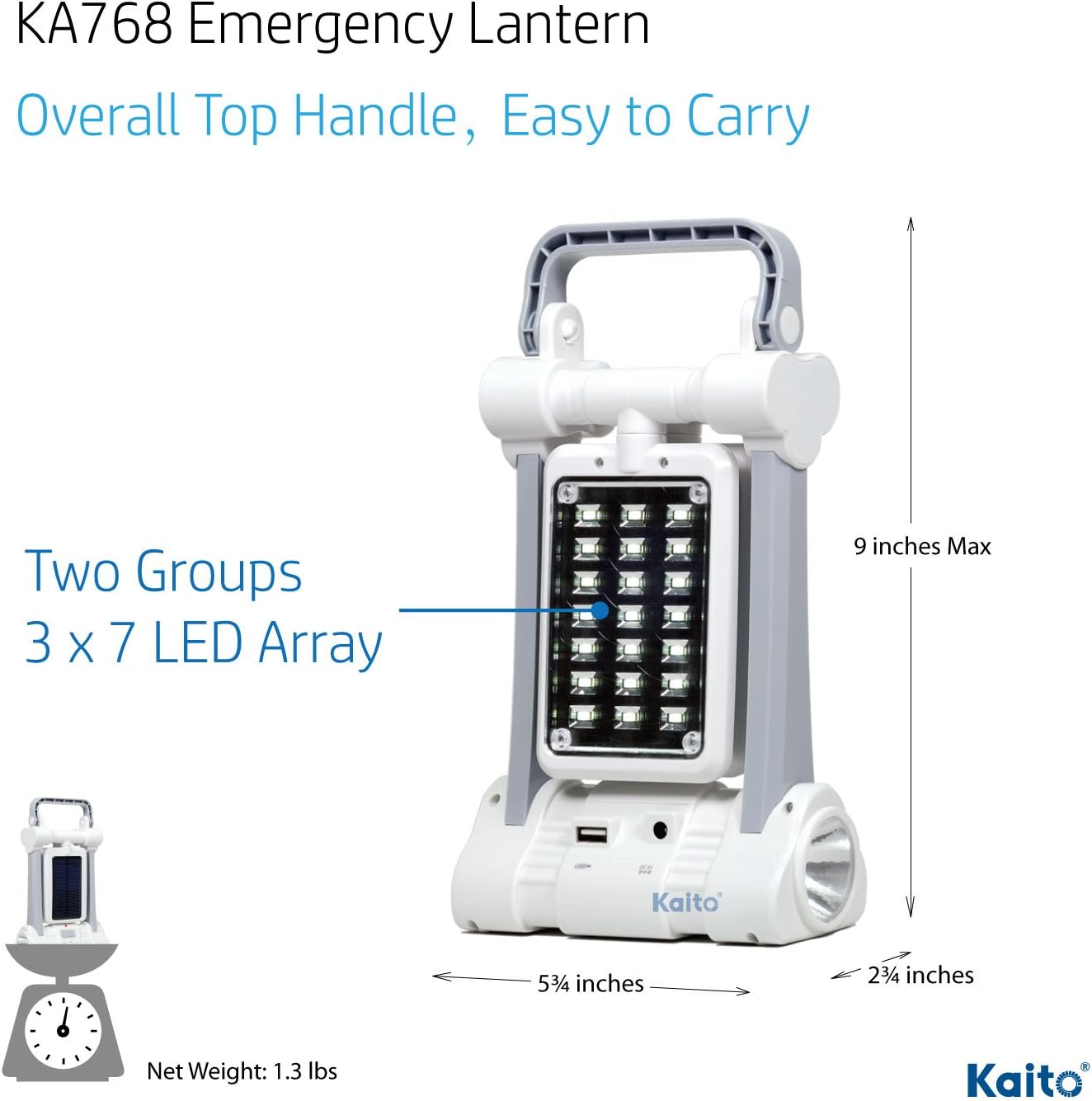
6-сүрөт: Dimensions of the Kaito KA768 Lantern.
10. Кепилдик жана колдоо
10.1 Кепилдик маалыматы
Kaito products are manufactured to high-quality standards. For specific warranty details, please refer to the warranty card included with your product or contact Kaito customer support directly. Keep your purchase receipt as proof of purchase.
10.2 Кардарларды колдоо
If you encounter any issues or have questions regarding your Kaito KA768 lantern, please contact Kaito customer support. Contact information can typically be found on the product packaging or the official Kaito webсайт.


