1. Киришүү
The MikroTik CSS326-24G-2S+RM is a powerful and versatile 24-port Gigabit Ethernet switch designed for advanced network management. This managed switch features two SFP+ ports for high-speed fiber connectivity, supporting both 1.25 Gb SFP and 10 Gb SFP+ modules. It offers comprehensive Layer 2 functionalities through its SwOS operating system, including VLAN configuration, port-to-port forwarding, MAC filtering, traffic mirroring, and bandwidth limitation. This manual provides essential information for the proper installation, operation, and maintenance of your CSS326-24G-2S+RM switch.
2. Коопсуздук маалыматы
Please read these safety instructions carefully before operating the device.
- Always connect the device to a power source that matches the voltage specified on the device label.
- Түзмөктү сууга, нымдуулукка же жогорку нымдуулукка дуушар кылбаңыз.
- Ensure proper ventilation to prevent overheating. The device is designed for passive cooling, but adequate airflow is still important.
- Аппаратты ачпаңыз casing. Тейлөөнү квалификациялуу персонал гана аткарышы керек.
- Use only accessories and power adapters approved by MikroTik.
- Бул аппарат имараттын ичинде гана колдонууга арналган.
3. Пакеттин мазмуну
Пакетиңизде төмөнкү заттар бар экенин текшериңиз:
- MikroTik CSS326-24G-2S+RM Network Switch
- Rack mount ears (for 1U rack installation)
- Power adapter (DC 10V-30V)

Image: Rack mount ears included for securing the switch in a standard 1U rack.
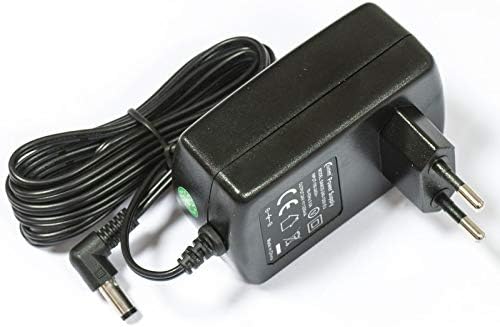
Image: The power adapter supplied with the switch, providing DC 10V-30V power.
4. Техникалык жабдыктар бүттүview
The CSS326-24G-2S+RM features a robust metal casing designed for 1U rack mounting.

Image: Front panel of the switch, displaying 24 Gigabit Ethernet ports and two SFP+ cages.

Image: Rear panel of the switch, featuring the DC power input and ventilation openings.
4.1. Порттор жана индикаторлор
- 24 x Gigabit Ethernet Ports (RJ45): Supports 10/100/1000 Mbps connections. Each port has LED indicators for link/activity status.
- 2 x SFP+ Cages: Supports 1.25 Gb SFP and 10 Gb SFP+ modules for fiber optic connections.
- Туруктуу кубат киргизүү: Located on the rear panel, accepts 10V-30V DC power.
- Калыбына келтирүү баскычы: For resetting the device to factory defaults or entering bootloader mode.
5. Орнотуу
5.1. Физикалык орнотуу
- Стойкага орнотуу: Attach the included rack mount ears to the sides of the switch using the provided screws. Secure the switch into a standard 1U rack slot.
- Иш тактада жайгаштыруу: If not rack mounting, place the switch on a flat, stable surface, ensuring adequate space around the device for ventilation.
- Кубат туташуу: Connect the power adapter to the DC-IN jack on the rear panel of the switch, then plug the adapter into a suitable power outlet.
- Тармактык байланыштар: Connect your network devices (computers, servers, other switches) to the RJ45 Gigabit Ethernet ports using standard Ethernet cables. For high-speed uplinks or fiber connections, insert compatible SFP or SFP+ modules into the SFP+ cages and connect fiber optic cables.
5.2. Баштапкы конфигурацияга кирүү
The CSS326-24G-2S+RM uses MikroTik's SwOS for management, which is a web-негизделген интерфейс.
- Компьютериңиз коммутатордун Ethernet портторунун бирине туташкандыгын текшериңиз.
- By default, the switch will attempt to obtain an IP address via DHCP. If no DHCP server is available, it will fall back to a static IP address (commonly 192.168.88.1 or 192.168.1.1, refer to the device's quick start guide for exact default).
- ачуу а web браузерди ачып, дарек тилкесине коммутатордун IP дарегин киргизиңиз.
- Log in using the default credentials (usually админ with no password). It is highly recommended to change the default password immediately after initial login for security.
6. Иштөө
The SwOS interface provides comprehensive control over the switch's functionalities.
6.1. Key Features and Configuration
- VLANды башкаруу: Configure Virtual Local Area Networks (VLANs) to segment your network traffic and enhance security. The switch supports IEEE 802.1Q VLANs.
- Порттон портко багыттоо: Control traffic flow between specific ports.
- MAC чыпкасы: Implement MAC address-based filtering for enhanced network access control.
- Жол кыймылын чагылдыруу: Duplicate network traffic from one port to another for monitoring and analysis.
- Өткөрүү жөндөмдүүлүгүнүн чектөөсү: Apply rate limits to individual ports to manage network usage.
- SFP/SFP+ Module Support: The SFP+ cages are compatible with both 1.25 Gb SFP and 10 Gb SFP+ modules, allowing flexible high-speed connectivity options.
- PoE колдоосу: The switch supports Power over Ethernet (PoE) functionality, allowing power delivery to compatible devices over Ethernet cables (check specific port capabilities in SwOS).
For detailed configuration steps and advanced features, refer to the official MikroTik SwOS documentation available on their webсайт.
7. Техникалык тейлөө
7.1. Микропрограмманы жаңыртуу
MikroTikти үзгүлтүксүз текшерип туруңуз website for the latest SwOS firmware updates. Firmware updates can provide new features, performance improvements, and critical security patches.
- Тиешелүү микропрограмманы жүктөп алыңыз file for your CSS326-24G-2S+RM model from the MikroTik webсайт.
- Access the SwOS web интерфейс.
- Navigate to the "System" or "Upgrade" section (exact location may vary by firmware version).
- Жүктөлүп алынган микропрограмманы жүктөө file and follow the on-screen instructions to complete the update. The device will reboot during this process.
7.2. Тазалоо
Keep the device clean and free from dust. Use a soft, dry cloth for cleaning. Do not use liquid cleaners or aerosols. Ensure ventilation openings are not obstructed.
7.3. Экологиялык эске алуулар
The switch is designed to operate within a temperature range of -20°C to +45°C. While it uses passive cooling, ensure it is placed in an environment with adequate airflow to prevent excessive heat buildup, especially in enclosed racks.
8. Кыйынчылыктарды
If you encounter issues with your MikroTik CSS326-24G-2S+RM switch, refer to the following common troubleshooting steps:
- Кубат жок:
- Verify the power adapter is securely connected to both the switch and a working power outlet.
- Электр розеткасын башка аспап менен текшериңиз.
- Тармакка туташуу жок:
- Ensure Ethernet cables are properly connected to both the switch and the network device.
- Check the link/activity LEDs on the switch ports. If they are off, try a different cable or port.
- Verify IP address settings on your connected device and the switch.
- If using SFP/SFP+ modules, ensure they are correctly seated and compatible, and that fiber cables are properly connected.
- Кирүү мүмкүн эмес Web Interface (SwOS):
- Confirm your computer's IP address is in the same subnet as the switch's default IP (e.g., 192.168.88.x if the switch is 192.168.88.1).
- Try resetting the switch to factory defaults using the reset button (Эскертүү: Бул бардык конфигурацияларды жок кылат.).
- Ensure no firewall on your computer is blocking access.
- Аткаруу маселелери:
- Ашыкча тармактык трафикти же циклдерди текшериңиз.
- Микропрограмманын жаңыртылганын текшериңиз.
- Monitor the switch's system temperature via SwOS to ensure it's within operating limits.
For more advanced troubleshooting or persistent issues, consult the MikroTik official documentation or contact MikroTik support.
9. Техникалык шарттар
| Өзгөчөлүк | Спецификация |
|---|---|
| Модел | CSS326-24G-2S+RM |
| Бренд | MikroTik |
| Которуу түрү | Башкарылган |
| Ethernet порттору | 24 x Гигабит Ethernet (10/100/1000 Мбит/сек) |
| SFP + Порттар | 2 x SFP+ (supports 1.25 Gb SFP and 10 Gb SFP+) |
| Тармактык стандарттар | IEEE 802.1Q |
| Power Input | DC-IN jack, 10V-30V |
| Power over Ethernet (PoE) | Колдоого алынган |
| Стойкага орнотуу | 1U Form Factor (Rack mount ears included) |
| Өлчөмдөрү (L x W x Y) | 17.32" x 5.67" x 1.73" (440 мм x 144 мм x 44 мм) |
| Элемент Салмагы | 0.91 кг (2 фунт) |
| Иштин материалы | Металл |
| Иштөө температурасы | -20°Cден +45°Cге чейин |
| Маалыматтарды өткөрүү ылдамдыгы | Секундасына 1000 мегабит (Гигабит) |
10. Кепилдик маалыматы
MikroTik products are covered by a limited warranty. The specific terms and duration of the warranty may vary by region and product. Please refer to the official MikroTik website or your local distributor for detailed warranty information. Keep your proof of purchase for warranty claims.
11. Колдоо
For technical support, additional documentation, or community forums, please visit the official MikroTik webсайт:
https://mikrotik.com/
You can find comprehensive guides, FAQs, and support resources there.


