1. Киришүү
The SONOFF G1 is a GPRS/GSM smart power switch designed for remote control of electrical appliances. Unlike Wi-Fi dependent devices, the G1 operates via a 2G GPRS network, requiring a standard SIM card for connectivity. This allows for remote management of devices in locations without Wi-Fi access, making it suitable for various applications including agriculture, pet care, and industrial control.
Негизги өзгөчөлүктөрү:
- Supports SIM Card (GSM/GPRS: 800/900/1800/1900MHz)
- Control via GPRS data, no Wi-Fi required
- Remote ON/OFF functionality through the eWeLink app
- Real-time device status synchronization with the app
- Scheduled and countdown timers for automated operation
- Device sharing with multiple users
- Smart scene integration based on environmental conditions
- Amazon Alexa жана Google Home менен үн менен башкаруунун шайкештиги
2. Коопсуздук маалыматы
Please read this section carefully before installation and operation to ensure safe use and prevent damage to the device or connected appliances.
- Электр энергиясын өчүрүү: Always disconnect power to the circuit before installing or performing any maintenance on the device.
- Кесиптик орнотуу: Installation should be performed by a qualified electrician if you are unfamiliar with electrical wiring.
- Тtage жана жүктөө: Киргизүү көлөмүн камсыз кылыңызtage and connected load do not exceed the device's specifications (Input: AC 90-250V, Maxload: 220V 3000W).
- Курчап турган чөйрө: Аппаратты нымдуулукка, экстремалдык температурага же коррозиялуу чөйрөгө тийгизбеңиз.
- SIM карта: Ensure the SIM card is correctly inserted and secured. Do not attempt to insert or remove the SIM card while the device is powered on.
3. Продукт бүтүп калдыview
The SONOFF G1 smart switch features input and output terminals, a SIM card slot, and an indicator light. Familiarize yourself with the device's components before proceeding with installation.

Сүрөт 3.1: Фронт view of the Sonoff G1 GPRS/GSM Smart Switch. This image displays the device's exterior, including the "Output" and "Input" terminals labeled L, E, N, and the device specifications such as GSM/GPRS frequencies (800/900/1800/1900 MHz), input voltage (AC 90-250V 50/60Hz), and maximum load (220V 3000W). CE and FC certifications are also visible.
Компоненттери:
- Input Terminals (L, N, E): Негизги электр менен камсыздоону туташтыруу үчүн.
- Output Terminals (L, N, E): For connecting the appliance to be controlled.
- SIM карта слоту: Located internally, for inserting a 2G GSM/GPRS SIM card.
- Статус индикатору: Provides feedback on the device's connection status.
4. Орнотуу
4.1 SIM картаны орнотуу
The Sonoff G1 requires a standard 2G GSM/GPRS SIM card for network connectivity. Ensure the SIM card is active and has a data plan.
- Өчүрүү: Ensure the Sonoff G1 is disconnected from all power sources.
- Ачык Casing: Түзмөктү этияттык менен ачыңызasing to access the internal circuit board.
- SIM салыңыз: Locate the SIM card slot on the circuit board. Insert the SIM card into the slot, ensuring it is correctly oriented and securely seated.
- Жабуу Casing: Reassemble the device casing.

Сүрөт 4.1: Ички view of the Sonoff G1 circuit board with a SIM card inserted. This image highlights the SIM card slot and also displays icons for downloading the eWeLink app from the App Store and Google Play, along with a QR code for device connection.
Эскертүү: Some regions may have discontinued 2G network support. Verify 2G network availability with your mobile carrier before use. 3G and 4G SIM cards may work if they support 2G fallback.
4.2 Электр өткөргүч схемасы
Connect the Sonoff G1 to your power source and appliance according to the following diagram. Incorrect wiring can cause damage to the device or pose a safety hazard.

Сүрөт 4.2: Wiring diagram illustrating the connection of the Sonoff G1. The diagram shows the input (N, L, E) from a 90V~250V power source and the output (N, L, E) connected to an appliance, such as a heater. The internal circuit board of the G1 is also depicted.
- Киргизүү байланышы: Connect the Live (L), Neutral (N), and Earth (E) wires from your main power supply to the corresponding "Input" terminals on the Sonoff G1.
- Чыгуу туташуу: Connect the Live (L), Neutral (N), and Earth (E) wires from your appliance to the corresponding "Output" terminals on the Sonoff G1.
- Коопсуз байланыштар: Ensure all wire connections are tight and secure to prevent loose contacts.
4.3 Колдонмону орнотуу жана түзмөктү жупташтыруу
The Sonoff G1 is controlled via the eWeLink mobile application.
- eWeLink колдонмосун жүктөп алыңыз: Download the "eWeLink" app from the Apple App Store (for iOS devices) or Google Play Store (for Android devices).
- Катталуу/Кирүү: Колдонмону ачып, жаңы аккаунт түзүңүз же бар аккаунт менен кириңиз.
- Түзмөктү күйгүзүү: Connect the Sonoff G1 to a power source after completing the wiring. The device will attempt to connect to the GPRS network.
- Түзмөк кошуу: In the eWeLink app, follow the on-screen instructions to add a new device. Select the GPRS device type. The app will guide you through the pairing process, which involves the device communicating with the cloud via the GPRS network.
- Түзмөктүн аталышы: Once successfully paired, you can name your Sonoff G1 for easy identification.
5. Операция
5.1 Remote ON/OFF Control
Control your connected appliances from anywhere using the eWeLink app over the GPRS network.
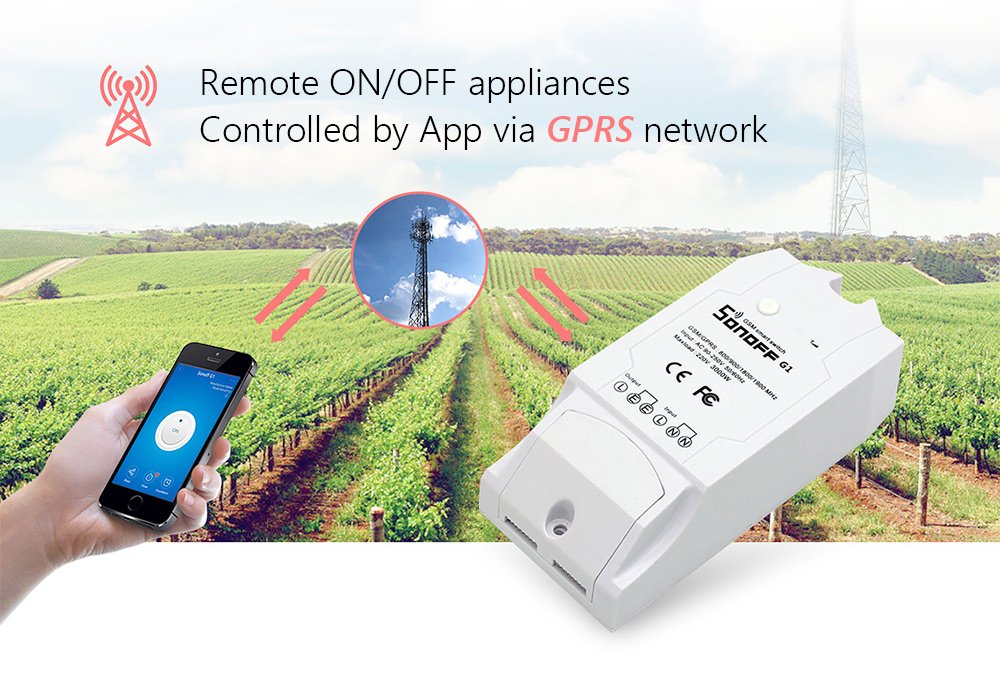
Сүрөт 5.1: Remote ON/OFF control of appliances via GPRS network. A smartphone screen shows the eWeLink app interface with an ON/OFF button, while a Sonoff G1 device is depicted in a field with a cellular tower in the background, symbolizing GPRS connectivity.

Сүрөт 5.2: Turn on/off appliances anytime. This image shows a hand interacting with the eWeLink app on a smartphone, pressing the "ON" button. A Sonoff G1 device is placed in a field with active irrigation sprinklers, demonstrating its use in agricultural applications.
- Open the eWeLink app and select your Sonoff G1 device.
- Tap the large power button icon to toggle the connected appliance ON or OFF.
- The app will display the real-time status of the device.
5.2 Убакыт функциялары
Automate your appliances with scheduled and countdown timers.

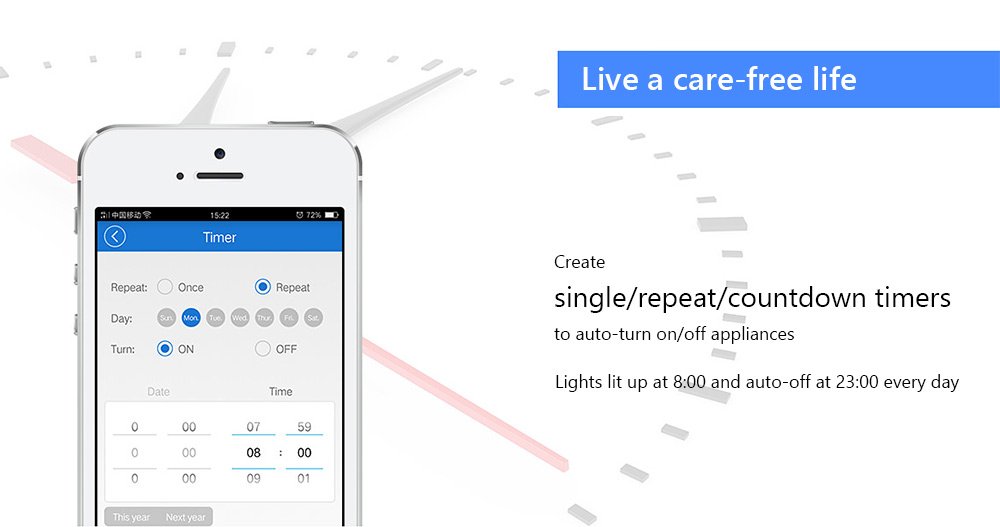
Сүрөт 5.3: Timer settings within the eWeLink app. The image displays options for "Repeat," "Once," and "Countdown" timers, allowing users to set specific days and times for the device to turn ON or OFF. An example shows lights turning on at 8:00 and off at 23:00 daily.
- Пландаштырылган таймерлер: Set specific times for the device to turn ON or OFF daily, on selected days, or once.
- Артка саноо таймерлери: Set a countdown for the device to turn ON or OFF after a specified duration.
5.3 Бөлүшүүнү башкаруу
Allow family members or colleagues to control the Sonoff G1 device.
- In the eWeLink app, navigate to the device settings.
- Select "Share Device" and enter the eWeLink account of the person you wish to share control with.
5.4 Акылдуу көрүнүш
Create automated scenarios based on environmental conditions or other device statuses.
- Access the "Scene" or "Smart Scene" section in the eWeLink app.
- Configure triggers (e.g., temperature, humidity from other sensors) and actions (e.g., turn G1 ON/OFF).
5.5 Үн менен башкаруу
Integrate your Sonoff G1 with voice assistants for hands-free control.
- Amazon Alexa / Google Home: eWeLink аккаунтуңузду байланыштыруу үчүн Alexa же Google Home колдонмосундагы көрсөтмөлөрдү аткарыңыз.
- Once linked, you can use voice commands such as "Alexa, turn on [Device Name]" or "Hey Google, turn off [Device Name]".
6. Тиркемелер
The Sonoff G1's GPRS connectivity makes it ideal for various remote control applications where Wi-Fi is unavailable or unreliable.
Сүрөт 6.1: Diverse applications of the Sonoff G1. This diagram illustrates the versatility of the device, showcasing its use in scenarios such as farmland irrigation, greenhouse climate control, server room power management, automated pet feeding, controlling roller shutters, and managing oxygen pumps.
- Modern Agriculture: Greenhouse light control, watering machines, oxygen pumps for aquaculture.
- Pet Feeding: Automated control of pet feeders.
- Server Room Control: Remote power cycling of servers or cooling systems.
- Roller Shutters: Remote operation of motorized roller shutters.
- Remote Pumps/Motors: Control of water pumps or other motors in remote locations.
7. Техникалык тейлөө
To ensure optimal performance and longevity of your Sonoff G1, follow these maintenance guidelines:
- Тазалоо: Түзмөктү кургак, жумшак чүпүрөк менен акырын сүртүңүз. Суюк тазалоочу каражаттарды же эриткичтерди колдонбоңуз.
- Курчап турган чөйрө: Keep the device in a dry, well-ventilated area, away from direct sunlight, dust, and extreme temperatures.
- Программалык камсыздоонун жаңыртуулары: Periodically check the eWeLink app for available firmware updates for your device to ensure you have the latest features and security enhancements.
- Туташуу текшерүү: Regularly verify the SIM card's data plan and 2G network signal strength in the device's location.
8. Кыйынчылыктарды
If you encounter issues with your Sonoff G1, refer to the following common problems and solutions:
| Көйгөй | Мүмкүн себеп | Чечим |
|---|---|---|
| Түзмөк тармакка туташпай жатат | No 2G network coverage; SIM card inactive/no data; SIM card incorrectly inserted. | Verify 2G network availability in your area. Check SIM card status and data plan with your carrier. Reinsert SIM card correctly. |
| Device not responding in app | Poor GPRS signal; device offline; app issue. | Check device's signal indicator. Restart the device. Close and reopen the eWeLink app. Ensure the device is powered on. |
| Appliance not turning ON/OFF | Incorrect wiring; appliance fault; device fault. | Review wiring diagram (Section 4.2). Test the appliance directly. Contact support if the device appears faulty. |
| Үн башкаруу иштебейт | eWeLink account not linked; incorrect voice command; internet issue with voice assistant. | Ensure eWeLink is correctly linked in Alexa/Google Home app. Use the exact device name. Check your voice assistant's internet connection. |
9. Техникалык шарттар
| Бренд | SONOFF |
| Модел | G1 |
| GSM/GPRS Frequency | 800/900/1800/1900 МГц |
| Киргизүү көлөмүtage | AC 90-250V |
| Max Load | 220V 3000W |
| Байланыш технологиясы | GPRS (2G) |
| Шайкеш түзмөктөр | Television, Audio/Video Receiver, Cable/Satellite Box, Media Player, Air Conditioner, Washing Machine, Smartphone, Garage Door, Fan, Projector, Set Top Box, Air Purifier, etc. |
| Өзгөчөлүктөр | Voice Search (via integrated assistants) |
| Элемент Салмагы | 95 г |
| Өлчөмдөр | 12.2 x 5.6 x 2.8 см (Пакеттин өлчөмдөрү) |
10. Кепилдик жана колдоо
- Кепилдик: This product comes with a 10 Days Replacement warranty. Please refer to your purchase documentation for specific terms and conditions.
- Орнотуу колдоо: Free installation support is available. Please refer to the official SONOFF website for contact details or support numbers.
- Кошумча жардам: For additional support, troubleshooting, or product information, please visit the official SONOFF webсайтка же кардарларды тейлөөгө кайрылыңыз.
11. Маанилүү эскертүүлөр
- 2G Network Dependency: The Sonoff G1 relies solely on 2G GPRS networks for communication. Ensure stable 2G coverage in the intended installation area.
- Regional Limitations: Some countries (e.g., America, Australia) have phased out 2G networks. Confirm 2G availability in your region before purchasing or using this product.
- SIM картанын шайкештиги: While 3G and 4G SIM cards may work if they support 2G fallback, it is recommended to verify compatibility with your service provider.


