1. Киришүү
This user manual provides comprehensive instructions for the Comix CS-3302 12-Digit Desktop Calculator. Please read this manual thoroughly before using the calculator to ensure proper operation and to maximize its lifespan. This calculator is designed for general office and school use, featuring a large LCD display, dual power source, and various calculation functions.
2. Коопсуздук маалыматы
- Калькуляторду экстремалдык температурага, тике күн нуруна же жогорку нымдуулукка дуушар кылбаңыз.
- Калькуляторду түшүрүп алуудан же катуу соккуга кабылтуудан алыс болуңуз.
- Do not attempt to disassemble or modify the calculator. This will void the warranty.
- Use a soft, dry cloth for cleaning. Do not use liquid cleaners or abrasive materials.
- Кичинекей балдар жетпеген жерде сактаңыз.
3. Продукт бүтүп калдыview

3.1-сүрөт: Фронт view of the Comix CS-3302 Desktop Calculator, showing the large LCD display and full keypad.
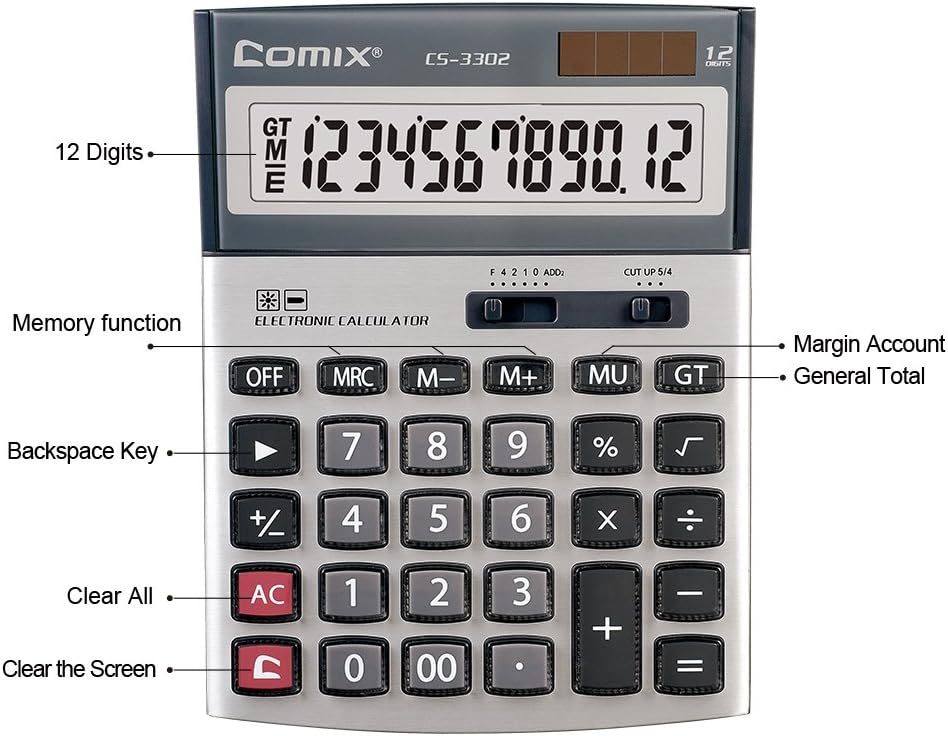
3.2-сүрөт: Key functions and display features of the Comix CS-3302 Calculator, including 12 digits display, memory functions, and clear keys.

3.3-сүрөт: Dimensions of the Comix CS-3302 Calculator, showing its compact and ergonomic design.

3.4-сүрөт: Бурчтуу view of the Comix CS-3302 Calculator, highlighting its sleek profile жана ачкычтын жайгашуусу.

3.5-сүрөт: Side profile of the Comix CS-3302 Calculator, showing its slim design.

3.6-сүрөт: Retail packaging of the Comix CS-3302 Calculator, highlighting key features like 12 digits, dual power, and acrylic keys.
4. Орнотуу
4.1 Кубат булагы
The Comix CS-3302 calculator operates on a dual power system: solar and battery. The solar panel provides power in well-lit environments, while a single AA battery (not included) serves as an auxiliary power source for low-light conditions or when solar power is insufficient.
- Батарея орнотуу: Locate the battery compartment on the back of the calculator. Open the cover and insert one AA battery, ensuring correct polarity (+/-). Close the battery compartment cover securely.
- Баштапкы күйгүзүү: The calculator should power on automatically when sufficient light is available or with the battery installed. If not, press the ON/AC баскычы.
5. Иштөө нускамалары
5.1 Негизги операциялар
- Кошумча (+): Биринчи санды киргизиңиз, басыңыз +, экинчи санды киргизип, анан басыңыз =.
- Кемитүү (-): Биринчи санды киргизиңиз, басыңыз -, экинчи санды киргизип, анан басыңыз =.
- Көбөйтүү (×): Биринчи санды киргизиңиз, басыңыз ×, экинчи санды киргизип, анан басыңыз =.
- Бөлүм (÷): Биринчи санды киргизиңиз, басыңыз ÷, экинчи санды киргизип, анан басыңыз =.
- Персенtage (%): Enter the number, press × (же ÷), enter the percentage маанисин, андан кийин басыңыз %. Мисалы үчүнample, 200дүн 10%ын эсептөө үчүн, 200 киргизиңиз × 10 %.
- Чарчы тамыр (√): Номерди киргизип, анан басыңыз √.
5.2 Атайын функциялар
- ӨЧҮК: Powers off the calculator.
- AC (баары ачык): Бардык жазууларды жана эстутумду тазалап, калькуляторду баштапкы абалына келтирет.
- C (Кирүүнү тазалоо): Clears the last entered number or the current display value without affecting previous calculations or memory.
- Backspace (►): Акыркы киргизилген санды өчүрөт.
- M+ (Memory Plus): Көрсөтүлгөн маанини эс тутумга кошот.
- M- (эс тутум минус): Көрсөтүлгөн маанини эстутумдан чыгарат.
- MRC (эстутумду кайра чакыруу/тазалоо): Эстутум маанисин кайра чакыруу үчүн бир жолу басыңыз. Эстутумду тазалоо үчүн эки жолу басыңыз.
- MU (Mark Up / Margin Account): Used for profit margin calculations. Enter cost, press MU, enter selling price, then press = to get the profit margin.
- GT (жалпы жалпы): Accumulates the results of all calculations. Pressing GT displays the grand total.
- +/- (Белги өзгөртүү): Көрсөтүлгөн сандын белгисин өзгөртөт (оңдан терске, же терсден оңго).
5.3 Decimal and Rounding Settings
The calculator features two slide switches at the top for controlling decimal places and rounding:
- Decimal Selector (F 4 2 1 0 ADD2):
- F (Floating Decimal): Displays all available decimal places.
- 4, 2, 1, 0: Sets the number of decimal places to 4, 2, 1, or 0 respectively.
- ADD2 (Add Mode): Automatically adds two decimal places to all results, useful for currency calculations.
- Rounding Selector (CUT UP 5/4):
- CUT (Cut Off): Truncates the number, discarding all digits beyond the set decimal places.
- UP (Round Up): Rounds up the last digit if there are any non-zero digits beyond the set decimal places.
- 5/4 (Round Half Up): Rounds up if the first discarded digit is 5 or greater, otherwise rounds down.
6. Техникалык тейлөө
- Тазалоо: Wipe the calculator surface with a soft, dry cloth. For stubborn dirt, slightly dampen the cloth with water, but ensure no liquid enters the calculator. Do not use chemical cleaners.
- Сактагыч: Калькуляторду көпкө чейин колдонбогон учурда, аны салкын, кургак жерде, күндүн түз нурунан жана өтө жогорку температурадан алыс сактаңыз.
- Батареяны алмаштыруу: If the display becomes dim or unresponsive in low light, replace the AA battery. Ensure the calculator is off before replacing the battery.
7. Кыйынчылыктарды
| Көйгөй | Мүмкүн себеп | Чечим |
|---|---|---|
| Дисплей бош же күңүрт. | Күн энергиясы үчүн жарык жетишсиз же батареянын кубаты аз. | Move to a brighter area or replace the AA battery. |
| Туура эмес эсептөө натыйжалары. | Incorrect input, incorrect decimal/rounding settings, or memory interference. | Басыңыз AC to clear all and restart. Check decimal and rounding switch positions. Ensure correct key presses. |
| Ачкычтар жооп бербейт. | Калькулятор тоңуп калган же физикалык бузулган. | Басып көрүңүз ӨЧҮРҮҮ анда ON/AC. If problem persists, remove and reinsert battery. If still unresponsive, contact support. |
8. Техникалык шарттар
| Бренд | Comix |
| Модель номери | CS-3302 (P/N: 11821063) |
| Дисплей | 12 орундуу ЖК |
| Power Source | Dual Power (Solar & 1x AA Battery - not included) |
| Материал | Акрил, металл |
| Өлчөмдөрү (L x W x Y) | Болжол менен 23.6 x 15.7 x 4.3 см (9.3 x 6.2 x 1.7 дюйм) |
| Салмагы | Болжол менен 322 г (0.71 фунт) |
| Иштөө температурасы | -25 ℃ to +60 ℃ (-13 ℉ to +140 ℉) |
| UPC | 842064102524 |
9. Кепилдик жана колдоо
Comix products are designed for quality and durability. This product comes with a 3 жылдык кепилдик сатып алынган күндөн тартып, нормалдуу пайдаланууда материалдардын жана жасалгалоонун кемчиликтерин жабуу.
For warranty claims, technical support, or any inquiries regarding your Comix CS-3302 calculator, please contact Comix customer service through their official website or the retailer where the product was purchased. Please have your proof of purchase and the product model number ready when contacting support.
For more information, visit the official Comix webсайт: www.comix.com


