Introduction
Сатып алганыңыз үчүн рахматasing the Vivibright GP8S Portable Micro Projector. This manual provides essential information for setting up, operating, and maintaining your projector. Please read it thoroughly before use to ensure optimal performance and longevity of the device.
The Vivibright GP8S is a compact and portable home theater projector designed to deliver clear images and videos, supporting various input sources including USB, SD, and HDMI.
Продукт бүттүview
Проектор компоненттери
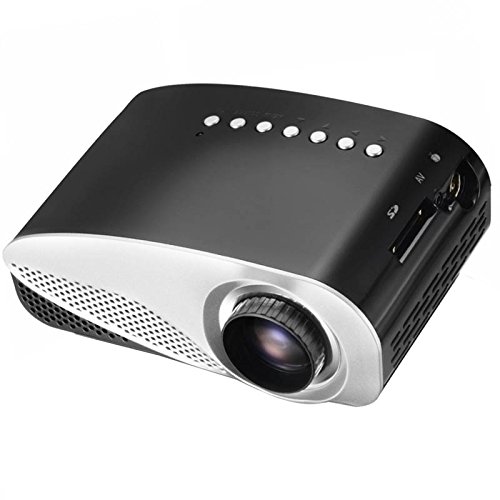
Сүрөт 1: Алдыңкы жана үстү View of the Vivibright GP8S Projector. This image displays the projector from a slightly elevated front-right angle, highlighting the main lens, ventilation grilles on the front, and the control buttons located on the top panel. The device features a sleek black and silver design.
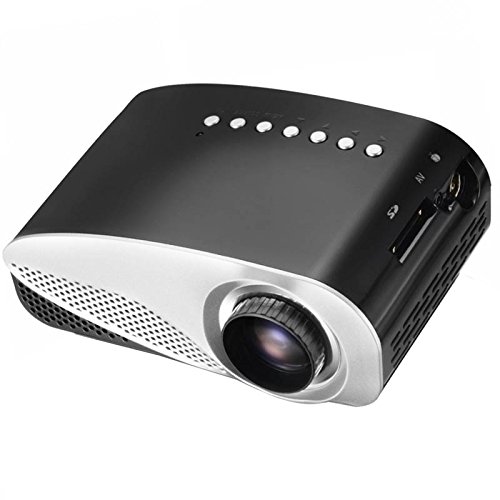
2-сүрөт: Каптал View of the Vivibright GP8S Projector. This image shows the projector from a side angle, emphasizing the ventilation grilles on the left side of the device, which are crucial for heat dissipation during operation.
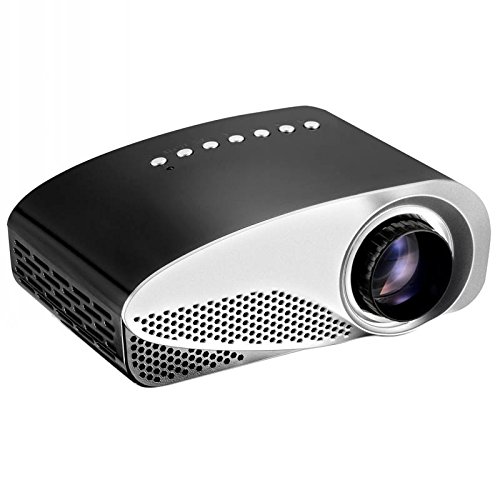
3-сүрөт: Бурчтуу View of the Vivibright GP8S Projector. This image provides another perspective of the projector, showcasing its compact form factor and the design elements from a different angle.
Арткы панель жана туташуу
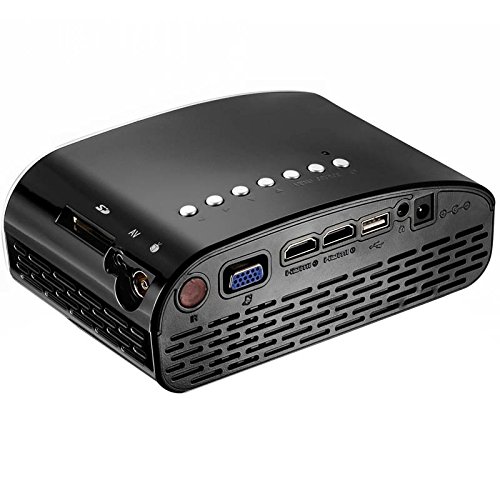
Figure 4: Rear Panel Connectivity of the Vivibright GP8S Projector. This image details the rear panel, displaying various input and output ports including HDMI, USB, SD card slot, AV input, and the power input. These ports allow for versatile connectivity with different media devices.
The Vivibright GP8S features a user-friendly interface with control buttons on the top panel and a comprehensive set of connectivity options on the rear. Key components include:
- Проекциялык линза: Located at the front for image output.
- Башкаруу баскычтары: Power, navigation, and source selection buttons on the top.
- Вентиляция торлору: On the sides and rear for heat dissipation.
- Киргизүү порттору: HDMI, USB, SD card slot, AV input.
- Кубат киргизүү: Кубат адаптерин туташтыруу үчүн.
- Фокус шакеги: Manual adjustment for image clarity (typically around the lens).
Орнотуу колдонмосу
1. Жайгаштыруу
Place the projector on a stable, flat surface. Ensure there is adequate space around the ventilation grilles for proper airflow. The distance from the screen or wall will determine the image size. Adjust the projector's position to achieve the desired projection size and angle.
2. Power Connection
- Connect the power adapter to the projector's power input port (refer to Figure 4).
- Кубат адаптерин ылайыктуу электр розеткасына сайыңыз.
- Проектордогу кубат индикаторунун жарыгы күйүп турушу керек.
3. Киргизүү түзүлүштөрүн туташтыруу
The Vivibright GP8S supports multiple input sources:
- HDMI: Connect an HDMI cable from your device (e.g., laptop, gaming console, set-top box) to one of the HDMI ports on the projector.
- USB: Медиа ойнотуу үчүн USB флэш-дискти USB портуна салыңыз fileтүздөн-түз с.
- SD карта: Медиа файлдарды ойнотуу үчүн SD картанын уячасына SD картаны салыңыз files.
- OF: Use an AV cable to connect older devices (e.g., DVD player) to the AV input port.
4. Фокусту тууралоо
Once the projector is powered on and displaying an image, rotate the focus ring around the lens until the projected image appears sharp and clear.
Иштөө нускамалары
1. Күйгүзүү / Өчүрүү
- Күйгүзүү үчүн: Press the power button on the projector's top panel or on the remote control. The projector will start up, and the Vivibright logo will appear.
- Өчүрүү үчүн: Press the power button again. A confirmation message may appear; select 'Yes' to shut down. Always allow the projector to cool down properly before unplugging it.
2. Киргизүү булагын тандоо
After powering on, you may need to select the correct input source:
- Press the 'Source' button on the projector or remote control.
- Use the navigation arrows to highlight the desired input (e.g., HDMI1, USB, SD, AV).
- Press 'OK' or 'Enter' to confirm your selection.
3. Медиа ойнотуу (USB/SD)
When a USB drive or SD card is inserted and selected as the source:
- The projector's media browser will appear.
- Папкалар аркылуу чабыттоо жана files using the remote control's arrow keys.
- а тандаңыз file (e.g., video, image, audio) and press 'OK' to play.
4. Алыстан башкарууну колдонуу
The included remote control allows for convenient operation from a distance. It typically includes buttons for power, source selection, volume control, menu navigation, and media playback controls.
Техникалык тейлөө
Regular maintenance ensures the longevity and optimal performance of your Vivibright GP8S projector.
1. Объективди тазалоо
- Оптикалык линзалар үчүн атайын жасалган жумшак, түксүз кездемени колдонуңуз.
- Линзаны тегерек кыймыл менен акырын сүртүңүз. Абразивдүү тазалоочу каражаттарды же ашыкча күч колдонуудан алыс болуңуз.
- Өтө катуу тактар үчүн, линзаны тазалоочу эритменин бир аз өлчөмүн кездемеге сүйкөөгө болот (линзага түз эмес).
2. Cleaning Ventilation Grilles
- Periodically check the ventilation grilles for dust accumulation.
- Use a soft brush or a can of compressed air to gently remove dust from the grilles.
- Тазалоодон мурун проектордун өчүрүлгөнүн жана розеткадан суурулганын текшериңиз.
3. Сактоо
When not in use for extended periods, store the projector in a cool, dry, dust-free environment. Consider using the original packaging or a protective case to prevent damage.
Проблемаларды чечүү
| Көйгөй | Мүмкүн себеп | Чечим |
|---|---|---|
| Сүрөт чагылдырылган жок |
|
|
| Сүрөт бүдөмүк |
|
|
| Үн жок |
|
|
| Пульт иштебей жатат |
|
|
Техникалык шарттар
| Бренд | Vivibright |
| Модел | GP8S |
| Дисплей технологиясы | LCD |
| Аппараттык интерфейс | HDMI, USB |
| Байланыш технологиясы | HDMI, USB |
| Өзгөчө өзгөчөлүк | Portable |
| Сунушталган Колдонуулар | Үй кинотеатры |
| Монтаж түрү | Столдун үстү |
| Элемент Салмагы | 870 г |
| Пакеттин өлчөмдөрү | 27.4 x 24.3 x 15.7 см |
| Камтылган аксессуарлар | Алыстан башкаруу |
Кепилдик жана колдоо
For information regarding warranty coverage, technical support, or service inquiries, please refer to the warranty card included with your product or contact your retailer. Keep your purchase receipt as proof of purchase.


