Introduction
The Astrum ET200 Stereo Wireless Headset is an in-ear Bluetooth headset designed for hands-free communication and audio playback. Featuring Bluetooth V4.0 connectivity, it supports music and call functions with an in-built microphone and audio caller ID. This manual provides detailed instructions to help you set up, operate, and maintain your headset.
Кутуда эмне бар
- 1 x Astrum ET200 Wireless Headset Earphone
- 1 x заряддоо кабели
- 2 x Ear-hooks (various sizes)
- 1 x User Manual
Продукт бүттүview
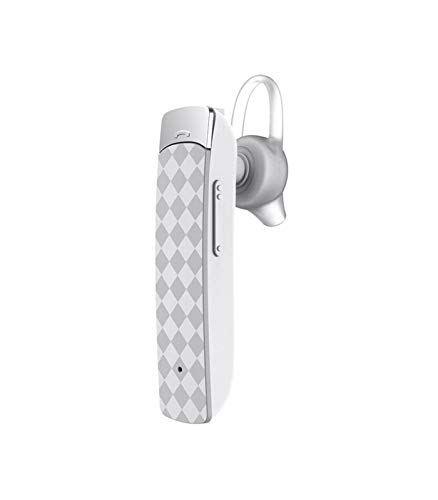

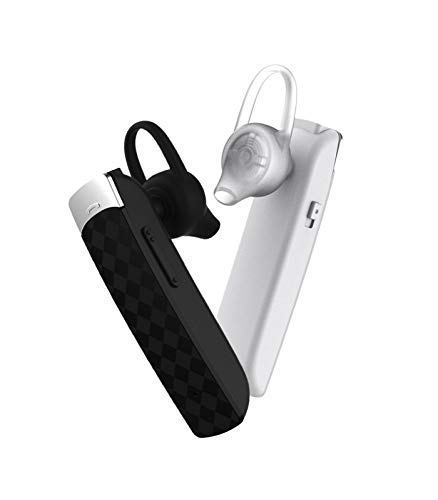
Жайгашуу
1. Гарнитураны заряддоо
Before first use, fully charge the headset. Connect the provided charging cable to the headset's charging port and the other end to a USB power source (e.g., computer USB port, wall adapter). The charging indicator light will illuminate during charging and turn off or change color when fully charged. Charging time is approximately 2 hours.
2. Bluetooth түзмөгү менен жупташуу
- Гарнитура өчүрүлгөнүн текшериңиз.
- Press and hold the multi-function button on the headset until the indicator light flashes red and blue alternately, indicating pairing mode.
- Bluetooth иштетилген түзмөгүңүздө (смартфон, планшет ж.б.) Bluetooth жөндөөлөрүнө өтүп, Bluetooth'ду иштетиңиз.
- Издөө available devices. The headset will appear as "ET200" or similar.
- Select "ET200" to connect. If prompted for a password, enter "0000".
- Once successfully paired, the indicator light will flash blue slowly, and you may hear a confirmation tone.
The headset supports Bluetooth V4.0 and has a range of up to 10 meters (33 feet) in an open environment.
Иштөө нускамалары
Күйгүзүү/өчүрүү
- Күйгүзүү: Press and hold the multi-function button for approximately 3 seconds until the blue indicator light flashes.
- Өчүрүү: Press and hold the multi-function button for approximately 3 seconds until the red indicator light flashes and then turns off.
Чалууларды башкаруу
- Чакырууга жооп берүү: Briefly press the multi-function button.
- Чакырууну аяктоо: Briefly press the multi-function button during a call.
- Чакырууну четке кагуу: Press and hold the multi-function button for 2 seconds when an incoming call rings.
- Акыркы номерди кайра терүү: Көп функциялуу баскычты эки жолу басыңыз.
Музыканы ойнотуу
- Ойнотуу/тындыруу: Briefly press the multi-function button.
- Кийинки трек: Көлөмү + баскычын басып, кармап туруңуз.
- Мурунку трек: Үн көлөмү - баскычын басып, кармап туруңуз.
Үндү тууралоо
- Көлөмүн жогорулатуу: Briefly press the Volume + button.
- Көлөмдү азайтуу: Briefly press the Volume - button.
Техникалык тейлөө
- Clean the headset regularly with a soft, dry cloth. Do not use abrasive cleaners or solvents.
- Гарнитураны экстремалдык температурага, нымдуулукка же тике күн нуруна тийгизүүдөн сактаңыз.
- Колдонбогондо гарнитураны салкын, кургак жерде сактаңыз.
- Гарнитураны бөлүктөргө бөлүүгө же өзгөртүүгө аракет кылбаңыз, анткени бул кепилдикти жокко чыгарат.
Проблемаларды чечүү
| Көйгөй | Мүмкүн себеп | Чечим |
|---|---|---|
| Гарнитура күйбөйт. | Батарея аз. | Гарнитураны толук заряддаңыз. |
| Гарнитураны жупташтыруу мүмкүн эмес. | Headset not in pairing mode; Bluetooth disabled on device; device out of range. | Ensure headset is in pairing mode (flashing red/blue). Enable Bluetooth on your device. Move device closer to headset (within 10m). |
| Үн жок же үн сапаты начар. | Үнү өтө төмөн; гарнитура туташтырылган эмес; тоскоолдук. | Increase volume on headset and device. Re-pair the headset. Move away from other wireless devices. |
| Чалуулардын сапатына байланыштуу көйгөйлөр. | Алсыз сигнал; микрофон бөгөттөлгөн. | Сигнал жакшыраак аймакка жылыңыз. Микрофон жабылбаганын текшериңиз. |
Техникалык шарттар
- Модел: ET200
- Байланыш технологиясы: Bluetooth V4.0
- Bluetooth Profiles: HFP / HSP / A2DP / AVRCP
- Зымсыз диапазон: 10 метрге чейин (33 фут)
- Чалуу убактысы: 5 саатка чейин
- Ойнотуу убактысы: 4.5 саатка чейин
- Заряддоо убактысы: 2 саатка чейин
- Күтүү убактысы: 200 саатка чейин
- Башкаруу түрү: Чакыруу башкаруу, тийүү
- Элемент Салмагы: 10 грамм
- Продукциянын өлчөмдөрү: 3.5 x 3.5 x 12.8 см
- Материал: Пластик
Кепилдик жана колдоо
The Astrum ET200 Stereo Wireless Headset comes with a 1 жылдык өндүрүүчүнүн кепилдиги сатып алынган күндөн тартып. Бул кепилдик өндүрүштүн кемчиликтерин жана нормалдуу колдонуудагы чеберчиликти камтыйт. Бул туура эмес колдонуудан, кырсыктардан, уруксатсыз өзгөртүүлөрдөн же кадимки эскирүүдөн келип чыккан зыянды камтыбайт.
For warranty claims, technical support, or any inquiries, please contact Astrum customer service. You can find more information and contact details on the official Astrum webсайт же сатып алуу пункту аркылуу.
Visit the official Astrum store for more products and support: Astrum Store on Amazon


