1. Introduction and Overview
The Rigol DL3031 is a high-performance, single-channel programmable DC electronic load. It is an essential instrument for engineers and technicians involved in power supply testing, battery discharge testing, LED driver testing, and other applications requiring precise load simulation. This manual provides detailed instructions for setting up, operating, and maintaining your DL3031 electronic load.
Негизги өзгөчөлүктөр төмөнкүлөрдү камтыйт:
- Single channel, DC150 V/60 A, total power up to 350 W.
- Dynamic mode: up to 15 kHz.
- Adjustable current rising speed: 0.001 A/µs to 5 A/µs.
- Min. readback resolution: 1 mV, 1 mA.
- 4.3-inch TFT LCD, capable of displaying multiple parameters and states simultaneously.
- Overvoltage/overcurrent/overpower/overtemperature/reverse voltage коргоо.
- 4 static modes: CC, CV, CR, CP.
- 3 dynamic modes: continuous, pulsed, toggled.
- Built-in RS232/USB/LAN communication interface.
- Battery test function, OCP test, OPP test, factory test function, etc.

Сүрөт 1.1: Алдыңкы view of the Rigol DL3031 Programmable DC Electronic Load.
2. Орнотуу
2.1 Таңгактан чыгаруу жана текшерүү
Carefully unpack the DL3031 electronic load and all accessories from its packaging. Verify that all components listed below are present and undamaged. If any items are missing or damaged, please contact your Rigol distributor immediately.
- Rigol DL3031 Electronic Load Unit
- Электр кабели
- USB кабели
- Quick колдонмо
- Калибрлөө сертификаты

Figure 2.1: Typical package contents for the Rigol DL3031.
2.2 Физикалык байланыштар
Before powering on the device, ensure all necessary connections are made securely.
- Кубат туташуу: Connect the supplied power cord to the AC power input on the rear panel and to a suitable AC power outlet. Ensure the voltage тандоосу (эгер бар болсо) жергиликтүү электр менен камсыздооңузга дал келет.
- Load Input Terminals: Connect the device under test (DUT) to the red (+) and black (-) input terminals on the front panel. For high current applications, use appropriate gauge wires to minimize voltagд тамчы.
- Sense Terminals (Optional): Так көлөм үчүнtage regulation at the DUT, connect the sense terminals (S+ and S-) to the DUT's output. This compensates for voltage drop across the load wires.
- Байланыш интерфейстери: The DL3031 supports various communication interfaces for remote control and data logging.
- USB хост: Located on the front panel, used for connecting USB storage devices.
- USB түзмөк: Located on the rear panel, used for connecting to a PC for remote control.
- LAN: Located on the rear panel, for network connectivity and remote control.
- RS-232: Located on the rear panel, for serial communication.
- Санариптик киргизүү/чыгаруу: Located on the rear panel, for external triggering and control signals.
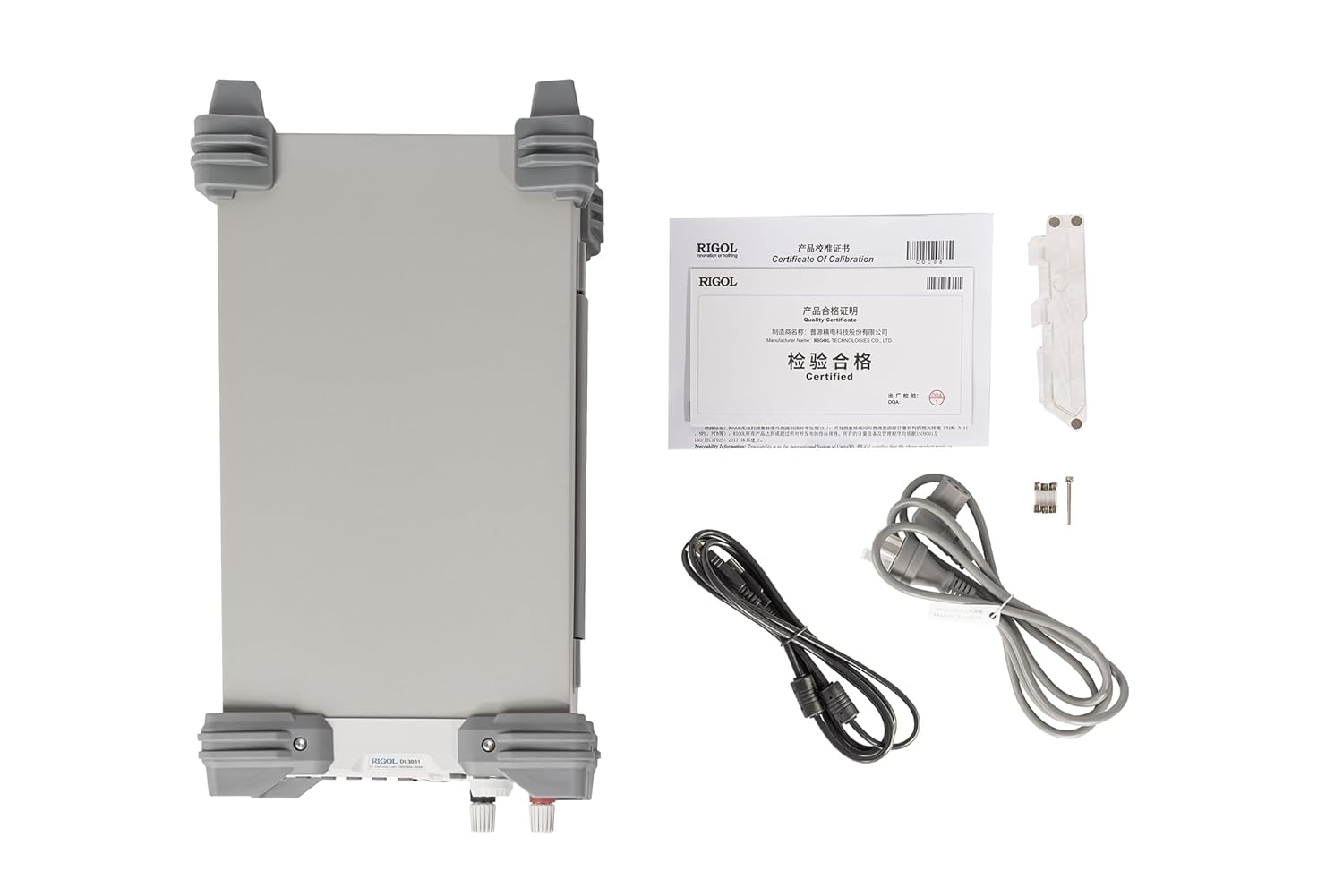
Figure 2.2: Rear panel connections of the Rigol DL3031.
2.3 Баштапкы күйгүзүү
After making all physical connections, press the power key on the front panel to turn on the electronic load. The 4.3-inch TFT LCD will display the startup screen, followed by the main measurement interface.
3. Operating the DL3031
3.1 Алдыңкы панелдин башкаруу элементтери
The front panel of the DL3031 is designed for intuitive operation. Familiarize yourself with the various controls and their functions.

Figure 3.1: Labeled front panel of the Rigol DL3031.
- ЖК: 4.3-inch TFT display for showing measurement data, settings, and waveforms.
- Function Keys (CC, CV, CR, CP, List): Керектүү иштөө режимин тандаңыз.
- Control Keys (Up, Down, Left, Right, OK): Менюларды чабыттоо жана параметрлерди тууралоо.
- Input Control Keys (Numeric Keypad): Directly input numerical values.
- Туткасы: Fine-tune parameter values.
- System Function Keys (Local, Utility, Option, Store, Help): Access system settings, save/recall configurations, and view жардам маалымат.
- Waveform Display Key: Toggles the waveform display for real-time graphing of parameters.
- Application Key (APP): Accesses specialized application modes like Battery Test, OCP, and OPP.
- USB хост: USB сактагыч түзмөктөрдү туташтыруу үчүн.
- Кубат ачкычы: Аппаратты күйгүзөт/өчүрөт.
- Channel Terminals (S+, S-, Input +, Input -): Connect the DUT and sense lines.
3.2 Иштөө режимдери
The DL3031 offers a variety of operating modes to suit different testing requirements.
3.2.1 Static Modes
These modes maintain a constant load condition.
- CC (Constant Current): Maintains a constant current draw from the DUT.
- CV (Дайыма Томtagд): Туруктуу көлөмдү сактайтtage across the DUT.
- CR (Constant Resistance): Maintains a constant resistance load on the DUT.
- CP (Constant Power): Maintains a constant power dissipation from the DUT.
3.2.2 Динамикалык режимдер
These modes allow for varying load conditions over time.
- Үзгүлтүксүз: Provides a continuous dynamic load.
- Импульс: Generates pulsed load changes.
- Toggled: Switches between two defined load levels.
- Тизме: Allows programming a sequence of up to 512 steps with different load conditions and durations.
3.2.3 Колдонмо режимдери
Access these specialized tests via the APP ачкыч.
- Батарея сыноо: Designed for testing battery discharge characteristics.
- OCP Test (Over Current Protection): Tests the overcurrent protection of a power supply.
- OPP Test (Over Power Protection): Tests the overpower protection of a power supply.
3.3 Waveform Graphing
The DL3031 can display real-time waveforms of current, voltage, resistance, and power over time, similar to an oscilloscope. This feature is useful for analyzing dynamic load responses and identifying transient behaviors.
Видео 3.1: Бүттүview of the Rigol DL3000 Series Electronic Load, demonstrating various modes and features including waveform graphing.
4. Техникалык тейлөө
Proper maintenance ensures the longevity and accuracy of your DL3031 electronic load.
- Тазалоо: Аспаптын сыртын жумшак, d чүпүрөк менен үзгүлтүксүз тазалап туруңузamp кездеме. Абразивдүү тазалагычтарды же эриткичтерди колдонбоңуз.
- Вентиляция: Ensure the rear exhaust fan and ventilation slots are clear of obstructions to prevent overheating. The fan is crucial for dissipating heat generated during operation.
- Сактагычты алмаштыруу: If the unit does not power on, check the fuse located near the AC power input on the rear panel. Replace with a fuse of the same type and rating as indicated on the unit (e.g., T 15A/250V for 230V AC, T 30A/250V for 115V AC).

Figure 4.1: Rear panel showing the exhaust fan and fuse location.
5. Кыйынчылыктарды
This section provides solutions to common issues you might encounter with the DL3031.
| Көйгөй | Мүмкүн себеп | Чечим |
|---|---|---|
| Түзмөк күйбөйт. | No AC power; Blown fuse; Power cord not connected. | Check power outlet; Replace fuse (refer to Section 4); Ensure power cord is securely connected. |
| No load current/voltage. | Input terminals not connected; Load mode not active; Over-protection triggered. | Verify DUT connection; Activate load mode (ON/OFF button); Check for OVP/OCP/OPP warnings on display. |
| Көрсөтүүлөр туруксуз же так эмес. | Poor connections; External noise; Sense lines not used (for precise voltagжана). | Ensure all connections are tight; Minimize external interference; Use sense lines for improved accuracy. |
| Компьютер менен байланыш катасы. | Incorrect cable; Driver not installed; Wrong communication settings. | Use correct USB/LAN/RS-232 cable; Install Rigol drivers; Verify communication settings (baud rate, IP address). |
If the problem persists after attempting these solutions, please contact Rigol customer support.
6. Техникалык шарттар
The following table outlines the key technical specifications for the Rigol DL3031 Electronic Load.
| Параметр | Value (DL3031) |
|---|---|
| Күч | 350 Вт |
| Тtage/Current | 150V/60A |
| CC Slew Rate | <2.5 A/µs |
| Динамикалык жыштык | 15 кГц чейин |
| Тtage Readback Resolution | 1 мВ |
| Current Readback Resolution | 1 мА |
| Продукциянын өлчөмдөрү (L x W x Y) | 9.41 x 17.4 x 6.18 дюйм |
| Элемент Салмагы | 16.71 фунт (7.58 килограмм) |
| Power Source | DC Power Supply |
| Коммуникация интерфейстери | RS232/USB/LAN |
| Коргоо функциялары | Overvoltage/overcurrent/overpower/overtemperature/reverse voltage |
7. Кепилдик жана колдоо
7.1 Кепилдик маалыматы
The Rigol DL3031 Programmable DC Electronic Load is manufactured by RIGOL TECHNOLOGIES USA INC. For specific warranty terms and conditions, please refer to the warranty card included with your product or visit the official Rigol webсайт. Кепилдик дооматтар үчүн сатып алганыңыздын далилин сактаңыз.
Кеңейтилген коргоо пландарын сатып алууга болот:
- 3 жылдык коргоо планы
- 4 жылдык коргоо планы
- Толук коргоо (ай сайын жаңыртуу опциясы)
7.2 Техникалык колдоо
For technical assistance, troubleshooting beyond this manual, or service inquiries, please contact Rigol customer support. You can find contact information on the official Rigol website or through your local distributor. When contacting support, please have your product model number (DL3031) and serial number ready.


