Introduction
This manual provides comprehensive instructions for the CHERRY MX Keyboard 1.0 TKL. This wired keyboard features a compact design, allowing for more desk space. It includes nonslip mounting feet for adjustable height and a comfortable typing experience. Dimmable illumination ensures convenient visibility in dark settings. The abrasion-resistant, laser-etched key caps are designed to prevent fading through extended use, and anti-ghosting technology helps eliminate input errors for reliable performance.
Жайгашуу
To set up your CHERRY MX Keyboard 1.0 TKL, follow these steps:
- Баскычтопту таңгактан чыгаруу: Баскычтопту таңгагынан кылдаттык менен чыгарып алыңыз.
- Компьютерге туташуу: Locate the USB-A connector on the keyboard's cable. Insert the USB-A connector into an available USB port on your computer. The keyboard is plug-and-play and should be recognized automatically by most operating systems.
- Баскычтоптун бийиктигин тууралоо: The keyboard features adjustable non-slip mounting feet. Gently flip out the feet located on the underside of the keyboard to raise its angle for a more comfortable typing position. Ensure both feet are extended evenly.

Figure 1: The CHERRY MX Keyboard 1.0 TKL with its USB cable, ready for connection.

Figure 2: Illustration of the adjustable non-slip feet on the underside of the keyboard, allowing for ergonomic height adjustment.
Иштөө нускамалары
Basic Typing and Functionality
The CHERRY MX Keyboard 1.0 TKL operates as a standard QWERTY keyboard. Its tenkeyless (TKL) design provides a compact footprint while retaining all essential alphanumeric and function keys.
Өнүгүү жарыктандыруу
The keyboard features dimmable white backlighting for enhanced visibility in various lighting conditions. You can adjust the brightness and lighting modes using the function keys in combination with the FN ачкыч.
- FN + F5: Арткы жарыктын жарыктыгын азайтыңыз.
- FN + F6: Арткы жарыктын жарыктыгын жогорулатыңыз.
- FN + F7: Cycle through backlight modes (e.g., static, breathing).
- FN + F8: Adjust backlight effect speed.
- FN + F9: Windows баскычын кулпулоо/ачуу.

Figure 3: Comparison showing the keyboard with its backlight off (left) and with the white backlight illuminated (right).

Figure 4: Diagram illustrating the multi-function keys and their combinations with the FN key for controlling multimedia, backlight, and Windows key lock.
Арбактарга каршы технология
The CHERRY MX Keyboard 1.0 TKL features full N-key rollover (NKRO) anti-ghosting technology. This ensures that every key press is registered accurately, even when multiple keys are pressed simultaneously, which is beneficial for fast typing and gaming.

Figure 5: Visual representation of the full key anti-ghosting feature, highlighting the keyboard's ability to register multiple simultaneous key presses accurately.
Техникалык тейлөө
Proper maintenance will extend the lifespan of your CHERRY MX Keyboard 1.0 TKL.
- Тазалоо:
- Тазалоодон мурун клавиатураны компьютерден ажыратыңыз.
- Бир аз жумшак, түксүз кездемени колдонуңуз dampened with water or a mild cleaning solution to wipe down the keycaps and keyboard surface.
- Ачкычтардын ортосундагы чаң жана таштанды үчүн кысылган абаны колдонуңуз.
- Клавиатуранын сырткы көрүнүшүнө жана ички компоненттерине зыян келтириши мүмкүн болгондуктан, катуу химиялык заттарды, абразивдүү тазалоочу каражаттарды же ашыкча нымдуулукту колдонуудан алыс болуңуз.
- Баскычка кам көрүү: The keycaps are abrasion-resistant and laser-etched to prevent fading. Avoid scratching or picking at the key legends.
- Сактагыч: Узак мөөнөткө колдонулбаганда, клавиатураны таза, кургак чөйрөдө күн нурунан жана экстремалдык температурадан алыс сактаңыз.

Сүрөт 6: Жакын пландан view of the keyboard's keycaps, highlighting their texture and laser-etched legends.
Проблемаларды чечүү
If you encounter issues with your CHERRY MX Keyboard 1.0 TKL, please refer to the following common troubleshooting steps:
- Баскычтоп жооп бербейт:
- USB кабелинин клавиатурага да, компьютерге да бекем туташтырылганын текшериңиз. Башка USB портун колдонуп көрүңүз.
- Компьютериңизди өчүрүп күйгүзүңүз.
- Check your computer's device manager to see if the keyboard is recognized and if there are any driver issues.
- Арткы жарык иштебей жатат же күңүрт болуп жатат:
- колдонуу FN + F5 жана FN + F6 key combinations to adjust brightness.
- Ensure the backlight is not turned off via FN + F7 or FN + F8.
- Keys Not Registering or "Ghosting":
- While the keyboard has anti-ghosting, ensure no debris is lodged under the keycap preventing proper actuation.
- Системага тиешелүү маселелерди жокко чыгаруу үчүн баскычтопту башка компьютерде сынап көрүңүз.
- Modifier Keys (Shift, Ctrl, Alt) Intermittent:
- Ensure no software conflicts are interfering with key inputs.
- Check for physical obstructions or damage to the key switch.
Техникалык шарттар
| Өзгөчөлүк | Деталь |
|---|---|
| Бренд | Cherry |
| Модель аты | MX Keyboard 1.0 TKL |
| Элемент моделинин номери | G803811LYAE2 |
| Байланыш технологиясы | Wired, USB-A |
| Keyboard Description | Тилексиз (TKL) |
| Түс | Кара |
| Элемент Салмагы | 1.43 фунт |
| Продукциянын өлчөмдөрү (LxWxH) | 14.92 x 5.83 x 1.18 дюйм |
| Өзгөчө өзгөчөлүк | Жарыктандыруу |
| Шайкеш түзмөктөр | PC |
| Камтылган компоненттер | Keyboard wired |
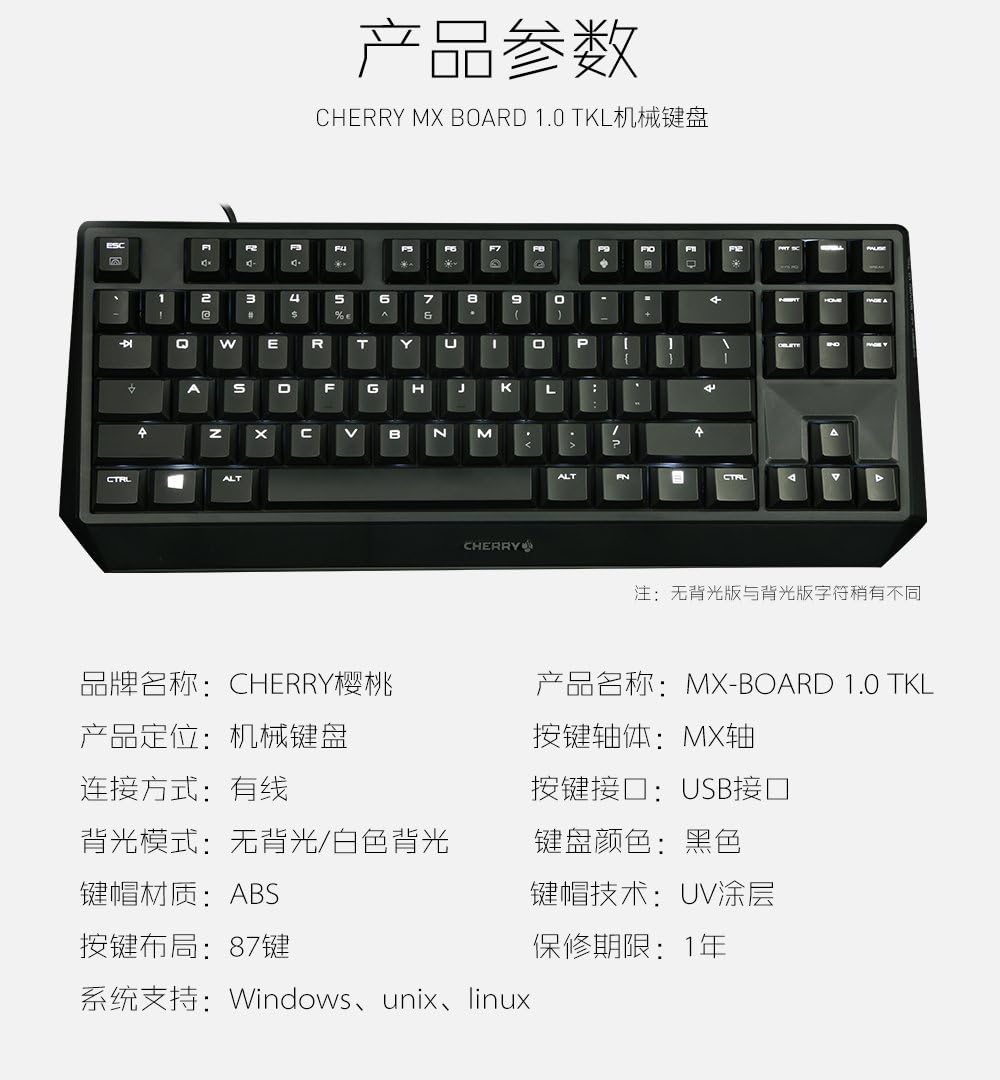
Figure 7: A detailed table outlining the technical specifications and parameters of the CHERRY MX Keyboard 1.0 TKL.
Кепилдик жана колдоо
Кепилдик маалымат
The CHERRY MX Keyboard 1.0 TKL typically comes with a 1 жылдык чектелген кепилдик сатып алынган күндөн тартып. Бул кепилдик нормалдуу колдонуудагы өндүрүш кемчиликтерин камтыйт. Кепилдик дооматтары үчүн сатып алганыңыздын далилин сактап коюңуз.
For specific warranty terms and conditions, please refer to the documentation included with your product or visit the official Cherry webсайт.
Кардарларды колдоо
If you require technical assistance, have questions about your product, or need to initiate a warranty claim, please contact Cherry customer support. Contact information can usually be found on the official Cherry webсайтында же продуктунун таңгагында.
For more information, visit the official Cherry store: Cherry Store on Amazon.


