Introduction
This manual provides detailed instructions for the safe and effective use of your Xiaomi Selfie Stick Tripod. Please read this manual thoroughly before operating the device and retain it for future reference.
The Xiaomi Selfie Stick Tripod is a versatile accessory designed for mobile photography and videography. It functions as both an extendable selfie stick and a stable tripod, featuring a wireless Bluetooth shutter for convenient remote control.
Продукт бүттүview
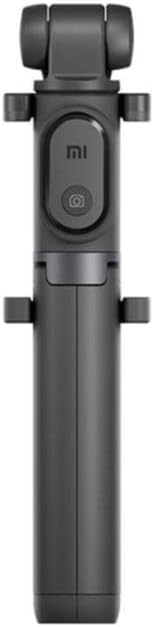
1-сүрөт: Xiaomi Selfie Stick Tripod (Folded). This image shows the compact design of the selfie stick when not in use, highlighting the integrated phone holder and remote button.

2-сүрөт: Xiaomi Selfie Stick Tripod in use as a tripod with a smartphone, alongside the detachable Bluetooth remote. This illustrates the product's dual functionality and wireless control.

3-сүрөт: Various dimensions of the Xiaomi Selfie Stick Tripod, including folded length, extended length, and phone holder size. This provides a clear understanding of the product's physical measurements.

4-сүрөт: Жакын план views of key components, including the phone clamp, Bluetooth remote, and the extendable monopod section. This highlights the design and functionality of individual parts.
Жайгашуу
Пакеттин мазмуну
- Xiaomi Selfie Stick Tripod (Model: XMZP601YM)
- Wireless Bluetooth Shutter Remote
- Колдонуучунун Колдонмосу (бул документ)
Battery Installation (Bluetooth Remote)
The Bluetooth remote requires 1 Lithium Ion battery. Ensure correct polarity when inserting the battery.
- Locate the battery compartment on the back of the Bluetooth remote.
- Батареянын капкагын ачыңыз.
- Insert the Lithium Ion battery, observing the positive (+) and negative (-) markings.
- Батареянын капкагын бекем жабыңыз.
Bluetooth Алыстан башкарууну жупташтыруу
To use the wireless shutter function, you must pair the remote with your smartphone.
- Ensure the Bluetooth remote is powered on.
- Смартфонуңуздан Bluetooth жөндөөлөрүнө өтүңүз.
- Bluetooth иштетүү.
- Издөө available devices. The remote should appear as "XMZP601YM" or similar.
- Select the remote to pair. Once paired, the indicator light on the remote will change (e.g., stop blinking).
Note: The remote is compatible with iOS 5.0 and above, and Android 4.2 and above.
Иштөө нускамалары
Селфи таякчасы катары колдонуу
- Gently pull the phone holder upwards to extend the monopod arm.
- Place your smartphone securely into the adjustable phone holder. Ensure the phone is centered and stable.
- Adjust the length of the monopod arm to your desired distance (up to 850 mm).
- Angle the phone holder for optimal shot composition. The holder supports multi-angle shooting, including 90-degree vertical shots.
- Use the paired Bluetooth remote to trigger the camera shutter.
Штатив катары колдонуу
- From the folded position, gently pull the bottom section downwards to reveal the tripod legs.
- Spread the three tripod legs outwards until they lock into a stable position.
- Штативди тегиз, туруктуу бетке коюңуз.
- Extend the monopod arm to the desired height (up to 850 mm).
- Secure your smartphone in the phone holder.
- Use the paired Bluetooth remote to trigger the camera shutter from a distance (up to 10 meters).
Note: The tripod function is suitable for both table-top and floor use.
Техникалык тейлөө
- Тазалоо: Аппаратты жумшак, кургак чүпүрөк менен сүртүңүз. Абразивдүү тазалагычтарды же эриткичтерди колдонбоңуз.
- Сактагыч: Store the selfie stick tripod in a cool, dry place away from direct sunlight and extreme temperatures.
- Батареяга кам көрүү: If the Bluetooth remote will not be used for an extended period, remove the battery to prevent leakage.
- Колдонуу: Түзмөктү түшүрүп албоо же катуу соккуга кабылбоо керек, анткени бул ички компоненттерге зыян келтириши мүмкүн.
Проблемаларды чечүү
| Көйгөй | Мүмкүн себеп | Чечим |
|---|---|---|
| Bluetooth пульт жупташтырылбай жатат. | Remote battery is low or dead. Bluetooth on phone is off. Remote is too far from phone. | Replace the battery in the remote. Ensure Bluetooth is enabled on your smartphone. Move the remote closer to your phone (within 10m). |
| Shutter button not working. | Remote not paired. Camera app not open or not configured for volume button shutter. | Re-pair the Bluetooth remote. Ensure your camera application is open and that its settings allow for volume button control of the shutter. |
| Tripod unstable. | Legs not fully extended or locked. Uneven surface. | Ensure all three tripod legs are fully extended and locked into position. Place the tripod on a flat, stable surface. |
| Monopod arm not extending/retracting smoothly. | Dust or debris in the telescopic mechanism. | Gently clean the telescopic sections with a soft, dry cloth. Avoid forcing the mechanism. |
Техникалык шарттар
- Модел: XMZP601YM
- Бренд: Xiaomi
- Продукциянын өлчөмдөрү: 1.97 x 1.97 x 9.45 дюйм (бүктөлгөн)
- Элемент Салмагы: 5.6 унция (160 грамм)
- Extendable Height: 180 mm to 850 mm (7 inches to 33.5 inches approx.)
- Bluetooth версиясы: 3.0
- Bluetooth диапазону: 10 метрге чейин
- Шайкеш OS: iOS 5.0 жана андан жогору, Android 4.2 жана андан жогору
- Шайкеш түзмөктөр: Smartphones, GoPro cameras
- Батареянын түрү (алыстан башкаруу): 1 литий-иондук батарейка (талап кылынат)
- Түсү: Кара
Кепилдик маалымат
This Xiaomi Selfie Stick Tripod (Model: XMZP601YM) comes with a 6 айлык кепилдик сатып алынган күндөн тартып. Бул кепилдик өндүрүштүк кемчиликтерди жана нормалдуу колдонуудагы бузулууларды камтыйт. Бул туура эмес пайдалануудан, кырсыктардан, уруксатсыз өзгөртүүлөрдөн же табигый кырсыктардан келтирилген зыянды камтыбайт.
Кепилдик дооматтары үчүн сатып алганыңыздын далилин сактап коюңуз.
Кардарларды колдоо
For technical assistance, troubleshooting not covered in this manual, or warranty inquiries, please contact Xiaomi customer support through their official webпродукт сатылып алынган сайт же сатуучу.
Көбүрөөк маалымат алуу үчүн, киргиле Амазонкадагы Xiaomi дүкөнү.


