Introduction
This manual provides comprehensive instructions for the setup, operation, and maintenance of your Thomson WHP5327 Wireless TV Headphones. Designed for comfortable, high-quality audio listening from various sources like TVs, Hi-Fi systems, smartphones, tablets, and laptops, these over-ear headphones offer a wireless range of up to 20 meters and come with a convenient charging station.
Коопсуздук маалыматы
Продукцияны колдонуудан мурун бардык коопсуздук нускамаларын кылдат окуп чыгыңыз. Бул колдонмону келечекте маалымат алуу үчүн сактаңыз.
- Do not expose the headphones or charging station to extreme temperatures, humidity, or direct sunlight.
- Аппаратты түшүрүүдөн же катуу таасирлерден сактаныңыз.
- Буюмду ажыратууга же өзгөртүүгө аракет кылбаңыз. Бул кепилдикти жокко чыгарат.
- Берилген кубат адаптерин жана кабелдерин гана колдонуңуз.
- Узакка созулган жогорку үн деңгээлинде угуу угууга зыян келтириши мүмкүн. Үндү ыңгайлуу деңгээлге коюңуз.
- Балдар жетпеген жерде сактаңыз.
Пакеттин мазмуну
Пакетте бардык буюмдар бар экенин текшериңиз:
- 1x Thomson WHP5327 Wireless TV Headphones
- 1x Charging Station / Transmitter
- 1x Power адаптер
- 2x Rechargeable Batteries (AA)
- 3x Audio Cables (e.g., 3.5mm Jack, RCA)
- 2x Audio Adapters (e.g., 6.3mm adapter)
- 1x Колдонуучунун колдонмосу
Продукт бүттүview
Зымсыз кулакчын системаңыздын компоненттери менен таанышып алыңыз.
Наушник

Сүрөт: каптал view of the Thomson WHP5327 headphones, highlighting the integrated volume control and power button on the earcup.
- Жөнгө салынуучу баш боосу: Ыңгайлуу ылайыктуу үчүн.
- Толгон кулакчындар: Provide comfort during extended listening sessions.
- Үндү көзөмөлдөө: Integrated on the earcup for easy adjustment.
- Кубат баскычы/Индикатор: To turn the headphones on/off and show status.
- Заряддоо байланыштары: Located on the bottom of the headband for charging on the station.
- 3.5 мм аудио уячасы: For optional wired connection to devices (cable may be required).
Charging Station / Transmitter
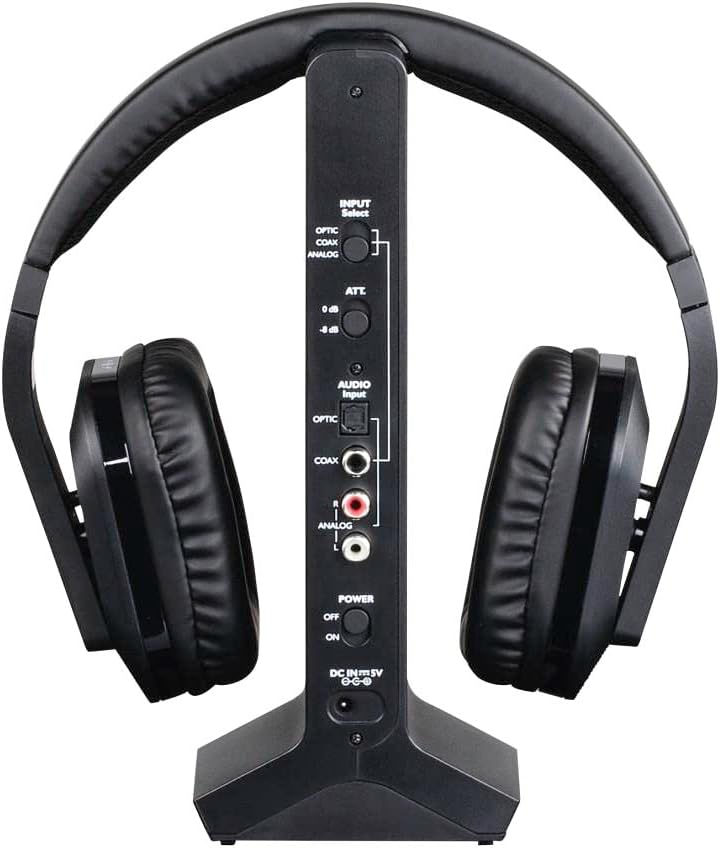
Сүрөт: Арткы view of the Thomson WHP5327 charging station, displaying the various audio input ports (Optical, Coaxial, Analog) and power connection.
- Headphone Cradle: For storing and charging the headphones.
- Кубат көрсөткүчү: Заряддоо абалын көрсөткөн жарык.
- Күч көрсөткүчү: Light indicating the station is powered on.
- Киргизүүнү тандоо которгучу: To choose between Optical, Coaxial, or Analog audio inputs.
- Аудио киргизүү порттору: Optical, Coaxial, and Analog (RCA) inputs for connecting to audio sources.
- Power Input (DC IN 5V): Кубат адаптерин туташтыруу үчүн.
- Кубат которгучу: To turn the charging station on/off.
Жайгашуу
1. Наушниктерди заряддоо
- Insert the provided rechargeable AA batteries into the headphone earcups, ensuring correct polarity.
- Connect the power adapter to the "DC IN 5V" port on the charging station and plug it into a wall outlet. The Power indicator on the station will light up.
- Place the headphones onto the charging station. Ensure the charging contacts align. The "CHARGE" indicator on the station will light up, indicating charging is in progress.
- Allow approximately 8 hours for the initial full charge. Subsequent charges may take less time.

Image: The Thomson WHP5327 headphones resting on their charging station, ready for use or charging.
2. Connecting the Charging Station to an Audio Source
The charging station acts as the transmitter. Choose the appropriate connection method for your audio source (TV, Hi-Fi, etc.).
- Optical Digital Audio (Recommended for TVs):
Connect an optical audio cable (not always included, check package contents) from your TV's "Optical Out" or "Digital Audio Out (Optical)" port to the "OPTIC" input on the charging station. Set the "INPUT Select" switch on the station to "OPTIC".
- Коаксиалдык санариптик аудио:
Connect a coaxial audio cable from your audio source's "Coaxial Out" port to the "COAX" input on the charging station. Set the "INPUT Select" switch on the station to "COAX".
- Analog Audio (RCA or 3.5mm Jack):
Use the provided RCA audio cable to connect your audio source's "Audio Out" (red and white RCA jacks) to the "ANALOG" RCA inputs on the charging station. If your source has a 3.5mm headphone jack, use the provided 3.5mm to RCA adapter cable. Set the "INPUT Select" switch on the station to "ANALOG".
Ensure the power switch on the charging station is set to "ON" after connecting the audio source.
Иштөө нускамалары
Күйгүзүү/өчүрүү
- To turn on the headphones, press and hold the Power button on the earcup until the indicator light illuminates.
- To turn off the headphones, press and hold the Power button again until the indicator light turns off.
Үндү көзөмөлдөө
Adjust the listening volume using the integrated volume control dial/buttons located on the earcup of the headphones.

Image: A person comfortably wearing the Thomson WHP5327 headphones while watching television, demonstrating typical usage.
Автоматтык өчүрүү
The transmitter and headphones feature an automatic shut-off function. If no audio signal is detected for approximately 5 minutes, both the transmitter and headphones will automatically power down to conserve battery life.
Зымсыз диапазон
The Thomson WHP5327 headphones offer a wireless range of up to 20 meters (approximately 65 feet) from the charging station/transmitter. Optimal range may vary depending on environmental factors such as walls, obstacles, and interference from other wireless devices.

Image: A diagram illustrating the wireless range between the headphones and the base unit, indicating a typical operational distance of 10-15 meters.
Зымдуу туташуу (милдеттүү эмес)
While primarily designed for wireless use, the WHP5327 headphones can also be used with a wired connection. Connect a 3.5mm audio cable (not always included) from your audio source (e.g., smartphone, tablet, laptop) to the 3.5mm audio jack on the headphone earcup. This allows for direct audio playback without the need for the charging station/transmitter.

Image: A person using the Thomson WHP5327 headphones connected via a cable to a smartphone, demonstrating the optional wired listening mode.
Техникалык тейлөө
- Тазалоо: Use a soft, dry cloth to clean the headphones and charging station. Do not use liquid cleaners or abrasive materials.
- Батареяны алмаштыруу: The headphones use rechargeable AA batteries. If the battery life significantly decreases, replace them with new rechargeable AA batteries of the same type and capacity. Ensure correct polarity when inserting.
- Сактагыч: When not in use, store the headphones on the charging station to keep them charged and ready. If storing for an extended period, ensure batteries are fully charged and store in a cool, dry place.
Проблемаларды чечүү
| Көйгөй | Мүмкүн себеп | Чечим |
|---|---|---|
| Наушниктен үн чыкпайт. | Headphones not turned on or not charged. Transmitter not powered or not connected to audio source. Incorrect input selected on transmitter. Аудио булагынын үнү өтө төмөн же үнсүз. | Ensure headphones are charged and turned on. Check power connection to transmitter and ensure it's ON. Verify audio cable connection from source to transmitter. Select correct input (Optical, Coaxial, Analog) on transmitter. Increase volume on audio source and headphones. |
| Үн бурмаланган же үзгүлтүктүү угулат. | Чектен тышкары. Башка зымсыз аппараттардын кийлигишүүсү. Наушниктин батареясы аз. | Өткөргүчкө жакыныраак жылыңыз. Move transmitter away from other electronic devices (Wi-Fi routers, cordless phones). Recharge headphones. |
| Наушник заряддалбай жатат. | Headphones not properly seated on charging station. Charging station not powered. Бузулган батарейкалар. | Ensure headphones are correctly placed on the station, making good contact. Кубат адаптеринин туташуусун жана дубалдагы розетканы текшериңиз. Батареялардын заряды жок болсо, аларды алмаштырыңыз. |
| Automatic shut-off occurs too quickly. | No audio signal or very low audio signal from source. | Increase the volume output from your audio source (e.g., TV). |
Техникалык шарттар
| Өзгөчөлүк | Деталь |
|---|---|
| Модел | WHP5327 |
| Type | Over-Ear, Circum-Aural, Wireless |
| Түс | Кара |
| Материал | Пластик |
| Жугуу | Радио жыштыгы (RF) |
| Carrier Frequency | 2400 МГц |
| Frequency Response | 20 Гц - 22 кГц |
| Импеданс | 24 Ом |
| Сезимталдуулук | 120 дБ |
| Ызы-чуунун катышы | 80 дБ |
| Distortion Rate (max.) | 1 % |
| Зымсыз диапазон | 20 м (65 фут) чейин |
| Battery Life (average volume) | 8 саатка чейин |
| Power Source | 2x AA Rechargeable Batteries (included) |
| Audio Inputs (Transmitter) | Optical, Coaxial, Analog (RCA) |
| Салмагы | 1.44 фунт (болжол менен 0.65 кг) |
Кепилдик жана колдоо
Thomson products are designed and manufactured to the highest quality standards. This product is covered by a limited warranty against defects in materials and workmanship. For detailed warranty terms and conditions, please refer to the warranty card included in your package or visit the official Thomson webсайт.
For technical support, troubleshooting assistance, or spare parts inquiries, please contact Thomson customer service. Contact information can typically be found on the product packaging or the official Thomson support webсайт.
Кепилдик дооматтары үчүн сатып алганыңыздын далилин сактап коюңуз.


