Introduction
This manual provides detailed instructions for the installation, operation, and troubleshooting of the J-Tech Digital 4K 60Hz HDMI Audio Extractor Converter, Model JTD18G-H5CH. This device extracts audio from an HDMI signal, allowing it to be output separately via SPDIF Optical or 3.5mm analog stereo connections, while passing the video signal through to a display.

Image: The J-Tech Digital 4K 60Hz HDMI Audio Extractor Converter, Model JTD18G-H5CH, showcasing анын компакттуу дизайны жана портунун жайгашуусу.
Маанилүү шайкештик эскертүүлөрү
- This unit passes Dolby Digital/DTS audio formats but does жок decode these formats for the analog output. For analog output, ensure your HDMI source is set to PCM audio.
- Not compatible with Apple TV 3rd Generation (Model: A2843) and certain Comcast Xfinity boxes (e.g., Pace pxd01ani).
- Not compatible with HDMI 1.2 sources or monitors manufactured before 2005.
- This unit does жок support HDMI ARC (Audio Return Channel) function.

Image: Visual representation of devices incompatible with the audio extractor, specifically Apple TV 3rd Generation and certain Comcast Xfinity boxes.
Пакеттин мазмуну
Пакетте бардык буюмдар бар экенин текшериңиз:
- J-Tech Digital 4K 60Hz HDMI Audio Extractor Converter (JTD18G-H5CH)
- DC 5V/1A Power адаптери
- User Manual
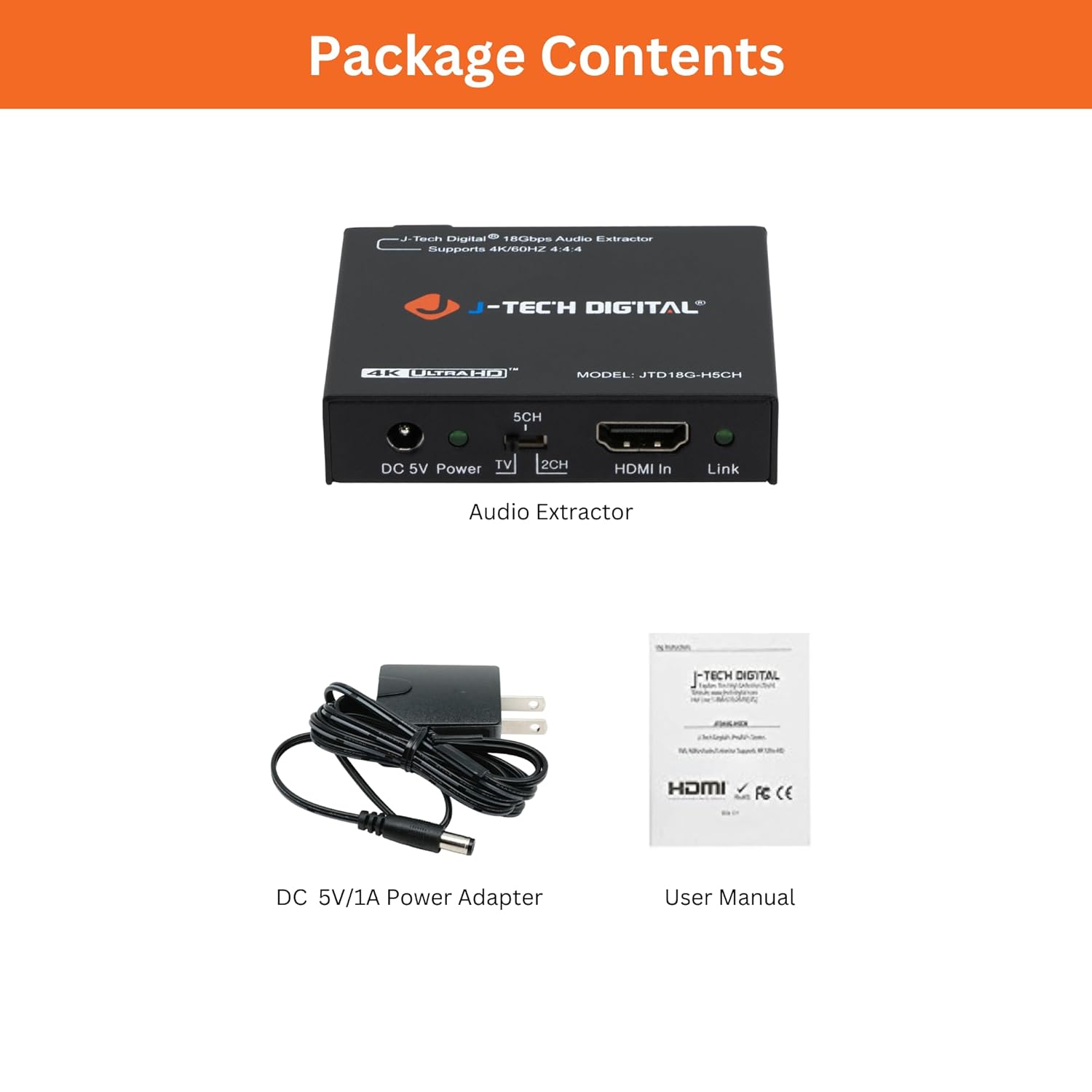
Image: The package contents, including the audio extractor unit, DC 5V/1A power adapter, and the user manual.
Орнотуу нускамалары
1. Device Interface Overview

Image: A detailed diagram illustrating the front and back panels of the audio extractor, labeling all ports and indicators including DC 5V Power, EDID Toggle Switch (TV/2CH/5CH), HDMI In, Link Indicator, HDMI Out, L/R 3.5mm Analog Output, and SPDIF Optical Output.
2. Байланыш диаграммасы
Follow these steps to connect the audio extractor:
- Connect your HDMI source device (e.g., Blu-ray player, gaming console, media player) to the HDMI Кирүү port on the extractor using an HDMI cable.
- Connect your display device (e.g., TV, monitor, projector) to the HDMI чыгышы port on the extractor using an HDMI cable.
- For analog stereo audio, connect your audio receiver or headphones to the L/R Out (3.5mm) port. Ensure the incoming audio format from the source is Stereo and the EDID switch is set to 2CH.
- For multi-channel digital audio, connect your audio receiver or sound system to the Optical Out (SPDIF) port. Ensure the incoming audio format is Stereo or Dolby Digital 5.1 and the EDID switch is set to 5CH.
- Connect the provided DC 5V/1A Power Adapter to the DC 5V кубаттуулугу port on the extractor, then plug it into a power outlet.
3. Standard Application Examples

Image: Connection diagram for using the L/R 3.5mm analog output, illustrating an HDMI source connected to the extractor, which then outputs video to a TV and analog audio to headphones.

Image: Connection diagram for using the SPDIF optical output, illustrating an HDMI source connected to the extractor, which then outputs video to a TV and optical audio to an external sound system.
Иштөө нускамалары
Аудио EDID Орнотуулары
The extractor features an EDID (Extended Display Identification Data) toggle switch to manage audio output. Adjust this switch based on your audio requirements:
- Сыналгы режими: Passes EDID information directly from the connected TV/display to the HDMI source. This allows the source to output audio formats supported by the display.
- 2CH режими: Activates a built-in EDID for 2-channel stereo audio. Use this setting when connecting to stereo audio systems via L/R 3.5mm or Optical, and ensure your source is set to PCM audio.
- 5CH режими: Activates a built-in EDID for 5.1 channel audio. Use this setting when connecting to a 5.1 channel audio system via Optical, supporting formats like Dolby Digital and DTS.
Эскертүү: For simultaneous audio output via both Optical and 3.5mm, the incoming audio format from the source must be set to Stereo (PCM).

Image: A visual guide to the EDID toggle switch on the audio extractor, detailing the 'TV', '2CH', and '5CH' settings and their respective audio output behaviors.
Video Pass-Through Capabilities
The extractor supports high-resolution video pass-through:
- Supports video resolutions up to 4K 50/60Hz (YUV444).
- Also supports 1080P@120Hz and 1080P@144Hz.
- Compatible with HDMI 2.0b (18Gbps) and HDCP 2.2.
- Supports HDR10 (use HDMI 2.0 certified cables for optimal HDR10 compatibility).
- Features CEC bypass.

Image: A graphic demonstrating the device's capability to support 4K@60Hz 4:4:4 resolution with HDR, alongside other supported resolutions and features like HDMI 2.0, HDCP 2.2, and CEC.
Техникалык тейлөө
The J-Tech Digital HDMI Audio Extractor is designed for reliable operation and requires minimal maintenance. Keep the device in a clean, dry environment away from direct sunlight and extreme temperatures. Avoid exposing the unit to moisture or liquids. Clean the exterior with a soft, dry cloth as needed. Do not attempt to open or service the unit yourself, as this will void the warranty.
Проблемаларды чечүү
No Sound from Optical Output Port
- Ensure the audio format on your input source device is set to Stereo, DTS, or standard Dolby Digital. Optical output does not support Dolby Digital Plus (DD+).
- Verify that the EDID switch on the extractor is set to the 5CH позиция.
- Check your optical cable for proper connection and functionality.

Image: A troubleshooting chart detailing common reasons for no sound from the optical output, emphasizing supported audio formats (Stereo, DTS, Dolby Digital) and unsupported formats (Dolby Digital Plus).
No Sound from 3.5mm L/R Output Port
- Ensure the audio format on your input source device is set to Stereo (PCM).
- Verify that the EDID switch on the extractor is set to the 2CH позиция.
- Check your 3.5mm audio cable for proper connection and functionality.

Image: A troubleshooting chart detailing common reasons for no sound from the 3.5mm L/R output, emphasizing that only Stereo audio format is supported for this output.
Video Display Issues
- Ensure all HDMI cables are securely connected and are of high quality, especially for 4K 60Hz and HDR signals (HDMI 2.0 certified cables are recommended).
- Verify that your display supports the resolution and refresh rate being output by the source device.
- Check the compatibility notes regarding HDMI 1.2 sources or older monitors.
Техникалык шарттар
| Модель номери | JTD18G-H5CH |
| Продукциянын өлчөмдөрү | 2.9 x 2.6 x 0.6 дюйм |
| Элемент Салмагы | 8.8 унция |
| Video Resolution Support | Up to 4K 50/60Hz (YUV444), 1080P@120Hz, 1080P@144Hz |
| HDMI шайкештиги | HDMI 2.0b (18Gbps), HDCP 2.2, DVI compliant |
| HDR колдоо | HDR10 (10-bit HDR pass-through) |
| Audio Formats (SPDIF) | LPCM, DTS Digital, Dolby Digital (passthrough) |
| Audio Formats (3.5mm) | 2-channel analog stereo (PCM) |
| Аудио С.ample Rates | 192 кГц чейин |
| БШКнын колдоосу | CEC bypass |
| Электр камсыздоо | DC 5V/1A |
| Interface Type | HDMI, Component (for video pass-through compatibility) |

Image: A diagram showing the physical dimensions of the J-Tech Digital HDMI Audio Extractor, indicating its length, width, and height.
Кепилдик жана техникалык колдоо
All J-Tech Digital products are backed by a one-year manufacturer replacement warranty. Additionally, customers receive free lifetime technical support from our dedicated customer support team based in Texas.
Technical Support Availability
- Сааттары: 9 AM – 6 PM CST
- Күндөр: Дүйшөмбүдөн жумага чейин
Contact information for technical support is available on the J-Tech Digital seller page.

Image: A graphic highlighting J-Tech Digital's commitment to lifetime technical support and a one-year manufacturer replacement warranty, with support hours and contact details.


