1. Киришүү
Сатып алганыңыз үчүн рахматasing the Yunteng YT-1288 Bluetooth Selfie Stick. This versatile device combines a selfie stick, monopod, and tripod functionality, designed to enhance your mobile photography and videography experience. It is compatible with a wide range of smartphones and cameras, offering adjustable length and a detachable Bluetooth remote for convenient operation.
Продукттун туура иштешин камсыз кылуу жана анын иштөө мөөнөтүн максималдуу узартуу үчүн аны колдонуудан мурун бул колдонмону кылдаттык менен окуп чыгыңыз.
2. Коопсуздук маалыматы
- Аппаратты экстремалдык температурага, түз күндүн нуруна же жогорку нымдуулукка дуушар кылбаңыз.
- Аппаратты суудан жана башка суюктуктардан алыс кармаңыз.
- Аппаратты түшүрүүдөн же катуу таасирлерден сактаныңыз.
- Аппаратты ажыратууга же өзгөртүүгө аракет кылбаңыз. Бул кепилдикти жокко чыгарат.
- Ensure your smartphone or camera is securely mounted before extending the stick or using it as a tripod.
- When extending the monopod, ensure all locking mechanisms are engaged to prevent accidental collapse.
- Балдар жетпеген жерде сактаңыз.
3. Продукт бүтүп калдыview
The Yunteng YT-1288 features a robust design with an extendable aluminum alloy pole, a secure phone/camera mount, and a detachable Bluetooth remote control.
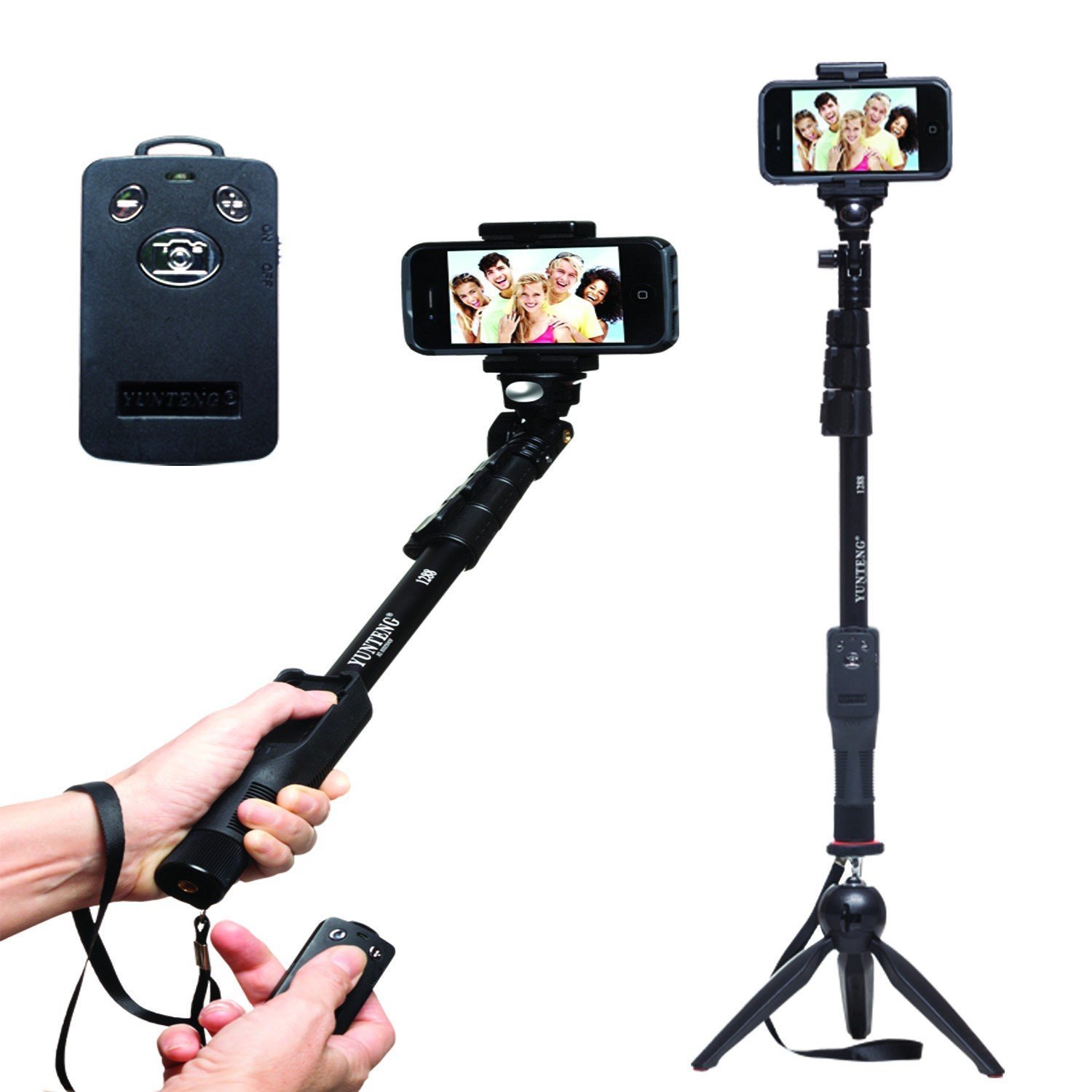
Figure 3.1: Yunteng YT-1288 Selfie Stick showing its handheld use with the remote, its extended form with a smartphone, and its tripod configuration.
Негизги өзгөчөлүктөрү:
- Extendable aluminum alloy monopod with grooved poles for stability.
- Adjustable head with 360-degree rotation for multiple angle shooting.
- Detachable Bluetooth remote shutter for convenient photo capture.
- Integrated tripod base for stable freestanding shots.
- Universal 1/4 inch screw mount for cameras and action cameras.
- Adjustable phone clamp compatible with smartphones 5.0cm to 8.0cm wide.
- Built-in wrist strap for added security.
4. Орнотуу колдонмосу
4.1 Түзмөгүңүздү туташтыруу
- Смартфондор үчүн:
- Locate the adjustable phone clamp at the top of the monopod.
- Пружиналуу клапанды акырын ажыратыңызamp and insert your smartphone. Ensure it is securely seated and centered within the clamp. Clamp supports phones with a width between 5.0 cm and 8.0 cm.
- For Cameras/Action Cameras:
- Remove the phone clamp by unscrewing it from the 1/4 inch screw mount.
- Align the 1/4 inch screw on the monopod head with the tripod mount on your camera or action camera.
- Carefully screw your camera onto the mount until it is firmly attached. Do not overtighten.
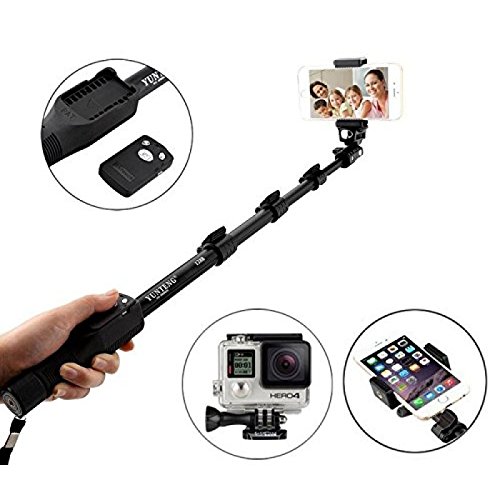
Figure 4.1: Demonstrates attaching a smartphone and highlights the detachable Bluetooth remote and compatibility with action cameras.
4.2 Pairing the Bluetooth Remote
The Bluetooth remote is compatible with smartphones only (not GoPro or other action cameras).
- Ensure the remote control has sufficient battery power.
- Turn on the Bluetooth remote by sliding the ON/OFF switch. An indicator light will begin to flash, indicating it is in pairing mode.
- On your smartphone, go to Settings > Bluetooth and turn Bluetooth ON.
- Издөө available devices. The remote will typically appear as "Yunteng" or "YT-1288".
- Select the remote from the list to pair. The indicator light on the remote will stop flashing and remain solid (or turn off) once successfully paired.
- Open your smartphone's camera application. The remote should now be ready to use.
- Note for some Android phones: You may need to change camera settings to use the clicker/Zoom In-Out function. Refer to your phone's camera settings for shutter button assignment.
4.3 Extending and Folding the Monopod
- Узартуу үчүн: Unlock each section of the monopod by twisting the locking collars counter-clockwise. Pull out each section to the desired length. Twist the locking collars clockwise to secure each section firmly in place. The monopod can extend from 425mm to 1250mm.
- Бүктөө үчүн: Unlock each section by twisting the locking collars counter-clockwise. Push each section back into the main body. Twist the locking collars clockwise to secure the folded sections.
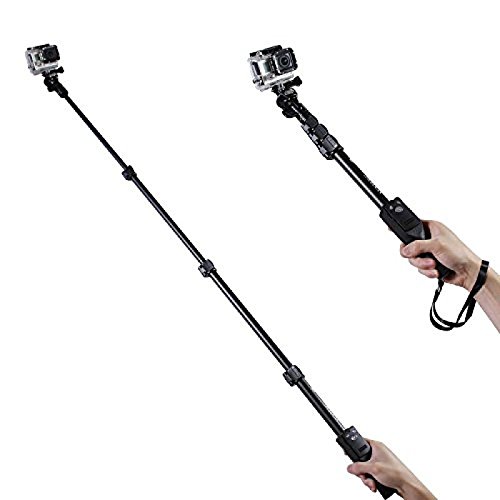
Figure 4.2: The Yunteng YT-1288 Selfie Stick shown fully extended, demonstrating its reach and compatibility with action cameras.
5. Иштөө нускамалары
5.1 Taking Photos/Videos with Remote
- Ensure your smartphone is securely mounted and the Bluetooth remote is paired.
- Смартфонуңуздун камера тиркемесин ачыңыз.
- Position the monopod and adjust the angle as desired.
- Press the appropriate button on the Bluetooth remote to capture a photo or start/stop video recording.
5.2 Штатив катары колдонуу
- Extend the integrated tripod legs at the base of the monopod.
- Ensure the legs are fully spread and stable on a flat surface.
- Adjust the monopod length and head angle as needed.
- Use the Bluetooth remote for hands-free photo or video capture.
5.3 Adjusting Angle and Rotation
The monopod head features an adjustable ball joint or similar mechanism. Loosen the thumb screw or locking knob to adjust the angle of your device (phone or camera). Tighten the screw/knob once the desired angle is achieved to secure it in place. The head allows for 360-degree rotation for versatile shooting perspectives.
6. Техникалык тейлөө
- Тазалоо: Wipe the monopod and remote with a soft, dry cloth. Do not use abrasive cleaners or solvents.
- Сактагыч: Аппаратты түз күн нурунан жана экстремалдык температурадан алыс салкын, кургак жерде сактаңыз.
- Батарея (Алыстан): If the Bluetooth remote's performance degrades, replace its battery if applicable.
7. Кыйынчылыктарды
| Көйгөй | Мүмкүн себеп | Чечим |
|---|---|---|
| Bluetooth пульт жупташтырылбай жатат. | Remote is off, battery low, or too far from phone. | Ensure remote is ON and charged/has new battery. Bring closer to phone. Restart phone's Bluetooth. |
| Remote paired but not taking photos. | Camera app settings, remote not fully recognized. | For Android, check camera settings for volume button/shutter function. Restart phone and remote. Try a different camera app. |
| Monopod sections not locking. | Locking collars not twisted firmly. | Ensure each locking collar is twisted clockwise until tight. Do not overtighten. |
| Phone not fitting in clamp. | Phone width exceeds clamp кубаттуулугу. | Clamp supports phones between 5.0cm and 8.0cm width. Ensure your phone is within this range. |
8. Техникалык шарттар
| Бренд | Юнтенг |
| Модел | YT-1288 |
| Шайкеш түзмөктөр | Smartphones (5.0cm - 8.0cm width), Cameras, Action Cameras (with 1/4 inch screw mount) |
| Катталган узундук | 425 мм (16.7 дюйм) |
| Узундук | 1250 мм (49.2 дюйм) |
| Материал | Алюминий эритмеси |
| Элемент Салмагы | 380 г |
| Bluetooth Remote | Detachable, for smartphones only |
9. Кепилдик жана колдоо
This product comes with a 6-month seller warranty. For any issues or support inquiries, please contact your point of purchase or the seller directly. Please retain your purchase receipt as proof of purchase for warranty claims.


