Introduction
This manual provides essential information for the installation, operation, and maintenance of your Proxicast High Gain 10 dBi Universal Wide-Band 4G / LTE, 5G & WiFi Omni-Directional Outdoor Antenna. This antenna is designed to improve signal strength and speed for various cellular broadband services and Wi-Fi networks.

Figure 1: Proxicast High Gain Omni-Directional Antenna (Model ANT-126-002)
Продукт бүттүview
The Proxicast ANT-126-002 is an omni-directional antenna designed for outdoor use. It supports a wide frequency range, making it compatible with 4G LTE, 5G Sub-6 cellular services, and Wi-Fi. Its robust construction ensures durability in various weather conditions.
- Жыштык диапазону: 600 - 6000 МГц
- Пайда: 10 дБ
- Туташтыргыч түрү: N-аял
- Курулуш: Weather and impact resistant ABS radome
- Монтаждоо: Includes stainless steel 2-way pole/wall mounting bracket

Figure 2: Antenna compatibility with 5G, LTE, and WiFi networks.

Figure 3: Integrated N-Female connector for coaxial cable attachment.
Орнотуу жана орнотуу
Proper installation is crucial for optimal performance. The antenna comes with a versatile mounting bracket for pole or wall installation.
Кутуда эмне бар:
- 1 x Proxicast Omni-Directional Antenna
- 1 x L кашаа
- 2 x U Bolts
- 4 х жуугучтар
- 4 х Кулпуну жуугучтар
- 4 Nuts х

Figure 4: Included mounting hardware for the antenna.
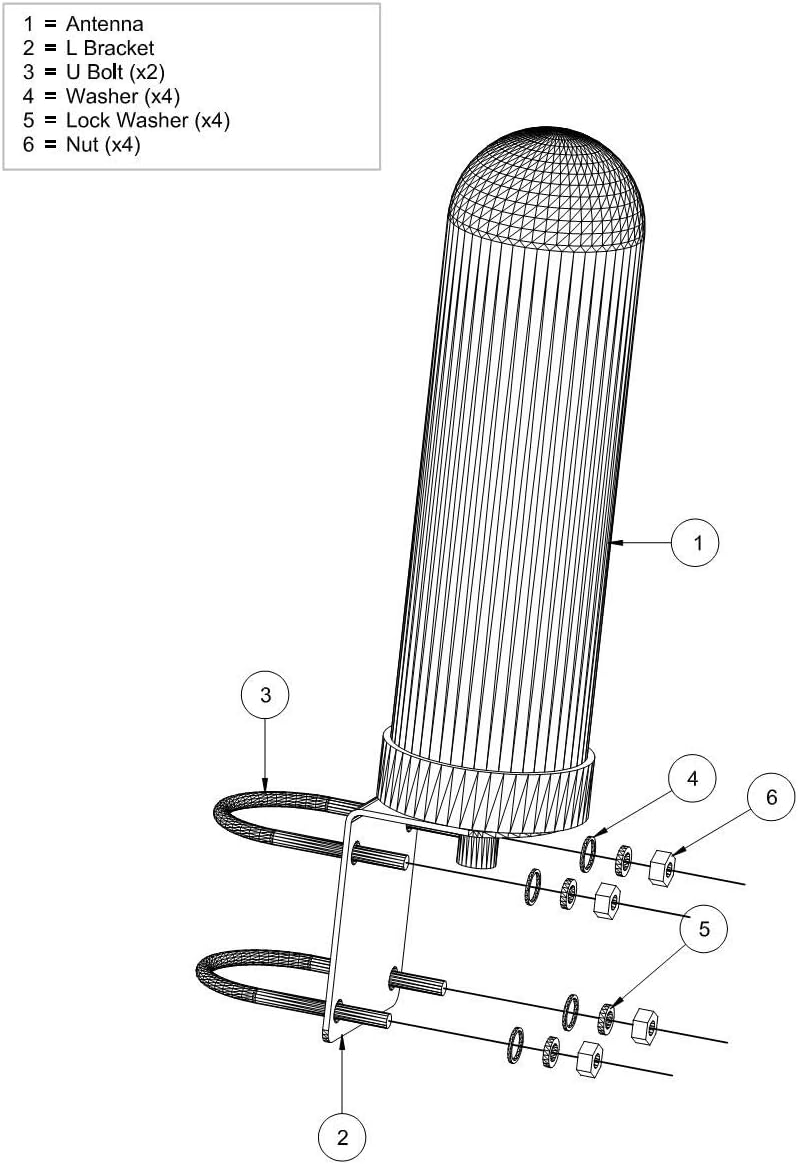
5-сүрөт: жарылган view of antenna and mounting components.
Монтаждоо көрсөтмөлөрү:
- Жайгашкан жерди тандоо: Select an outdoor location with a clear line of sight to cellular towers or Wi-Fi access points. Consider mounting on a pole or wall.
- Assemble Bracket: Attach the L-bracket to the antenna using the provided nuts and washers.
- Secure Antenna:
- For pole mounting: Use the U-bolts to secure the L-bracket to a mast (mast sold separately).
- For wall mounting: Use appropriate screws (not included) to secure the L-bracket directly to a sturdy wall surface.
- Коаксиалдык кабелди туташтыруу: Connect a 50 Ohm coaxial cable (not included) to the N-Female connector on the antenna. Ensure the connection is tight and weatherproofed.
- Маршруттук кабель: Route the coaxial cable to your cellular modem, router, or radio device.
Маанилүү эскертүү: This antenna must be connected via a 50 Ohm coaxial cable to an existing cellular modem/router/radio device. It does not improve signal for cell phones or other devices not directly wired to the antenna.
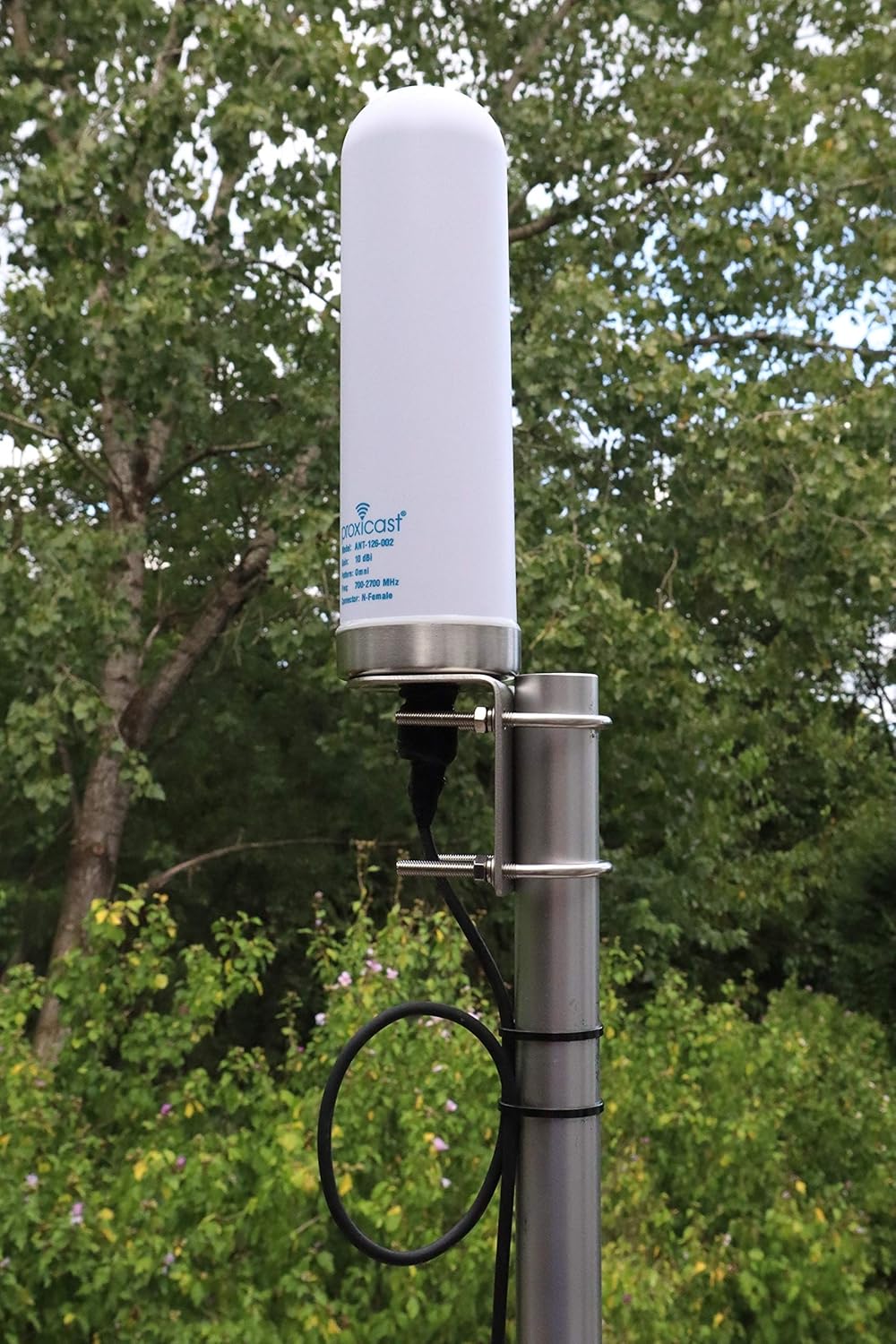
6-сүрөт: Мисample of the antenna mounted on an outdoor pole.
Иштөө принциптери
The Proxicast ANT-126-002 is an omni-directional antenna, meaning it receives and transmits signals in a 360-degree pattern around its axis. This makes it suitable for locations where the exact direction of the signal source is unknown or where signals may come from multiple directions.
It is designed to enhance the signal strength and data throughput for compatible devices by providing a higher gain connection to cellular and Wi-Fi networks. The antenna's wideband capability ensures compatibility across various frequency bands used by major carriers like Verizon, AT&T, T-Mobile, Telus, Bell Canada, Rogers, and DigiCel.
Видео 1: Кыскача маалыматview of the Proxicast 10 dBi Wide-Band Omni Antenna, showcasing анын дизайны жана өзгөчөлүктөрү.
Техникалык тейлөө
The Proxicast antenna is built for outdoor durability with a weather and impact resistant ABS radome. Minimal maintenance is required.
- Мезгилдүү текшерүү: Annually inspect the antenna and its mounting hardware for any signs of wear, corrosion, or loosening. Ensure all connections remain secure.
- Тазалоо: If necessary, gently clean the antenna's exterior with a soft, damp кездеме. Катуу химиялык заттарды же абразивдүү материалдарды колдонуудан алыс болуңуз.
- Кабелдин бүтүндүгү: Check the coaxial cable for any damage, kinks, or degradation of the outer jacket. Ensure weatherproof seals at connectors are intact.
Проблемаларды чечүү
If you experience issues with signal improvement, consider the following troubleshooting steps:
- Байланыштарды текшерүү: Ensure the 50 Ohm coaxial cable is securely connected to both the antenna's N-Female port and your modem/router/radio device. A loose connection can significantly degrade performance.
- Кабель түрү: Verify that you are using a 50 Ohm coaxial cable. Using a 75 Ohm cable (common for TV) will result in poor performance.
- Required Adapters: If your device uses a different connector type (e.g., SMA), ensure you are using the correct 50 Ohm adapter (e.g., N Male to SMA Female). Incorrect adapters can cause signal loss.
- Антеннаны жайгаштыруу: Experiment with different mounting locations and heights. Even small changes in position can impact signal reception, especially if obstructions are present.
- Түзмөктүн шайкештиги: Confirm that your modem/router/radio device is configured to use an external antenna and is compatible with the antenna's frequency range.
- Сигнал булагы: While omni-directional, performance can still be affected by distance to the nearest cell tower or Wi-Fi access point.
If problems persist after following these steps, contact Proxicast customer support for further assistance.
Техникалык шарттар
| Өзгөчөлүк | Деталь |
|---|---|
| Модель номери | АНТ-126-002 |
| Бренд | Проксикаст |
| Антенна түрү | 4G/LTE, 5G, WiFi Omni-Directional Wideband Antenna |
| Жыштык диапазону | 600 - 6000 МГц |
| Peak Gain | 10 дБ |
| Импеданс | 50 Ом |
| Туташтыргыч түрү | N-аял |
| Продукциянын өлчөмдөрү | 3 x 3 x 10.6 дюйм (7.6 x 7.6 x 26.9 см) |
| Элемент Салмагы | 1 фунт (0.45 кг) |
| Түс | Ак |
| Өзгөчөлүктөр | 360 Degree, High Gain, Multidirectional, Signal Booster, Wireless |

Figure 7: Physical dimensions of the Proxicast antenna.

Figure 8: Detailed technical drawing showing antenna dimensions.

Figure 9: Antenna performance verified through independent lab testing.
Кепилдик жана колдоо
For information regarding product warranty, please refer to the official Proxicast website or contact their customer service directly. Protection plans may also be available for purchase separately.
Кардарларды колдоо: If you require technical assistance or have questions about your Proxicast antenna, please visit the Proxicast Store on Amazon же алардын кызмат адамы webбайланыш маалыматы үчүн сайт.


