Продукт бүттүview
The MOTOROLA Talkabout T280 is a rechargeable two-way radio designed for instant communication. It features 22 channels, a maximum talking range of 25 miles under optimal conditions, and weather alert capabilities. The T280 is suitable for various communication needs, including outdoor activities and emergency preparedness.
Негизги өзгөчөлүктөр төмөнкүлөрдү камтыйт:
- 22 FRS channels for communication.
- Rechargeable NiMH battery packs with micro-USB charging.
- Weatherproof design for durability.
- Emergency preparedness features, including weather alerts.

Сүрөт: Төмөнкү view of the Motorola T280 radio, featuring the 'Talkabout' branding.
Пакеттин мазмуну
The MOTOROLA Talkabout T280 bundle includes the following items:
- Two (2) T280 Radios
- One (1) Y Cable with Dual Micro-USB Chargers
- Two (2) NiMH Rechargeable Battery Packs
- Two (2) Belt Clips
- One (1) Red Carry Case
- Emergency Preparedness Checklist
Жайгашуу
1. Батареяны орнотуу
- Радио өчүрүлгөнүн текшериңиз.
- Радионун артындагы батарея бөлүкчөсүнүн капкагын табыңыз.
- Батарея уясынын капкагын ачыңыз.
- Insert the NiMH rechargeable battery pack, ensuring correct polarity. The radio also supports 4 AAA alkaline batteries (not included) as an alternative.
- Батарея уясынын капкагын бекем жабыңыз.

Сүрөт: каптал view of the Motorola T280 radio, illustrating the general area for battery access and the belt clip attachment point.
2. Батареяларды заряддоо
- Connect the Y cable with dual micro-USB chargers to a compatible USB power source.
- Plug the micro-USB connectors into the charging ports located at the bottom of each radio.
- Радио дисплейдеги батареянын индикатору заряддоо абалын көрсөтөт.
- Allow sufficient time for a full charge before first use (typically 8-10 hours).
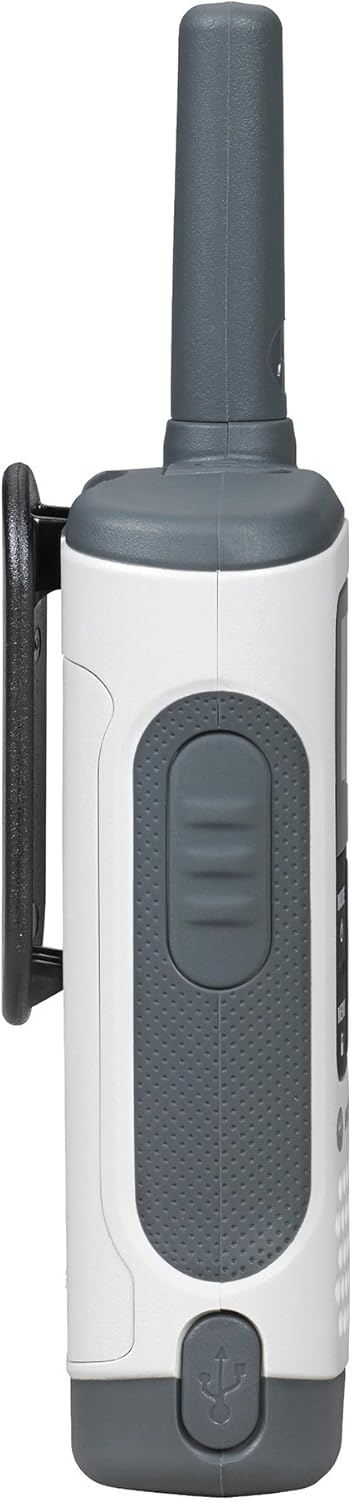
Сүрөт: Төмөнкү view of the Motorola T280 radio, highlighting the micro-USB charging port.
3. Белдемчи клипти чаптоо
- Кур кыскычын радионун арткы жагындагы оюктар менен тегиздеңиз.
- Белдин кыскышын ылдый карай жылдырыңыз, ал чыкылдаганга чейин.
- To remove, push the release tab and slide the clip upwards.
Иштөө нускамалары
1. Күйгүзүү/өчүрүү
- Күйгүзүү үчүн: басып, кармап туруңуз РЕЖИМ/МЕНЮ button until the radio turns on.
- Өчүрүү үчүн: басып, кармап туруңуз РЕЖИМ/МЕНЮ button until the radio turns off.

Сүрөт: алдыңкы view of two Motorola T280 radios, showing the display, MODE/MENU, plus/minus, and monitor buttons.
2. Үндү тууралоо
- колдонуу + (Plus) and - (Minus) buttons to increase or decrease the listening volume.
3. Каналды тандоо
- Радио күйүп турганда, басыңыз РЕЖИМ/МЕНЮ баскычын бир жолу. Канал номери жарк этет.
- колдонуу + or - каалаган каналды тандоо үчүн баскычтар (1-22).
- басыңыз РЕЖИМ/МЕНЮ каналды тандоону ырастоо үчүн кайра басыңыз.
- For optimal communication, ensure all radios in your group are set to the same channel and privacy code.
4. Купуялык кодун орнотуу
Privacy codes help reduce interference from other users. The T280 supports 121 privacy codes (38 CTCSS codes and 83 DCS codes).
- Каналды тандагандан кийин, басыңыз РЕЖИМ/МЕНЮ баскычын эки жолу басыңыз. Купуялык кодунун номери күйүп-өчүп турат.
- колдонуу + or - каалаган купуялык кодун тандоо үчүн баскычтар.
- басыңыз РЕЖИМ/МЕНЮ button again to confirm the privacy code.
5. Берүү жана кабыл алуу
- Өткөрүш үчүн: басып, кармап туруңуз Push-to-Talk (PTT) button located on the side of the radio. Speak clearly into the microphone. Release the PTT button to listen.
- Кабыл алуу үчүн: PTT баскычы басылбагандыгын текшериңиз. Радио тандалган канал жана купуялык код боюнча берүүлөрдү автоматтык түрдө кабыл алат.
Сүрөт: каптал view of the Motorola T280 radio, highlighting the Push-to-Talk (PTT) button.
6. Монитор функциясы
- басыңыз МОН button (often labeled with a 'Z' or 'MON' icon) to temporarily disable the privacy code and listen for activity on the current channel. This is useful for checking for weak signals or if you suspect interference.
7. Weather Alerts
The T280 can receive NOAA weather alerts. Refer to the radio's display for weather channel indicators. In areas with NOAA broadcasts, the radio can alert you to severe weather conditions.
- To activate/deactivate weather alerts, consult the full user manual for specific menu navigation steps.
Техникалык тейлөө
1. Батареяга кам көрүү
- Always use the provided NiMH rechargeable battery packs or approved AAA alkaline batteries.
- Эски жана жаңы батарейкаларды же ар кандай типтеги батареяларды аралаштырбаңыз.
- Remove batteries if the radio will not be used for extended periods.
- Батареяларды салкын, кургак жерде сактаңыз.
2. Тазалоо
- Радиону жумшак, d менен тазалаңызamp кездеме.
- Абразивдүү тазалагычтарды же эриткичтерди колдонбоңуз.
- Ensure the micro-USB charging port is free of debris.
3. Сууга туруктуулук
The T280 radio is designed to be waterproof. However, ensure all port covers (e.g., micro-USB charging port, accessory port) are securely closed to maintain its water resistance. Avoid submerging the radio for extended periods or exposing it to high-pressure water jets.

Сүрөт: Жогорку view of the Motorola T280 radio, showing the antenna and the covered accessory port.
Проблемаларды чечүү
| Көйгөй | Мүмкүн чечим |
|---|---|
| Радио күйбөйт. |
|
| Башка радиолор менен байланышууга болбойт. |
|
| Аудио сапаты начар же статикалык. |
|
| Чектелген диапазон. |
|
Техникалык шарттар
| Өзгөчөлүк | Деталь |
|---|---|
| Модель номери | T280 |
| Продукциянын өлчөмдөрү | 6.42 x 2.13 x 1.24 дюйм |
| Элемент Салмагы | 6.4 унция |
| Каналдардын саны | 22 |
| Жыштык диапазону | 300 МГц - 3 ГГц |
| Сүйлөшүү диапазону максималдуу | 25 Miles (under optimal conditions) |
| Power Source | NiMH Rechargeable Battery Packs (included) or 4 AAA batteries (not included) |
| Тtage | 9.6 вольт (ток) |
| Сууга туруктуулук деңгээли | Суу өткөрбөйт |
| Өзгөчөлүктөр | Rechargeable, Waterproof, Weather Alerts |
Кепилдик жана колдоо
For warranty information, technical support, and additional resources, please visit the official Motorola Solutions webсайтка же кардарларды тейлөө бөлүмүнө кайрылыңыз.
You can find more information and products from Motorola Solutions at their official store: Motorola Solutions дүкөнү.


