1. Продукт бүтүп калдыview
The LG 32MA70HY-P is a 32-inch class (31.5" measured diagonally) Full HD IPS monitor designed for professional use. It offers a 16:9 aspect ratio, true color reproduction, and a fast response time, enhancing visual clarity from various viewing angles. Key features include On-Screen Control for easy settings optimization, Reader Mode for comfortable extended viewing, and Screen Split 2.0 for efficient multi-tasking with up to four windows in 14 possible configurations. The monitor features a refined Arcline design and provides multiple input options.

Сүрөт 1: Алдыңкы view of the LG 32MA70HY-P monitor.
Негизги өзгөчөлүктөрү:
- 32-inch Full HD (1920x1080) IPS Display
- Inputs: DisplayPort, HDMI, D-Sub
- On-Screen Control for intuitive monitor settings management
- Screen Split 2.0 for enhanced multi-tasking
- Reader Mode for reduced eye strain
- VESA-compatible for wall mounting (7.9 x 3.9 inches / 200 x 100 mm)
- Windows 10 compatible
2. Пакеттин мазмуну
Please check that all components are included in your product box. If any components are missing, contact your retailer.
- LG 32MA70HY-P Monitor
- Монитор стенд (негизги жана моюн)
- Электр кабели
- HDMI кабели
- Колдонуучунун Колдонмосу (бул документ)
3. Орнотуу
3.1 Стендди чогултуу
- Чийилбеш үчүн мониторду кылдаттык менен жумшак, таза бетке ылдый каратып коюңуз.
- Монитордун арткы жагына тыкылдаганча бекитиңиз.
- Стенд негизин стенд мойнуна бекитип, аны берилген бурагыч менен бекитиңиз.
The monitor is also VESA-compatible (200 x 100 mm) for wall mounting. Refer to your wall mount instructions for proper installation.
3.2 Мониторду туташтыруу
Мониторду компьютериңизге же башка түзмөктөргө тиешелүү кабелдерди колдонуп туташтырыңыз.
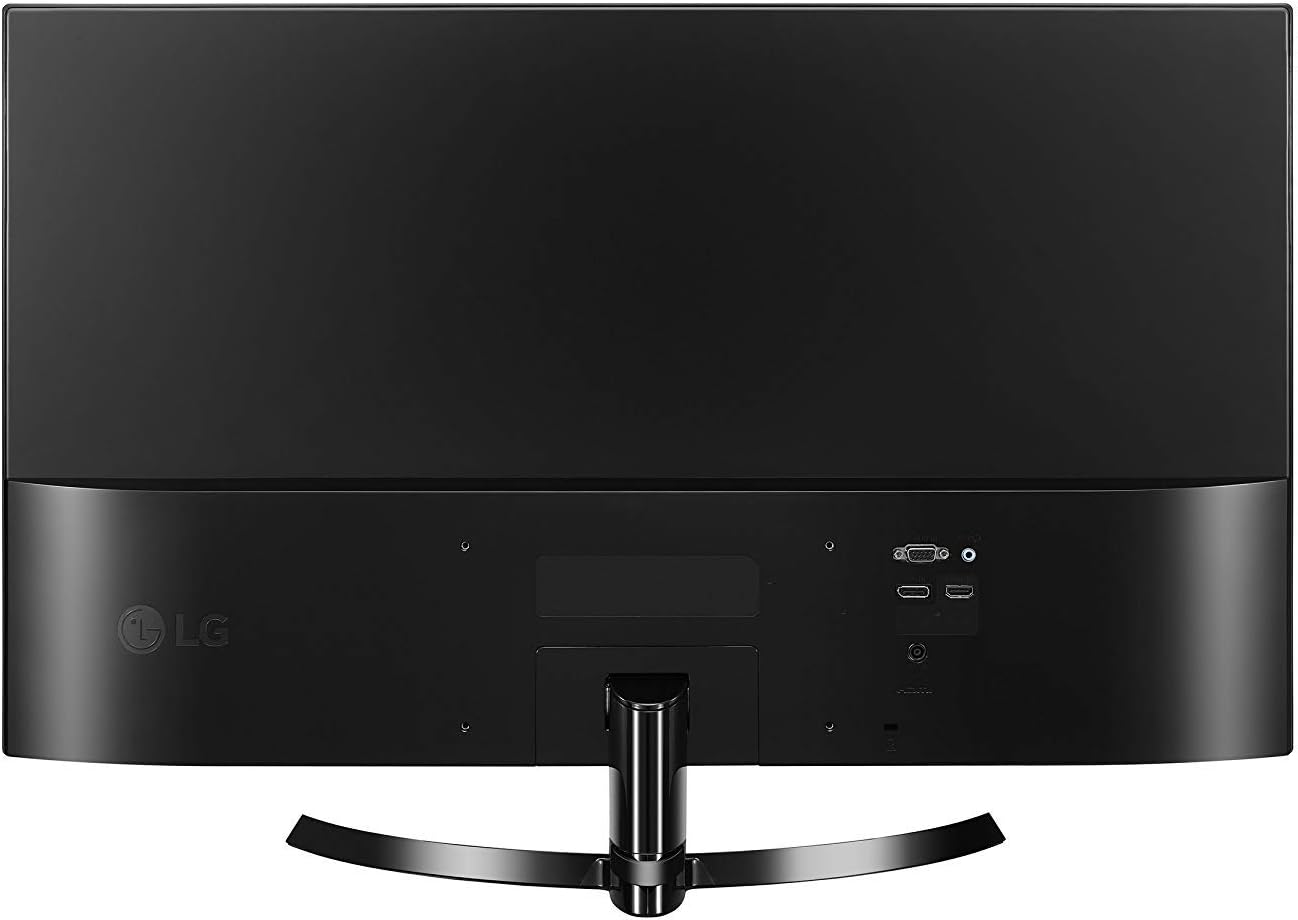
2-сүрөт: Арткы view киргизүү порттору бар монитордун.
- Кубат туташуу: Connect the power cable to the monitor's DC-IN port and then to a power outlet.
- HDMI туташуу: Use the provided HDMI cable to connect the monitor's HDMI IN port to your computer's HDMI output.
- DisplayPort туташуу: Connect a DisplayPort cable (not included) from the monitor's DP-IN port to your computer's DisplayPort output.
- D-Sub Connection: Connect a D-Sub (VGA) cable (not included) from the monitor's D-SUB IN port to your computer's VGA output.
4. Мониторду иштетүү
4.1 Күйгүзүү/өчүрүү
Мониторду күйгүзүү же өчүрүү үчүн анын ылдыйкы борборундагы джойстик баскычын басыңыз.
4.2 Экрандагы башкаруу (OSC)
The monitor settings can be adjusted using the joystick button. Move the joystick up, down, left, or right to navigate through the On-Screen Control menu.
- Joystick Up: Негизги менюга кирет.
- Joystick Down: Мониторду өчүрөт.
- Joystick Left: Adjusts volume or accesses specific functions.
- Joystick Right: Selects input source or accesses specific functions.
4.3 Киргизүүнү тандоо
To switch between input sources (HDMI, DisplayPort, D-Sub), move the joystick to the right to access the input selection menu, then navigate and select your desired input.
4.4 Screen Split 2.0
Screen Split 2.0 is a software feature that allows you to divide your screen into multiple sections for efficient multi-tasking. Install the On-Screen Control software from the LG website to utilize this feature. It supports displaying up to four different windows in 14 possible configurations.
4.5 Окуучу режими
Activate Reader Mode through the On-Screen Control menu to adjust the screen's color temperature and brightness, reducing blue light emissions for comfortable viewing during extended work sessions.
5. Техникалык тейлөө
5.1 Мониторду тазалоо
- Тазалоодон мурун мониторду дайыма электр розеткасынан сууруп алыңыз.
- Бир аз жумшак, түксүз кездемени колдонуңуз dampсуу же жумшак, абразивдүү эмес экран тазалагыч менен иштетиңиз.
- Тазалоочу каражатты түз экранга чачпаңыз. Алгач аны кездемеге сүйкөңүз.
- Avoid using benzene, thinner, or any volatile substances, as they may damage the screen surface.
5.2 Жалпы кам көрүү
- Монитор же анын кабелдерине оор нерселерди коюудан алыс болуңуз.
- Do not expose the monitor to direct sunlight, high temperatures, or high humidity.
- Ашыкча ысып кетүүдөн сактануу үчүн монитордун айланасында жетиштүү желдетүүнү камсыз кылыңыз.
6. Кыйынчылыктарды
If you encounter issues with your monitor, refer to the following troubleshooting tips:
- Кубат жок: Кубат кабели мониторго да, розеткага да бекем туташтырылганын текшериңиз. Электр розеткасынын иштеп жатканын текшериңиз.
- Сигнал жок: Verify that the video cable (HDMI, DisplayPort, or D-Sub) is securely connected to both the monitor and your computer. Ensure the correct input source is selected on the monitor using the On-Screen Control menu.
- Screen Flickering (HDMI 1080i): If the selected resolution is HDMI 1080i 60/50 Hz and the screen is flickering, change the resolution to the recommended 1080P.
- Сүрөттүн сапаты маселелери: Adjust brightness, contrast, and other display settings through the On-Screen Control menu. Ensure your computer's display resolution matches the monitor's native resolution (1920x1080).
7. Техникалык шарттар
Detailed technical specifications for the LG 32MA70HY-P monitor:
| Өзгөчөлүк | Спецификация |
|---|---|
| Screen Size | 32 дюйм (31.5" Диагоналы) |
| Панел түрү | IPS |
| Резолюция | 1920 x 1080 (Full HD) |
| Аспект катышы | 16:9 |
| Жарыктык | 250 кд/м² |
| Киргизүүлөр | 1x DisplayPort, 1x HDMI, 1x D-Sub |
| Элемент Салмагы | 1 фунт (болжол менен 0.45 кг) |
| Продукциянын өлчөмдөрү (стенд менен) | 28.61 x 8.06 x 19.37 дюйм (WxDxH) |
| Продукциянын өлчөмдөрү (стендсиз) | 28.6 x 3.7 x 16.9 дюйм (WxDxH) |
| VESA тоосунун шайкештиги | 200 x 100 мм (7.9 x 3.9 дюйм) |
| Түс | Кара |
| Power Source | AC |

Figure 3: Monitor dimensions with stand.
8. Кепилдик жана колдоо
Кепилдик жөнүндө толук маалымат жана техникалык колдоо алуу үчүн, өнүмүңүз менен кошо берилген кепилдик картасын караңыз же расмий LG компаниясына кайрылыңыз. website. The LG support website provides comprehensive resources, including FAQs, driver downloads, and contact information for customer service.
Онлайн колдоо: www.lg.com/us/support