1. Киришүү
Thank you for choosing the Eurom Alutherm 2000 Wi-Fi convection heater. This manual provides essential information for the safe and efficient operation, installation, and maintenance of your new heater. Please read these instructions carefully before use and keep them for future reference.
The Eurom Alutherm 2000 Wi-Fi is an elegant convection heater designed to integrate seamlessly into any interior. With a power output of 2000 W, it is capable of heating spaces between 49-65 m³, making it suitable for living rooms, bedrooms, or offices. This heater can be wall-mounted for continuous heating and features a built-in thermostat to maintain your desired temperature. Control is made convenient through the free Eurom Smart app, which also allows for connecting multiple heaters.
2. Коопсуздук нускамалары
Өрт, электр шок же жаракат алуу коркунучун азайтуу үчүн ар дайым төмөнкү коопсуздук чараларын сактаңыз:
- Бул жылыткычты колдонуудан мурун бардык нускамаларды окуп чыгыңыз.
- Бул жылыткычты ваннага, душка же бассейнге жакын жерде колдонбоңуз.
- Жылыткычты жаппаңыз. Жылыткычты жапсаңыз, ысып кетүүгө жана өрткө алып келиши мүмкүн.
- Keep flammable materials such as furniture, curtains, and other combustible items at least 1 meter (3 feet) from the front and sides of the heater.
- VoltagРейтинг этикеткасында көрсөтүлгөн e сиздин электр кубатыңызга туура келетtage.
- Зымы же сайы бузулган, же жылыткыч иштебей калгандан же кулап түшкөндөн же кандайдыр бир түрдө бузулгандан кийин эч кандай жылыткычты иштетпеңиз.
- Бул шайман физикалык, сезүү же акыл-эс жөндөмү начар же тажрыйбасы жана билими жок адамдар (анын ичинде балдар) үчүн, эгерде алардын коопсуздугуна жооптуу адам тарабынан көзөмөлсүз же шайманды колдонуу боюнча көрсөтмө болбосо, колдонууга арналбайт.
- Балдар шайман менен ойнобошу үчүн аларды көзөмөлгө алуу керек.
3. Продукт бүтүп калдыview
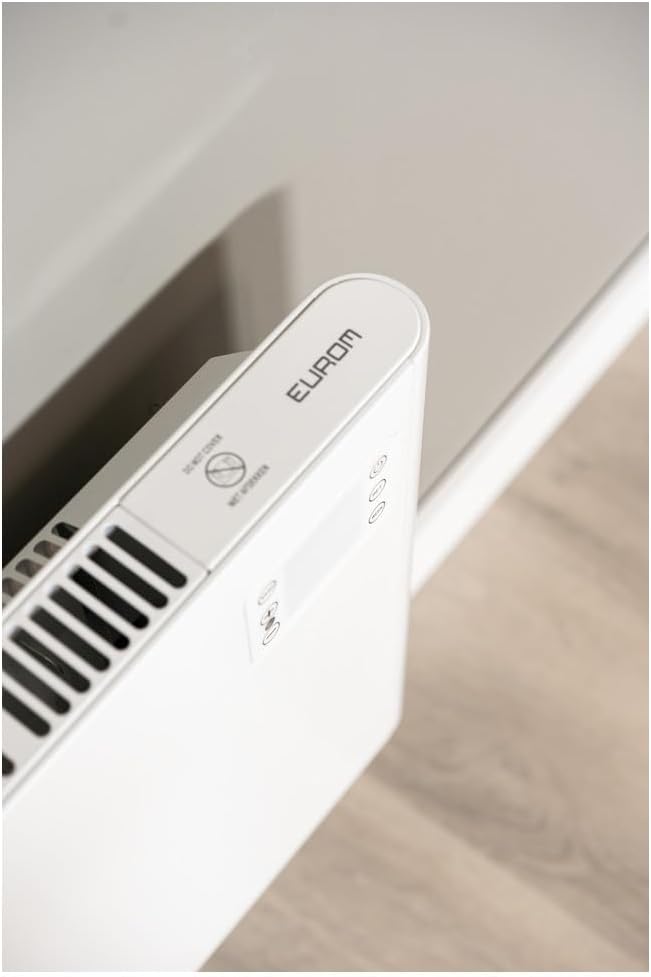
The Eurom Alutherm 2000 Wi-Fi heater features a sleek design and intuitive controls. Below are key components and their descriptions.



4. Орнотуу жана орнотуу
The Eurom Alutherm 2000 Wi-Fi heater offers flexible installation options: wall-mounted or freestanding.
4.1 Дубалга орнотуу
For permanent heating, the unit can be securely mounted to a wall. Refer to the included mounting template and hardware for precise installation. Ensure the heater is installed at a safe distance from flammable materials and that there is adequate clearance for air circulation.

4.2 Freestanding Placement
If you prefer a portable solution, attach the provided feet to the base of the heater. Place the heater on a stable, level surface, ensuring it is not obstructed and has sufficient space around it for proper operation.

4.3 Кубат туташтыруу
Once installed, plug the heater into a suitable electrical outlet. Ensure the main power switch (Figure 3.4) is in the 'OFF' position before plugging in. After plugging in, switch the main power switch to 'ON'.
5. Иштөө нускамалары
The Alutherm 2000 Wi-Fi can be operated via its integrated control panel, the remote control, or the Eurom Smart app.
5.1 Башкаруу панелинин иштеши
The control panel (Figure 3.6) allows direct adjustment of settings:
- Кубат баскычы: Жылыткычты күйгүзөт же өчүрөт.
- Режим баскычы: Cycles through different operating modes (e.g., Comfort, ECO, Anti-frost).
- SET баскычы: Тандоолорду ырастайт же жөндөөлөр менюсуна кирет.
- Температураны жөндөө (+/-): Керектүү температураны жогорулатат же азайтат.
- WEEK Button: Accesses weekly programming settings.
5.2 Алыстан башкаруунун иштеши
The remote control (Figure 3.5) provides convenient access to all heater functions from a distance. Its buttons mirror the functions available on the control panel.
5.3 Eurom Smart App Control (Wi-Fi)
For advanced control and scheduling, download the free Eurom Smart app. This app allows you to:
- Turn the heater on/off remotely.
- Set and adjust the desired temperature.
- Program weekly heating schedules.
- Connect and manage multiple Eurom Wi-Fi heaters.
Follow the in-app instructions for pairing your heater with the app and connecting to your home Wi-Fi network.
6. Техникалык тейлөө
Үзгүлтүксүз тейлөө сиздин жылыткычыңыздын оптималдуу иштешин жана узак иштөөсүн камсыз кылат.
- Тазалоо: Тазалоодон мурун ар дайым жылыткычты розеткадан сууруп, аны толугу менен муздатыңыз. жумшак колдонуу, damp сырткы беттерин сүртүү үчүн чүпүрөк. Абразивдүү тазалагычтарды же эриткичтерди колдонбоңуз.
- Сактагыч: Эгерде жылыткычты узак убакытка сактап жатсаңыз, анын таза жана кургак экенине ынаныңыз. Аны салкын, кургак жерде, мүмкүн болсо, баштапкы таңгагында сактаңыз.
- Текшерүү: Periodically check the power cord and plug for any signs of damage. If damage is found, do not use the heater and contact qualified service personnel.
7. Кыйынчылыктарды
If you encounter issues with your Eurom Alutherm 2000 Wi-Fi heater, refer to the following common problems and solutions:
| Көйгөй | Мүмкүн себеп | Чечим |
|---|---|---|
| Жылыткыч күйбөйт. | No power supply; Main power switch off; Overheat protection activated. | Check power outlet and plug; Ensure main power switch (Figure 3.4) is ON; Unplug, allow to cool for 30 minutes, then restart. |
| Heater not heating to desired temperature. | Temperature setting too low; Room size exceeds heater capacity; Obstruction of air vents. | Increase temperature setting; Ensure heater is appropriate for room size; Clear any obstructions from air vents. |
| Wi-Fi туташуу маселелери. | Weak Wi-Fi signal; Incorrect app pairing; Router issues. | Ensure heater is within Wi-Fi range; Re-pair the heater with the Eurom Smart app; Restart your Wi-Fi router. |
| Heater overheats or runs continuously. | Thermostat malfunction; Air vents blocked; Software glitch. | Ensure vents are clear and heater is not covered; If issue persists, unplug and contact support. (Эскертүү: Колдонуучу кайраview mentioned potential overheating issues if the management module gets stuck. Always monitor the heater.) |
| Heater does not restart automatically after power outage. | Design limitation. | This model may require manual restart after a power interruption. |
If the problem persists after attempting these solutions, please contact Eurom customer support.
8. Техникалык шарттар
| Өзгөчөлүк | Спецификация |
|---|---|
| Бренд | Eurom |
| Модель номери | EUM360776 |
| Түс | Ак |
| Продукциянын өлчөмдөрү (L x W x Y) | 101 x 46 x 12 см |
| Салмагы | 6 килограмм |
| Энергия эффективдүүлүгү классы | B |
| Өзгөчөлүктөр | Wi-Fi Compatible, Electronic Thermostat |
| Форма фактору | Tower |
| Ички/тышкы колдонуу | Indoor |
| Power Source | Электр зымдары |
| Жылытуу ыкмасы | мантиядагы |
| Монтаж түрү | Дубалга орнотуу |
9. Кепилдик жана колдоо
For warranty information, please refer to the documentation provided with your purchase or visit the official Eurom website. If you require technical assistance, spare parts, or have any questions regarding your Eurom Alutherm 2000 Wi-Fi heater, please contact Eurom customer support directly. Contact details can typically be found on the product packaging or the manufacturer's webсайт.


