Introduction
The Pyle PDWMKRHD20 is a compact home audio/video karaoke mixer designed to integrate microphone vocals with your existing audio and video systems. This device allows you to connect microphones, mix their audio with music from various sources, and output the combined sound and video to a display or speaker system. It features HDMI and auxiliary (3.5mm) input/output options, along with individual controls for music volume, microphone volume, echo, and tone.

Image: The Pyle PDWMKRHD20 karaoke mixer unit shown with two wired microphones, highlighting its compact design and main controls.
Кутуда эмне бар
Сураныч, пакеттин мазмунун текшерип, бардык буюмдар бар экенин текшериңиз:
- Microphone Receiver Base (PDWMKRHD20 unit)
- (2) Wired Microphones
- Audio Connection Cables (RCA and 3.5mm)
- Кубаттуу адаптер

Image: All components included in the Pyle PDWMKRHD20 package: the mixer unit, two wired microphones, various audio connection cables, and the power adapter.
Жайгашуу
Follow these steps to connect your Pyle PDWMKRHD20 karaoke mixer to your audio/video system.
1. Connecting to a TV or Home Theater System (HDMI)
- Connect an HDMI cable from your video source (e.g., media player, gaming console) to the HDMI-IN port on the PDWMKRHD20 mixer.
- Connect another HDMI cable from the HDMI OUT port on the PDWMKRHD20 mixer to an HDMI input on your TV or home theater receiver.
- Ensure your TV or receiver is set to the correct HDMI input.

Сүрөт: деталдуу view of the rear panel of the Pyle PDWMKRHD20 mixer, indicating the HDMI input/output connectors and the Aux (3.5mm) input/output ports.
2. Connecting to Audio Devices (Auxiliary)
- To connect an external audio source (e.g., smartphone, tablet) for music, use a 3.5mm audio cable from your device's headphone jack to the AUX IN (3.5мм) port on the PDWMKRHD20 mixer.
- To output mixed audio to speakers or an amplifier without HDMI, connect a 3.5mm audio cable from the AUX OUT (3.5mm) port on the PDWMKRHD20 mixer to the audio input of your speakers or ampөмүрлүү.
3. Микрофондорду туташтыруу
- Plug the provided wired microphones into the MIC 1 жана MIC 2 (1/4'') input jacks on the front of the PDWMKRHD20 mixer.
- Ensure the microphones are switched to the 'ON' position if they have an on/off switch.

Image: An illustrative diagram demonstrating how the Pyle PDWMKRHD20 mixer connects to various devices, including mobile phones, televisions, and home theater systems, for audio and video integration.
4. Power Connection
- Кубат адаптерин DC 5V input port on the rear of the PDWMKRHD20 mixer.
- Кубат адаптерин стандарттуу розеткага сайыңыз.
- басыңыз КҮЧ button on the front panel to turn on the unit. The power indicator light will illuminate.
Иштөө нускамалары
Once the unit is set up, you can begin using your Pyle PDWMKRHD20 karaoke mixer.
Controls Overview

Сүрөт: жогорудан ылдыйга view of the Pyle PDWMKRHD20 mixer, clearly displaying the rotary control knobs for Music volume, Microphone 1 volume, Microphone 2 volume, Echo effect, and Tone adjustment.
- MUSIC баскычы: Adjusts the overall volume of the background music from your connected audio/video source.
- MIC 1 / MIC 2 Knobs: Control the individual volume levels for Microphone 1 and Microphone 2.
- ECHO баскычы: Adjusts the amount of echo effect applied to the microphone vocals.
- TONE баскычы: Modifies the tonal quality (bass/treble) of the microphone vocals.
- КҮЧ баскычы: Агрегатты күйгүзөт же өчүрөт.
Негизги операция
- Turn on the PDWMKRHD20 mixer using the КҮЧ баскычы.
- Start playing music from your connected source (e.g., TV, media player, smartphone).
- тууралаңыз МУЗЫКА knob to your desired background music volume.
- Ensure your microphones are connected and switched on.
- Speak into the microphones and adjust the individual MIC 1 жана MIC 2 knobs to set the vocal volume.
- Эксперимент менен ECHO жана ООН knobs to achieve your preferred vocal sound.
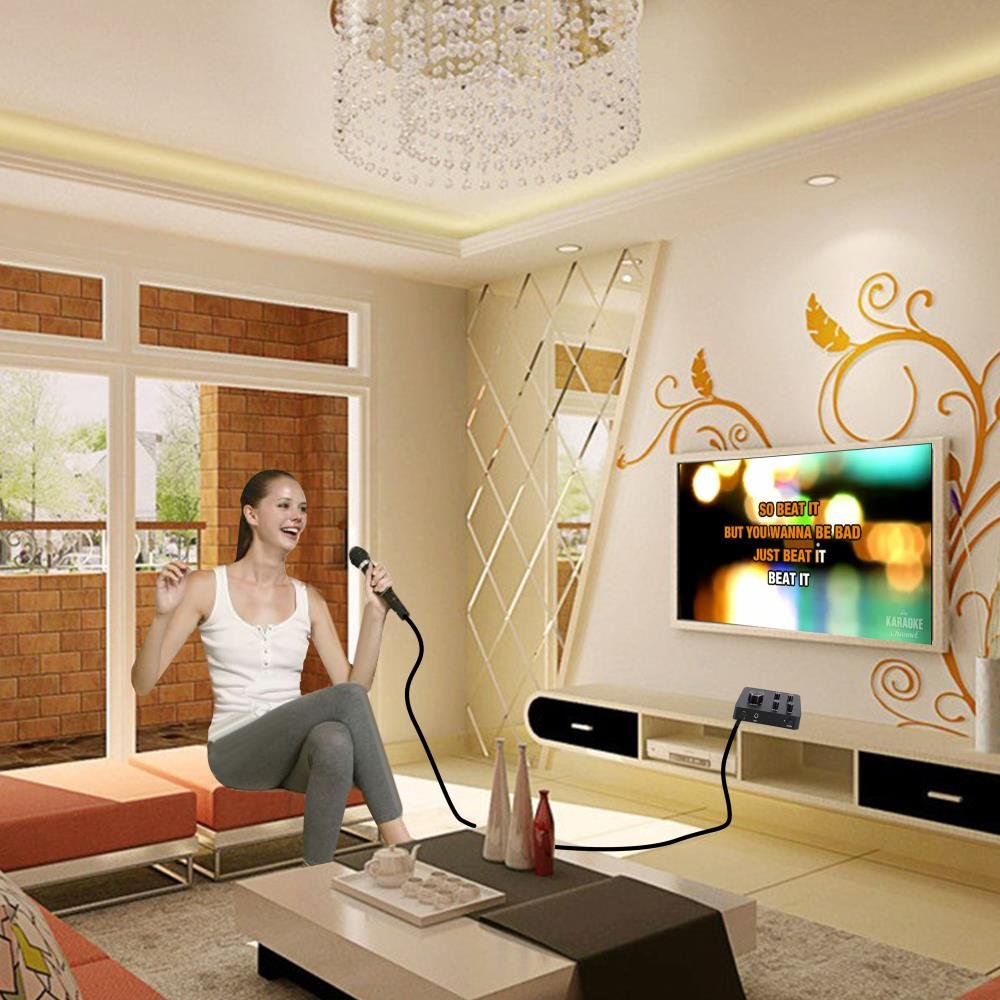
Image: A family enjoying a karaoke session, with the Pyle PDWMKRHD20 mixer connected to a television, demonstrating typical home use.
Техникалык тейлөө
To ensure the longevity and optimal performance of your Pyle PDWMKRHD20 mixer, follow these maintenance guidelines:
- Тазалоо: Use a soft, dry cloth to clean the exterior of the unit. Avoid using liquid cleaners, aerosols, or solvents.
- Сактагыч: Эгерде аппарат көпкө колдонулбаса, аны салкын, кургак жерде, күн нуру түз тийген жерден жана өтө жогорку температурадан алыс сактаңыз.
- Колдонуу: Handle the unit and microphones with care. Avoid dropping or subjecting them to strong impacts.
- Вентиляция: Ensure the unit has adequate ventilation and is not placed in an enclosed space that could lead to overheating.
Проблемаларды чечүү
If you encounter issues with your Pyle PDWMKRHD20 mixer, refer to the following common problems and solutions:
| Көйгөй | Мүмкүн себеп | Чечим |
|---|---|---|
| Микрофондордон үн жок |
|
|
| No music sound |
|
|
| Бурмаланган үн |
|
|
| Күч жок |
|
|
Техникалык шарттар
Technical specifications for the Pyle PDWMKRHD20 Home Audio/Video Karaoke Mixer:
- Модель номери: PDWMKRHD20
- Түсү: Кара
- Продукциянын өлчөмдөрү: 11.51 x 17.02 x 4.52 см
- Элемент Салмагы: 281.23 г
- Киргизүү/чыгарма: HDMI In/Out, Aux (3.5mm) In/Out
- Микрофон кириштери: (2) 1/4'' Microphone Input Jacks
- Кубат булагы: DC 5V (кошулган кубат адаптери аркылуу)
- Камтылган компоненттер: Microphone Receiver Base, (2) Microphones, Audio Connection Cables, Power Adapter
Кепилдик жана колдоо
The Pyle PDWMKRHD20 Home Audio/Video Karaoke Mixer typically comes with a 1 жылдык кепилдик from the date of purchase. For warranty claims, technical support, or further assistance, please refer to the contact information provided with your purchase documentation or visit the official Pyle webсайт.
For additional support, you may also contact your retailer.


