1. Киришүү
Thank you for choosing the TOORX AHF-154 6-Digit LED Timer. This manual provides essential information for the safe and efficient operation of your new timer. Please read these instructions carefully before use and retain them for future reference.
2. Пакеттин мазмуну
- TOORX AHF-154 6-Digit LED Timer Unit
- Зымсыз алыстан башкаруу
- Кубаттуу адаптер (12V)
- Instruction Manual
3. Продукт бүтүп калдыview
The TOORX AHF-154 is a versatile 6-digit LED timer designed for various fitness and training applications. It features a clear display, durable aluminum casing, and a convenient wireless remote control for easy operation.

3.1-сүрөт: The TOORX AHF-154 6-Digit LED Timer shown with its wireless remote control. The timer features a large, bright display for clear visibility during workouts.

3.2-сүрөт: А деталдуу view of the TOORX AHF-154 LED display, illustrating the six-digit format for time and interval tracking.
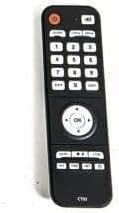
3.3-сүрөт: The wireless remote control for the TOORX AHF-154 timer, featuring numerical keys and dedicated function buttons for easy programming and control.
4. Орнотуу
4.1 Кубат туташтыруу
- Connect the provided 12V power adapter to the DC input port on the back of the timer.
- Plug the power adapter into a standard electrical outlet. The timer display will illuminate.
4.2 Орнотуу (милдеттүү эмес)
The timer can be wall-mounted for optimal visibility. Ensure the mounting surface is sturdy enough to support the timer's weight. Use appropriate screws and anchors (not included) for secure installation.
5. Иштөө нускамалары
All functions are controlled via the wireless remote control. Ensure the remote has fresh batteries and is pointed towards the timer for optimal signal transmission.
5.1 24-Hour Time Display
- басыңыз TIME button on the remote. The display will show the current time.
- Убакытты коюу үчүн басыңыз SET, then use the number keys to enter the desired time (HH:MM).
- Басыңыз OK ырастоо үчүн.
5.2 Countdown / Count-up Timer
5.2.1 Артка эсептөө
- басыңыз ЭСКЕРТҮҮ баскычы.
- Use the number keys to enter the desired countdown time (e.g., 05:00 for 5 minutes).
- Басыңыз START саноону баштоо үчүн.
- Басыңыз ТЫНЫГУУ to temporarily stop, and START кайра улантуу үчүн.
- Басыңыз RESET to return to the initial set time.
5.2.2 Count-up
- басыңыз САНАП АЛУУ button. The display will show 00:00.
- Басыңыз START санай баштоо.
- Басыңыз ТЫНЫГУУ to temporarily stop, and START кайра улантуу үчүн.
- Басыңыз RESET to clear the count.
5.3 Interval Timer (Custom Programs)
This function allows you to program custom work and rest intervals.
- басыңыз ИНТЕРВАЛ баскычы.
- Follow the on-screen prompts (if any) or use the remote to set:
- Work Time (W): Duration of each work period.
- Rest Time (R): Duration of each rest period.
- Cycles (C): Number of repetitions for the work/rest sequence.
- Басыңыз START to begin the interval program.
5.4 Алдын ала коюлган программалар
The timer includes several pre-programmed workout modes:
- FIGHT Mode: 5 minutes of work followed by 1 minute of rest.
- TABATA Mode: 8 rounds of 20 seconds work and 10 seconds rest.
- Секундомер: Standard stopwatch function (count-up from 00:00:00).
To activate a preset program:
- Тиешелүү баскычты басыңыз (мисалы, УРУШ, TABATA, САКТОМЕР) пультта.
- Басыңыз START программаны баштоо үчүн.
5.5 10-Second Pre-Countdown
Before any timed function (Countdown, Interval, Preset Programs), the timer will automatically initiate a 10-second countdown to prepare the user for the start of the activity.
5.6 Калыбына келтирүү функциясы
басыңыз RESET button at any time to stop the current function and return the timer to its default or previously set value for that function.
6. Техникалык тейлөө
- Тазалоо: Wipe the timer and remote control with a soft, dry cloth. Do not use abrasive cleaners or solvents.
- Сактагыч: Store the timer in a cool, dry place away from direct sunlight and extreme temperatures.
- Батареяны алмаштыруу: If the remote control becomes unresponsive, replace its batteries (type not specified, typically AAA or CR2032 coin cell).
7. Кыйынчылыктарды
- Timer not turning on: Ensure the power adapter is securely connected to both the timer and a working electrical outlet.
- Алыстан башкаруу жооп бербей жатат: Check the remote's batteries and replace if necessary. Ensure there are no obstructions between the remote and the timer.
- Дисплей күңүрт же бүлбүлдөп жатат: Verify the power connection. If the issue persists, contact customer support.
8. Техникалык шарттар
| Өзгөчөлүк | Спецификация |
|---|---|
| Модель номери | AHF-154 |
| Дисплей | 6 цифралуу LED |
| Өлчөмдөрү (L x W x Y) | 64 x 16 x 5 cm (approximate unit size) |
| Материал | Алюминий Casing |
| Power Input | 12V DC |
| Салмагы | 12 Kilograms (approximate shipping weight) |
| Функциялар | 24h Time, Interval Timer, Count-up, Countdown, Custom Counts, Preset Programs (FIGHT, TABATA, Stopwatch), 10s Pre-countdown, Reset |
9. Кепилдик жана колдоо
For warranty information and technical support, please refer to the documentation provided at the point of purchase or contact your TOORX retailer. Keep your proof of purchase for any warranty claims.


