1. Киришүү
Thank you for choosing the CELLO Quick Pop 300 2-Slice Automatic Pop-up Toaster. This appliance is designed for efficient and convenient toasting of bread slices. Featuring 7 browning levels, a cool-touch body, and a removable crumb tray, it ensures a safe and enjoyable user experience. Please read this manual thoroughly before use to ensure proper operation and maintenance.
2. Маанилүү коргоо чаралары
- Тостерди иштетүүдөн мурун бардык нускамаларды окуп чыгыңыз.
- ысык беттерге тийбеңиз. Туткаларды же туткаларды колдонуңуз.
- Электр шокунан коргоо үчүн шнурду, вилкаларды же тостерди сууга же башка суюктукка салбаңыз.
- Кандайдыр бир шайманды балдар же алардын жанында колдонуп жатканда, катуу көзөмөл керек.
- Колдонбогондо жана тазалоодон мурун розеткадан ажыратыңыз. Бөлүктөрүн кийүүдөн же чечүүдөн мурун муздатыңыз.
- Эч кандай шайманды зымы же сайы бузулган, же шайман иштебей калгандан кийин же кандайдыр бир түрдө бузулгандан кийин иштетпеңиз.
- Шаймандын өндүрүүчүсү сунуш кылбаган кошумча тиркемелерди колдонуу жаракатка алып келиши мүмкүн.
- Сыртта колдонбоңуз.
- Шнур столдун же столдун четине илинип калышына же ысык беттерге тийбеңиз.
- Ыстык газ же электр мешине же ысытылган мештин жанына коюуга болбойт.
- Ар дайым алгач сайгычка сайыңыз, андан кийин шнурду розеткага сайыңыз. Өчүрүү үчүн каалаган башкарууну "өчүрүү" абалына буруңуз, андан кийин розеткадан сайгычты чыгарыңыз.
- Шайманды максаттуу колдонуудан башка максатта колдонбоңуз.
- Өтө чоң тамак-аштарды, фольгадан жасалган таңгактарды же идиш-аяктарды тостерге салбоо керек, анткени алар өрт чыгарышы же электр тогуна урунуу коркунучун жаратышы мүмкүн.
- Тостерлер жабылып же күйүүчү материалга, анын ичинде пардаларга, перделерге, дубалдарга жана ушул сыяктууларга тийсе, анда өрт чыгышы мүмкүн.
- Тостер токко сайылып турганда тамакты чыгарууга аракет кылбаңыз.
- кароосуз иштетпеңиз.
3. Продукт бүтүп калдыview
Familiarize yourself with the components of your CELLO Quick Pop 300 Toaster:
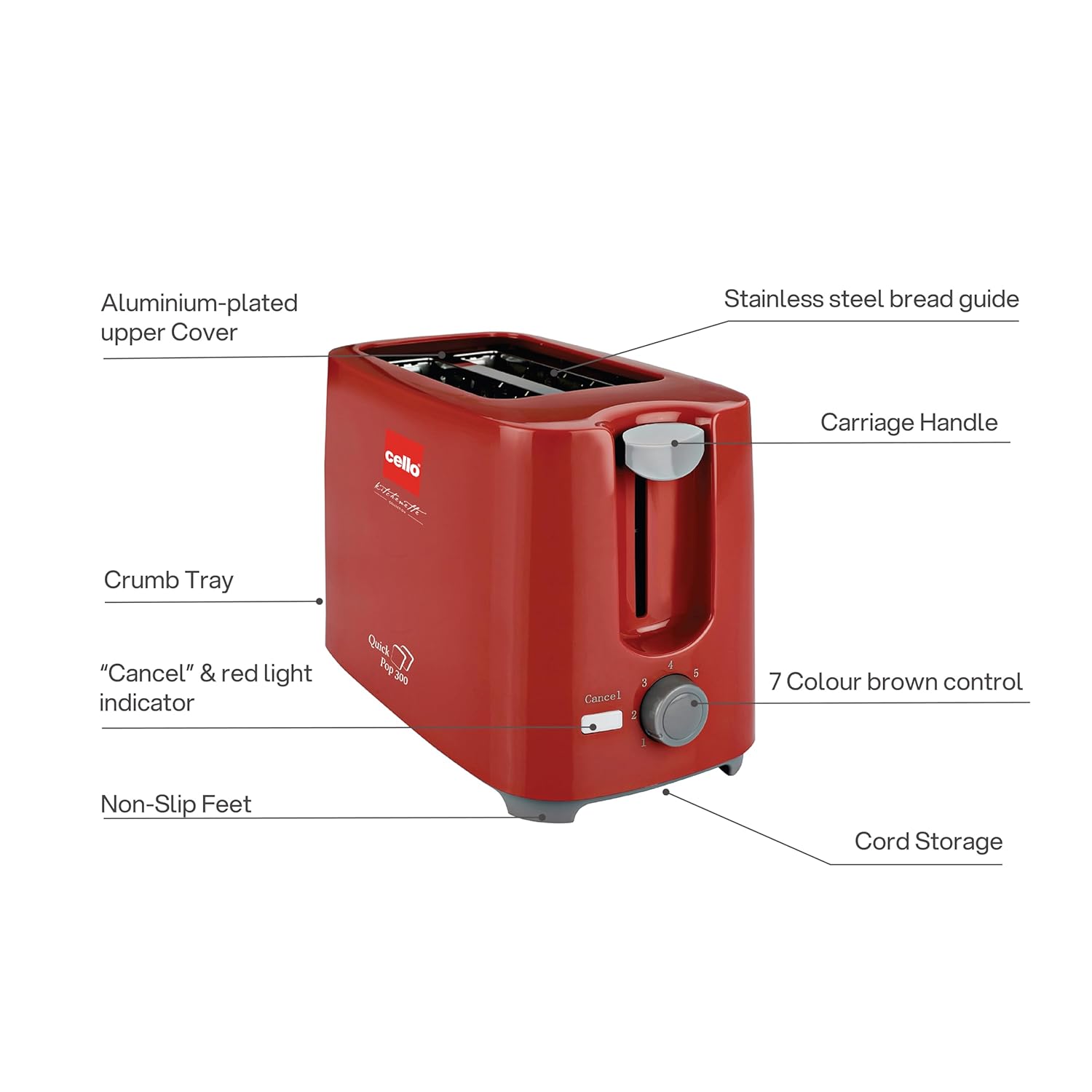
3.1-сүрөт: Main components of the CELLO Quick Pop 300 Toaster.
- Aluminium-plated Upper Cover: Provides durability and a sleek finish.
- Stainless Steel Bread Guide: Ensures bread slices are centered for even toasting.
- Арабанын туткасы: Used to lower and raise bread into the toasting slots.
- Чакан табак: Removable tray located at the bottom for easy cleaning of crumbs.
- "Cancel" & Red Light Indicator: Button to stop the toasting cycle and indicator light for operation.
- 7 Colour Brown Control: Dial to select desired browning level from 1 (lightest) to 7 (darkest).
- Буту тайып кетпейт: Provides stability and prevents the toaster from sliding on surfaces.
- Шнур сактагыч: Integrated area at the base for neat storage of the power cord.

3.2-сүрөт: Деталдаштырылган views of key features including the crumb tray, browning control, upper cover, carriage handle, cord storage, and non-slip feet.
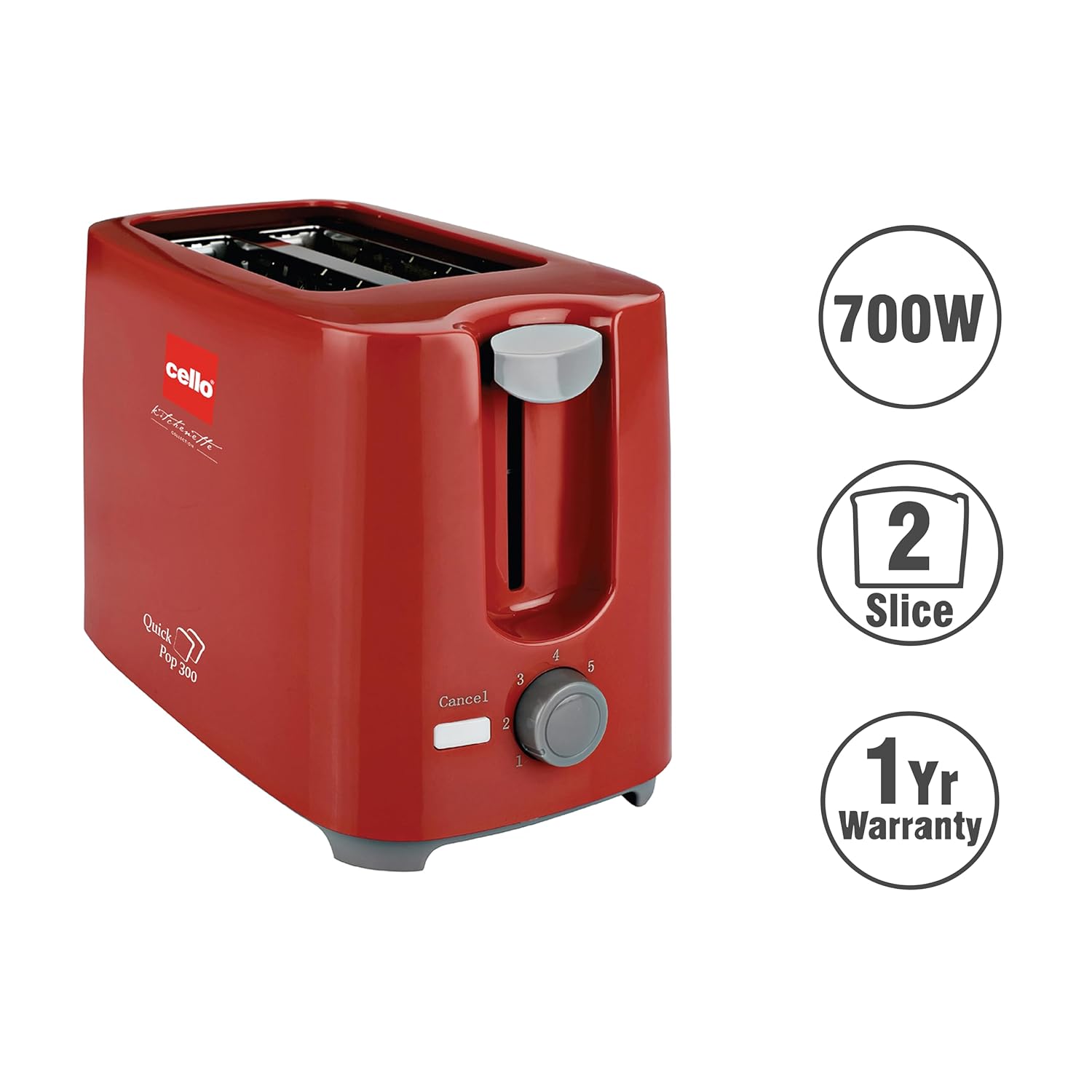
3.3-сүрөт: The CELLO Quick Pop 300 Toaster, a 700W appliance with a 2-slice capacity, backed by a 1-year warranty.
4. Орнотуу
- Unpack the Toaster: Carefully remove the toaster and all packaging materials from the box. Retain the user manual and warranty card.
- Жайгашкан жери: Тостерди пардалар же дубалдар сыяктуу тез күйүүчү материалдардан алыс, туруктуу, жалпак, ысыкка чыдамдуу бетке коюңуз. Шаймандын айланасында жетиштүү желдетүү бар экенин текшериңиз.
- Алгачкы колдонуу: Before first use, operate the toaster without bread for a few minutes on the highest browning setting (7) to burn off any manufacturing residues. A slight odor or smoke may be present; this is normal and will dissipate. Ensure the area is well-ventilated.
- Кубат туташуу: Электр шнурын ылайыктуу электр розеткасына сайыңыз.
Видео 4.1: Unboxing and initial setup of the CELLO Quick Pop 300 Toaster, demonstrating how to remove it from packaging and prepare for use. This video is provided by the seller.
5. Операция
- Нан салыңыз: Place up to two slices of bread into the toasting slots. The stainless steel bread guide will automatically center the bread.
- Браунинг деңгээлин тандоо: бургула 7 Colour Brown Control dial to your desired browning setting. Level 1 is for light toast, and Level 7 is for dark toast.
- Тост жасоону баштоо: ылдый басыңыз Каретка туткасы until it locks into place. The red light indicator will illuminate, signifying that the toasting cycle has begun.
- Automatic Pop-up: Once the selected browning level is achieved, the toast will automatically pop up, and the red light indicator will turn off.
- Жокко чыгаруу функциясы: Тост циклин каалаган убакта токтотуу үчүн басыңыз "Cancel" button. The carriage handle will immediately pop up, and the red light will turn off.
Видео 5.1: Кыскачаview of the CELLO Quick Pop 300 Toaster's features, including the carriage handle, browning control, and crumb tray. This video is provided by the seller.
6. Тазалоо жана тейлөө
Үзгүлтүксүз тазалоо оптималдуу иштешин камсыз кылат жана тостериңиздин иштөө мөөнөтүн узартат.
- Ажыратып, муздатуу: Тазалоодон мурун ар дайым тостерди розеткадан сууруп, аны толугу менен муздатып туруңуз.
- Бош күкүм салгыч: тартыңыз Removable Bread Crumbs Tray located at the bottom of the toaster. Dispose of the crumbs. Wipe the tray with a damp чүпүрөк жана кайра киргизүү алдында кылдат кургатуу.
- Тышкы тазалоо: Тостердин сыртын жумшак менен сүртүңүз, гamp кездеме. Абразивдүү тазалоочу каражаттарды же металл кыргычтарды колдонбоңуз, анткени алар бетти чийип салышы мүмкүн.
- Ички тазалоо: Do not insert any objects into the toasting slots to clean them. If food gets stuck, unplug the toaster and carefully remove it once the appliance has cooled.
- Шнур сактагыч: Utilize the integrated cord storage facility at the base of the toaster to keep the power cord neatly wrapped when not in use.
7. Кыйынчылыктарды
If you encounter any issues with your toaster, refer to the following common problems and solutions:
| Көйгөй | Мүмкүн себеп | Чечим |
|---|---|---|
| Тостер күйбөйт. | Not plugged in; power outlet malfunction; carriage handle not fully depressed. | Ensure the toaster is securely plugged into a working outlet. Press the carriage handle down until it locks. |
| Bread is not toasting or toasts unevenly. | Browning control set too low; bread slices too thick or thin; first use residue. | Adjust the browning control to a higher setting. Ensure bread fits properly in slots. Perform initial burn-off cycle if new. |
| Түтүн же күйүк жыт. | Crumbs in the toaster; food stuck in slots; initial use residue. | Unplug and let cool. Empty and clean the crumb tray. Carefully remove any stuck food. Ensure proper ventilation during initial use. |
| Carriage handle does not stay down. | Toaster not plugged in or no power; browning cycle not initiated. | Ensure the toaster is plugged in and the power outlet is active. The handle will only lock down when power is supplied and the toasting cycle can begin. |
8. Техникалык шарттар
- Бренд: виолончель
- Модел: Quick Pop 300
- Түсү: Кызыл
- Материал: Акрилонитрил бутадиен стирол (ABS)
- Продукциянын өлчөмдөрү: 6.1D x 11.8W x 7.5H Сантиметр
- Ватtage: 700 Ватт
- Бөлүктөрдүн саны: 2
- Браунинг орнотуулары: 7 деңгээл
- Тtage: 240 вольт
- Элемент Салмагы: 810 грамм
- Өзгөчөлүктөр: Anti-Slip Base, Automatic Shut-Off, Cancel Function, Cool Touch Exterior, Removable Crumb Tray
- Келип чыккан өлкө: Индия

8.1-сүрөт: Dimensions of the CELLO Quick Pop 300 Toaster.
9. Кепилдик жана колдоо
The CELLO Quick Pop 300 Toaster comes with a 1 жылдык кепилдик сатып алынган күндөн тартып. Толук шарттар жана эрежелер үчүн кошо берилген кепилдик картасын караңыз.
For prompt after-sales service or any inquiries, please contact CELLO customer care:
- All India Customer Care No: 7400001799
- Электрондук почта: customercare@cellokitchenette.com

9.1-сүрөт: CELLO Customer Care details for support and service.


