1. Киришүү
1.1 Продукт бүттүview
The TFA Dostmann Climat Home Mega is a comprehensive wireless thermometer and hygrometer system designed to monitor temperature and humidity at multiple locations. This system includes a main display unit, a thermo-hygro sensor, two cable temperature transmitters, and a Weather Hub Gateway for remote data access via an application. It allows you to track indoor and outdoor climate conditions, helping maintain a healthy and comfortable environment.
1.2 Пакеттин мазмуну
- 1x Base Station (TFA 30.3060.01)
- 1x Thermo-Hygro Sensor (TFA 30.3180.IT)
- 2x Cable Temperature Transmitters (TFA 30.3181.IT)
- 1x Weather Hub Gateway
- Монтаждоочу материал
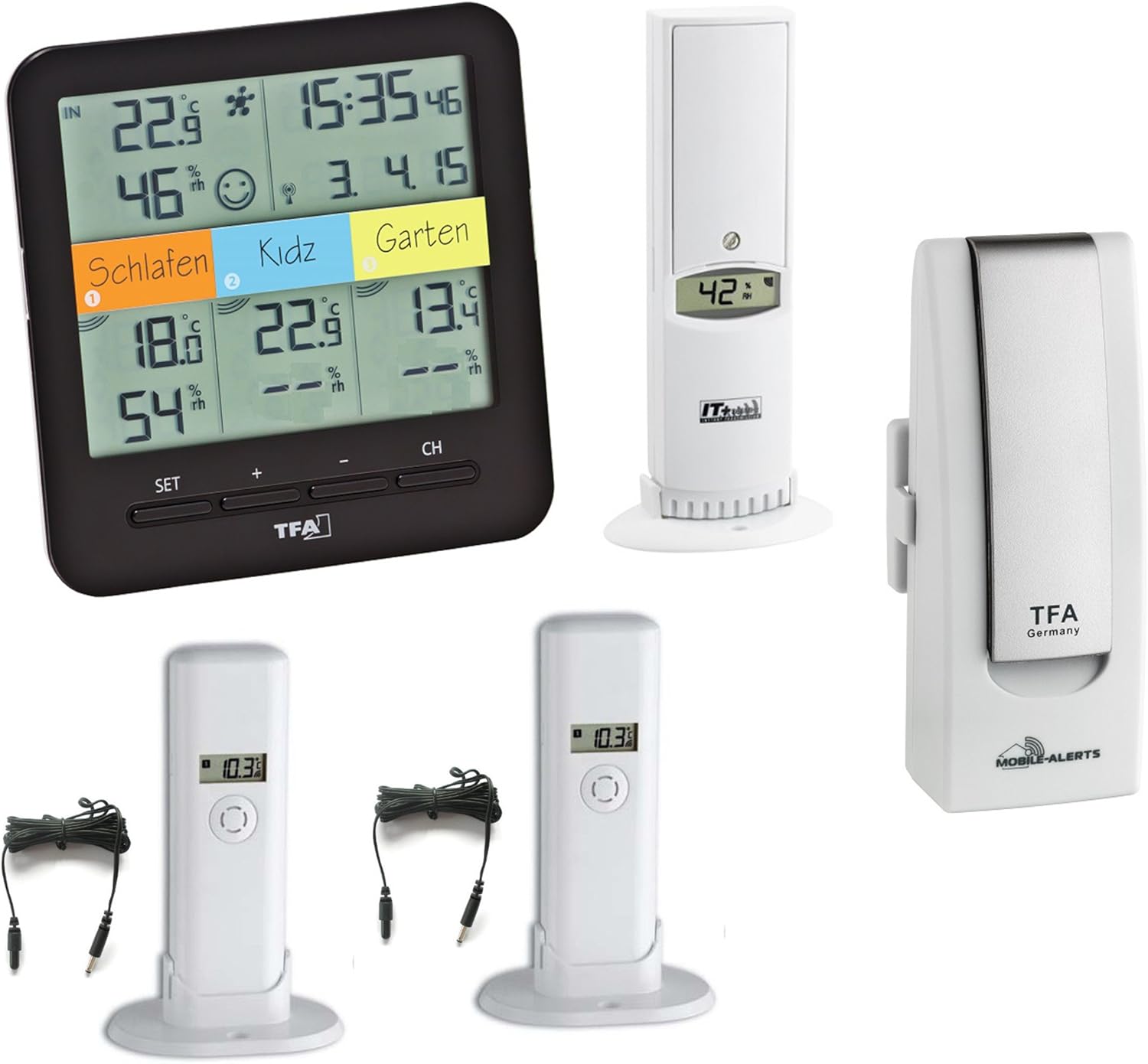
Сүрөт 1.1: Бүттүview of the TFA Dostmann Climat Home Mega system, including the main display unit, thermo-hygro sensor, cable temperature transmitters, and Weather Hub Gateway.
2. Орнотуу колдонмосу
2.1 Батареяны орнотуу
The main unit requires 5x 1.5V AA batteries, and the sensors require 4x 1.5V AAA batteries (not included). Ensure correct polarity when inserting batteries.
- Open the battery compartment on the back of the main unit and each sensor.
- Insert the required batteries, observing the polarity markings (+/-).
- Батарея бөлүкчөлөрүн коопсуз жабыңыз.
2.2 Сенсордун жайгашуусу
Place the thermo-hygro sensor and cable temperature transmitters in desired monitoring locations. The thermo-hygro sensor measures both temperature and humidity, while the cable transmitters measure only temperature.

Image 2.1: The thermo-hygro sensor, which measures both temperature and humidity.

Image 2.2: A cable temperature transmitter, used for temperature-only measurements.
- For optimal wireless transmission, ensure sensors are within 100 meters (open field) of the main unit.
- Avoid placing sensors in direct sunlight or near heat sources for accurate readings.
- The cable temperature transmitters are suitable for outdoor use or specific areas like refrigerators/freezers.
2.3 Weather Hub Gateway Connection
The Weather Hub Gateway allows you to access sensor data remotely via a smartphone application. It requires a wired LAN connection with internet access.

Image 2.3: The Weather Hub Gateway, which connects to your network for remote monitoring.
- Connect the Weather Hub Gateway to your router using an Ethernet cable.
- Connect the power adapter to the Gateway and plug it into an electrical outlet.
- Download the free Weather Hub application on your smartphone.
- Follow the in-app instructions to register your Gateway and add your sensors. The Gateway supports up to 50 sensors.
3. Операция
3.1 Дисплейview
The main display unit shows indoor temperature and humidity, along with readings from up to three external sensors. It also displays the radio-controlled time and date.

Image 3.1: The main display unit showing indoor and outdoor temperature/humidity readings, time, and date.
- IN: Indoor temperature and humidity.
- 1, 2, 3: External sensor channels.
- Убакыт/дата: Radio-controlled time and date.
- Минималдуу/Макс: Displays minimum and maximum recorded values.
3.2 Негизги орнотуулар
Use the 'SET' button to access settings and the '+' and '-' buttons to adjust values.
- Убакыт алкагы: Adjust the time zone offset (-9/+9 hours) if the radio-controlled time does not match your local time.
- Минималдуу/максималдуу функция: Press the 'MIN/MAX' button to view the minimum and maximum temperature/humidity values recorded since the last reset. Hold the button to reset these values.
- Channel Selection (CH): Use the 'CH' button to cycle through the external sensor channels or to enable automatic channel rotation.
3.3 Using the Weather Hub App
Once the Weather Hub Gateway is set up and sensors are added, you can monitor your climate data from anywhere using the dedicated smartphone application. The app provides real-time readings, historical data, and customizable alerts.
4. Техникалык тейлөө
4.1 Батареяны алмаштыруу
When the battery indicator appears on the display, replace the batteries in the respective unit (main unit or sensor). Always replace all batteries in a unit at the same time with new ones of the same type.
4.2 Тазалоо
Clean the device and sensors with a soft, damp cloth. Do not use abrasive cleaners or solvents, as these can damage the surfaces and electronic components. Ensure no moisture enters the battery compartments or other openings.
5. Кыйынчылыктарды
- Дисплей/Бош экран жок: Батарея орнотулганын текшерип, батарейкалардын жаңы экенин текшериңиз.
- No Sensor Readings: Ensure sensors are within range of the main unit. Check sensor batteries. Press the 'CH' button on the main unit to re-scan for sensors.
- Туура эмес окуулар: Ensure sensors are not in direct sunlight, near heat sources, or in areas with extreme drafts. Allow time for sensors to acclimatize to new environments.
- Weather Hub App Connectivity Issues: Verify the Weather Hub Gateway is properly connected to your router and has internet access. Check the status lights on the Gateway. Ensure your smartphone has an active internet connection.
- Radio-Controlled Time Not Synchronizing: Place the main unit away from electronic interference. Allow up to 24 hours for initial synchronization. Manual time setting may be required if signal is consistently poor.
6. Техникалык шарттар
6.1 Climat Home Mega Unit (TFA 30.3060.01)
- Ички температура диапазону: -10 + 60 °C (14 + 140 °F)
- Тышкы температура диапазону: -40 + 60 °C (-40 + 140 °F)
- Нымдуулуктун чеги: 1...99% R.H.
- Берүү жыштыгы: 868 МГц
- Өлчөмдөрү: 128 x 32 (58) x 128 мм
- Кубат булагы: 5x 1.5V AA batteries (not included)
6.2 Weather Hub Gateway
- Температураны өлчөө диапазону: -29 ° Cден +59 ° Cге чейин (-20 ° Fден +74 ° F)
- Температураны өлчөөнүн тактыгы: ±1 °C (±1 °F)
- Maximum Reception Distance (Sensors): 100 м (ачык талаа)
- Байланыш: Wired LAN with internet access
- Maximum Sensors Supported: 50ге чейин
- Өлчөмдөрү: 40 (44) x 28 (32) x 104 мм
6.3 Жалпы
- Өндүрүүчү: TFA-Dostmann
- Модель номери: TFA 30.3060.01.IT.Profi
- Кубат булагы: Батарея менен иштейт
7. Кепилдик жана колдоо
This product is covered by a manufacturer's warranty. For specific warranty terms and conditions, please refer to the documentation included with your purchase or contact TFA-Dostmann customer support. For technical assistance or service inquiries, please visit the official TFA-Dostmann webсайтка же сатуучуга кайрылыңыз.


