Introduction
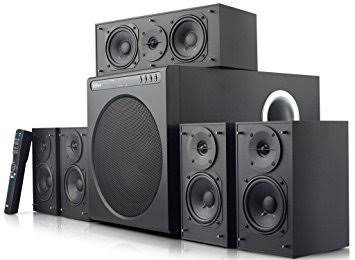
Сатып алганыңыз үчүн рахматasing the Edifier DA5100 5.1 multimedia speaker system. This manual provides detailed instructions to help you set up, operate, and maintain your speakers for optimal performance and longevity. Please read this manual thoroughly before using the product.
Пакеттин мазмуну
Улантуудан мурун, пакетиңизде бардык компоненттер бар экенин текшериңиз:
- Сабвуфер бирдиги
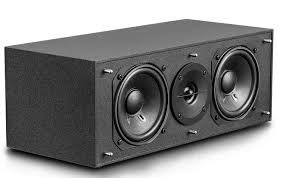
- Борбордук спикер
- Front satellite speakers (2)
- Rear satellite speakers (2)
- Алыстан башкаруу
- Audio input cables (RCA to RCA, 3.5mm to RCA)
- Speaker connection cables
- Колдонуучунун колдонмосу (бул документ)
Маанилүү коопсуздук чаралары
Коопсуз иштөөнү камсыз кылуу жана зыяндын алдын алуу үчүн төмөнкүлөрдү сактаңыз:
- Агрегатты жамгырга же нымдуулукка дуушар кылбаңыз.
- Do not open the speaker enclosures; there are no user-serviceable parts inside.
- Түзмөктү оодарылып кетпеши үчүн, аны туруктуу, тегиз жерге коюңуз.
- Ensure adequate ventilation around the speakers and subwoofer.
- Disconnect from power during lightning storms or when unused for long periods.
- Жылуулук булактарынан жана күндүн нурларынан алыс болуңуз.
- Белгиленген кубат менен жабдууну жана аксессуарларды гана колдонуңуз.
Орнотуу колдонмосу
1. Спикердин жайгашуусу
Proper speaker placement is crucial for optimal 5.1 surround sound experience.
- Борбордук спикер: Place directly in front of the listening position, typically above or below your display.
- Front Speakers (Left/Right): Position equidistant from the listening position, forming an equilateral triangle with the listener.
- Rear Speakers (Left/Right): Place behind the listening position, slightly to the sides, at ear level or slightly above.
- ЛГурченко: Can be placed anywhere in the room, but corner placement often enhances bass. Experiment for best results.
2. Спикерлерди туташтыруу
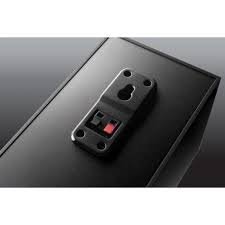
Connect the satellite speakers to the subwoofer unit using the provided speaker cables. Ensure correct polarity (red to red, black to black) for each connection.
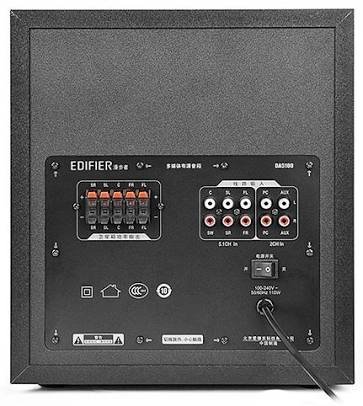
- Identify the speaker output terminals on the rear of the subwoofer. These are typically labeled for Front Left (FL), Front Right (FR), Center (C), Surround Left (SL), and Surround Right (SR).
- Connect each satellite speaker to its corresponding terminal on the subwoofer.
3. Аудио булактарын туташтыруу
The DA5100 offers multiple input options. Choose the one that best suits your audio source.
- 5.1 Канал киргизүү: For true 5.1 surround sound, connect your DVD player, Blu-ray player, or sound card's 5.1 analog outputs to the corresponding 5.1 input jacks on the subwoofer (FL, FR, C, SL, SR, SW).
- PC киргизүү: Use the 3.5mm to RCA cable to connect your computer's audio output to the "PC" input jacks.
- AUX киргизүү: Use the RCA to RCA cable to connect other stereo audio devices (e.g., TV, game console) to the "AUX" input jacks.
4. Power Connection
After all audio and speaker connections are made, connect the power cord to the subwoofer and then to a wall outlet. Ensure the power switch on the rear of the subwoofer is in the "OFF" position before plugging in.
Иштөө нускамалары
1. Күйгүзүү / Өчүрүү
Locate the power switch on the rear panel of the subwoofer. Flip it to the "ON" position to power on the system. Flip it to "OFF" to power off.
2. Киргизүүнү тандоо
Use the "Input" button on the remote control or the control panel on the subwoofer to cycle through the available audio inputs: 5.1, PC, AUX.
3. Үндү башкаруу
Use the "Volume +" and "Volume -" buttons on the remote control or the main volume knob on the subwoofer to adjust the overall system volume.
4. Individual Channel Volume Adjustment
The remote control allows for individual adjustment of the center, surround, and subwoofer volumes to fine-tune your sound experience.
- Press the "Center", "Surround", or "Subwoofer" button on the remote.
- Use the "Volume +" or "Volume -" buttons to adjust the level for that specific channel.
5. Үнсүз функция
Press the "Mute" button on the remote control to temporarily silence the audio. Press it again to restore the sound.
Техникалык тейлөө жана кам көрүү
To keep your Edifier DA5100 speakers in optimal condition:
- Тазалоо: Use a soft, dry cloth to wipe down the speaker surfaces. Do not use liquid cleaners or abrasive materials.
- Вентиляция: Ensure that the subwoofer's heat sink and ventilation ports are not obstructed.
- Сактагыч: Эгерде динамиктерди узак убакытка сактап жатсаңыз, аларды электр кубатынан сууруп, салкын, кургак жерде сактаңыз.
- Кабелдик башкаруу: Keep cables tidy and avoid sharp bends or kinks to prevent damage.
Проблемаларды чечүү
If you encounter issues with your Edifier DA5100 system, refer to the table below for common problems and solutions.
| Көйгөй | Мүмкүн себеп | Чечим |
|---|---|---|
| Үн жок | Power off; incorrect input selected; loose cables; muted. | Check power switch; select correct input; re-connect all cables securely; un-mute. |
| Бурмаланган үн | Volume too high; poor audio source quality; incorrect cable connection. | Reduce volume; try a different audio source; check cable connections and polarity. |
| Пульт иштебей жатат | Dead batteries; obstruction between remote and sensor. | Replace batteries; ensure clear line of sight to the subwoofer's IR sensor. |
| Only some speakers producing sound | Incorrect 5.1 setup; loose speaker cables; audio source not 5.1. | Verify 5.1 input connections; check individual speaker cables; ensure audio source is outputting 5.1. |
Көйгөй кайталана берсе, Edifier кардарларды колдоо бөлүмүнө кайрылыңыз.
Техникалык шарттар
The following are the general specifications for the Edifier DA5100 5.1 speaker system. Specifications are subject to change without notice.
- Чыгуу кубаттуулугу: RMS 8W x 5 + 38W (THD+N=10%)
- Жыштык жообу: R/L/C/SL/SR: 150Hz-20KHz | SW: 20Hz-130Hz
- Киргизүү сезгичтиги: 5.1CH: L/R: 450mV+/-50mV; SW: 150mV+/-50mV | PC: 700mV+/-50mV | AUX: 350mV+/-50mV
- Киргизүү Түрү: 5.1 Channel, PC, AUX
- Бас бирдиги: 8 дюйм (210мм)
- Mid-range Unit: 3 дюйм (78мм)
- Үч ыргак бирдиги: 1 дюйм (25мм)
- Өлчөмдөрү (сабвуфер): 270 мм x 300 мм x 435 мм (эн x ж x D)
- Dimensions (Satellite): 130 мм x 160 мм x 100 мм (эн x ж x D)
Кепилдик маалымат
Edifier products come with a limited warranty. Please refer to the warranty card included with your product or visit the official Edifier webСиздин аймакка тиешелүү деталдуу кепилдик шарттары жана шарттары үчүн сайт. Сатып алуу квитанциясын кепилдик дооматтары үчүн сатып алуунун далили катары сактаңыз.
Кардарларды колдоо
For further assistance, technical support, or service inquiries, please contact Edifier customer support through their official webсайт же продукт таңгагында көрсөтүлгөн байланыш маалыматы.
Edifier расмий Webсайт: www.edifier.com


