1. Introduction and Overview
The HumanWare Explore 8 is an advanced, portable electronic magnifier designed to assist individuals with low vision in reading documents and viewing objects with enhanced clarity. Featuring an 8.0-inch touchscreen and powerful magnification capabilities up to 30X, it offers a versatile solution for both home and on-the-go use. Its compact design ensures ease of transport, making it an indispensable tool for daily tasks.

Image: The Explore 8 magnifier positioned over a newspaper, showing a magnified weather forecast on its screen. This illustrates its primary function for reading printed materials.
2. Негизги өзгөчөлүктөрү
- 8-inch Handheld Design: The first handheld magnifier on the market with an 8-inch screen, offering a large viewing area in a portable form factor.
- Жогорку чоңойтуу: Provides magnification up to 30X with stunning HD image quality, ensuring clear and detailed viewing.
- Ыңгайлаштырылуучу функциялар: Fully customizable settings allow users to tailor the device to their specific visual needs and preferences.
- Интуитивдик сенсордук экран: Navigate easily through menus and functions using the responsive touchscreen interface.
- Dual Ultra HD Cameras: Equipped with twin Ultra HD cameras for versatile use, supporting both desktop reading and distance viewing.
3. Орнотуу колдонмосу
3.1. Кутудан чыгаруу жана алгачкы текшерүү
Carefully remove the Explore 8 from its packaging. Inspect the device for any visible damage. Ensure all components, including the device, charging cable, and power adapter, are present.
3.2. Аппаратты заряддоо
Before first use, fully charge the Explore 8. Connect the charging cable to the device's charging port and plug the power adapter into a standard electrical outlet. The charging indicator light will show the charging status. A full charge may take several hours.
3.3. Күйгүзүү / Өчүрүү
Түзмөктү күйгүзүү үчүн, экран күйгөнгө чейин түзмөктүн капталында/үстү жагында жайгашкан кубат баскычын басып туруңуз. Өчүрүү үчүн, өчүрүү буйругу чыкканга чейин кубат баскычын кайра басып туруңуз, андан кийин ырастаңыз.
4. Иштөө нускамалары
4.1. Basic Magnification
Place the Explore 8 directly over the text or object you wish to magnify. Use the physical zoom buttons (typically marked '+' and '-') or pinch-to-zoom on the touchscreen to adjust the magnification level. The device supports magnification up to 30X.

Image: A user comfortably reading documents with the Explore 8 magnifier, demonstrating its ease of use for extended periods.
4.2. Viewing Modes and Color Schemes
The Explore 8 offers various viewing modes and customizable color schemes to enhance readability. Access these options through the on-screen menu. Common modes include full color, black on white, white on black, yellow on blue, and more. Experiment to find the combination that provides the best contrast and comfort for your eyes.
4.3. Desktop and Distance Viewing
The device features twin Ultra HD cameras. One camera is optimized for close-up desktop viewing (e.g., reading a book), while the other is for distance viewing (e.g., looking at a whiteboard or street signs). Switch between these camera modes via the dedicated button or touchscreen menu option.

Image: The back of the Explore 8, illustrating its built-in stand that allows for stable, hands-free use on a flat surface for desktop viewing.
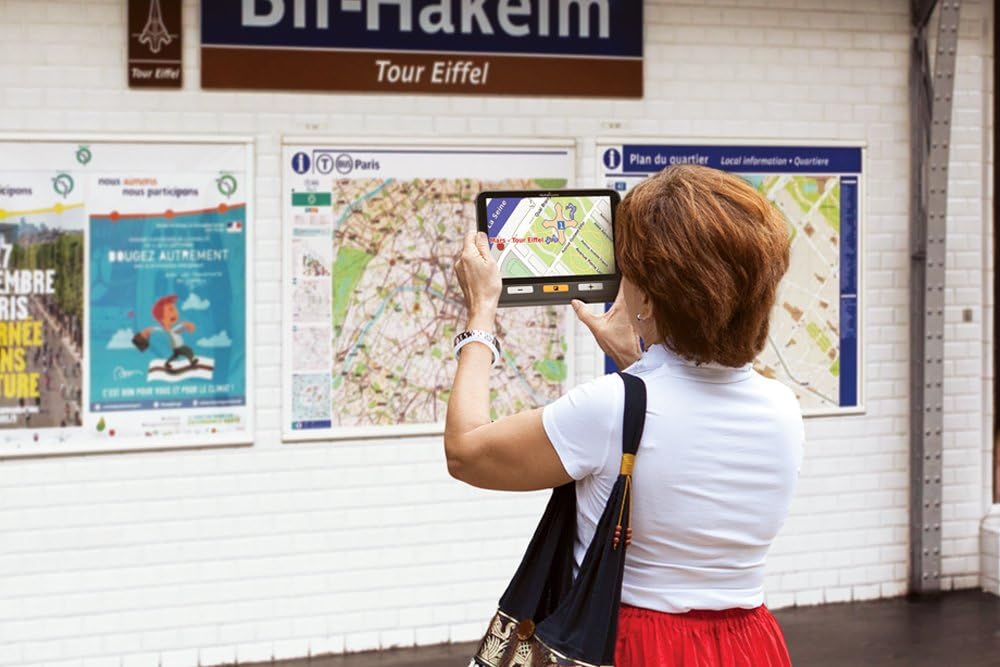
Image: A user utilizing the Explore 8 to magnify a large map in a public setting, showcasing its utility for distance viewинг жана навигация.
4.4. Менюларда жана жөндөөлөрдө багыт алуу
Tap the screen to bring up the on-screen menu. Use your finger to tap on icons and options to adjust settings such as brightness, contrast, line markers, and more. Refer to the on-screen help or the full digital manual for detailed explanations of each setting.
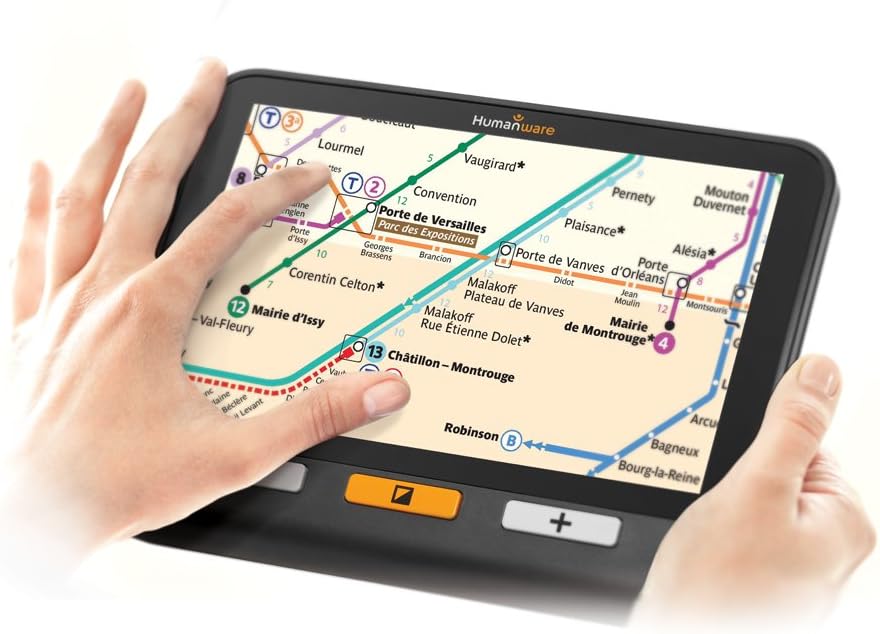
Image: Close-up of hands using the touchscreen of the Explore 8 to navigate a magnified subway map, highlighting the interactive touch interface.
5. Техникалык тейлөө жана кам көрүү
5.1. Аспапты тазалоо
To clean the screen, use a soft, lint-free cloth specifically designed for electronic displays. For the device body, a slightly damp cloth can be used. Avoid abrasive cleaners, solvents, or spraying liquids directly onto the device.
5.2. Батареяга кам көрүү
To prolong battery life, avoid fully discharging the device frequently. Charge the device regularly, and if storing for an extended period, ensure it has at least a 50% charge. Store in a cool, dry place.
5.3. Сактоо
When not in use, store the Explore 8 in its protective case (if provided) or a safe place to prevent scratches and damage to the screen and cameras.
6. Кыйынчылыктарды
| Көйгөй | Мүмкүн себеп | Чечим |
|---|---|---|
| Түзмөк күйбөйт. | Батареянын аздыгы; аппарат катып калган. | Charge the device for at least 30 minutes. Perform a hard reset (refer to manufacturer's instructions for specific button combination, usually holding power button for 10-15 seconds). |
| Экран бош же бурмаланган. | Туура эмес viewing mode; software glitch; physical damage. | Которуу viewing modes. Restart the device. If problem persists, contact HumanWare support. |
| Magnification is not clear. | Dirty camera lens; incorrect focus; lighting issues. | Clean the camera lenses with a soft cloth. Adjust lighting conditions. Ensure the device is positioned correctly over the object. |
| Түзмөк заряддалбай жатат. | Бузук кабель/адаптер; кубаттоо портунда көйгөй бар. | Try a different charging cable and power adapter. Ensure the charging port is free of debris. Contact support if the issue continues. |
7. Продукттун спецификациялары
- Бренд: HumanWare
- Модель номери: FGEX-1016
- UPC: 762988545019
- Түсү: Кара
- Линзанын материалы: Акрил
- Чоңойтуу күчү: 30X чейин
- Экрандын өлчөмү: 8.0 дюйм (диагоналдык)
- Элемент Салмагы: Болжол менен 3.14 фунт (1.42 кг)
- Пакеттин өлчөмдөрү: Болжол менен 10 x 8 x 4 дюйм (25.4 x 20.3 x 10.2 см)
- Камералар: Twin Ultra HD cameras
- Батарея: Rechargeable (type not specified, but implied by charging instructions)
8. Кепилдик жана колдоо
The HumanWare Explore 8 Handheld Electronic Magnifier typically comes with a manufacturer's warranty covering defects in materials and workmanship. The duration and terms of the warranty may vary by region and purchase date. Please refer to the warranty card included with your product or visit the official HumanWare webтолук кепилдик маалымат алуу үчүн сайт.
For technical support, service, or warranty claims, please contact HumanWare customer service directly. You can usually find contact information (phone numbers, email, or support portal) on their official webсайт: www.humanware.com. When contacting support, please have your product model number (FGEX-1016) and serial number ready.


