1. Киришүү
This manual provides essential information for the installation, operation, and maintenance of your Swann 1080p Full HD DVR Add-on Dome Security Camera. This camera is designed to enhance your existing DVR security system with high-definition video surveillance, featuring advanced True Detect heat and motion detection for reliable monitoring both indoors and outdoors.

Image 1: Swann 1080p Full HD Dome Security Camera.
2. Пакеттин мазмуну
Орнотууну баштоодон мурун, бардык компоненттердин бар экендигин текшериңиз:
- 1 x PRO-1080PMSD Camera
- 1 x BNC Cable (60ft / 18m)
- 1 х кубат адаптери
- Винттерди жана сайгычтарды орнотуу
- Иштөө нускамалары (бул документ)
- Уурулукка каршы стикерлер

Image 2: Contents of the Swann 1080p DVR Add-on Camera package.
3. Орнотуу жана орнотуу
The Swann 1080p Full HD Dome Security Camera is designed for surface mounting and is suitable for both indoor and outdoor environments due to its weather-resistant casing (IP65 rated).
3.1 Камераны орнотуу
- Жайгашкан жерди тандаңыз: Каалаган жерди тандаңыз viewing angle and is within reach of the included BNC cable and power adapter. Consider areas where heat and motion detection will be most effective.
- Тоону камсыз кылуу: Use the provided mounting screws and plugs to securely attach the camera's base to a flat surface. Ensure the camera is firmly fixed to prevent movement.
- Тууралоо Viewбурч: Once mounted, adjust the camera's position to achieve the optimal viewing area. The camera offers a wide 90-degree field of view.
3.2 Камераны туташтыруу
- BNC кабелин туташтырыңыз: Connect one end of the 60ft (18m) BNC cable to the camera's BNC port and the other end to an available BNC input on your compatible DVR system.
- Кубат адаптерин туташтыруу: Plug the power adapter into the camera's power input and then into a standard electrical outlet.
- Күйгүзүү: Ensure your DVR system is powered on. The camera should automatically connect and display video feed on your DVR monitor.
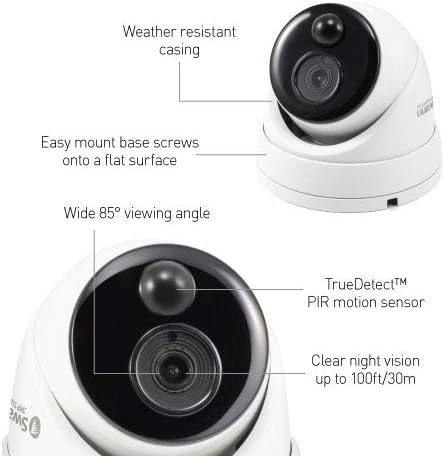
Сүрөт 3: Детальдуу view of the camera's features and mounting points.
4. Иштөө нускамалары
Your Swann 1080p Full HD Dome Security Camera integrates seamlessly with your DVR system, offering advanced surveillance capabilities.
4.1 Видеонун сапаты жана түнкү көрүнүш
The camera provides 1080p Full HD video resolution, capturing clear and detailed footage. It features automatic night vision with a range of up to 100 feet (30 meters), ensuring continuous monitoring even in complete darkness. The camera automatically switches between day and night modes based on ambient light conditions.

Сүрөт 4: Мисample of 1080p Full HD wide-angle view түнкү көрүү мүмкүнчүлүгү менен.
Video 1: Demonstrates 1080p Full HD camera footage, showing clear details like license plates and faces, and automatic night vision.
4.2 True Detect Heat and Motion Detection
The camera incorporates Swann's True Detect technology, utilizing a Passive Infrared (PIR) sensor to detect heat signatures from moving objects such as people and cars. This intelligent detection minimizes false alarms triggered by non-relevant motion (e.g., swaying branches), ensuring you receive more accurate and meaningful alerts.

Image 5: True Detect system showing detection of a person and car, with app push and email alert notifications.
Video 2: Explains Swann's True Detect heat sensing technology, showing how it differentiates between warm objects (people, cars) and other motion to reduce false alarms.
4.3 Remote Access and App Control
Manage and monitor your security system remotely using the Swann Security App on your smartphone or tablet. The app allows for live streaming, receiving push notifications for detected activity, and customizing controls. The system is compatible with Digital Video Recorders, Smartphones, and Tablets, and can be controlled via Amazon Alexa and Google Assistant.

Image 6: Remote access to your Swann security system via smartphone, tablet, and laptop.

Image 7: The Swann Security App interface for comprehensive control and monitoring.
5. Техникалык тейлөө
To ensure optimal performance and longevity of your Swann security camera, regular maintenance is recommended:
- Тазалоо: Мезгил-мезгили менен камеранын линзасын жумшак, гamp cloth to remove dust, dirt, or smudges that may affect image clarity. Avoid abrasive cleaners.
- Кабелдик текшерүү: Regularly check the BNC cable and power adapter for any signs of wear, damage, or loose connections. Secure or replace as necessary.
- Программалык камсыздоонун жаңыртуулары: Check the Swann website or your DVR system's settings for any available firmware updates to ensure your camera operates with the latest features and security enhancements.
- Аба ырайын коргоо: Although the camera is weather-resistant (IP65), ensure it is installed in a location that minimizes direct exposure to extreme weather conditions where possible, to prolong its lifespan.

Image 8: The camera's durable design withstands various weather conditions.
6. Кыйынчылыктарды
If you encounter issues with your Swann security camera, refer to the following common troubleshooting steps:
- Видео түрмөгү жок:
- Кубат адаптери камерага да, иштеген электр розеткасына да бекем туташып турганын текшериңиз.
- Verify the BNC cable is properly connected to both the camera and the DVR input.
- Check if the DVR channel for the camera is enabled and configured correctly.
- Сүрөттүн сапаты начар:
- Камеранын линзасын тазалап, тоскоолдуктарды же тактарды кетириңиз.
- Ensure the camera is within its optimal operating range and not experiencing signal interference.
- Check your DVR's display settings for resolution and clarity.
- Кыймылды аныктоо иштебей жатат:
- Verify that True Detect (PIR motion detection) is enabled in your DVR settings for the specific camera channel.
- Камераны камсыз кылыңыз view is not obstructed and that the area of interest is within the detection zone.
- Adjust sensitivity settings in your DVR if necessary.
- Жалган ойготкучтар:
- While True Detect minimizes false alarms, extreme weather conditions or direct sunlight on the PIR sensor can sometimes trigger alerts.
- Adjust the camera's angle or detection zones to exclude areas with frequent non-relevant motion.
For further assistance, please refer to the support section or contact Swann customer service.
7. Техникалык шарттар
| Модель номери | SWPRO-1080MSD-US |
| Видео тартуунун резолюциясы | 1080p (Full HD) |
| Натыйжалуу Video Resolution | 1080 Pixels (2 MP) |
| Ички/тышкы колдонуу | Ички, сырткы |
| Байланыш технологиясы | BNC (Wired camera system) |
| Power Source | DC |
| Viewбурч | 90 Degrees (Field Of View) / 85 Degrees |
| Түнкү көрүү диапазону | 100 Фут |
| Төмөн жарык технологиясы | Түнкү түс |
| Эскертүү түрү | Motion Only (True Detect Heat & Motion) |
| Эл аралык коргоо рейтинги | IP65 |
| Шайкеш түзмөктөр | Digital Video Recorder, Smartphone, Tablet |
| Controller Type | Amazon Alexa, Google Жардамчысы |
| Башкаруу ыкмасы | Колдонмо |
| Материал | Поликарбонат (PC) |
| Түс | Ак |
| Элементтин өлчөмдөрү (L x W x Y) | 4.4 x 4.4 x 3.2 дюйм |
| Элемент Салмагы | 14.1 унция (0.88 фунт) |
8. Кепилдик жана колдоо
Your Swann 1080p Full HD DVR Add-on Dome Security Camera comes with a 1 жылдык Чектелген Кепилдик. This warranty covers protection against factory defects and includes technical support.
Should you experience any challenges with your product, please reach out to Swann's dedicated customer care support team. You can contact them via Amazon Message or email at any time. Swann is committed to providing reliable security solutions and will assist with item replacement within one year of purchase for covered issues.


