Introduction
This manual provides detailed instructions for the setup, operation, and maintenance of your Zebronics ZEB-BT6860RUCF 5.1 Channel Multimedia Speaker System. Please read this manual thoroughly before using the product to ensure proper functionality and to maximize your audio experience.
Пакеттин мазмуну
Төмөндө тизмеленген нерселердин баары пакетиңизге камтылганын текшериңиз:
- 1 x Сабвуфер блогу
- 5 x Satellite Speaker Units
- 1 x Алыстан башкаруу
- Audio Cables (AUX, RCA)
- User Manual
Продукт бүттүview

Image: The complete Zebronics ZEB-BT6860RUCF 5.1 speaker system, including the subwoofer, five satellite speakers, and the remote control.

Image: Close-up of the subwoofer's front panel, illustrating the 'Input', 'Previous', 'Next', 'Play', 'Volume' controls, along with the SD/MMC card slot and USB port.
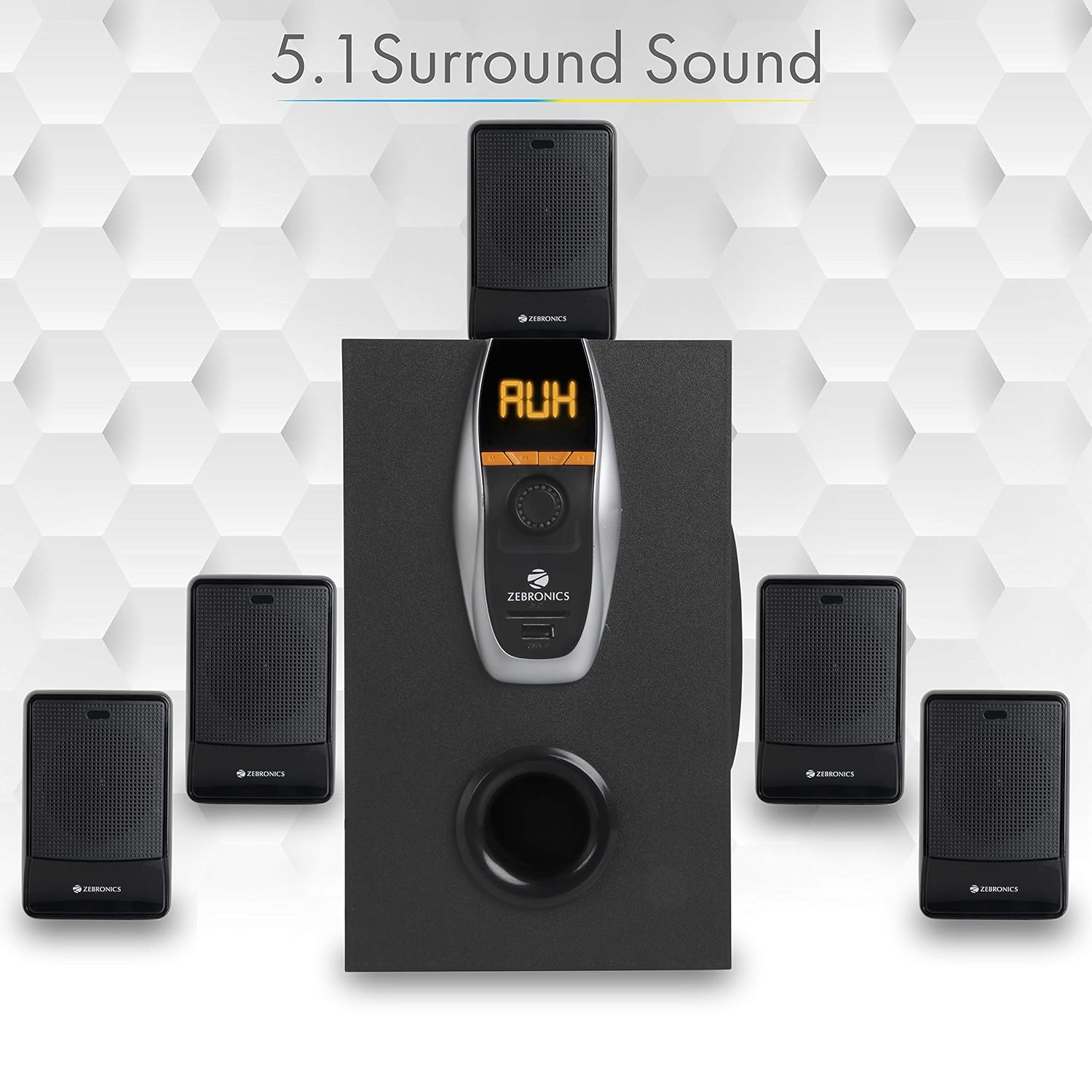
Image: A visual representation of the recommended 5.1 surround sound speaker setup, showing the central subwoofer and the five satellite speakers positioned for optimal audio distribution.

Сүрөт: деталдуу view of the subwoofer, highlighting its wooden enclosure design, which contributes to sound quality.

Image: The rear panel of the subwoofer, showing the various input and output ports, including Stereo Input, 5.1 Input, Satellite Output terminals, and the main Power Switch.

Image: A diagram illustrating the physical dimensions of the subwoofer unit: 160 mm (Width), 240 mm (Depth), and 277 mm (Height).
Орнотуу нускамалары
- Спикердин жайгашуусу: Position the subwoofer centrally. Place the five satellite speakers around your listening area for optimal 5.1 surround sound. Refer to the 5.1 Surround Sound Speaker Placement image for guidance.
- Спутник динамиктерин туташтыруу: Connect each of the five satellite speakers to the corresponding output terminals on the rear panel of the subwoofer. Ensure correct polarity (positive to positive, negative to negative).
- Кубат туташуу: Connect the power cable to the subwoofer and then plug it into a suitable power outlet.
- Аудио булагы туташуу:
- For 5.1 Input: Use the provided RCA cables to connect your 5.1 channel audio source (e.g., DVD player, compatible TV) to the 5.1 Input ports on the subwoofer's rear panel.
- For Stereo/AUX Input: Use a 3.5mm to RCA cable to connect your stereo audio source (e.g., computer, laptop, MP3 player) to the Stereo Input (AUX) ports on the subwoofer's rear panel.
- Күйгүзүү: Flip the power switch on the rear panel of the subwoofer to the 'ON' position. The front display will illuminate.
Иштөө нускамалары
Алдыңкы панелдин башкаруу элементтери
The subwoofer's front panel features controls for various functions:
- Киргизүү: Press to cycle through input modes (Bluetooth, USB, SD, AUX, FM).
- Мурунку: Short press for previous track/station. Long press for fast rewind (USB/SD).
- Кийинки: Short press for next track/station. Long press for fast forward (USB/SD).
- Ойнотуу/тындыруу: Play or pause audio playback. In FM mode, long press to auto-scan and save stations.
- Үн баскычы: Башкы үн деңгээлин тууралоо үчүн айлантыңыз.
- USB порт: MP3 ойнотуу үчүн USB флеш-дискти салыңыз.
- SD/MMC карта слоту: Insert an SD or MMC card for MP3 playback.
Алыстан башкаруу функциялары
The included remote control provides convenient access to all speaker functions:
- Күч: Turn the speaker system On/Off.
- Режим: Select input source (BT/USB/SD/AUX/FM).
- Көлөм +/-: Башкы үнүн тууралаңыз.
- Үнсүз: Аудионун үнүн өчүрүү же ачуу.
- Ойнотуу/тындыруу: Ойноону көзөмөлдөө.
- Мурунку кийинки: Navigate tracks or FM stations.
- EQ: Эквалайзердин алдын ала орнотууларын тандаңыз (эгерде бар болсо).
- Сандык баскычтар: Тректи түз тандоо (USB/SD) же FM станциясынын киргизүүсү.
Bluetooth операциясы
- Power on the speaker system.
- Press the 'Input' button on the front panel or 'Mode' button on the remote until 'BT' mode is selected. The display will show 'BT' and a pairing indicator will flash.
- Enable Bluetooth on your mobile device or computer and search for available devices.
- Select 'ZEB-BT6860RUCF' from the list of devices.
- Once paired, the speaker will confirm the connection, and you can begin playing audio from your device.
USB/SD карта менен иштөө
- Insert a USB flash drive or SD/MMC card (up to 32GB) containing MP3 audio files into the respective port/slot on the front panel.
- The speaker system will automatically switch to USB or SD mode and begin playing the first track. If not, press the 'Input' or 'Mode' button to select the correct source.
- Use the 'Previous', 'Next', and 'Play/Pause' buttons on the front panel or remote control to manage playback.
AUX киргизүү операциясы
- Connect your audio source to the AUX input ports on the rear panel using an appropriate audio cable.
- Press the 'Input' button on the front panel or 'Mode' button on the remote until 'AUX' mode is selected.
- Туташкан түзмөгүңүздөн аудио ойнотуңуз.
FM радиосунун иштеши
- Press the 'Input' button on the front panel or 'Mode' button on the remote until 'FM' mode is selected.
- To auto-scan and save available FM stations, long press the 'Play/Pause' button on the front panel or remote control. The system will scan and store stations automatically.
- Use the 'Previous' and 'Next' buttons to navigate through the saved FM stations.
Техникалык тейлөө
- Тазалоо: Динамиктин беттерин тазалоо үчүн жумшак, кургак чүпүрөктү колдонуңуз. Абразивдүү тазалоочу каражаттарды, момдорду же эриткичтерди колдонбоңуз.
- Вентиляция: Ensure the subwoofer and satellite speakers have adequate ventilation. Do not block any ventilation openings.
- Курчап турган чөйрө: Avoid exposing the speaker system to direct sunlight, extreme temperatures, high humidity, or dusty environments.
- Өчүрүү: Always power off the system and unplug it from the power outlet before cleaning or if it will be unused for an extended period.
Проблемаларды чечүү
| Көйгөй | Мүмкүн себеп | Чечим |
|---|---|---|
| Күч жок | Электр кабели туташкан эмес; Кубат өчүргүч өчүк; Розетка бузук. | Ensure power cable is securely connected. Turn the power switch ON. Test the power outlet with another device. |
| Үн жок | Volume too low; Incorrect input mode; Audio cables loose/faulty; Mute activated. | Increase volume. Select correct input mode. Check audio cable connections. Deactivate mute function. |
| Bluetooth туташпай жатат | Speaker not in BT mode; Device Bluetooth off; Already connected to another device; Interference. | Ensure speaker is in BT mode. Turn on device Bluetooth. Disconnect from other devices. Move closer to the speaker. |
| USB/SD ойнотуу көйгөйлөрү | Туура эмес file формат; Бузулган files; USB/SD card not inserted correctly; Max memory size exceeded. | камсыз кылуу files are MP3 format. Check for corrupted files. Reinsert USB/SD card. Use cards up to 32GB. |
| Пульт иштебей жатат | Batteries depleted; Obstruction; Remote sensor blocked. | Replace remote control batteries. Remove any obstructions between remote and speaker. Ensure remote sensor on subwoofer is clear. |
| FM кабыл алуу начар | Алсыз сигнал; Антенна узартылган эмес. | Extend the FM antenna fully. Try repositioning the antenna or the speaker system for better signal. |
Техникалык шарттар
| Өзгөчөлүк | Спецификация |
|---|---|
| Жалпы чыгаруу кубаттуулугу (RMS) | 70 Ватт |
| Сабвуфердин чыгыш күчү | 40 Ватт |
| Спутниктен чыккан кубат | 6 Ватт x 5 |
| Frequency Response | 35Гц - 20КГц |
| Сезимталдуулук | 600мВ |
| Bluetooth версиясы | 2.1 + EDR |
| USB/SD Max. Memory Size | 32 ГБ |
| USB/SD File Формат колдоо | MP3 |
| Туташуу параметрлери | Bluetooth, USB, SD/MMC, AUX, FM |
| Шайкеш түзмөктөр | Desktop, Laptop, MP3 Player, DVD Players, Televisions |
| Сабвуфердин өлчөмдөрү (Т x Т x Б) | 35D x 39W x 45H Centimeters (Product Dimensions) |
| Элемент Салмагы | 5.4 кг |
| Энергияны керектөө | 45 Вт |
| Башкаруу ыкмасы | Алыстан башкаруу, блоктун баскычтары |
| Келип чыккан өлкө | Кытай |
Кепилдик жана колдоо
Your Zebronics ZEB-BT6860RUCF Multimedia Speaker System comes with a 1-year carry-in warranty to the service center from the date of purchase. Please retain your purchase receipt for warranty claims.
For technical support, service, or warranty inquiries, please contact Zebronics customer service. Refer to the official Zebronics webакыркы байланыш маалыматы үчүн сайтка же продуктунун таңгагына кайрылыңыз.
Импорттоочу: ZEBRONICS INDIA PVT LTD, NO : 118, POONAMMALE HIGH ROAD , VEPERY


