1. Продукт бүтүп калдыview
The AT&T CD4930 is a corded telephone system designed for reliable communication with integrated digital answering system and Caller ID features. It offers user-friendly functionality with an extra-large tilt display and large buttons for enhanced visibility and ease of use.
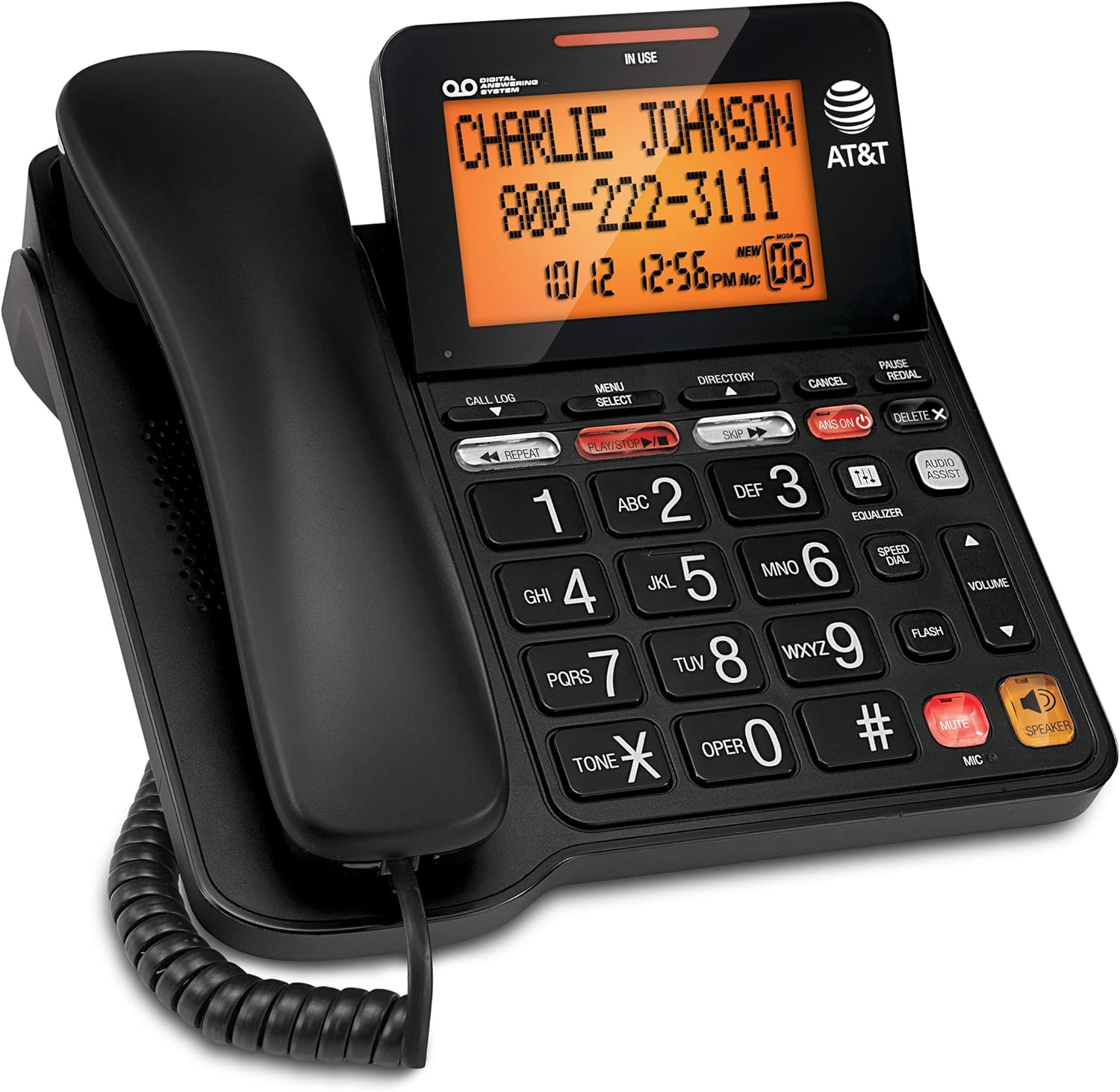
Figure 1: AT&T CD4930 Corded Phone with Digital Answering System and Caller ID.
Негизги өзгөчөлүктөрү:
- Санариптик жооп берүү системасы: Records up to 25 minutes of messages, announcements, and memos. Features instant playback, selective save/delete, and message skipping/repeating.
- Динамик: Allows hands-free conversation, enabling multiple participants to join calls.
- Арткы жарык дисплей: Provides clear visibility of caller information, time, and date.
- Чалуучунун ID: Displays name, number, time, and date of incoming calls, including call waiting.
- Extra-Large Tilt LCD: Оптималдуулугу үчүн жөнгө салынуучу дисплей viewing of Caller ID and call history.
- Аудио жардам: Temporarily increases overall volume and enhances sound frequencies for clearer speech.
- Мадам: Ыңгайлаштырылуучу аудио адисиfiles (bass, treble, natural tones) to suit individual needs.
2. Орнотуу
2.1 Пакеттин мазмуну
Пакетте бардык компоненттер бар экенин текшериңиз:
- AT&T CD4930 Corded Phone Base Unit
- Телефон
- Уюлдук аппараттын шнуры
- Телефон линиясы
- AC кубат адаптери
2.2 Connection
- Телефонду туташтыруу: Plug one end of the coiled handset cord into the handset and the other end into the jack labeled сүйл on the side of the phone base.
- Телефон линиясын туташтыруу: Plug one end of the telephone line cord into the jack labeled LINE on the back of the phone base. Plug the other end into a telephone wall jack.
- Туташуу кубаты: Plug the small end of the AC power adapter into the DC IN 6V jack on the back of the phone base. Plug the large end into a standard electrical outlet.
Upon successful connection, the display will illuminate, and the phone will perform a self-check. Allow a few moments for the phone to initialize.
2.3 Initial Setup (Date and Time)
Setting the correct date and time is crucial for accurate Caller ID and answering system timestamps.
- Басыңыз МЕНЮ/ТАНДОО.
- колдонуу ▼ or ▲ buttons to scroll to КҮН/УБАКЫТТЫ КОЮ, андан кийин басыңыз МЕНЮ/ТАНДОО.
- Enter the current month, day, and year using the dial pad. Press МЕНЮ/ТАНДОО ар бир кирүүдөн кийин.
- Enter the current hour and minute. Use the ▼ or ▲ тандоо үчүн баскычтар AM or PM, андан кийин басыңыз МЕНЮ/ТАНДОО ырастоо үчүн.
- Басыңыз ЖОК КЫЛУУ менюдан чыгуу үчүн.
3. Иштөө нускамалары
3.1 Чалууларды кабыл алуу жана кабыл алуу
- Чалуу үчүн: Телефонду көтөрүңүз же басыңыз СПИКЕР. Dial the phone number.
- Чалууга жооп берүү үчүн: When the phone rings, lift the handset or press СПИКЕР.
- Чалууну аяктоо үчүн: Place the handset back on the cradle or press СПИКЕР if using speakerphone.
3.2 Динамик
The speakerphone allows for hands-free communication.
- Жандыруу үчүн: Чалуу учурунда, басыңыз СПИКЕР баскычы.
- Өчүрүү үчүн: Lift the handset to switch back to handset mode, or press СПИКЕР дагы бир жолу чалууну токтотуу үчүн.
3.3 Үндү башкаруу
Adjust the listening volume during a call.
- Чалуу учурунда басыңыз ТОМ ▲ to increase volume or ТОМ ▼ үнүн азайтуу.
3.4 Үнсүз кылуу функциясы
Temporarily disable your microphone during a call.
- Чалуу учурунда басыңыз БАСУУ. The microphone will be muted.
- Басыңыз БАСУУ кайра сүйлөшүүнү улантуу үчүн.
3.5 Redial and Pause
- Кайра терүү: Телефонду көтөрүңүз же басыңыз СПИКЕР, андан кийин басыңыз РЕДИАЛ to dial the last number called.
- Тыныгуу: When entering a phone number, press ТЫНЫГУУ to insert a 4-second pause. Useful for dialing numbers that require access codes or extensions.
4. Санариптик жооп берүү системасы
Интегралдык санариптик жооп берүү системасы билдирүүлөрдү 25 мүнөткө чейин жаздыра алат.
4.1 Turning the Answering System On/Off
- Басыңыз ANS ON/OFF to toggle the answering system on or off. When on, the ANS ON индикатор жарыгы күйөт.
4.2 Playing Messages
- Басыңыз ОЙНОО/ТОКТОТУУ to play new messages. If no new messages, it will play old messages.
- Ойнотуу учурунда:
- Басыңыз КАЙТАЛОО to repeat the current message. Press twice to play the previous message.
- Басыңыз ӨТКӨРҮҮ кийинки билдирүүгө өтүү.
- Басыңыз ЖОК to delete the current message.
- Басыңыз ОЙНОО/ТОКТОТУУ ойнотууну токтотуу үчүн.
4.3 Recording an Outgoing Announcement
- Басыңыз МЕНЮ/ТАНДОО.
- чейин жылдырыңыз БИЛДИРУУ жана басыңыз МЕНЮ/ТАНДОО.
- Тандоо RECORD ANN. жана басыңыз МЕНЮ/ТАНДОО.
- Speak clearly into the microphone on the phone base.
- Басыңыз ОЙНОО/ТОКТОТУУ to end recording. The announcement will play back.
5. Чалуучуну аныктоо функциялары
The Caller ID feature displays information about incoming calls.
5.1 Viewing Call Log
- Басыңыз ЧАЛУУ ЛОГ.
- Колдонуу ▼ or ▲ to scroll through the call entries.
- Басыңыз ЖОК КЫЛУУ чыгуу.
5.2 Dialing from Call Log
- Ал эми viewing a call log entry, lift the handset or press СПИКЕР көрсөтүлгөн номерди терүү үчүн.
5.3 Deleting Call Log Entries
- Ал эми viewing a call log entry, press ӨЧҮРҮҮ X to delete the current entry.
- To delete all entries, press МЕНЮ/ТАНДОО, чейин жылдырыңыз DELETE ALL CALLS, жана басыңыз МЕНЮ/ТАНДОО. Суралганда ырастаңыз.
6. Техникалык тейлөө
6.1 Телефонду тазалоо
Телефонуңузду таза кармоо үчүн, аны жумшак, бир аз сүртүңүзamp кездеме. Тазалоочу чачыраткычтарды же катуу химиялык заттарды колдонбоңуз, анткени алар каптамага же электрдик компоненттерге зыян келтириши мүмкүн.
6.2 Жалпы кам көрүү
- Телефонду өтө жогорку температурага, түз күн нуруна же нымдуулукка дуушар кылбаңыз.
- Do not drop the phone or subject it to severe impact.
- Keep the phone away from sources of electrical noise, such as motors or fluorescent lighting.
7. Кыйынчылыктарды
If you experience issues with your AT&T CD4930 phone, refer to the following common problems and solutions:
| Көйгөй | Чечим |
|---|---|
| Терүү үнү жок. |
|
| Чалуучуну укпай жатам же чалуучу мени укпай жатат. |
|
| Caller ID is not displaying. |
|
| Автожооп берүүчү система билдирүүлөрдү жазбайт. |
|
For further assistance, please refer to the full user manual available on the AT&T support website or contact AT&T customer service.
8. Техникалык шарттар
| Өзгөчөлүк | Деталь |
|---|---|
| Модель номери | CD4930 |
| Бренд | AT&T |
| Телефон түрү | Стационардык телефон |
| Жооп берүү системасынын түрү | Санарип |
| Жаздыруу мүмкүнчүлүгү | 25 мүнөткө чейин |
| Power Source | Электр зымдары |
| Терүүчү түрү | Кош баскычтоп |
| Материал | Пластик |
| Элемент Салмагы | 2.42 фунт |
| Пакеттин өлчөмдөрү | 10.2 x 8.98 x 3.62 дюйм |
| Өндүрүүчү | VTech |
| Келип чыккан өлкө | Малайзия |
9. Кепилдик жана колдоо
9.1 Кепилдик маалыматы
For detailed warranty information regarding your AT&T CD4930 Corded Phone, please refer to the warranty card included in your product packaging or visit the official AT&T webсайт. Кепилдиктин шарттары жана шарттары ар кандай болушу мүмкүн.
9.2 Кардарларды колдоо
If you require technical assistance, have questions about your product, or need to report an issue, please contact AT&T Customer Support:
- Онлайн колдоо: Расмий AT&T колдоо кызматына кайрылыңыз website for FAQs, troubleshooting guides, and downloadable manuals.
- Телефондук колдоо: Refer to your product documentation or the AT&T webэң акыркы кардарларды тейлөө байланыш номерлери үчүн сайт.
Please have your product model number (CD4930) and serial number ready when contacting support.


