Introduction
The iHome iSP100 is a Wi-Fi enabled outdoor smart plug designed for wireless control and scheduling of outdoor lighting, decorations, and small appliances up to 1800W. Its rugged, water-resistant design allows for use in outdoor environments, specifically with covered GFI-enabled 120V power supplies. This smart plug integrates with various leading smart home platforms, including Apple HomeKit, Amazon Alexa, Google Assistant, IFTTT, SmartThings, Nest, and Wink, offering flexible control options via app or voice commands.
Маанилүү коопсуздук маалыматы
- Сыртта гана колдонуу: This device is designed for outdoor use with a covered GFI-enabled 120V power supply. Ensure the outlet is protected from direct exposure to water.
- Электрдик рейтинг: Do not exceed the maximum load of 1800W. Overloading can cause damage to the device and pose a fire hazard.
- Суу каршылык: While water-resistant, the device should not be submerged in water. Ensure all connections are secure and protected.
- Балдар жана үй жаныбарлары: Keep the device and its cords out of reach of children and pets to prevent accidental injury or damage.
- Тейлөө: Аппаратты ачууга же оңдоого аракет кылбаңыз. Бардык тейлөөлөрдү квалификациялуу кызматкерлерге тапшырыңыз.
Пакеттин мазмуну
- iHome iSP100 Wifi Outdoor Smart Plug
- Ыкчам баштоо колдонмосу (бул колдонмодо камтылган эмес)
Продукт бүттүview
The iSP100 features a compact, black, weather-resistant housing with a flexible 6-inch power cord designed for convenient use with outdoor GFI covered outlets. It includes a single smart outlet for controlling connected devices.
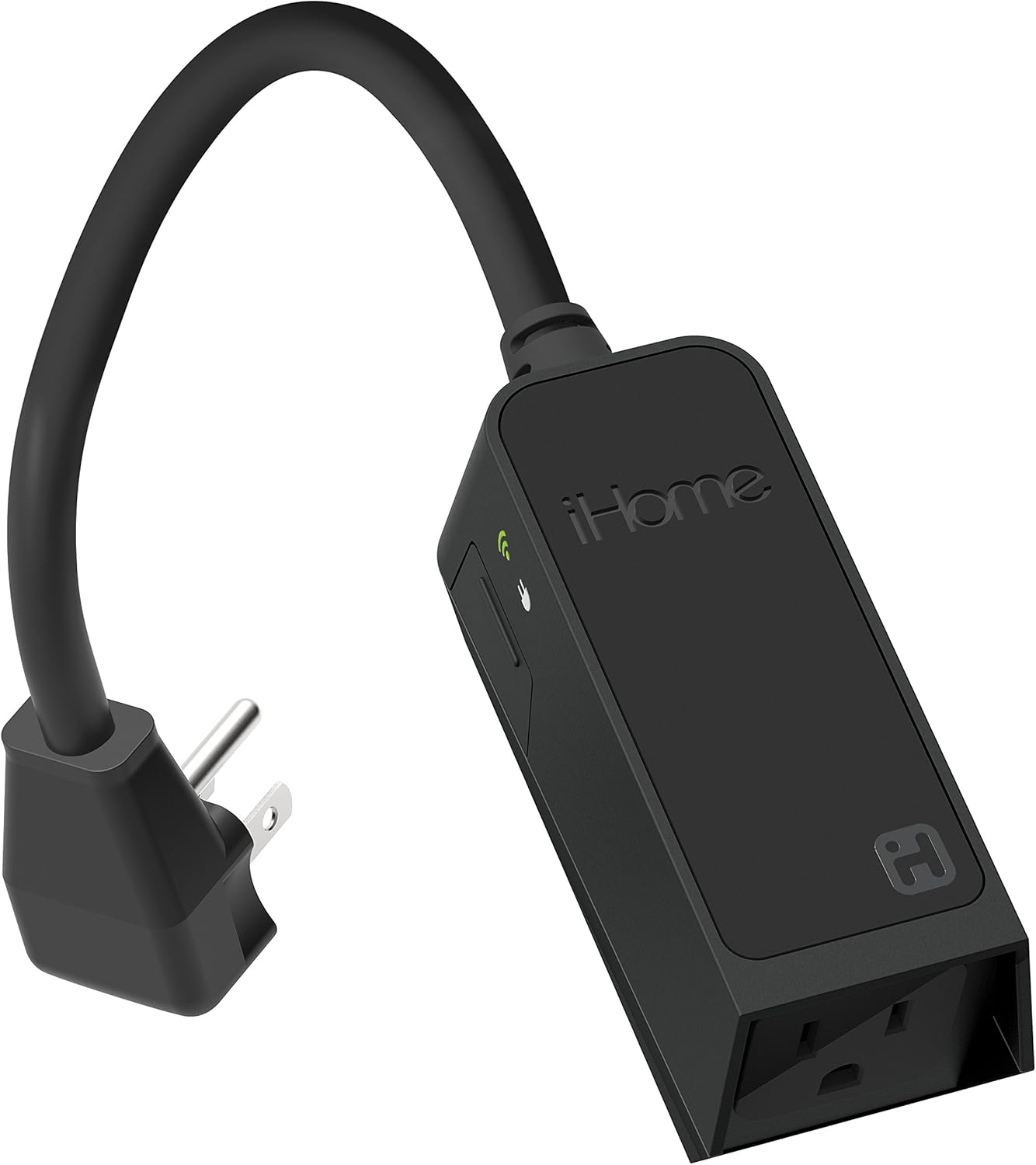
1-сүрөт: Фронт view of the iHome iSP100 Wifi Outdoor Smart Plug, showing its compact design and flexible power cord.

2-сүрөт: Жогорудан төмөн view of the iSP100, highlighting its elongated shape and integrated power cord.

3-сүрөт: Бурчтуу view of the iSP100, showing the iHome branding and the outlet.
Орнотуу нускамалары
1. Физикалык орнотуу
- Locate a covered GFI-enabled 120V outdoor power outlet. Ensure the outlet is in good working condition and protected from direct weather exposure.
- Plug the iSP100 into the GFI-enabled outdoor outlet. The flexible 6-inch cord allows for the outlet cover to close completely, maintaining weather resistance.
- Mount the iSP100 securely if desired, using the integrated mounting hole.
- Plug your outdoor lighting, decorations, or small appliance (up to 1800W) into the iSP100 smart plug.

4-сүрөт: The iSP100 installed on an outdoor wall, plugged into a GFI outlet with its flexible cord allowing the cover to close.
2. Колдонмону орнотуу жана жупташтыруу
- Бекер жүктөп алыңыз iHome Control колдонмону Apple App Store дүкөнүнөн (iOS түзмөктөрү үчүн) же Google Play Store дүкөнүнөн (Android түзмөктөрү үчүн) жүктөп алыңыз.
- Open the iHome Control app and follow the on-screen instructions to create an account or log in.
- Мобилдик түзмөгүңүз туташып турганын текшериңиз 2.4GHz Wi-Fi тармагы. The iSP100 operates on the 2.4GHz band.
- In the app, select the option to add a new device. The app will guide you through the pairing process. This typically involves scanning a HomeKit code (for iOS) or following Wi-Fi connection steps.
- Once connected, the app will allow you to name your iSP100 and assign it to a room or group.
- Check for and install any available firmware updates through the iHome Control app to ensure optimal performance and security.
3. Smart Home платформасынын интеграциясы
The iSP100 supports a broad range of smart home platforms. Follow the instructions within your preferred smart home app (e.g., Apple Home, Amazon Alexa, Google Home) to add the iSP100:
- Apple HomeKit: Use the Apple Home app to scan the HomeKit code on the device or packaging.
- Amazon Alexa: Enable the iHome Control skill in the Alexa app and link your iHome account. Discover devices.
- Google Жардамчысы: Link your iHome Control account in the Google Home app.
- Other Platforms (IFTTT, SmartThings, Nest, Wink): Refer to the specific app's instructions for connecting third-party devices or services.
Иштөө нускамалары
1. Кол менен башкаруу
The iSP100 may feature a physical button to manually turn the connected device on or off. Refer to the device itself for the exact location and function of this button.
2. App Control (iHome Control App)
- Алыстан кирүү: Control your iSP100 from anywhere with an internet connection via the iHome Control app.
- Күйгүзүү/өчүрүү башкаруу: Tap the device icon in the app to toggle power to the connected appliance.
- Пландаштыруу: Set custom schedules for your devices to turn on or off at specific times, days of the week, or based on sunrise/sunset.
- Сахналар: Create scenes to control multiple smart devices simultaneously with a single command or tap. For example, a "Holiday Lights" scene could turn on all connected outdoor decorations.
3. Үн менен башкаруу
Once integrated with your preferred smart assistant, you can control the iSP100 using voice commands:
- Siri (Apple HomeKit): "Hey Siri, turn on the patio lights."
- Amazon Alexa: "Alexa, turn off the outdoor decorations."
- Google Жардамчысы: "Hey Google, set the driveway lights to 7 PM."
Видео 1: An overview of the iHome iSP100 Wifi Outdoor Smart Plug, demonstrating its features and compatibility with various smart home platforms and voice assistants.
Техникалык тейлөө
- Тазалоо: Disconnect the smart plug from power before cleaning. Wipe the exterior with a soft, damp кездеме. Катуу химиялык заттарды же абразивдүү тазалагычтарды колдонбоңуз.
- Сактагыч: When not in use for extended periods, store the iSP100 in a cool, dry place away from direct sunlight and extreme temperatures.
- Программалык камсыздоонун жаңыртуулары: Regularly check the iHome Control app for firmware updates to ensure the device has the latest features and security enhancements.
Проблемаларды чечүү
| Көйгөй | Мүмкүн себеп | Чечим |
|---|---|---|
| Түзмөк Wi-Fi'га туташпай жатат. | Incorrect Wi-Fi band (5GHz instead of 2.4GHz), weak signal, incorrect password. | Ensure your router broadcasts a 2.4GHz network and your phone is connected to it during setup. Move the smart plug closer to the router. Double-check Wi-Fi password. |
| Smart plug trips GFI outlet. | Faulty unit, internal short, or GFI sensitivity. | Unplug the smart plug and any connected devices. Test the GFI outlet with another appliance. If the smart plug still trips the GFI when nothing is plugged into it, the unit may be faulty. Contact support. |
| Пульт иштебей жатат. | No internet connection, app issues, device offline. | Check your home internet connection. Ensure the iSP100 is online in the iHome Control app. Restart the app or your mobile device. |
| Үн буйруктары таанылган жок. | Incorrect device name, smart assistant not linked, microphone issues. | Verify the device name in your smart assistant app. Ensure your iHome account is correctly linked. Speak clearly and ensure your smart assistant device's microphone is working. |
| Schedules or scenes not activating. | Incorrect schedule settings, device offline, app synchronization issues. | Review schedule and scene settings in the iHome Control app. Ensure the iSP100 is connected to Wi-Fi. Update app and device firmware. |
Техникалык шарттар
- Модел: iSP100
- Бренд: iHome
- Кубат киргизүү: 120 вольт
- Максималдуу жүк: 1800 Ватт
- Байланыш: Wi-Fi (2.4 ГГц гана)
- Шайкештик: Apple HomeKit, Amazon Alexa, Google Assistant, IFTTT, SmartThings, Nest, Wink
- Дизайн: Rugged, rain-resistant outdoor design
- Корндун узундугу: 6-inch outdoor power cord
- Өлчөмдөрү: Болжол менен 1.81 x 1.77 x 6.26 дюйм
- Салмагы: Болжол менен 3.52 унция
- UPC: 047532913491

5-сүрөт: Diagram illustrating the iHome Smart Home Family, showing various sensors and smart plugs that can be controlled and monitored from anywhere.

6-сүрөт: Diagram detailing iHome's full end-to-end security across the IoT ecosystem, including authentication, encryption, access control, data storage, and infrastructure.
Кепилдик жана колдоо
The iHome iSP100 Wifi Outdoor Smart Plug comes with a 1 жылдык Чектелген Кепилдик. For technical support, warranty claims, or additional product information, please visit the official iHome webсайтка же кардарларды тейлөө бөлүмүнө кайрылыңыз.
Сиз да зыярат кылсаңыз болот Amazonдагы iHome дүкөнү көбүрөөк өнүмдөр жана маалымат үчүн.


