1. Киришүү
This manual provides essential information for the safe and efficient operation of your InFocus IN112XV Presentation Projector. The IN112XV is designed for business presentations and educational use, offering a long lamp life, high brightness, and clear image quality.
- Узартылган Лamp Жашоо: Enjoy over 15,000 hours of viewing.
- Жогорку жарыктык: 3800 lumens for clear images in various lighting conditions.
- Контраст катышы: 26000:1 for distinct whites and blacks.
- ийкемдүү Viewing: Projects images from 28 inches to 300 inches diagonally.
- Байланыш: Features HDMI input and SVGA (800 x 600) resolution.
2. Пакеттин мазмуну
Төмөндө тизмеленген нерселердин баары пакетиңизге камтылганын текшериңиз:
- InFocus IN112XV Projector
- Электр кабели
- Алыстан башкаруу
- VGA кабели
- Документтер (бул колдонмо жана башка колдонмолор)
3. Продукт бүтүп калдыview
Familiarize yourself with the components and controls of your InFocus IN112XV projector.
3.1 Фронт View
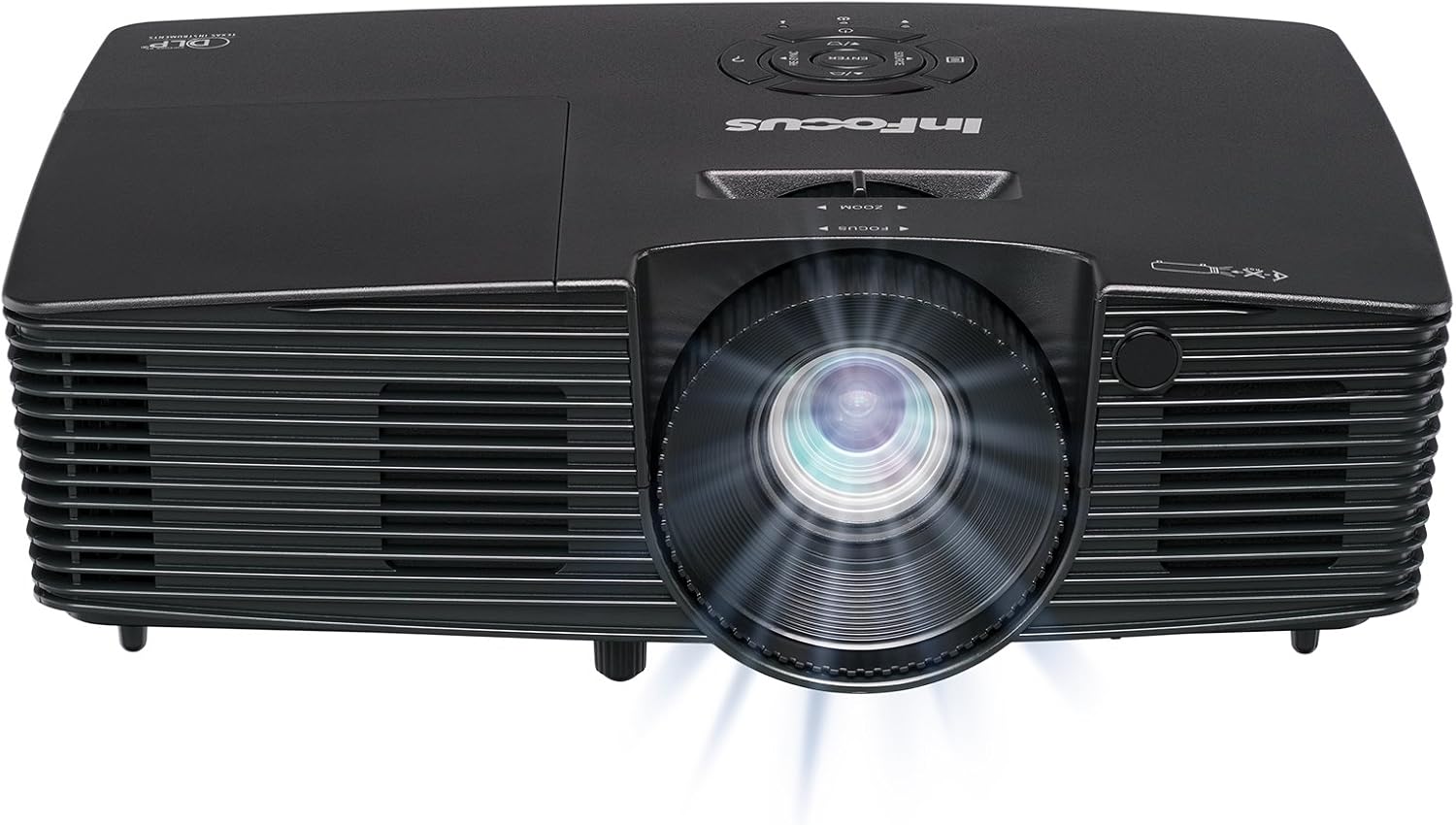
Сүрөт 3.1: Фронт view of the InFocus IN112XV projector. This image highlights the main projection lens and the front ventilation grilles.
3.2 Жогору View жана Башкаруу панели

Сүрөт 3.2: Жогорку view of the InFocus IN112XV projector. The control panel is visible on the right, featuring buttons for power, source selection, menu navigation, keystone adjustment, and volume. The focus and zoom adjustment rings are located around the lens.
The control panel on the top of the projector allows for basic operation without the remote. Key buttons include:
- Күч: Проекторду күйгүзөт же өчүрөт.
- Булак: Жеткиликтүү киргизүү булактары аркылуу айлануу.
- Меню: Экрандагы дисплей (OSD) менюсуна кирет.
- Киргизүү: OSD менюсундагы тандоолорду ырастайт.
- Жебе баскычтары: Navigate menu options and adjust settings.
- Re-Sync: Synchronizes the image.
3.3 Арткы View and Connection Ports

Сүрөт 3.3: Арткы view of the InFocus IN112XV projector. This image displays the available connection ports, including Video In, S-Video In, Computer In (VGA), HDMI, and the power input.
Арткы панель тышкы түзмөктөрдү туташтыруу үчүн ар кандай портторду камсыз кылат:
- Видеодо: For composite video sources.
- S-Video In: For S-Video sources.
- Computer In (VGA): For connecting to computers via VGA cable.
- HDMI: Санариптик видео жана аудио булактары үчүн.
- Кызмат: For service and maintenance purposes.
- Кубат киргизүү: Connects the power cord to an electrical outlet.
3.4 Алыстан башкаруу

Сүрөт 3.4: Remote control for the InFocus IN112XV projector. The remote provides full control over the projector's functions, including power, source selection, menu navigation, keystone correction, and volume.
The remote control offers convenient access to all projector functions. Ensure batteries are correctly installed.
4. Орнотуу
4.1 Орнотуу
Position the projector on a stable, flat surface or mount it securely. Ensure there is adequate space around the projector for ventilation.
4.2 Кубат туташтыруу
- Электр шнурун проектордун электр киргизүү портуна туташтырыңыз.
- Электр шнурунун экинчи учун жерге туташтырылган электр розеткасына сайыңыз.
4.3 Киргизүү булактарын туташтыруу
The projector supports various input sources. Choose the appropriate cable for your device:
- HDMI: Connect an HDMI cable from your source device (e.g., laptop, media player) to the projector's HDMI port.
- VGA (Компьютерде): Connect a VGA cable from your computer to the projector's Computer In port. This is a plug-and-play connection.
- Video In / S-Video In: Use composite video or S-Video cables for older video sources.
- Мобилдик түзмөктөр: To connect an iPad or smartphone, a LightCast Key (sold separately) is required.
5. Иштөө нускамалары
5.1 Күйгүзүү/өчүрүү
- Күйгүзүү үчүн: басыңыз Күч button on the projector's control panel or the remote control. The power indicator light will change.
- Өчүрүү үчүн: басыңыз Күч button again. A confirmation message may appear. Press again to confirm shutdown. Allow the projector to cool down before unplugging.
5.2 Киргизүү булагын тандоо
After connecting your source device, select the correct input:
- басыңыз Булак button on the projector's control panel or the remote control to cycle through available inputs (HDMI, VGA, Video, S-Video).
- Alternatively, use the dedicated input buttons (HDMI, VGA, Video) on the remote control.
5.3 Фокусту жана масштабды тууралоо
For a clear and appropriately sized image, adjust the lens rings:

Сүрөт 5.1: Manual Focus Adjustment. This image illustrates the effect of adjusting the focus ring, transforming a blurry projection into a clear and sharp image.
- Фокус: айлантыңыз Фокус ring on the projector lens until the image appears sharp and clear.
- Чоңойтуу: айлантыңыз Чоңойтуу ring on the projector lens to adjust the size of the projected image.
5.4 Негизги таштарды оңдоо
If the projected image appears trapezoidal (wider at the top or bottom), use keystone correction to square it:
- басыңыз Keystone+ or Keystone- buttons on the remote control to adjust the image geometry.
5.5 Меню Навигациясы
Access the On-Screen Display (OSD) menu for advanced settings:
- басыңыз Меню button on the remote or control panel.
- Меню параметрлери боюнча багыт алуу үчүн жебе баскычтарын колдонуңуз.
- Басыңыз Кириңиз параметрди тандоо же орнотууну ырастоо үчүн.
- Басыңыз Меню again to exit the OSD.
6. Техникалык тейлөө
6.1 Лamp Жашоо
Проектор лamp has an estimated life of over 15,000 hours. When the lamp reaches the end of its life, the projector may display a warning message or the image brightness may significantly decrease. Refer to the full service manual for lamp replacement procedures if necessary.
6.2 Тазалоо
- Проектор Casing: Use a soft, dry cloth to wipe the exterior of the projector. Do not use abrasive cleaners or solvents.
- Объектив: Gently clean the lens with a lens cleaning cloth and specialized lens cleaning solution. Avoid touching the lens surface with your fingers.
- Вентиляция тешиктери: Periodically check and clean the ventilation openings to ensure proper airflow and prevent overheating. Use a soft brush or compressed air to remove dust.
7. Кыйынчылыктарды
Бул бөлүмдө проекторуңузда жолуга турган жалпы маселелер каралат.
| Көйгөй | Мүмкүн себеп | Чечим |
|---|---|---|
| Сүрөт көрсөтүлгөн жок |
|
|
| Сүрөт бүдөмүк |
|
|
| Сүрөт трапеция түрүндө |
|
|
| Projector runs hot or smells of burning plastic |
|
|
| Аудио жок |
|
|
Маанилүү эскертүү: This projector is not recommended for high-definition movie viewing. While it can accept a 1080p input signal, it projects at its native SVGA (800 x 600) resolution.
8. Техникалык шарттар
| Өзгөчөлүк | Деталь |
|---|---|
| Модель номери | IN112XV |
| Дисплей технологиясы | DLP |
| Native Resolution | SVGA (800 x 600) |
| Жарыктык | 3800 Lumens |
| Контраст катышы | 26000:1 |
| Lamp Жашоо | 15,000 саатка чейин |
| Байланыш | HDMI, VGA (Computer In), Video In, S-Video In |
| Өзгөчө өзгөчөлүк | 3D даяр |
| Сунушталган Колдонуулар | Бизнес, билим берүү |
| Продукциянын өлчөмдөрү | 8.8 x 12.4 x 4 дюйм |
| Элемент Салмагы | 5.5 фунт |
9. Кепилдик жана колдоо
9.1 Кепилдик маалыматы
The InFocus IN112XV projector is backed by a 2 жылдык кепилдик. Бул кепилдик нормалдуу колдонуудагы материалдардагы жана жасалгадагы кемчиликтерди камтыйт. Кепилдик дооматтары үчүн сатып алганыңыздын далилин сактап коюңуз.
9.2 Кардарларды колдоо
For technical assistance, troubleshooting beyond this manual, or warranty service, please contact InFocus customer support. Contact information can typically be found on the official InFocus webсайтында же продуктуңузга кошулган документтерде.


