1. Киришүү
Welcome to the user manual for your S.M.S.L Audio Remote Control. This remote is designed to provide convenient control over various S.M.S.L audio devices.
This remote control is compatible with a range of S.M.S.L models, including AD18, SA300, M400, M500, M200, Q5 PRO, DA-8, SH-8, DP3, SK10th, and SU-8. It utilizes infrared (IR) technology to communicate with your audio components.
2. Орнотуу
2.1 Батареяны орнотуу
Your remote control requires two (2) AAA batteries for operation. Please follow these steps to install them:
- Пульттун артындагы батарея отсегин табыңыз.
- Open the battery compartment cover by sliding or pressing the latch.
- Insert two AAA batteries, ensuring correct polarity (+ жана -) бөлүмдүн ичинде көрсөтүлгөндөй.
- Батарея бөлүкчөсүнүн капкагын чыкылдагыча бекем жабыңыз.
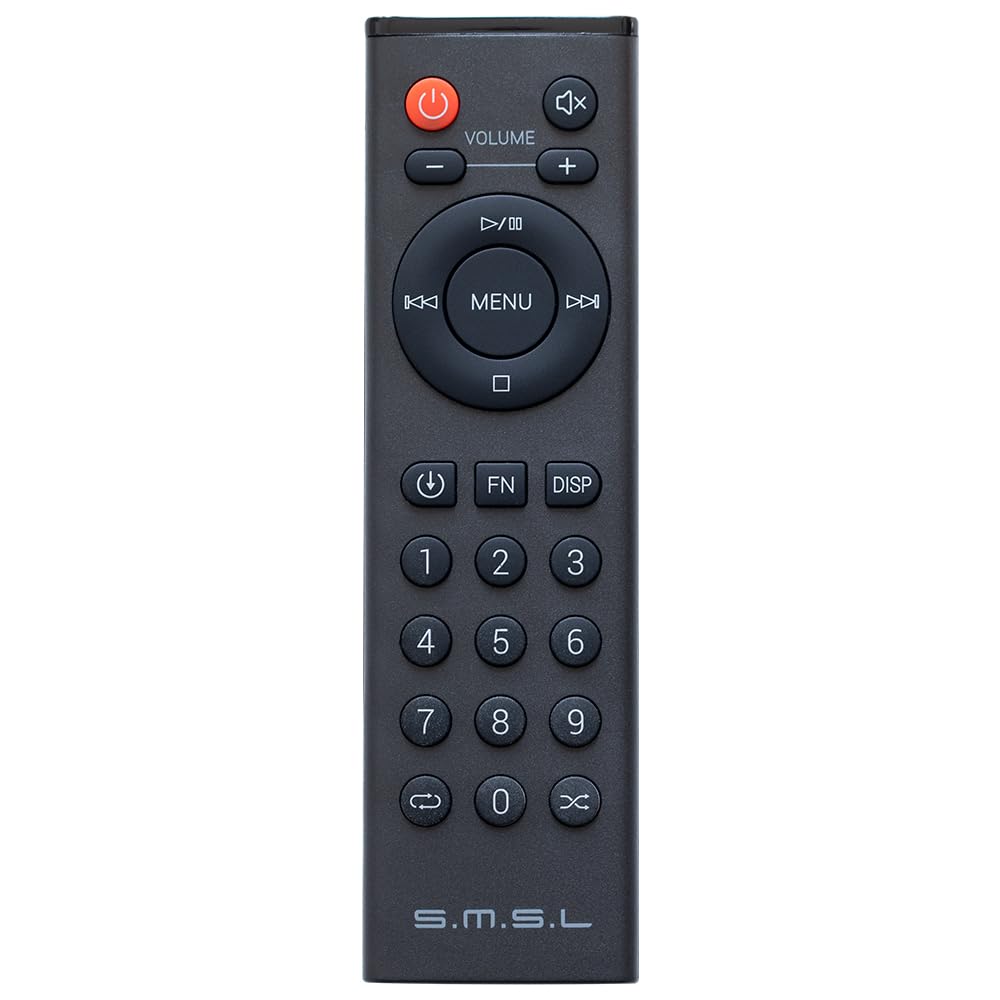
Image: S.M.S.L Audio Remote Control. The back of the remote shows the battery compartment, which requires two AAA batteries.
2.2 Аппаратты тандоо
This remote control features A, B, and C buttons, typically located at the top, to select the specific S.M.S.L device you wish to control. This allows the remote to send the correct commands for different models.
To ensure proper functionality, press the corresponding button (A, B, or C) for your device before attempting to use other functions. If the remote does not respond, verify that the correct device mode is selected.
3. Иштөө нускамалары
3.1 Жалпы колдонуу
Point the remote control directly at the infrared (IR) receiver of your S.M.S.L audio device. Ensure there are no physical obstructions between the remote and the device that could block the signal.
For optimal performance, maintain a clear line of sight. Please note that this remote may be highly directional, requiring precise aiming towards the device's IR sensor.
3.2 Button Functions (General)
The remote control provides various buttons for common functions. While specific button layouts and functions may vary slightly depending on the S.M.S.L device being controlled, typical functions include:
- Кубат баскычы: Turns the connected S.M.S.L device on or off.
- Үнүн жогорулатуу/төмөндөтүү: Adjusts the audio output level of the device.
- Киргизүү/Булакты тандоо: Cycles through available audio inputs (e.g., USB, Optical, Coaxial, Bluetooth).
- Үнсүз баскычы: Аудио чыгыштын үнүн басат.
- Чабыттоо баскычтары (өйдө, ылдый, солго, оңго, OK/Enter): Used for menu navigation and selection on compatible devices with display screens.
- Menu/Setup Button: Accesses the device's settings menu for configuration.
For detailed information on specific button functionality, please refer to the user manual provided with your particular S.M.S.L audio device.
4. Техникалык тейлөө
4.1 Батареяны алмаштыруу
Replace batteries when the remote's response becomes inconsistent, weak, or stops working entirely. Always replace both AAA batteries simultaneously with new, fresh batteries. Do not mix old and new batteries or different battery types.
4.2 Тазалоо
Wipe the remote control with a soft, dry cloth to remove dust and fingerprints. Do not use liquid cleaners, solvents, or abrasive materials, as they may damage the remote's surface, buttons, or internal components.
5. Кыйынчылыктарды
- Пульт жооп бербей жатат:
- Check if the batteries are correctly inserted and have sufficient charge. Replace both batteries if necessary.
- Ensure a clear line of sight between the remote's IR emitter and the S.M.S.L device's IR receiver. Remove any obstructions.
- Verify that the correct device mode (A, B, or C button) is selected for the S.M.S.L audio component you intend to control.
- Poor responsiveness or highly directional operation:
- This remote may require precise aiming. Ensure you are pointing it directly at the device's IR sensor.
- Strong ambient light sources (e.g., direct sunlight, bright fluorescent lights) can sometimes interfere with the IR signal. Try reducing such interference.
- Баскычтар күтүлгөн функцияларды аткарбай жатат:
- Confirm the remote is in the correct device mode (A, B, or C) for your specific S.M.S.L unit.
- Consult the user manual for your specific S.M.S.L audio device to understand its remote control functions and compatibility.
6. Техникалык шарттар
- Продукциянын өлчөмдөрү: 5.91 x 1.38 x 0.43 дюйм (15 x 3.5 x 1.1 см)
- Элемент Салмагы: 1.44 унция (40.8 грамм)
- Батареялар: 2 AAA батарейка (талап кылынат)
- Байланыш технологиясы: Инфракызыл (IR)
- Шайкеш түзмөктөр: S.M.S.L AD18, SA300, M400, M500, M200, Q5 PRO, DA-8, SH-8, DP3, SK10th, SU-8, and other compatible S.M.S.L audio components.
- Өзгөчө өзгөчөлүгү: Эргономикалык дизайн
- Колдоого алынган түзмөктөрдүн максималдуу саны: 3 (via A/B/C selection buttons)
7. Кепилдик жана колдоо
For warranty information or technical support regarding your S.M.S.L Audio Remote Control, please refer to the documentation provided with your S.M.S.L audio device or contact S.M.S.L customer service directly.
You can often find the most up-to-date support information and contact details on the official S.M.S.L webсайт.


