Introduction
Thank you for choosing the Fakir RS 701 Robert L Robot Vacuum Cleaner. This manual provides essential information for the safe and efficient use of your new appliance. Please read these instructions carefully before operating the device and retain them for future reference. The Fakir RS 701 Robert L is designed to automate floor cleaning, offering features such as stair detection, virtual wall functionality, and suitability for various floor types.
Коопсуздук нускамалары
To reduce the risk of fire, electric shock, or injury, always observe basic safety precautions when using electrical appliances.
- Ensure the power adapter and charging station are placed in a dry area, away from water or moisture.
- Do not operate the robot vacuum if it has been dropped, damaged, left outdoors, or dropped into water.
- Чачты, кенен кийимдерди, манжаларды жана дененин бардык бөлүктөрүн тешиктерден жана кыймылдуу бөлүктөрдөн алыс кармаңыз.
- Чоң же курч буюмдарды, суюктуктарды же күйүп жаткан/түтөп жаткан материалдарды көтөрбөңүз.
- Робот чаң соргуч иштеп жатканда балдарды жана үй жаныбарларын көзөмөлдөңүз.
- Use only the manufacturer-specified charging station and power adapter.
- Before cleaning or maintenance, ensure the robot is turned off and disconnected from the power source.
- Do not use the appliance in areas with flammable or combustible liquids.
Пакеттин мазмуну
Кутучаны кылдаттык менен ачып, төмөндө көрсөтүлгөн бардык буюмдардын бар экенин жана жакшы абалда экенин текшериңиз.
- Fakir RS 701 Robert L Robot Vacuum Cleaner
- Кубаттоочу станция
- Кубаттуу адаптер
- Алыстан башкаруу
- Моп тиркеме
- Мотор коргоо чыпкасы
- Ushетка түрмөгү
- Rubber Roll
- Каптал щеткалар (топтом)
- Чаң чыпкасы
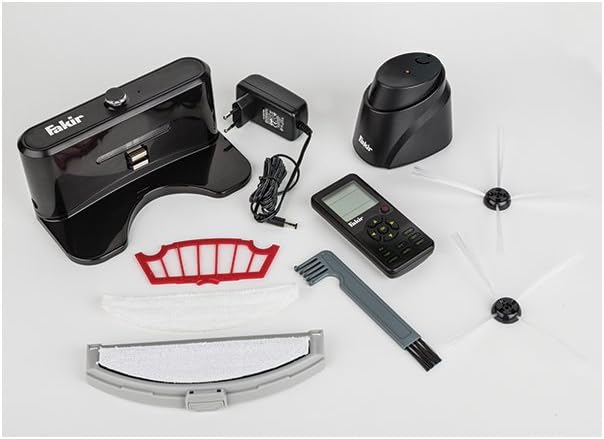
Image: All components included with the Fakir RS 701 Robot Vacuum Cleaner, showing the robot, charging station, remote, brushes, filters, and mop attachment.
Продукт бүттүview
The Fakir RS 701 Robert L is a circular robot vacuum cleaner designed for automated floor cleaning. It features a main body with a dustbin, cleaning brushes, sensors, and a control panel. A remote control is provided for convenient operation.
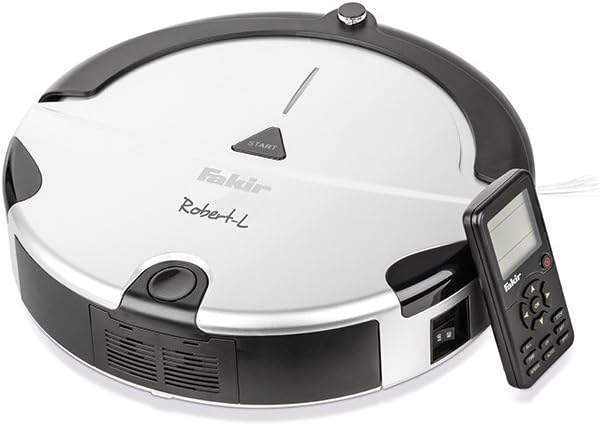
Image: The Fakir RS 701 Robert L Robot Vacuum Cleaner, showing its top panel with 'START' button and the included remote control.

Image: The Fakir RS 701 Robert L Robot Vacuum Cleaner positioned next to its charging station.
Негизги компоненттер:
- Негизги блок: Houses the motor, dustbin, battery, and control electronics.
- Каптал щеткалар: Two rotating brushes that sweep debris into the vacuum's path.
- Main Brush/Rubber Roll: Collects dirt from the floor.
- контейнери: Чаң сорулган таштандыларды чогултат.
- Сенсорлор: Detect obstacles, stairs, and the charging station.
- Заряддоо байланыштары: Located on the underside of the robot and on the charging station.
- Алыстан башкаруу: For manual control and programming.
Жайгашуу
- Заряддоо станциясын жайгаштыруу: Place the charging station against a wall in an open area, ensuring there are no obstacles for at least 1 meter (3 feet) to the sides and 2 meters (6 feet) in front. Connect the power adapter to the charging station and plug it into a wall outlet.
- Алгачкы заряддоо: Place the robot vacuum onto the charging station. Ensure the charging contacts on the robot align with those on the station. The robot should begin charging automatically. For first use, charge the robot for at least 4-6 hours or until the charging indicator shows a full charge.
- Каптал щеткаларды орнотуу: Gently push the side brushes onto their respective posts on the underside of the robot until they click into place.
- Тазалоо аянтын даярдоо: Before operation, remove any loose cables, small objects, or fragile items from the floor to prevent entanglement or damage.
Иштөө нускамалары
Starting a Cleaning Cycle:
- Кол менен баштоо: Press the 'START' button on the top of the robot or the corresponding button on the remote control. The robot will begin cleaning in its default mode.
- Пландаштырылган тазалоо: Use the remote control to set a cleaning schedule. Refer to the remote control section for detailed programming instructions.
Тазалоо режимдери:
The Fakir RS 701 Robert L offers various cleaning modes to suit different needs. These can typically be selected via the remote control.
- Автоматтык тазалоо: The robot navigates and cleans automatically.
- Четтерин тазалоо: Робот дубалдарды жана эмеректердин четтерин тазалайт.
- Тазалоо: Робот белгилүү бир аймакты спираль түрүндө тазалайт.
- Mop Function: Attach the mop attachment for light dust wiping on hard floors. Ensure the mop is damp, нымдуу эмес.
Өзгөчөлүктөр:
- Stair Detection: Integrated sensors prevent the robot from falling down stairs or off ledges.
- Virtual Wall (Room Separator): Use the virtual wall accessory (if included or purchased separately) to create invisible barriers, preventing the robot from entering specific areas.
- Автоматтык түрдө заряддоо: When the battery is low or a cleaning cycle is complete, the robot will automatically return to its charging station.
Алыстан башкарууну колдонуу:
The remote control allows for full command over the robot's functions.
- Багыт баскычтары: Роботту кол менен башкарыңыз.
- Баштоо/тындыруу баскычы: Begin or pause a cleaning cycle.
- Үй баскычы: Send the robot back to its charging station.
- Режим тандоо: Choose between different cleaning modes (Auto, Edge, Spot).
- Пландоо баскычы: Set daily cleaning times. Consult the remote control's specific instructions for programming details.
Техникалык тейлөө
Regular maintenance ensures optimal performance and extends the lifespan of your robot vacuum. Always turn off the robot and disconnect it from the charging station before performing any maintenance.
1. Emptying the Dustbin:
- Таштанды урнасын чыгаруу баскычын басып, таштанды челектерин чыгарыңыз.
- Open the dustbin lid and empty its contents into a trash receptacle.
- Зарыл болсо, кайра салаардан мурун, таштанды челектин толугу менен кургаганын текшерип, суу менен чайкаңыз.
2. Чыпкаларды тазалоо:
- Remove the dust filter and motor protection filter from the dustbin.
- Tap the filters to remove loose dirt. For thorough cleaning, rinse them under running water.
- Allow filters to air dry completely for at least 24 hours before reinstallation. Do not use a dryer.
3. Cleaning Brushes:
- Каптал щеткалар: Pull the side brushes off their posts. Remove any hair or debris wrapped around them. If damaged, replace them.
- Main Brush/Rubber Roll: Remove the brush cover and lift out the main brush and rubber roll. Use the cleaning tool (if provided) to cut and remove tangled hair or fibers.
4. Cleaning Sensors and Charging Contacts:
- Wipe the cliff sensors (located on the underside) and charging contacts (on the robot and charging station) with a clean, dry cloth.
- Ensure the drive wheels are free of debris.
5. Mop Attachment:
- Remove the mop attachment after each use.
- Wash the mop cloth by hand or machine. Allow it to air dry completely.
Проблемаларды чечүү
If your Fakir RS 701 Robert L encounters issues, refer to the following common problems and solutions.
| Көйгөй | Мүмкүн себеп | Чечим |
|---|---|---|
| Робот башталбайт же жооп бербейт. | Батарея аз; Кубат өчүргүч өчүрүлгөн; Алыстан башкаруу пультунун батареялары түгөнгөн. | Charge the robot; Ensure the main power switch is on; Replace remote control batteries. |
| Робот заряддоо станциясына кайтып келбейт. | Charging station obstructed; Robot too far from station; Charging contacts dirty. | Ensure clear path to station; Manually place robot on station; Clean charging contacts on both robot and station. |
| Начар тазалоо көрсөткүчү. | Full dustbin; Clogged filters; Tangled brushes; Worn side brushes. | Empty dustbin; Clean or replace filters; Clean main and side brushes; Replace worn side brushes. |
| Робот бат-баттан тыгылып калат. | Тоскоолдуктар (кабелдер, килемчелер); Кир аска сенсорлору. | Clear the cleaning area of obstacles; Clean all sensors. |
| Remote control programming is difficult. | Unfamiliarity with interface; Incorrect button sequence. | Refer to the specific remote control section in this manual or the quick start guide for detailed programming steps. Practice the sequence. |
Техникалык шарттар
| Бренд | Факир |
| Модель номери | RS 701 Robert L |
| Күч | 45 Ватт |
| Тtage | 7 вольт |
| Батарея түрү | Литий-ион |
| Батарея автономиясы | 2 саатка чейин (120 мүнөт) |
| Продукциянын өлчөмдөрү (L x W x Y) | 32 x 32 x 9 см |
| Элемент Салмагы | 3.2 килограмм |
| Өзгөчөлүктөрү | Cordless, Stair Detection, Room Separator Function, Automatic Charging |
Кепилдик жана колдоо
For warranty information and customer support, please refer to the warranty card included with your product or visit the official Fakir webсайт. Сатып алганыңыздын далили катары сатып алуу дүмүрчөгүңүздү сактаңыз.
If you encounter issues not covered in this manual, please contact Fakir customer service for assistance.


