1. Киришүү
This manual provides essential information for the safe and efficient operation of your Roadstar TSPK-990CDBT Portable Stereo System. Please read these instructions thoroughly before using the device and retain them for future reference. The TSPK-990CDBT is a versatile multimedia tower speaker featuring CD playback, FM radio, Bluetooth connectivity, USB playback, and an AUX-in port.
2. Коопсуздук маалыматы
- Кубат булагы: электр менен жабдууну камсыз кылуу voltage matches the requirements specified on the unit. Use only the provided power adapter.
- Вентиляция: Желдетүү тешиктерин жаппаңыз. Аба агымынын туура болушу үчүн түзмөктүн айланасында жетиштүү орун калтырыңыз.
- Суу жана ным: Аппаратты жамгырга, нымга же тамчылатуучу/чачыраган суюктуктарга тийгизбеңиз. Ваза сыяктуу суюктуктар толтурулган нерселерди аппараттын үстүнө койбоңуз.
- Жылуулук: Аппаратты радиаторлор, жылуулук регистрлери, мештер же башка аппараттар (анын ичинде) сыяктуу жылуулук булактарынан алыс кармаңыз. ampкөтөргүчтөр) жылуулукту пайда кылуучу.
- Тазалоо: Тазалоодон мурун блокту розеткадан сууруп алыңыз. Жумшак, кургак чүпүрөктү колдонуңуз. Суюк тазалагычтарды же аэрозоль тазалагычтарды колдонбоңуз.
- Тейлөө: Бул продуктту өзүңүз тейлөөгө аракет кылбаңыз. Бардык тейлөөнү квалификациялуу тейлөө кызматкерлерине тапшырыңыз.
- CD ойноткуч: This product utilizes a Class 1 laser. Do not open the CD compartment while a disc is playing.
3. Пакеттин мазмуну
Кутучаны этияттык менен ачып, бардык буюмдардын бар экенин жана жакшы абалда экенин текшериңиз. Эгерде кандайдыр бир буюмдар жок болсо же бузулуп калса, сатуучуга кайрылыңыз.
- Roadstar TSPK-990CDBT Main Unit
- Алыстан башкаруу
- AC кубат адаптери
- Audio Cable (3.5mm to RCA)
- Mounting Screws for Base (if applicable)

3.1-сүрөт: Included accessories: remote control, power adapter, and audio cable.
4. Продукт бүтүп калдыview
4.1 Алдыңкы жана үстүнкү панели
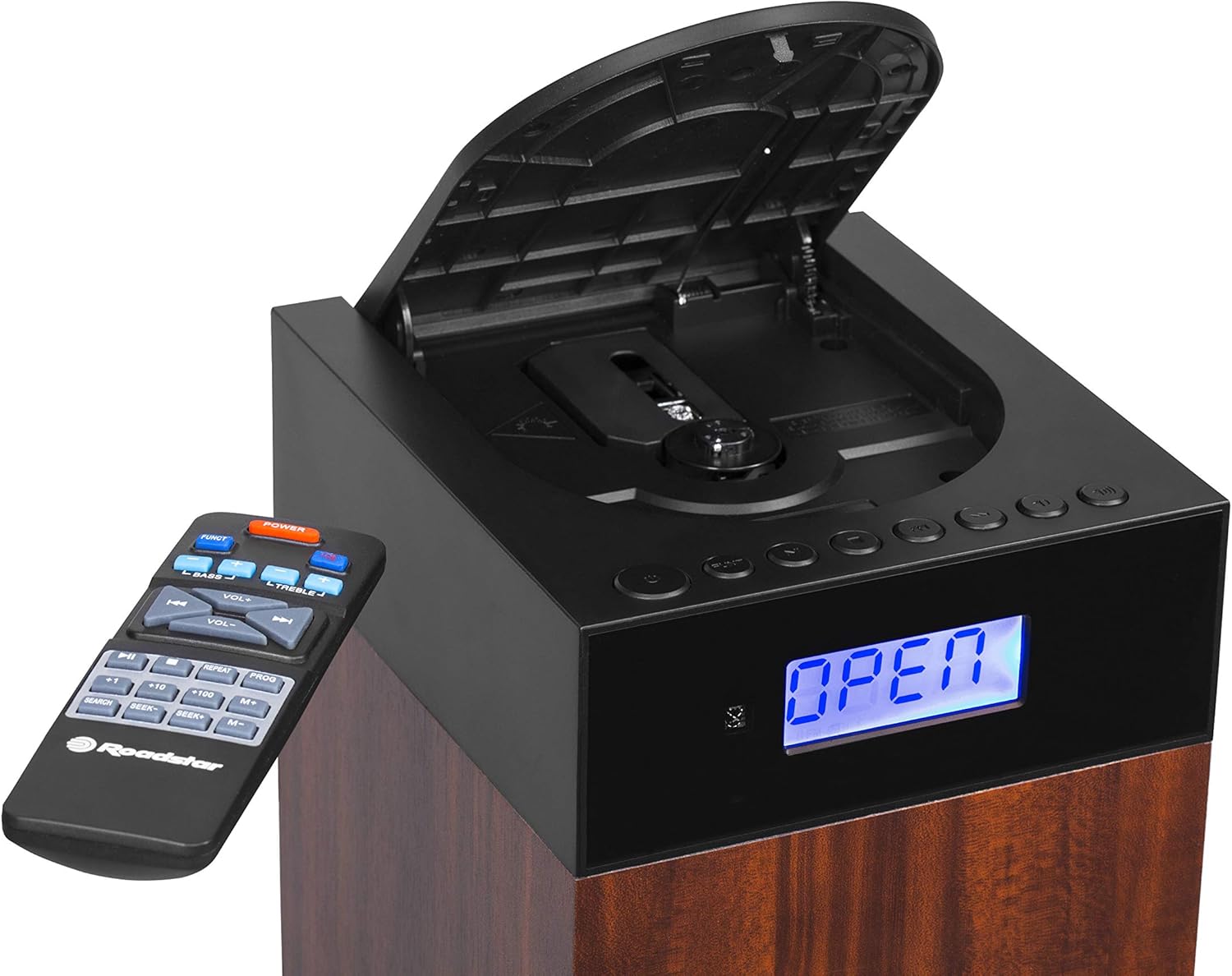
4.1-сүрөт: Фронт view showing the LCD display, control buttons, and open CD compartment.
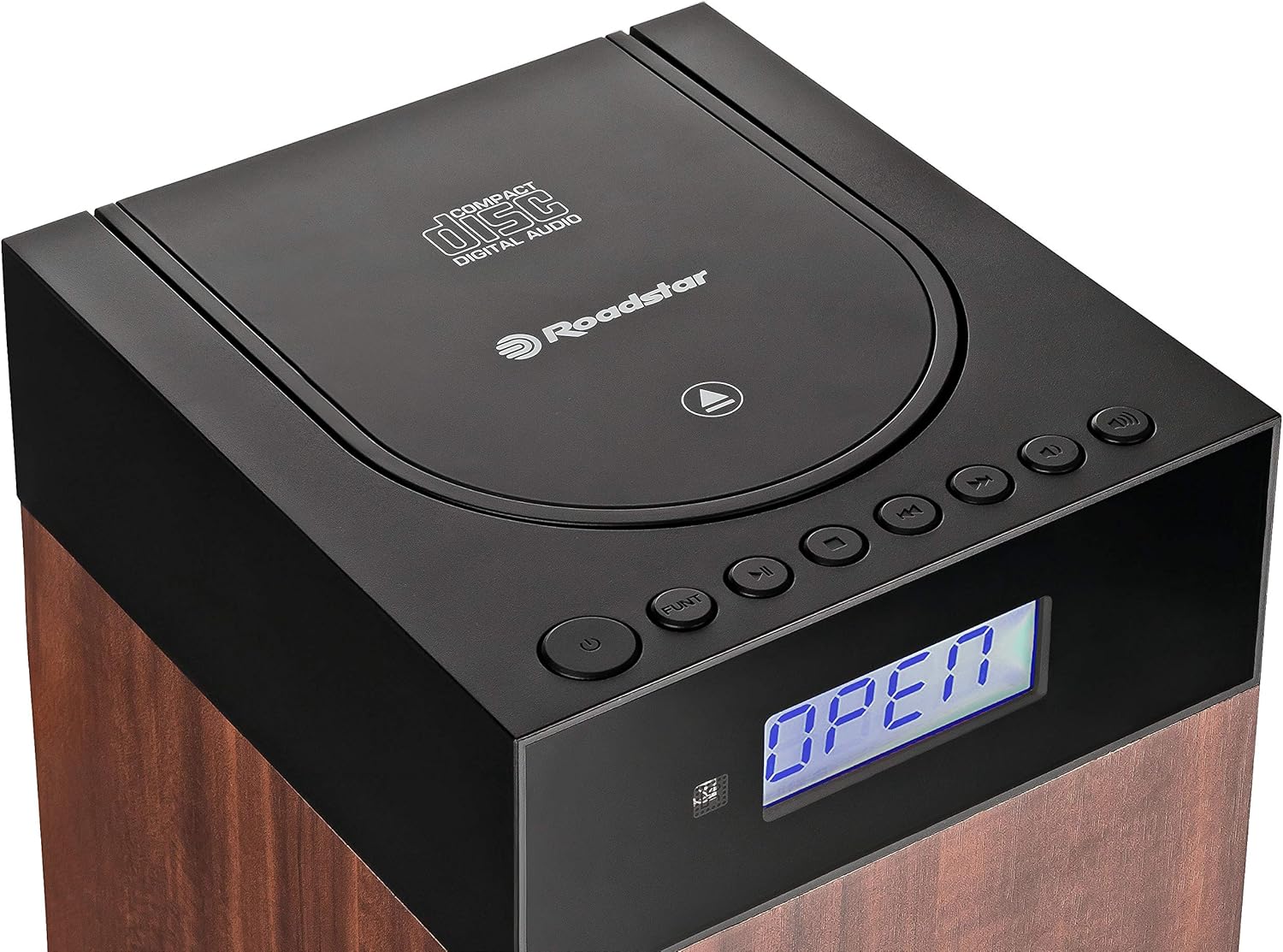
4.2-сүрөт: Жогорку view showing the CD compartment lid and main controls.
The front panel features an LCD display for status information and mode indicators. The top section houses the CD player compartment and primary control buttons such as Power, Function, Play/Pause, Skip, and Volume.
4.2 Арткы панелдин туташуулары

4.3-сүрөт: Rear panel connections: DC IN, Power ON/OFF switch, USB port, and AUX IN.
The rear panel includes the DC IN port for power, a master ON/OFF switch, a USB port for media playback, and an AUX IN port for connecting external audio devices.
5. Орнотуу
5.1 Пакеттен чыгаруу жана жайгаштыруу
- Бирдикти жана бардык аксессуарларды таңгактан чыгарыңыз.
- Place the stereo system on a stable, flat surface. Ensure there is sufficient space around the unit for ventilation.
- Avoid placing the unit near heat sources, direct sunlight, or areas with high humidity or dust.
5.2 Кубат туташтыруу
- Connect the supplied AC power adapter to the DC IN port on the rear of the unit.
- Электр адаптеринин экинчи учун стандарттуу розеткага сайыңыз.
- Ensure the master ON/OFF switch on the rear panel is in the 'ON' position.
5.3 Алыстан башкаруунун батареясын орнотуу
- Алыстан башкаруу пультунун артындагы батарея бөлүмүнүн капкагын ачыңыз.
- Insert two AAA batteries (not included) according to the polarity markings (+ and -) inside the compartment.
- Батарея уясынын капкагын бекем жабыңыз.
6. Иштөө нускамалары
6.1 Күйгүзүү/өчүрүү жана режимди тандоо
- басыңыз КҮЧ системаны күйгүзүү же өчүрүү үчүн түзмөктөгү же алыстан башкаруу пультундагы баскычты басыңыз.
- басыңыз ФУНКЦИЯ button repeatedly to cycle through available modes: CD, FM, Bluetooth, USB, AUX. The selected mode will be displayed on the LCD.
6.2 CD ойнотуу
- басыңыз ФУНКЦИЯ баскычын басып, CD режимин тандаңыз.
- Түзмөктүн үстүнкү жагындагы CD бөлүмүнүн капкагын акырын ачыңыз.
- Place a CD (CD-DA, CD-R, or CD-RW) with the label side facing up onto the spindle.
- Close the CD compartment lid. The unit will read the disc, and playback should begin automatically.
- колдонуу ОЙНОО/ТЫНЫТТЫРУ ойнотууну тындыруу же улантуу үчүн баскыч.
- басыңыз АЛГА ӨТҮҢҮЗ or АРТКА ӨТКӨРҮҮ тректер арасында өтүү үчүн баскычтар.
- колдонуу КАЙТАЛОО button to repeat the current track or the entire disc.
- колдонуу RANDOM button for shuffled playback.
6.3 FM радиосунун иштеши
- басыңыз ФУНКЦИЯ FM режимин тандоо үчүн баскыч.
- For automatic station search, press and hold the ОЙНОО/ТЫНЫТТЫРУ баскычы (же SCAN on remote). The radio will scan and save available stations.
- Кол менен тууралоо үчүн, колдонуңуз АЛГА ӨТҮҢҮЗ or АРТКА ӨТКӨРҮҮ жыштыкты жөндөө үчүн баскычтар.
- To save a preset, tune to the desired station, then press the ПРОГ баскыч, колдонуу ӨТКӨРҮҮ алдын ала коюлган номерди тандоо үчүн баскычтарды басыңыз жана ПРОГ ырастоо үчүн дагы.
- Алдын ала коюлган орнотууну эстеп калуу үчүн, колдонуңуз M+ or M- пульттагы баскычтар.
6.4 Bluetooth байланышы

6.1-сүрөт: Зымсыз аудио агымы үчүн Bluetooth байланышы.
- басыңыз ФУНКЦИЯ button to select Bluetooth mode. The LCD will display "BT" or a similar indicator, and the unit will enter pairing mode.
- Bluetooth иштетилген түзмөгүңүздө (мисалы, смартфон) Bluetooth'ду иштетиңиз жана жеткиликтүү түзмөктөрдү издеңиз.
- Select "TSPK-990CDBT" from the list of devices.
- Once paired, you can play audio from your device through the stereo system.
- Control playback (Play/Pause, Skip) using your connected device or the remote control.
6.5 USB ойнотуу
- Insert a USB flash drive containing MP3, WMA, or WAV audio fileарткы панелдеги USB портуна сайыңыз.
- басыңыз ФУНКЦИЯ USB режимин тандоо үчүн баскыч.
- Playback should begin automatically. If not, use the ОЙНОО/ТЫНЫТТЫРУ баскычы.
- колдонуу АЛГА ӨТҮҢҮЗ or АРТКА ӨТКӨРҮҮ тректер арасында өтүү үчүн баскычтар.
6.6 AUX-ин туташуу
- Connect one end of the supplied audio cable (or a standard 3.5mm audio cable) to the headphone jack or line-out port of your external audio device.
- Connect the other end of the cable to the AUX IN port on the rear panel of the stereo system.
- басыңыз ФУНКЦИЯ AUX режимин тандоо үчүн баскычты басыңыз.
- Play audio from your external device. The sound will be output through the stereo system.
6.7 Алыстан башкарууну колдонуу
The remote control provides full functionality for the stereo system. Point the remote control towards the front of the main unit. Ensure there are no obstructions between the remote and the unit.
- КҮЧ: Аппаратты күйгүзөт/өчүрөт.
- FUNC: Selects the input source (CD, FM, BT, USB, AUX).
- VOL +/-: Үн деңгээлин тууралайт.
- BASS +/-: Басс деңгээлин тууралайт.
- TREBLE+/-: Үчтүк деңгээлди тууралайт.
- ОЙНОТУУ/ТЫНДЫРУУ (►/−): Play/Pause for CD/USB/BT. Scan for FM.
- SKIP (◀◀/►►): Skips tracks/files. Tunes FM frequency.
- STOP (■): Stops CD/USB playback.
- КАЙТАЛОО: Учурдагы тректи же бардык тректерди кайталайт.
- ПРОГ: Programs FM presets or CD playback order.
- М+/М-: Recalls saved FM presets.
- ИЗДӨӨ: Initiates auto-scan for FM stations.
7. Техникалык тейлөө
7.1 Агрегатты тазалоо
Wipe the exterior of the unit with a soft, dry cloth. Do not use abrasive cleaners, waxes, or solvents as they may damage the finish. Ensure the unit is unplugged before cleaning.
7.2 CDге кам көрүү
Handle CDs by their edges. Keep them clean and free of scratches. If a CD is dirty, wipe it gently with a soft, lint-free cloth from the center outwards. Do not use harsh chemicals.
7.3 Сактоо
If the unit will not be used for an extended period, unplug it from the power outlet and store it in a cool, dry place, away from direct sunlight and extreme temperatures.
8. Кыйынчылыктарды
If you encounter problems with your stereo system, refer to the following table for possible solutions.
| Көйгөй | Мүмкүн себеп | Чечим |
|---|---|---|
| Күч жок | Power adapter not connected; Master switch OFF; Power outlet faulty. | Check power adapter connection; Ensure master ON/OFF switch is ON; Try a different power outlet. |
| Үн жок | Volume too low; Mute activated; Incorrect input mode selected. | Increase volume; Check if mute is active; Select the correct input mode (CD, FM, BT, USB, AUX). |
| CD ойнобой жатат | CD inserted incorrectly; CD dirty or scratched; CD compartment not closed. | Insert CD with label side up; Clean or replace CD; Ensure CD lid is fully closed. |
| Bluetooth туташпай жатат | Unit not in Bluetooth mode; Device not in pairing mode; Device too far. | Select Bluetooth mode on the unit; Ensure your device's Bluetooth is on and discoverable; Move device closer to the unit. |
| FM кабыл алуу начар | Антенна узартылбаган же туура эмес жайгаштырылган; Интерференция. | Adjust the position of the FM antenna wire; Move the unit away from other electronic devices. |
| Пульт иштебей жатат | Батареялар түгөндү же туура эмес салынды; Пульт менен блоктун ортосундагы тоскоолдук. | Replace batteries, ensuring correct polarity; Remove any obstructions; Point remote directly at the unit. |
9. Техникалык шарттар
| Өзгөчөлүк | Спецификация |
|---|---|
| Модель номери | TSPK-990CDBT |
| Бренд | Roadstar |
| Өлчөмдөрү (L x W x Y) | 17 x 20 x 100 см |
| Салмагы | 6.6 кг |
| Power Output | 55 Ватт |
| Байланыш | Bluetooth, USB, Auxiliary (3.5mm) |
| Динамик түрү | Multimedia Tower |
| Power Source | AC (өзгөрмө ток) |
| Шайкеш түзмөктөр | Smartphone, CD players, USB drives |
| CD Playback Formats | CD-DA, CD-R, CD-RW |
| USB ойнотуу форматтары | MP3, WMA, WAV |
| Радио тюнер | Digital FM with PLL |
10. Кепилдик жана колдоо
This product is covered by a manufacturer's warranty. Please refer to the warranty card included with your purchase or visit the official Roadstar website for detailed warranty terms and conditions. For technical support, service inquiries, or replacement parts, please contact Roadstar customer service through their official channels.
You can find more information and support on the official Roadstar webсайт: Roadstar Official Store


