1. Киришүү
This manual provides essential instructions for the safe and effective use of your AdirOffice Electronic Pistol Safe. Please read this manual thoroughly before installation and operation to ensure proper functionality and security. Keep this manual for future reference.
Коопсуздук маалыматы
- Ок атуучу куралдарды ар дайым ок-дарылардан өзүнчө жана зарядсыз сактаңыз.
- Keep the safe locked and the access code confidential.
- Do not store the override keys inside the safe. Keep them in a secure, separate location.
- Уруксатсыз алып кетүүнү алдын алуу үчүн сейфтин бекем орнотулганын текшериңиз.
- This safe is designed to deter theft and unauthorized access, but it is not impenetrable.
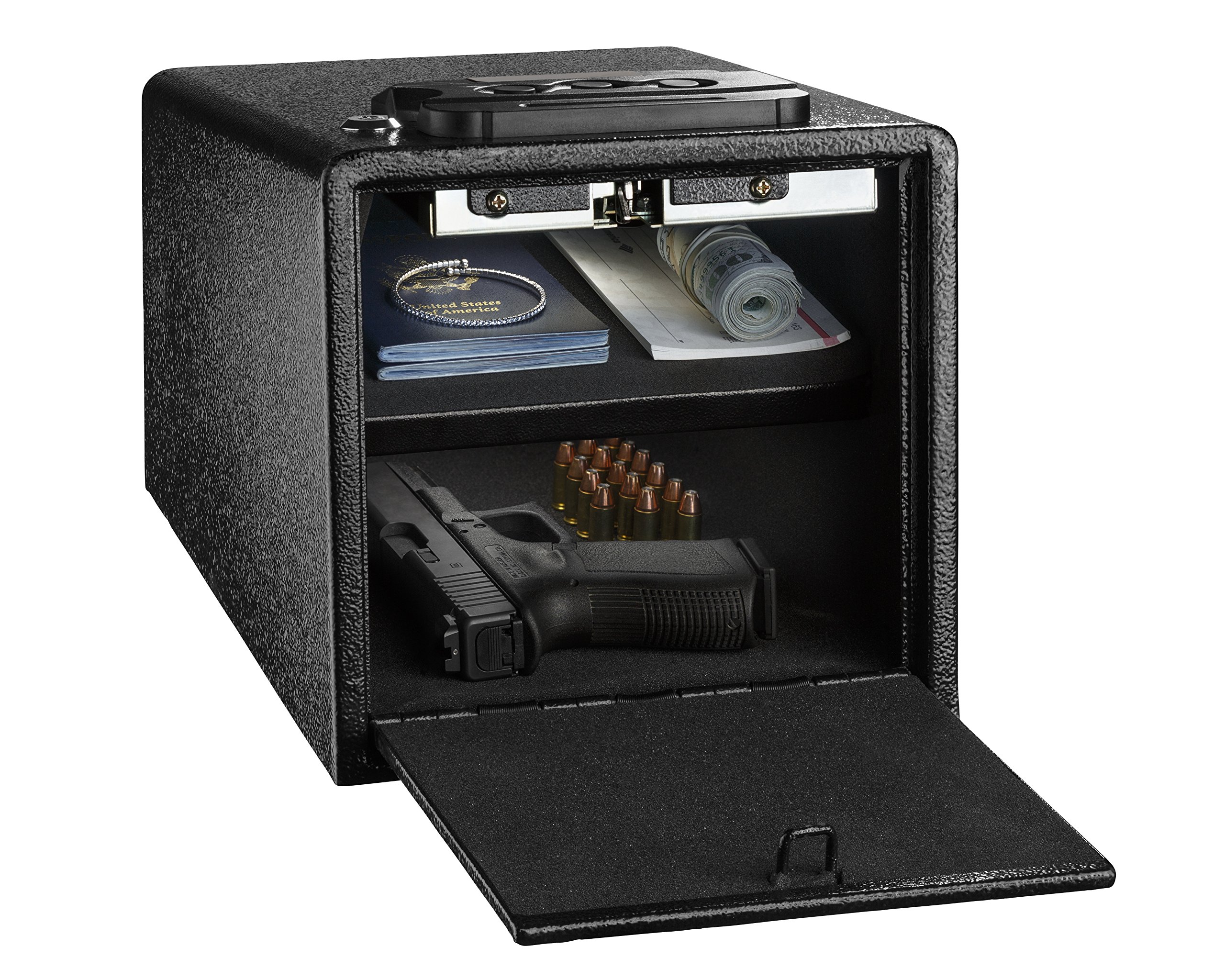
Image 1.1: AdirOffice Electronic Pistol Safe, open to show interior storage.
2. Пакеттин мазмуну
Төмөндө тизмеленген нерселердин баары пакетиңизге камтылганын текшериңиз:
- AdirOffice Electronic Pistol Safe
- Ачкычтарды жокко чыгаруу (2)
- Mounting Screws (for installation)
- Көрсөтмө (бул документ)
- Foam Lining (pre-installed inside the safe)
3. Орнотуу
3.1 Батареяны орнотуу
- Locate the battery compartment, typically on the inside of the safe door or on the back panel of the keypad.
- Insert the required number of AA batteries (not included), ensuring correct polarity (+/-).
- Батарея уясынын капкагын бекем жабыңыз.
Эскертүү: If the batteries are low, the safe may not retain the programmed code. Replace batteries promptly when the low battery indicator appears or if the keypad becomes unresponsive.
3.2 Сейфти орнотуу
For enhanced security, it is recommended to mount the safe to a strong horizontal or vertical surface.
- Choose a suitable location for mounting, such as a shelf, floor, or wall stud.
- Open the safe door to access the pre-drilled mounting holes located at the bottom or back of the safe.
- Position the safe and mark the drilling points on the chosen surface through the pre-drilled holes.
- Белгиленген чекиттерде бетке тешиктерди бургулаңыз.
- Align the safe with the pilot holes and secure it using the provided mounting screws. Tighten all screws firmly.

Image 3.1: Illustration of the safe's mounting points for secure installation.

Сүрөт 3.2: Мисample of safe placement on a shelf.
4. Иштөө нускамалары
4.1 Колдонуучу кодуңузду орнотуу
- With the safe door open, locate the red or green reset button on the inside of the door or near the battery compartment.
- Press the reset button. You should hear a beep, and the indicator light on the keypad will illuminate.
- 5 секунданын ичинде клавиатурадан каалаган 3-8 орундуу кодду киргизиңиз.
- Press the '#' or 'ENTER' button to confirm. You should hear a confirmation beep.
- Сейфти жабуудан мурун жаңы кодду анын туура иштешин текшерүү үчүн ачык эшик менен текшериңиз.
4.2 Сейфти кодуңуз менен ачуу
- Enter your programmed 3-8 digit user code on the keypad.
- Press the '#' or 'ENTER' button.
- The safe door will spring open automatically.
4.3 Opening the Safe with Override Keys
In case of forgotten code, dead batteries, or electronic malfunction, the safe can be opened using the override keys.
- Locate the keyhole, usually concealed behind a small cover on the keypad panel.
- Remove the cover and insert one of the override keys.
- Turn the key clockwise while simultaneously turning the handle or allowing the door to spring open.
- Remove the key and store it in a secure location, separate from the safe.

Image 4.1: Safe interior with foam lining for protection.
Image 4.2: The safe features an alarm for incorrect code entries.
5. Техникалык тейлөө
5.1 Батареяны алмаштыруу
Replace batteries annually or when the low battery indicator light illuminates. Always use new, high-quality AA alkaline batteries.
- Open the safe using your code or the override key.
- Батарея бөлүкчөсүн табыңыз.
- Эски батарейкаларды алып чыгып, аларды туура жок кылыңыз.
- Туура полярдуулукту камсыз кылуу менен жаңы батарейкаларды салыңыз.
- Батарея отсегин жабыңыз.
5.2 Тазалоо
Сейфтин сыртын жумшак, d менен тазалаңызamp кездеме. Абразивдүү тазалагычтардан же эриткичтерден алыс болуңуз, алар жасалгага же электрондук компоненттерге зыян келтирет.
6. Кыйынчылыктарды
- Сейф код менен ачылбайт:
- Ensure batteries are fresh and installed correctly. Replace if necessary.
- Re-enter the code carefully, ensuring each digit is pressed firmly.
- If the code was recently changed, try the old code or reset the code following Section 4.1.
- Use the override key to open the safe and then re-program your code.
- Code does not 'stay' or resets:
- This is often an indication of low batteries. Replace all batteries with new ones.
- Ensure the code programming steps (Section 4.1) are followed precisely, including pressing '#' or 'ENTER' to confirm.
- Door mechanism gets stuck or does not open smoothly:
- Check for any obstructions around the door or inside the safe that might be preventing smooth operation.
- Ensure the safe is mounted on a flat, stable surface and not warped or under stress.
- Эгер көйгөй чечилбесе, кардарларды колдоо менен байланышыңыз.
- Баскычтоп жооп бербейт:
- Батареяларды алмаштырыңыз.
- If still unresponsive, use the override key to open the safe and contact customer support.
7. Техникалык шарттар
| Өзгөчөлүк | Деталь |
|---|---|
| Модель номери | 671-100-BLK |
| Өндүрүүчү | AdirOffice |
| Кулпу түрү | Электрондук баскычтоп кулпусу |
| Материал | Эритме болот |
| Түс | Кара |
| Сырткы өлчөмдөрү (Т x Т x Б) | 8.7" x 11.8" x 6.8" (болжол менен 22.1 x 27.43 x 17.27 см) |
| Ички өлчөмдөрү (D x W x Y) | 11.0" x 7.9" x 6.9" (approximate, based on product images) |
| Элемент Салмагы | 5.35 кг (11.79 фунт) |
| Монтаж түрү | Полго орнотуу, дубалга орнотуу |
| Power Source | AA батарейкалар (киргизилген эмес) |

Image 7.1: Safe dimensions overview.
8. Кепилдик жана колдоо
For warranty information or technical support, please contact AdirOffice customer service. Refer to the product packaging or the official AdirOffice webакыркы байланыш маалыматы үчүн сайт.


