1. Киришүү
The Marantz ND8006 is a versatile digital media player designed to integrate various audio sources into a single unit. It functions as a CD player, network music streamer, digital-to-analog converter (DAC), and pre-amplifier. This device supports playback from physical CDs, local USB storage, and online services including streaming platforms and Internet radio. It incorporates HEOS multi-room audio technology, Apple AirPlay, and Bluetooth connectivity.
The ND8006 features Marantz's unique Musical Digital Filtering (MMDF) technology, audiophile-grade DACs, and HDAM (Hyper Dynamic Amplifier Module) circuitry to ensure precise handling of digital audio signals, resulting in high-resolution sound reproduction. It also includes a dedicated headphone amplifier with HDAM-SA2 and gain control. The unit can connect directly to powered speakers or a power amplifier via its variable level output, allowing it to serve as a multi-source digital player and pre-ampөмүрлүү.
2. Кутуда эмне бар
Төмөндө тизмеленген нерселердин баары пакетиңизге камтылганын текшериңиз:
- Marantz ND8006 Digital Media Player
- Алыстан башкаруу
- Алыстан башкаруу үчүн AA батарейкалары (x2)
- Электр кабели
- Audio Cables (if applicable, check packaging)
- Wireless Antennas (x2)
3. Орнотуу
3.1 Пакеттен чыгаруу жана жайгаштыруу
Carefully remove the ND8006 from its packaging. Place the unit on a stable, level surface with adequate ventilation to prevent overheating. Avoid placing it near heat sources or in direct sunlight.
3.2 Антенналарды туташтыруу
Attach the two supplied wireless antennas to the antenna terminals on the rear panel of the ND8006. Ensure they are securely tightened and positioned vertically for optimal Wi-Fi and Bluetooth reception.
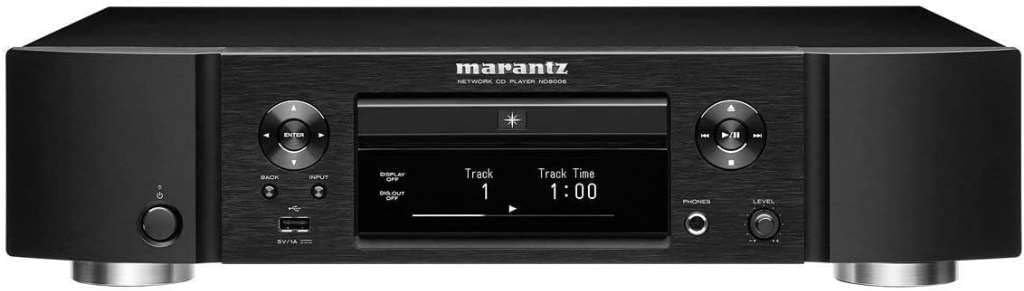
Сүрөт 1: Алдыңкы view of the Marantz ND8006 Digital Media Player.
3.3 Кубат туташтыруу
Connect the supplied power cord to the AC inlet on the rear of the ND8006, then plug the other end into a suitable wall outlet. Ensure the unit's power switch is in the OFF position before connecting.
3.4 Аудио байланыштар
The ND8006 offers various output options:
- Analog Output (Fixed/Variable): а туташуу amplifier's analog input using RCA cables. Use the fixed output for an amplifier with its own volume control, or the variable output if using the ND8006 as a pre-amplifier directly to a power ampкөтөргүч же кубаттуу динамиктер.
- Digital Outputs (Optical/Coaxial): Connect to a separate DAC or digital input on an amplifier using an optical or coaxial digital cable.
For digital audio inputs, the ND8006 includes optical and coaxial digital inputs, as well as a USB-B input for connecting to a computer and a front USB-A port for USB storage devices.
3.5 Тармактык туташуу
The ND8006 can connect to your home network via wired Ethernet or Wi-Fi.
- Зымдуу туташуу: Connect an Ethernet cable from your router to the LAN port on the rear of the ND8006.
- Зымсыз туташуу: After powering on, navigate to the network settings menu on the unit's display to connect to your Wi-Fi network. Follow the on-screen instructions to select your network and enter the password.
3.6 Алыстан башкарууну жөндөө
Insert the two supplied AA batteries into the remote control, ensuring correct polarity. The remote can control both the ND8006 and compatible Marantz ampаман калгандар.

Figure 2: Remote control for the Marantz ND8006.
4. Иштөө нускамалары
4.1 Негизги операция
- Күйгүзүү/өчүрүү: Press the power button on the front panel or the remote control.
- Киргизүүнү тандоо: Use the 'INPUT' button on the front panel or the remote to cycle through available sources (CD, Network, USB-A, USB-B, Optical, Coaxial, Bluetooth).
- Үндү көзөмөлдөө: If using the ND8006 in variable output mode (as a pre-amplifier), adjust the 'LEVEL' knob on the front panel or the volume buttons on the remote.
4.2 CD ойнотуу
Insert a CD into the disc tray. The unit will automatically switch to CD input and begin playback. Use the play, pause, stop, skip, and search buttons on the front panel or remote control.
4.3 USB ойнотуу
Connect a USB storage device (e.g., USB flash drive, external hard drive) to the front USB-A port. Select 'USB-A' as the input. Use the navigation buttons on the unit or remote to browse and select audio fileойнотуу үчүн.
4.4 Network Streaming (HEOS, AirPlay, Internet Radio)
Ensure the ND8006 is connected to your network. Download the HEOS app on your smartphone or tablet for comprehensive control over network features, including:
- HEOS: Access music streaming services (Spotify, Tidal, Amazon Music, etc.), Internet radio, and music files stored on your local network (NAS, PC). The HEOS app allows multi-room audio synchronization with other HEOS-enabled devices.
- Air Play 2: Stream audio wirelessly from Apple devices (iPhone, iPad, Mac) to the ND8006.
- Интернет радиосу: Browse and play thousands of Internet radio stations via the HEOS app or the unit's menu.
4.5 Bluetooth байланышы
Select 'Bluetooth' as the input. On your mobile device, enable Bluetooth and select 'Marantz ND8006' from the list of available devices to pair. Once paired, you can stream audio from your device to the ND8006.
4.6 DAC Functionality (USB-B Input)
Connect your computer to the ND8006's rear USB-B input using a USB cable. Install any necessary drivers (available on the Marantz website) on your computer. Select 'USB-B' as the input on the ND8006 to use it as an external DAC for your computer's audio output.
4.7 Гарнитуранын чыгышы
Plug headphones into the 6.3mm (1/4 inch) headphone jack on the front panel. Adjust the 'PHONES LEVEL' knob to control headphone volume independently.
4.8 Үн менен башкаруу (Amazon Alexa)
The ND8006 is compatible with Amazon Alexa. To enable voice control, link your HEOS account with your Alexa account through the Alexa app. You can then use voice commands to control playback, volume, and input selection.
5. Техникалык тейлөө
5.1 Тазалоо
To clean the unit, wipe the exterior surfaces with a soft, dry cloth. For stubborn marks, use a slightly damp cloth with a mild, non-abrasive cleaner, then wipe dry. Avoid using harsh chemicals, solvents, or abrasive materials, as these can damage the finish.
5.2 Disc Tray Care
Keep the disc tray clean and free of dust. Avoid touching the lens inside the disc tray. If the tray becomes dirty, use a soft, dry cloth to gently clean it.
5.3 Микропрограмма жаңыртуулары
The ND8006 supports automatic firmware updates via its internet connection. Ensure the unit is connected to the internet to receive the latest software improvements and features. You can check for updates manually through the unit's setup menu.
6. Кыйынчылыктарды
If you encounter issues with your Marantz ND8006, refer to the following common problems and solutions:
| Көйгөй | Мүмкүн себеп | Чечим |
|---|---|---|
| Күч жок | Электр зымы туташкан эмес; розетка туура эмес | Электр шнурунун бекем туташтырылганын текшериңиз; Башка розетканы колдонуп көрүңүз. |
| Үн чыгышы жок | Incorrect input selected; Amplifier not powered on; Cables loose; Mute activated | Select correct input source; Power on amplifier; Check all audio cable connections; Deactivate mute function. |
| CD ойнобойт | Disc inserted incorrectly; Disc dirty or scratched; Disc format not supported | Insert disc correctly (label side up); Clean or replace disc; Ensure disc is a standard audio CD. |
| Тармакка туташуу маселелери | Wi-Fi password incorrect; Router issues; Antennas not connected | Verify Wi-Fi password; Restart router; Ensure antennas are securely attached. |
| Пульт иштебей жатат | Batteries depleted or inserted incorrectly; Obstruction between remote and unit | Replace batteries, ensuring correct polarity; Remove any obstructions; Ensure remote is pointed at the unit's IR sensor. |
If the problem persists after attempting these solutions, please contact Marantz customer support for further assistance.
7. Техникалык шарттар
The following are the technical specifications for the Marantz ND8006 Digital Media Player:
| Өзгөчөлүк | Деталь |
|---|---|
| Модель аты | ND8006 |
| Продукт өлчөмдөрү (W x D x H) | 17.32 x 14.53 x 4.17 дюйм (440 x 369 x 106 мм) |
| Элемент Салмагы | 17.64 фунт (8.0 кг) |
| Түс | Кара |
| Байланыш технологиясы | Bluetooth, USB, Wi-Fi, Ethernet, AirPlay 2 |
| Өзгөчөлүктөр | Unique Digital Filtering (MMDF), Wireless Streaming (HEOS), DAC, Pre-ampөмүр, Кулакчын Ampөмүрлүү |
| Диск шайкештиги | CD, CD-R/RW (MP3, WMA) |
| USB-A киргизүү | Front panel, for USB storage devices |
| USB-B киргизүү | Rear panel, for PC/Mac connection (DAC) |
| Digital Inputs | Optical (x2), Coaxial (x1) |
| Аналогдук чыгуулар | RCA (Fixed/Variable) |
| Наушник чыгаруу | 6.3mm (1/4 inch) with gain control |
| Энергияны керектөө | Refer to product label for specific values |
| Алыстан башкаруу үчүн батарейкалар | 2 x AA (киргизилген) |

3-сүрөт: бурчтуу фронт view of the Marantz ND8006.

4-сүрөт: Ички view showcasing the components of the Marantz ND8006.
8. Кепилдик жана колдоо
Кепилдик боюнча кенен маалымат алуу үчүн продуктуңузга кошулган кепилдик картасын караңыз же расмий Marantz компаниясына барыңыз. website. Marantz provides customer support for product inquiries, technical assistance, and service requests.
To obtain support, please visit the Marantz support section on their official website or contact their customer service hotline. Have your product model number (ND8006) and purchase information ready when contacting support.


