1. Киришүү
The APC Smart-UPS SMT2200C is designed to protect your critical servers, switches, routers, and networking devices from power outages and harmful power conditions. Featuring APC SmartConnect, this UPS offers cloud-enabled monitoring and management, ensuring the longevity and optimal performance of your power infrastructure. It provides 1980 watts of pure sine wave battery backup and surge protection, making it an ideal solution for small to medium-sized businesses.
2. Кутуда эмне бар
Upon unpacking your APC Smart-UPS SMT2200C, please ensure all the following items are present:
- UPS бирдиги
- SmartConnect Installation Guide
- User Manual
- PowerChute Business Edition Installation CD
- Коопсуздук маалыматы
- Ethernet кабели
- USB кабели
3. Орнотуу
3.1. Физикалык орнотуу
The SMT2200C UPS unit weighs approximately 112.2 pounds. Ensure you have adequate assistance when moving and positioning the unit to prevent injury. Place the UPS in a well-ventilated area, away from direct sunlight and heat sources. Connect your critical equipment to the UPS outlets.

This image displays the front of the APC Smart-UPS SMT2200C. It features a sleek black design with the APC logo and 'Smart-UPS 2200' branding. The front panel includes an LCD screen and navigation buttons for monitoring and configuration.
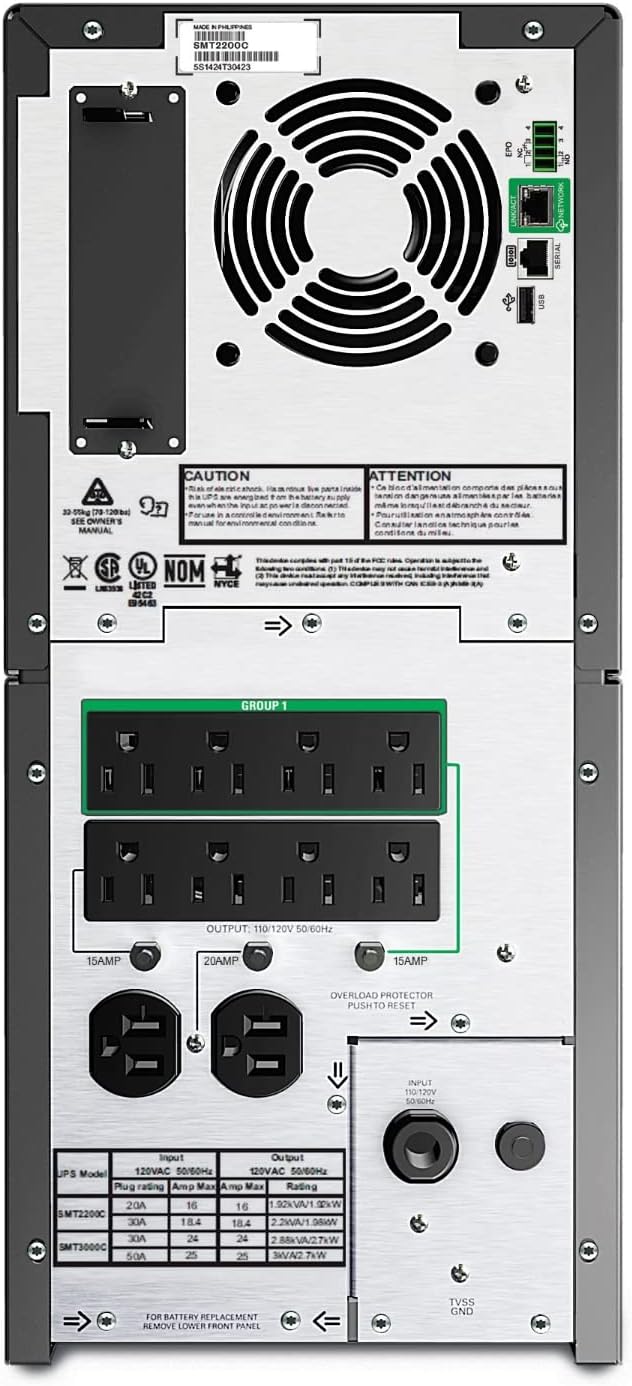
This image shows the rear panel of the APC Smart-UPS SMT2200C. It clearly displays the various power outlets, including eight NEMA 5-15R and two NEMA 5-20, along with the NEMA 5-20P input. The dedicated Ethernet port for SmartConnect is also visible, crucial for network connectivity and remote monitoring.
3.2. SmartConnect Setup (Cloud Monitoring)
The APC Smart-UPS SMT2200C features SmartConnect, allowing for remote monitoring and management via a secure cloud portal. To set up SmartConnect:
- Тармакка туташуу: Connect the UPS to your network using the dedicated Ethernet port located on the rear of the unit.
- QR кодун сканерлөө: Locate the QR code on the UPS unit. Use a smartphone or tablet to scan this QR code. This will automatically direct you to the SmartConnect web portal for registration.
- Эсеп түзүү: Follow the on-screen prompts to create a new SmartConnect account if you don't already have one.
- Register UPS: Complete the registration process for your UPS unit using the product ID and product key provided.
Once registered, your UPS will automatically connect with your SmartConnect account, enabling remote monitoring and management.
4. Операция
4.1. Негизги операция
The SMT2200C provides reliable power protection and backup. It features a pure sine wave output, which is essential for sensitive electronic equipment. The Automatic Voltage Regulation (AVR) feature automatically adjusts high and low voltages to a safe level, preserving battery life and protecting connected devices from harmful power fluctuations.
4.2. LCD интерфейси
The front-panel LCD provides real-time status updates and allows for intuitive navigation and configuration. You can view operational status, battery charge level, load percentage, and other critical information directly from the display. The interface supports multiple language options for user convenience.

This image shows the APC Smart-UPS SMT2200C placed discreetly under a desk in an office environment, next to a briefcase. This illustrates the unit's form factor and how it can fit into typical office or home office setups without occupying excessive space.
4.3. SmartConnect Features
Through the SmartConnect web порталы, сиз:
- Алыстан байкоо: View the UPS status, operating mode (Online, On Battery), device health, and event logs from any internet-connected device.
- Automatic Notifications: Receive automatic life cycle notifications to help maximize the UPS's lifespan and ensure timely maintenance.
- Программалык камсыздоонун жаңыртуулары: Simplify firmware updates for your UPS, ensuring it always runs with the latest features and security enhancements.
- Support and Advice: Gain easy access to support and expert advice from APC, helping you resolve any issues efficiently.
5. Техникалык тейлөө
5.1. Батареяны башкаруу
The Smart-UPS SMT2200C incorporates intelligent battery management features to optimize battery life and performance:
- Температура менен компенсацияланган кубаттоо: Adjusts charging voltage based on battery temperature, extending battery life.
- Periodic Self-Test: The UPS performs automatic self-tests to ensure battery integrity and alerts you to potential issues.
- Battery Replacement Notifications: SmartConnect provides proactive notifications and recommendations for battery replacement, ensuring continuous protection.
5.2. Тазалоо жана кам көрүү
To maintain your UPS, keep it clean and free from dust. Use a dry cloth to wipe down the exterior. Do not use liquid cleaners or aerosol cleaners. Ensure proper ventilation around the unit to prevent overheating.
6. Кыйынчылыктарды
If you encounter any issues with your APC Smart-UPS SMT2200C, please refer to the following general guidelines. For detailed troubleshooting steps, consult the full user manual provided on the installation CD or contact APC customer support.
- Эч кандай кубаттуулугу жок: Ensure the UPS is properly connected to a power source and turned on. Check all connected cables.
- Ашыкча жүктөө сигналы: Reduce the load connected to the UPS. Ensure the total wattage of connected devices does not exceed the UPS's capacity (1980W).
- Батарея заряддалбай жатат: Verify the UPS is connected to a stable power source. Allow sufficient time for the battery to charge. If the issue persists, the battery may need replacement.
- Өзгөчө жыт: A slight chemical smell may be present upon initial use, which should dissipate within a few days. If the smell is strong or persistent, contact support.
7. Техникалык шарттар
| Атрибут | Нарк |
|---|---|
| Бренд | APC |
| Модель номери | SMT2200C |
| Кубаттуулугу | 2200VA / 1980W |
| Киргизүү көлөмүtage | 120 вольт |
| Output Connections | (8) NEMA 5-15R, (2) NEMA 5-20 |
| Киргизүү байланышы | NEMA 5-20P |
| Батарея түрү | Жабылган коргошун кислотасы |
| Элемент Салмагы | 112.2 фунт |
| Түс | Кара |
| Материал | Металл |
| Өндүрүүчү | APC |
| Биринчи жеткиликтүү күн | 1-декабрь, 2017-жыл |
8. Кепилдик жана колдоо
8.1. Кепилдик маалыматы
The APC Smart-UPS SMT2200C comes with a comprehensive warranty:
- UPS Unit: 3 years repair or replace (excluding battery).
- Батарея: 2 жыл.
- Connected Equipment Protection Policy: Up to $150,000.
For all units purchased and/or registered after August 1, 2023, SmartConnect will be offered as a 6-month free trial.
8.2. Кардарларды колдоо кызматы
For technical assistance, product inquiries, or warranty claims, please visit the official APC website or contact their customer support. The SmartConnect portal also provides direct access to support resources and proactive advice from APC experts.


