Introduction
The Thrustmaster T80 Ferrari 488 GTB Edition racing wheel is a replica of the Ferrari 488 GTB steering wheel, officially licensed by Ferrari and PlayStation 4. This racing wheel is designed to provide a realistic driving experience across various PlayStation 4, PlayStation 5, and PC racing games. It features integrated PlayStation buttons for system navigation and an ergonomic design suitable for different racing game genres.
The wheel incorporates a realistic linear resistance mechanism with automatic re-centering, utilizing Thrustmaster's exclusive "Bungee Cord" system. It also includes sequential paddle shifters and a large, adjustable pedal set for precise control over acceleration and braking. A central clamping system ensures optimal stability during use.
Пакеттин мазмуну
- Thrustmaster T80 Ferrari 488 GTB Edition Racing Wheel
- 2-Pedal Pedal Set
- Бекитүү системасы
- Кепилдик маалымат
- Колдонуучунун Колдонмосу (бул документ)
Жайгашуу
1. Attaching the Racing Wheel to a Surface
The T80 Ferrari 488 GTB Edition racing wheel features a central clamping system designed for optimal stability. This system allows you to securely attach the wheel to a desk or table.
- Place the racing wheel on a flat, stable surface (e.g., a desk or table).
- Position the central clamping system's wide jaws against the edge of the surface.
- Клamping screw until the wheel is firmly secured and does not move during use.
2. Connecting the Pedal Set
Connect the pedal set to the racing wheel using the dedicated connector cable. Ensure the connection is secure.
3. Тутум туташуусу
The racing wheel is compatible with PlayStation 4, PlayStation 5, and PC (Windows 7/8/10).
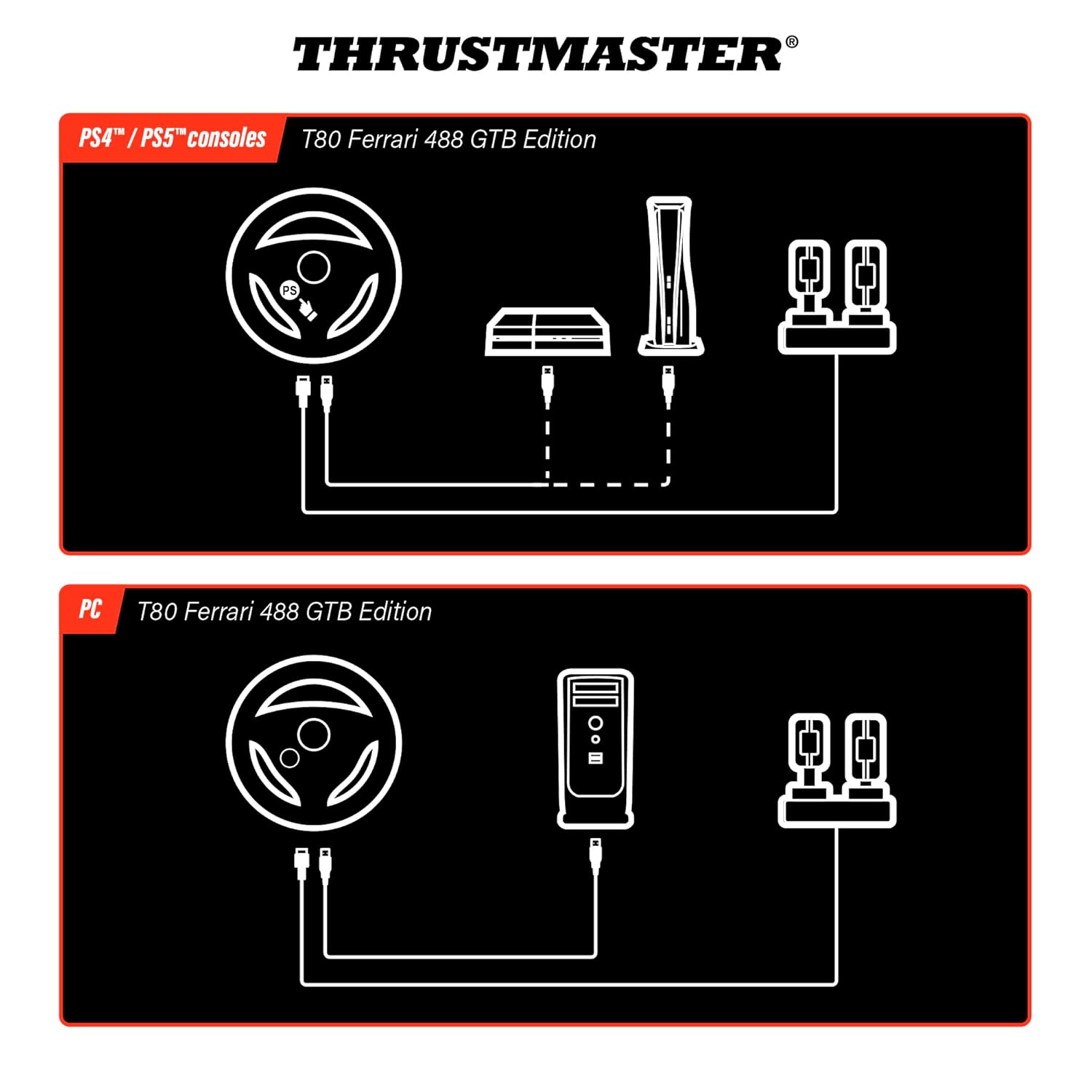
Image: Connection diagram for the T80 Ferrari 488 GTB Edition racing wheel. The top diagram illustrates connecting the wheel and pedals to a PlayStation 4 or PlayStation 5 console via USB. The bottom diagram shows connecting the wheel and pedals to a PC via USB.
PlayStation 4 / PlayStation 5 үчүн:
- Консолуңуздун өчүрүлгөнүн текшериңиз.
- Connect the racing wheel's USB cable to an available USB port on your PlayStation console.
- Power on your console. The system should automatically detect the racing wheel.
- Press the "PS" button on the racing wheel to assign it to a user profile.
PC үчүн:
- Connect the racing wheel's USB cable to an available USB port on your PC.
- Windows will automatically detect the device and install the necessary drivers. If prompted, follow the on-screen instructions.
- For optimal performance, it is recommended to download and install the latest drivers and firmware from the official Thrustmaster support webсайт.
Иштөө нускамалары
Рулду башкаруу

Сүрөт: алдыңкы view of the T80 Ferrari 488 GTB Edition racing wheel, showing the Ferrari logo, PlayStation buttons (PS, SHARE, OPTIONS), action buttons, D-pad, and paddle shifters.
- Integrated PlayStation Buttons: The wheel features "PS", "SHARE", and "OPTIONS" buttons for easy navigation within the PlayStation system and game menus.
- Action Buttons & D-pad: The wheel is equipped with 11 action buttons and a D-pad, which can be configured for various in-game functions.
- Sequential Paddle Shifters: Two digital paddle shifters (up and down) are mounted on the wheel, allowing for quick gear changes. These are designed for durability and responsiveness.
- Linear Resistance & Auto-Centering: The "Bungee Cord" mechanism provides realistic linear resistance to steering movements and automatic re-centering, enhancing control and immersion. The rotation angle is 240 degrees.
Pedal Set Operation

Сүрөт: жогорудан төмөнгө view of the T80 Ferrari 488 GTB Edition racing wheel and its two-pedal set. The pedals are shown with a wide footrest, indicating their adjustable nature for comfortable use.
- Two-Pedal Set: Includes an accelerator pedal and a brake pedal.
- Adjustable Tilt & Footrest: The pedal set features adjustable tilt and a wide footrest, allowing users to customize their setup for comfort and precise control.
- Progressive Brake Resistance: The brake pedal offers progressive resistance, simulating a more realistic braking feel.
Техникалык тейлөө
Proper maintenance ensures the longevity and optimal performance of your Thrustmaster T80 Ferrari 488 GTB Edition racing wheel.
- Тазалоо: Use a soft, dry cloth to clean the racing wheel and pedal set. Avoid using abrasive cleaners or solvents, as these can damage the surfaces.
- Сактагыч: Колдонулбай турган учурда, түзмөктү таза, кургак жерде, күндүн түз нурунан жана өтө жогорку температурадан алыс сактаңыз.
- Кабелдик башкаруу: Ensure all cables are not kinked or pinched to prevent damage.
- Программалык камсыздоонун жаңыртуулары: Regularly check the official Thrustmaster support website for any available firmware updates. Keeping your device's firmware up-to-date can improve performance and compatibility.
Проблемаларды чечүү
If you encounter issues with your racing wheel, please refer to the following common solutions:
| Көйгөй | Мүмкүн чечим |
|---|---|
| Wheel not detected by console/PC |
|
| No force feedback or linear resistance |
|
| Педаалдар жооп бербейт |
|
| Buttons not working correctly |
|
If these solutions do not resolve your issue, please contact Thrustmaster customer support.
Техникалык шарттар
| Өзгөчөлүк | Деталь |
|---|---|
| Модель номери | 4160672 |
| Шайкештик | PlayStation 4, PlayStation 5, PC (Windows 7/8/10) |
| Руль дөңгөлөгүнүн диаметри | 28 см (11 дюйм) |
| Айлануу бурч | 240 градус |
| Каршылык системасы | Realistic linear resistance with automatic re-centering (Thrustmaster "Bungee Cord" system) |
| Shifters | 2 digital sequential paddle shifters |
| Buttons | 11 action buttons, 1 D-pad, "PS", "SHARE", "OPTIONS" buttons |
| Педаль топтому | 2-pedal set (accelerator, brake) with adjustable tilt and wide footrest; progressive brake resistance |
| Clampтутум | Борбордук клamping system with wide jaws for optimal stability |
| Продукциянын өлчөмдөрү | 14.57 x 12.4 x 12.4 дюйм |
| Элемент Салмагы | 8.6 фунт |
| Өндүрүүчү | Thrustmaster |
| Дата биринчи жеткиликтүү | 9-декабрь, 2017-жыл |
Кепилдик жана колдоо
This product comes with a manufacturer's warranty. Please refer to the warranty information included in your package for details regarding coverage and duration. For technical support, driver downloads, firmware updates, and additional product information, please visit the official Thrustmaster support webсайт:
You can also find support resources and contact information on the Amazon'догу Thrustmaster дүкөнү.


