
Introduction
This manual provides comprehensive instructions for the setup, operation, and maintenance of your MASTER & DYNAMIC MH40 Over-Ear Headphones. Please read this guide thoroughly to ensure optimal performance and longevity of your device.
Пакеттин мазмуну
Пакетиңизде бардык буюмдар бар экенин текшериңиз:
- MASTER & DYNAMIC MH40 Over-Ear Headphones
- Audio Cable with In-line Microphone
- USB-C Charging Cable (for Bluetooth functionality)
- Canvas Carrying Case
- Колдонуучунун Колдонмосу (бул документ)
Продукт бүттүview
The MH40 headphones are designed with premium materials for durability and comfort. Key components include:
- Forged Aluminum Body: Provides a robust and lightweight structure.
- Lambskin Ear Pads: Offer comfort for extended listening sessions.
- Custom Neodymium Drivers: Engineered for superior sound reproduction.
- Жөнгө салынуучу баш боосу: коопсуз жана жайлуу туура келет.
- Ажыралуучу кабелдер: For both audio and charging.

Figure 1: MASTER & DYNAMIC MH40 Over-Ear Headphones, showcasing black metal and camo leather design.
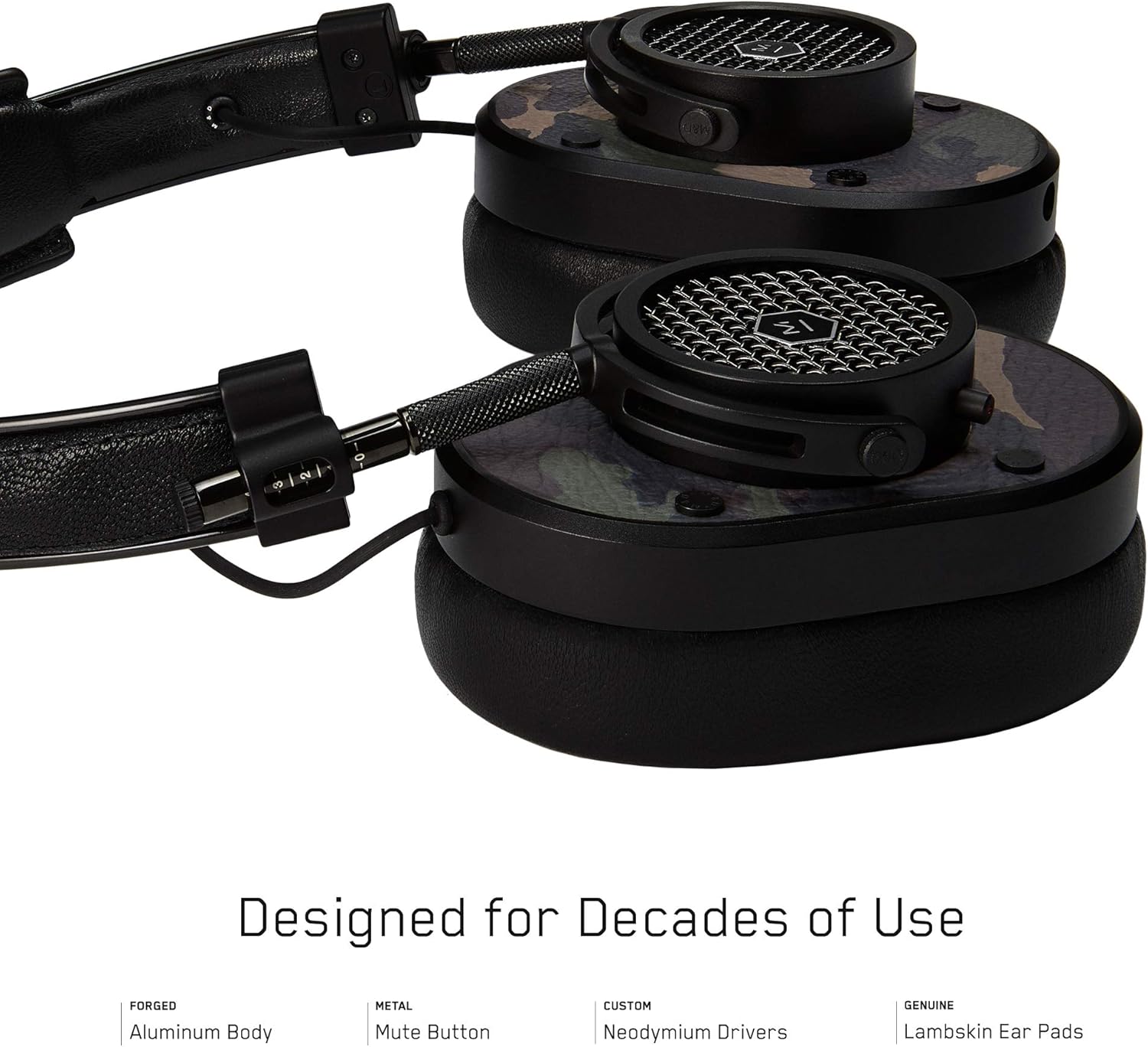
2-сүрөт: Детальдуу view of the MH40 headphone earcups, highlighting the lambskin ear pads, metal grille, and adjustable hinge.
Жайгашуу
1. Тууралоону тууралоо
- Gently extend or retract the metal arms on each side of the headband to adjust the height.
- Position the earcups so they fully cover your ears, ensuring a comfortable and secure fit.
- The lambskin ear pads are designed to conform to your head shape for optimal sound isolation and comfort.
2. Зымдуу туташуу
- Locate the audio input port on the left earcup.
- Insert one end of the provided audio cable into the headphone's audio input.
- Connect the other end of the audio cable to your audio device's 3.5mm jack.
3. Bluetooth жупташтыруу (зымсыз байланыш)
The MH40 headphones support Bluetooth connectivity for wireless audio. Ensure the headphones are charged before pairing.
- Күйгүзүү: Press and hold the power button (usually located on one of the earcups) until the indicator light flashes.
- Жупташтыруу режими: Continue holding the power button or press a dedicated Bluetooth pairing button (if available) until the indicator light flashes rapidly, indicating pairing mode.
- Түзмөк туташуу: On your audio device (smartphone, tablet, computer), navigate to Bluetooth settings and select "MH40" from the list of available devices.
- Ырастоо: The indicator light on the headphones will turn solid blue or green once successfully paired.
Note: The Bluetooth range is approximately 10 meters (33 feet).
Иштөө нускамалары
Аудио ойнотуу
- Ойнотуу/тындыруу: Press the multi-function button (often on the in-line microphone or earcup) once.
- Кийинки трек: Press the multi-function button twice rapidly.
- Мурунку трек: Press the multi-function button three times rapidly.
- Үндү көзөмөлдөө: Use the volume up/down buttons on the in-line microphone or dedicated earcup controls.
Чалууларды башкаруу
- Чалууга жооп берүү/аяктоо: Көп функциялуу баскычты бир жолу басыңыз.
- Чакырууну четке кагуу: Көп функциялуу баскычты болжол менен 2 секунд басып туруңуз.
- Микрофондун үнүн басуу: The MH40 features a dedicated mute button, typically located on the earcup or in-line control. Press to mute/unmute during a call.
Техникалык тейлөө
- Тазалоо: Use a soft, dry cloth to wipe the headphones. For leather parts, use a specialized leather cleaner if necessary. Avoid harsh chemicals or abrasive materials.
- Сактагыч: When not in use, store the headphones in the provided canvas carrying case to protect them from dust and scratches.
- Кабельге кам көрүү: Handle cables gently. Avoid sharp bends or excessive pulling to prevent damage. The retractable cable feature helps manage cable length.
- Кулак төшөктөрү: The magnetic ear pads are removable for cleaning or replacement. Gently pull them off and reattach by aligning the magnets.
Проблемаларды чечүү
Үн жок
- текст: Ensure the audio cable is securely connected to both the headphones and the audio source. Check the volume level on both the headphones and the source device.
- Bluetooth: Verify that the headphones are powered on and successfully paired with your device. Check the volume levels. Try re-pairing the headphones.
Bluetooth аркылуу жупташтырылбай жатат
- Кулакчындар жупташтыруу режиминде экенин текшериңиз (индикатордун жарыгы тез күйүп-өчүп турат).
- Баштапкы түзмөгүңүздө Bluetooth иштетилгенин текшериңиз.
- Наушниктерди түзмөгүңүзгө жакыныраак жылдырыңыз (10 метр аралыкта).
- Turn off and on both the headphones and your device, then attempt pairing again.
- Эгер мурда жупташтырылган болсо, түзмөктү булагыңыздан "унутуп", кайра жупташтырып көрүңүз.
Микрофон иштебейт
- Микрофонду үнсүз кылуу баскычы иштеп турганын текшериңиз.
- Ensure the audio cable with the in-line microphone is fully inserted.
- Verify microphone input settings on your connected device.
Техникалык шарттар
| Модель аты | MH40 |
| Байланыш технологиясы | Зымдуу, Bluetooth |
| Зымсыз байланыш технологиясы | Bluetooth |
| Материал | Copper (components), Lambskin (ear pads), Canvas (carrying case) |
| Башкаруу түрү | Чакыруу башкаруу, тийүү |
| Кабель өзгөчөлүгү | Тартылуучу |
| Элемент Салмагы | 0.36 килограмм (12.7 унция) |
| Аудио драйвер түрү | Динамикалык драйвер |
| Bluetooth диапазону | 10 метр |
| Наушник формасы | Ашыкча кулак |
| Өзгөчөлүктөр | Carrying case included, Lightweight, Microphone Included, Noise Isolation, Wireless |
| Продукциянын өлчөмдөрү | 7.48 x 6.3 x 2.76 дюйм |
| Өндүрүүчү | MASTER & DYNAMIC |
| Түс | Black Metal / Camo Leather |
| Кулак жайгаштыруу | Кулак үстүндө |
| Noise Control | Үн изоляциясы |
| UPC | 858901007099 |
Кепилдик жана колдоо
For detailed warranty information and customer support, please refer to the official MASTER & DYNAMIC webсайтка же түздөн-түз кардарларды тейлөөгө кайрылыңыз. Кепилдик дооматтар үчүн сатып алганыңыздын далилин сактаңыз.
Онлайн колдоо: www.masterdynamic.com/support (Exampшилтеме, чыныгы шилтеме ар кандай болушу мүмкүн)


