1. Киришүү
MOZA AirCross S – күзгүсүз камералар, экшн-камералар жана уюлдук телефондор сыяктуу ар кандай камералар үчүн иштелип чыккан көп функциялуу 3-октуу колго кармалуучу гимбаль стабилизатору. Анын компакттуу жана жеңил дизайны өркүндөтүлгөн стабилизациялоо технологиясы менен айкалышып, колдонуучуларга жылмакай, кесипкөй деңгээлдеги сүрөттөрдү тартууга мүмкүндүк берет.tage. Бул колдонмодо AirCross S гимбалыңызды орнотуу, иштетүү жана тейлөө боюнча кеңири көрсөтмөлөр берилген.
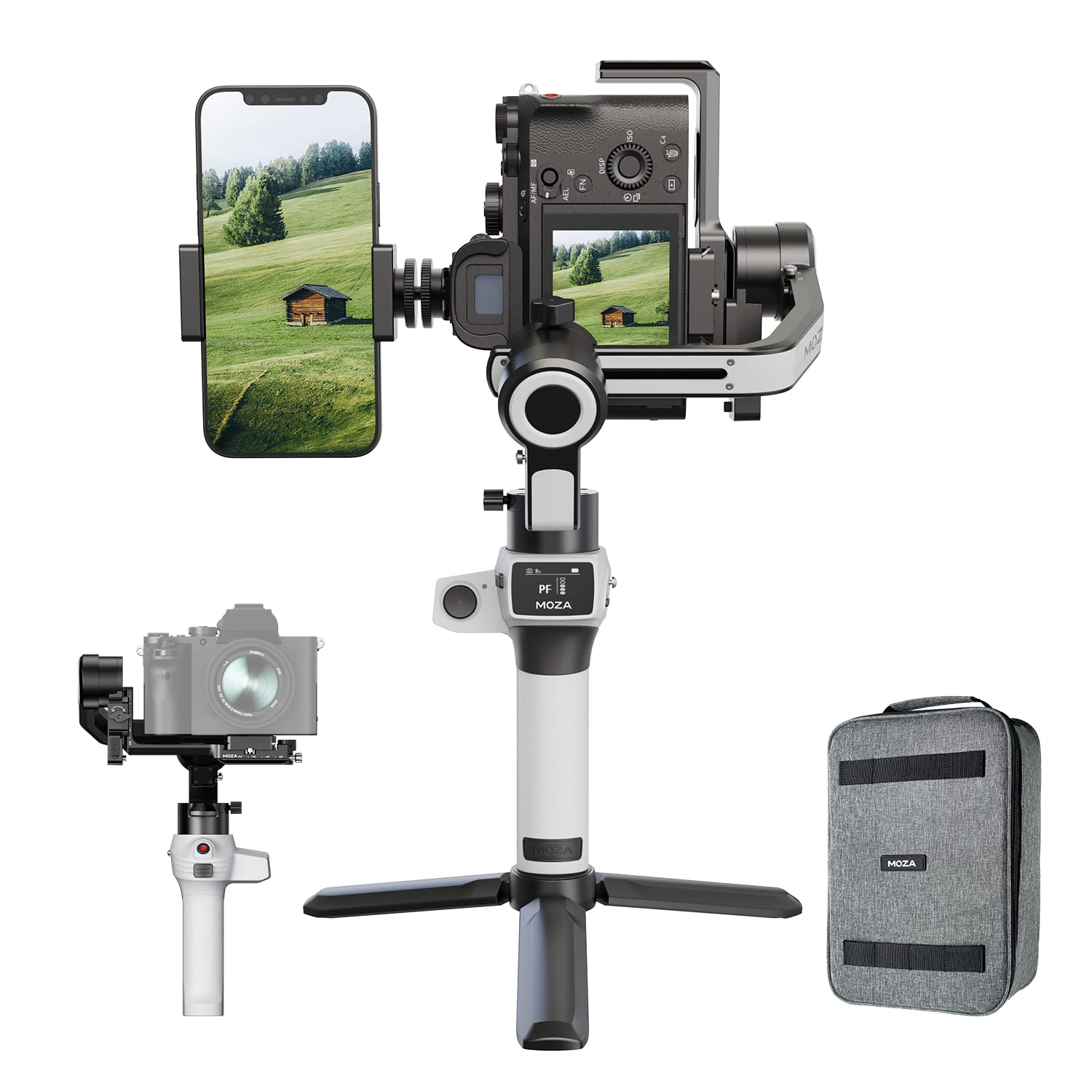
Сүрөт 1.1: MOZA AirCross S Gimbal стабилизатору, ага камера жана телефон орнотулган, анын көп түзмөк менен шайкештигин көрсөтөт.
2. Орнотуу колдонмосу
2.1 Кутудан чыгаруу жана алгачкы текшерүү
MOZA AirCross S уячаңызды алгандан кийин, бардык компоненттерди кылдаттык менен таңгактан чыгарыңыз. Таңгактын ичинде гимбал жана продукттун таңгагында көрсөтүлгөн бардык кошумча аксессуарлар бар экенин текшериңиз. Түзмөктүн көрүнгөн бузулууларын текшериңиз.
- MOZA AirCross S Gimbal
- Quick Чыгарган Plate
- Мини штатив
- Заряддоо кабели
- Колдонуучунун Колдонмосу (бул документ)
2.2 Батареяны заряддоо
MOZA AirCross S орнотулган жогорку кубаттуулуктагы батарея менен жабдылган. Биринчи жолу колдонуудан мурун, берилген кубаттоочу кабелди колдонуп, гимбалды толугу менен кубаттаңыз. Гимбаль 9V 2A чейин тез кубаттоону колдойт. Толук кубаттоо болжол менен 10 саат иштөөнү камсыз кылат.
- Кубаттоочу кабелди гимбалдын кубаттоо портуна туташтырыңыз.
- Экинчи учун USB кубат адаптерине (кошулмага кирбейт) же кубат банкына туташтырыңыз.
- Индикатор жарыгы кубаттоо абалын көрсөтүп, толук заряддалганда өчөт.
2.3 Камераны же уюлдук телефонду орнотуу
AirCross S ар кандай түзмөктөрдү оңой орнотуу үчүн кош катмарлуу тез ачылуучу пластина менен жабдылган.
- Тез ачылуучу пластинаны камераңыздын түбүнө же уюлдук телефон кармагычына бекитиңиз.
- Орнотулган түзүлүшү бар тез ажыратылуучу пластинаны гимбалдын орнотуу платформасына бекем бекитилгенге чейин жылдырыңыз.
- Түзмөктүн борборго коюлганын жана туруктуу экенин текшериңиз.

Сүрөт 2.1: MOZA AirCross S кош камерага орнотуу мүмкүнчүлүгүн көрсөтүп, камераны да, смартфонду да кармап турат.

Сүрөт 2.2: Детальдуу view MOZA AirCross S учагынын кош камерага орнотулгандыгынын, анын жөнгө салынуучу дизайнын баса белгилеп турат.
2.4 Гимбалды тең салмактоо
Оптималдуу иштөө жана кыймылдаткычтын чыңалуусунун алдын алуу үчүн туура тең салмактуулук абдан маанилүү. Камера өчүрүлгөндө түз турганга чейин тез ажыратуучу пластинадагы жана гимбал рычагдарындагы камеранын абалын тууралаңыз.
- Эңкейиш огунун балансы: Камераны түз абалда калганга чейин алдыга же артка жылдырыңыз.
- Айланма огу балансы: Камераны солго же оңго жылдырыңыз, ал бир калыпта турганча.
- Пан огунун балансы: Гимбал кыйшайганда туруктуу бойдон калганга чейин горизонталдуу рычагды тууралаңыз.
2.5 Автоматтык тюнинг
Баланстоодон кийин, оптималдуу мотор параметрлери үчүн автоматтык түрдө жөнгө салуу функциясын колдонуңуз. DeepRed технологиясы менен иштеген бул функция орнотулган түзмөгүңүздүн жалпы салмагына жараша гимбалдын жөндөөлөрүн автоматтык түрдө тууралайт.
- Гимбалдын күйүп турганын жана тең салмактуу экенин текшериңиз.
- MOZA колдонмосуна кирип, автоматтык түрдө жөндөө функциясын иштетиңиз.
- Гимбал өзүн калибрлөө үчүн бир катар кыймылдарды аткарат.
3. Иштөө нускамалары
3.1 Күйгүзүү/өчүрүү
Гимбалды күйгүзүү же өчүрүү үчүн туткада жайгашкан кубат баскычын басып, кармап туруңуз. Индикатор жарыктары кубат абалын ырастайт.
3.2 Негизги башкаруу каражаттары
Эки баскычтуу кол туткасы гимбалдын кыймылдарын жана режимдерин интуитивдик башкарууну камсыз кылат.
- Джойстик: Панорамалоо жана эңкейтүү кыймылдарын башкарат.
- Режим баскычы: Ар кандай иштөө режимдери аркылуу циклдерди өткөрөт (мисалы, Pan-Follow, Lock Mode, FPV Mode). Режимдин толук сүрөттөмөлөрүн MOZA колдонмосунан караңыз.
- Trigger баскычы: Көбүнчө белгилүү бир функцияларды тез кайра борборлоштуруу же активдештирүү үчүн колдонулат.

3.1-сүрөт: MOZA AirCross S туткасындагы башкаруу панели, анда джойстик жана режим баскычтары көрсөтүлгөн.
3.3 Өркүндөтүлгөн атуу режимдери
MOZA AirCross S MOZA колдонмосу аркылуу жеткиликтүү болгон бир нече өркүндөтүлгөн атуу режимдерин колдойт.
- Вертикалдуу режим: Кошумча аксессуарларсыз жергиликтүү вертикалдык видео тартууга мүмкүндүк берет. Бул социалдык медиа контенти үчүн идеалдуу.
- Узак экспозициялуу кыймылдын убакыт аралыгы: Аныкталган жапкыч убактысы, узактыгы, интервалдары жана жолу менен динамикалык убакыт ылдамдатууларын түзүңүз.
- Dolly Zoom: Камераны жылдырып жатып, жылмакай масштабдоо менен классикалык "Vertigo эффектине" жетишиңиз.

Сүрөт 3.2: MOZA AirCross S тик режимде тартууга ылайыкташтырылган, социалдык медиа контенти үчүн идеалдуу.

3.3-сүрөт: Колдонуучу MOZA AirCross S гимбалын камера менен иштетип, кадимки колдонууну көрсөтүп жатат.
3.4 MOZA тиркемесинин байланышы
AirCross S телефонуңуздун толук мүмкүнчүлүктөрүн ачуу үчүн түзмөгүңүздүн колдонмолор дүкөнүнөн MOZA колдонмосун жүктөп алыңыз. Колдонмо параметрлерди так жөндөөгө, өркүндөтүлгөн тартуу режимдерине жетүүгө жана алыстан башкарууга мүмкүндүк берет.
- Мобилдик түзмөгүңүздө Bluetooth'ду иштетиңиз.
- MOZA колдонмосун ачып, жеткиликтүү түзмөктөрдүн тизмесинен AirCross S тандаңыз.
- Туташуу үчүн экрандагы көрсөтмөлөрдү аткарыңыз.
4. Техникалык тейлөө
4.1 Тазалоо
Гимбалды жумшак, кургак чүпүрөк менен үзгүлтүксүз тазалап туруңуз. Суюк тазалоочу каражаттарды же эриткичтерди колдонуудан алыс болуңуз, анткени алар электрондук компоненттерге зыян келтириши мүмкүн. Мотордун муундарында чаң же таштандылар топтолбогонун текшериңиз.
4.2 Сактоо
Колдонулбаган учурда, MOZA AirCross S кургак, салкын жерде, күндүн түз нурунан жана өтө жогорку температурадан алыс сактаңыз. Бузулуп калбашы үчүн, гимбалды баштапкы таңгагында же коргоочу капта сактоо сунушталат.
4.3 Батареяга кам көрүү
Батареянын иштөө мөөнөтүн узартуу үчүн, батареяны тез-тез толук зарядсыздандырбаңыз. Эгер узак убакытка сактасаңыз, батареяны ар бир үч ай сайын болжол менен 50-60% га чейин заряддаңыз.
5. Кыйынчылыктарды
| Көйгөй | Мүмкүн себеп | Чечим |
|---|---|---|
| Гимбал дирилдейт же моторлор титирейт. | Туура эмес тең салмактуулук; пайдалуу жүктөм чектен ашып кетти; автоматтык түрдө жөнгө салуу аткарылган жок. | Камеранын кемчиликсиз тең салмактуулугун текшериңиз. MOZA колдонмосу аркылуу автоматтык түрдө жөндөөнү аткарыңыз. Пайдалуу жүк 4 фунт чегинде экенин текшериңиз. |
| Гимбал күйбөйт. | Батарея түгөнүп калды. | Гимбалдын батарейкасын толугу менен заряддаңыз. |
| MOZA колдонмосуна туташуу мүмкүн эмес. | Bluetooth өчүк; колдонмо жаңыртылган жок; gimbal жупташтыруу режиминде эмес. | Телефонуңузда Bluetooth иштетилгенин текшериңиз. Колдонмону жана gimbalды өчүрүп-күйгүзүңүз. Колдонмонун жаңыртууларын текшериңиз. |
| Гимбал ысып кетип, өчүп калат. | Ашыкча жүктөлгөн моторлор; узак убакыт бою оор колдонуу; начар желдетүү. | Мүмкүн болсо, пайдалуу жүктү азайтыңыз. Гимбалды муздатыңыз. Кыймылдаткычтын чыңалышын азайтуу үчүн туура тең салмактуулукту камсыз кылыңыз. |
6. Техникалык шарттар
| Өзгөчөлүк | Деталь |
|---|---|
| Бренд | MOZA |
| Модель аты | ЭйрКросс S |
| Продукциянын өлчөмдөрү | 24 x 17 x 39 см |
| Элемент Салмагы | 1.1 кг |
| Максималдуу жүк | 4 фунт (болжол менен 1.8 кг) |
| Шайкеш түзмөктөр | Күзгүсүз камералар, Экшн-камералар, Уюлдук телефондор |
| Батареянын орточо иштөө мөөнөтү | 10 саат |
| Заряддоо ылдамдыгы | 9V 2A чейин (тез кубаттоо) |
| Сүрөттү турукташтыруу технологиясы | Ооба |
| Келип чыккан өлкө | Кытай |

6.1-сүрөт: MOZA AirCross S тарабынан колдоого алынган ар кандай камера моделдерин көрсөткөн шайкештик диаграммасы.
7. Кепилдик жана колдоо
7.1 Кепилдик маалыматы
MOZA AirCross S Gimbal стабилизатору төмөнкүлөр менен келет 1 жылдык кепилдик сатып алынган күндөн тартып. Бул кепилдик кадимки колдонуудагы өндүрүштүк кемчиликтерди жана бузулууларды камтыйт. Кепилдик дооматтары үчүн сатып алганыңызды тастыктаган документти сактап коюңуз. Кепилдик туура эмес колдонуудан, кырсыктардан, уруксатсыз өзгөртүүлөрдөн же туура эмес тейлөөдөн келип чыккан зыянды камтыбайт.
7.2 Кардарларды колдоо
Техникалык жардам, мүчүлүштүктөрдү оңдоо же кепилдик боюнча суроолоруңуз болсо, MOZA кардарларды тейлөө кызматына кайрылыңыз. Ошондой эле, расмий MOZA сайтына кирсеңиз болот webКөп берилүүчү суроолор жана кошумча ресурстар үчүн сайт.
- Электрондук почта: care@nikitadistributors.com
- Телефон: 18002668571
- Онлайн ресурстар: Расмий MOZAга кайрылыңыз webжаңыртылган колдоо маалыматы үчүн сайт.


