Introduction
Welcome to the world of miniature crafting with your new ROBOTIME Ada's Studio DIY Miniature House kit. This kit allows you to construct a detailed miniature painter's studio, complete with an easel, paintings, brushes, paints, and art books. This manual provides comprehensive instructions to guide you through the assembly process, operation of features, maintenance, and troubleshooting.

Figure 1: Fully assembled Ada's Studio DIY Miniature House.
Коопсуздук маалыматы
Please read all safety warnings before beginning assembly. This product contains small parts and is not suitable for children under 36 months due to choking hazards. Adult supervision is recommended for younger users (recommended age 14 years and older).
- Keep all small components out of reach of young children.
- Use glues and paints in a well-ventilated area.
- Handle sharp tools (e.g., scissors, craft knives) with care.
Орнотуу жана чогултуу
The Ada's Studio kit requires assembly of various miniature components. Follow the steps carefully for best results.
1. Пакеттен чыгаруу жана Компонентти идентификациялоо
Carefully unpack all contents from the box. Verify that all sheets of pre-cut parts, fabric pieces, wires, LED components, and accessory bags are present. Refer to the included parts list (if any) to ensure no components are missing.
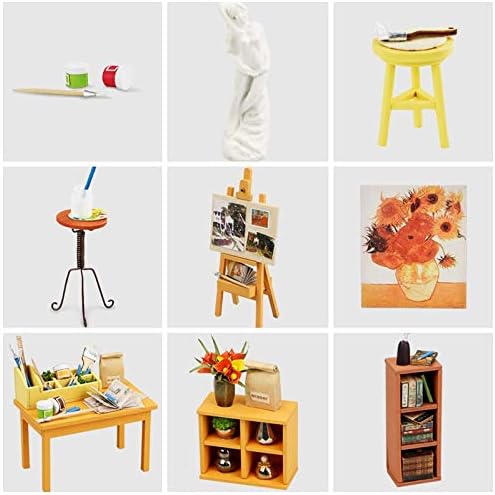
2-сүрөт: Мисample of various miniature components included in the kit.
2. Чогултуу кадамдары
Follow the numbered instructions provided in the kit's dedicated assembly guide. General steps include:
- Даярдоо: Carefully detach pre-cut pieces from their sheets. Use fine-grit sandpaper to smooth any rough edges if necessary.
- жабыштыруу: Apply glue sparingly to the designated tabs or surfaces. Hold pieces together firmly until the glue sets.
- Folding and Cutting: For paper or fabric components, follow the score lines for accurate folds and use sharp scissors or a craft knife for precise cuts.
- Wiring (LEDs): Connect the LED components according to the wiring diagram. Ensure correct polarity if applicable. Secure wires neatly to avoid obstruction.
- Деталдаштыруу: Attach small accessories and decorative elements last, ensuring they are securely fastened.

Figure 3: Illustrative assembly steps, including cutting, gluing, and fabric work.
Иштөө нускамалары
The Ada's Studio miniature house features integrated LED lighting to illuminate your completed scene.
LED жарык иштетүү
Once assembly is complete and the wiring is connected, the LED lights can be activated. The kit typically includes a battery box (batteries not included) with an on/off switch. Insert the required batteries (e.g., AAA batteries) into the battery box, connect it to the main power line of the LED circuit, and use the switch to turn the lights on or off.

Figure 4: Ada's Studio with LED lights off (left) and on (right).
Техникалык тейлөө
To ensure the longevity and appearance of your miniature house, follow these simple maintenance guidelines:
- Чаңдандыруу: Regularly dust the miniature house with a soft brush or a can of compressed air to remove accumulated dust. Avoid using wet cloths, which may damage paper or fabric components.
- Жайгашкан жери: Display the model in a dry environment, away from direct sunlight, extreme temperatures, and high humidity, which can cause warping or fading.
- Колдонуу: Handle the assembled model with care, preferably by its base, to avoid dislodging delicate components.
- Батареяны алмаштыруу: If the LED lights dim or stop working, replace the batteries in the battery box. Ensure proper battery orientation.
Проблемаларды чечүү
If you encounter issues during assembly or operation, refer to the following common problems and solutions:
| Көйгөй | Мүмкүн себеп | Чечим |
|---|---|---|
| Бөлүктөрү бири-бирине туура келбейт. | Excess glue, rough edges, incorrect orientation. | Ensure glue is applied thinly. Gently sand edges if needed. Double-check the assembly diagram for correct part orientation. |
| LED жарыктары күйбөйт. | Incorrect battery installation, dead batteries, loose wire connection, faulty LED. | Check battery polarity and ensure batteries are fresh. Verify all wire connections are secure. Inspect LED for visible damage. |
| Жок компоненттер. | Parts overlooked during unpacking, manufacturing error. | Carefully re-check all packaging materials. Contact ROBOTIME customer support with your model number and a description of the missing part. |
Техникалык шарттар
| Өзгөчөлүк | Деталь |
|---|---|
| Продукциянын өлчөмдөрү | 19 x 19 x 14 см (7.5 x 7.5 x 5.5 дюйм) |
| Салмагы | 270 г (0.6 фунт) |
| Модель номери | DG103 |
| Сунушталган Жаш | 14 жаш жана андан улуу |
| Материалдар | Cardboard, Plastic, Metal, Paper |
| Ассамблея талап кылынат | Yes (DIY Kit) |
| Батареялар талап кылынат | Yes (for LED lighting, not included) |
Кепилдик жана колдоо
For any questions, missing parts, or support regarding your ROBOTIME Ada's Studio DIY Miniature House, please contact the manufacturer or your point of purchase. Keep your proof of purchase and model number (DG103) ready when contacting support.
ROBOTIME products are designed for quality and enjoyment. If you experience any issues, please reach out to their customer service for assistance.


