1. Киришүү
This manual provides comprehensive instructions for the installation, operation, and maintenance of your BitFenix Spectre Pro RGB LED 140mm Case Fan with Controller. Please read this manual thoroughly before installation and retain it for future reference.
2. Пакеттин мазмуну
Төмөндө тизмеленген бардык компоненттер пакетиңизде бар экенин текшериңиз:
- 1x BitFenix Spectre Pro RGB LED 140mm Case Fan
- 1x RGB LED Controller Box
- 1x RGB Control Button (with magnetic backing)
- 1x Motherboard RGB Sync Cable (for ASUS Aura Sync compatibility)
- 1x Power Cable (Molex to Controller)
- 4x желдеткичти орнотуучу бурамалар
- 4x Anti-Vibration Rubber Mounts

2.1-сүрөт: All components included in the BitFenix Spectre Pro RGB LED 140mm Case Fan package. This includes the 140mm fan, the RGB controller box, various connection cables, mounting screws, and rubber anti-vibration mounts.
3. Өзгөчөлүктөрү
The BitFenix Spectre Pro RGB LED Case Fan offers the following key features:
- TriBright LED Technology: Provides vibrant and uniform RGB illumination.
- ASUS Aura Sync Ready: Compatible with ASUS Aura Sync motherboards for synchronized RGB lighting control.
- Reinforced Fan Blades: Designed for durability and optimal airflow, with centered LED lighting for enhanced aesthetics.
- High Pressure/CFM Design: Engineered to deliver significant airflow and static pressure for effective cooling.
- Focused Airflow: Optimized blade design ensures efficient cooling performance.
- Тынч операция: Designed to minimize noise levels during operation.
- Узак өмүр: Constructed for extended operational lifespan.
4. Орнотуу жана орнотуу
Follow these steps to properly install your BitFenix Spectre Pro RGB LED Case Fan.
4.1 Коопсуздук чаралары
- Орнотууну баштоодон мурун, компьютериңиздин өчүрүлгөнүн жана розеткадан суурулганын текшериңиз.
- Бөлүктөрдү кармоодон мурун жерге туташтырылган металл буюмга тийип, статикалык электрди чыгарыңыз.
- Зыян болбош үчүн компоненттерди кылдаттык менен кармаңыз.
4.2 Fan Mounting
- Компьютериңиздин корпусунун ичиндеги орнотуучу жерди аныктаңыз (мисалы, алдыңкы, арткы, үстүнкү, астыңкы).
- Align the fan with the screw holes in your case.
- Optionally, place the anti-vibration rubber mounts between the fan and the case to reduce noise.
- Secure the fan using the four provided mounting screws. Do not overtighten.
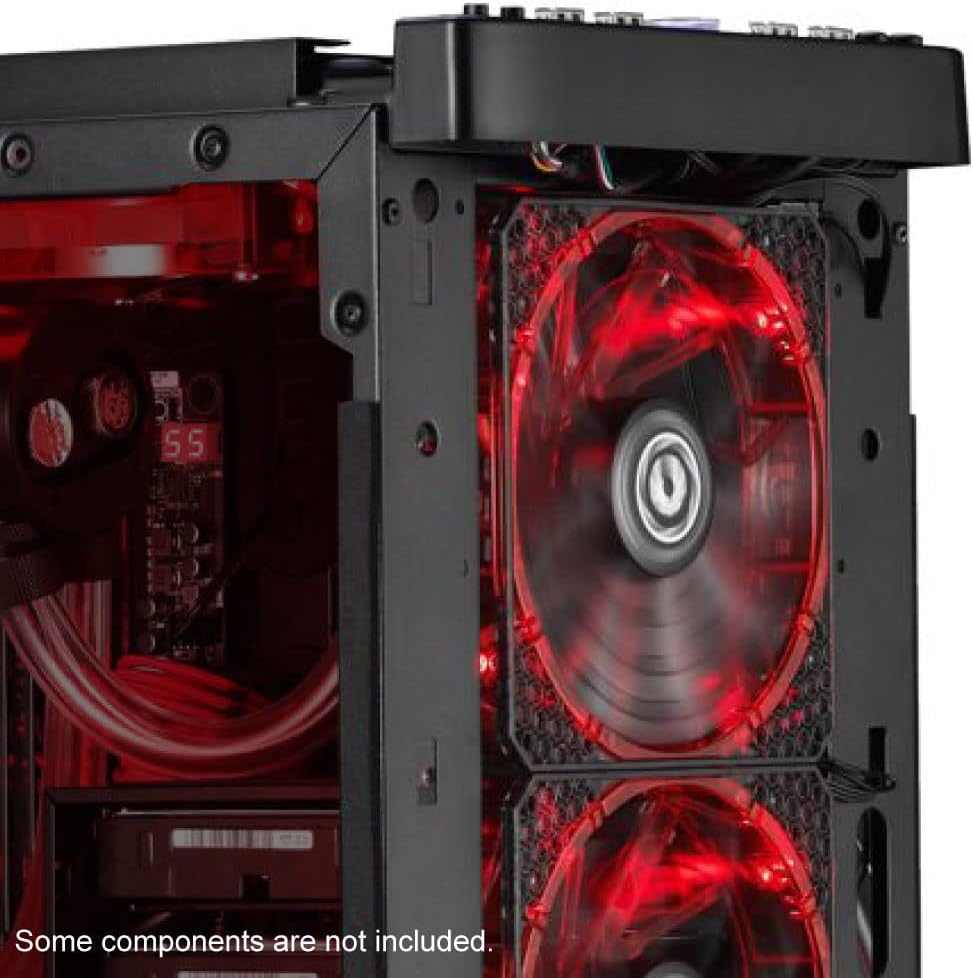
4.1-сүрөт: Мурункуample of the BitFenix Spectre Pro RGB LED fan installed within a PC case, demonstrating its placement and illumination.
4.3 Controller and Cable Connections
The Spectre Pro RGB fan utilizes a dedicated controller for power and RGB effects. Refer to the image below for a visual guide to the fan and controller unit.

4.2-сүрөт: The BitFenix Spectre Pro RGB LED fan and its accompanying RGB controller box, highlighting its compatibility with ASUS Aura Sync.
- Желдеткичти контроллерге туташтыруу: Plug the 4-pin fan cable from the Spectre Pro RGB fan into an available fan header on the RGB LED Controller Box. The controller supports multiple fans; ensure a secure connection.
- Power the Controller: Connect the provided Molex power cable to the RGB LED Controller Box and to an available Molex connector from your power supply unit (PSU).
- RGB Control Options:
- Кол менен башкаруу: Connect the RGB Control Button to the designated port on the RGB LED Controller Box. This button allows you to cycle through various lighting modes and colors. The button has a magnetic backing for convenient placement inside or outside your case.
- Motherboard Sync (ASUS Aura Sync): If your motherboard supports ASUS Aura Sync, connect the provided Motherboard RGB Sync Cable from the RGB LED Controller Box to your motherboard's 4-pin RGB header. This allows software control of the fan's RGB lighting.
- Кабелдик башкаруу: Туура аба агымын жана таза түзүлүштү камсыз кылуу үчүн бардык кабелдерди тыкан өткөрүңүз.
5. Иштөө нускамалары
Once installed and connected, power on your computer to begin operation.
5.1 Желдетүүчүнүн иштеши
The fan will begin spinning once power is supplied to the controller. The fan speed is constant at 1500 RPM.
5.2 RGB жарыкты башкаруу

5.1-сүрөт: The BitFenix Spectre Pro RGB LED fan showcasinанын жандуу, көп түстүү жарыктандыруусу.
- Using the RGB Control Button: Press the connected RGB Control Button to cycle through various pre-programmed lighting effects, colors, and modes.
- Using Motherboard Software (ASUS Aura Sync): If connected to a compatible ASUS motherboard, use the ASUS Aura Sync software to customize and synchronize the fan's RGB lighting with other compatible components in your system. Refer to your motherboard's manual for specific software instructions.
6. Техникалык тейлөө
Үзгүлтүксүз техникалык тейлөө желдеткичиңиздин оптималдуу иштешин жана узак мөөнөттүү иштешин камсыз кылууга жардам берет.
- Тазалоо: Periodically clean the fan blades and frame to remove dust buildup. Use a soft brush or compressed air. Ensure the fan is powered off and unplugged before cleaning.
- Текшерүү: Кабелдердин бекем туташууларын жана эскирүү белгилерин текшериңиз.
7. Кыйынчылыктарды
If you encounter issues with your Spectre Pro RGB fan, refer to the following troubleshooting guide:
| Көйгөй | Мүмкүн себеп | Чечим |
|---|---|---|
| желдеткич айланбай жатат | No power to controller; Fan cable loose; Faulty controller/fan | Check Molex power connection to controller; Ensure fan cable is securely plugged into controller; Test with another fan/controller if available. |
| RGB LEDs not lighting up | RGB cable loose; Incorrect RGB header connection; Software conflict; Faulty LEDs | Verify RGB cable connection to controller and motherboard (if applicable); Ensure correct 4-pin RGB header is used; Check motherboard software settings; Try manual control with the button. |
| Вентилятор өтө ызы-чуулуу | Loose mounting; Obstruction; Bearing issue | Ensure fan is securely mounted; Check for cables or objects interfering with fan blades; If noise persists, contact support. |
8. Техникалык шарттар
Detailed technical specifications for the BitFenix Spectre Pro RGB LED 140mm Case Fan:
| Өзгөчөлүк | Спецификация |
|---|---|
| Бренд | BITFENIX |
| Модель номери | BFF-SRGB-14025C-RP |
| Fan Size | 140мм |
| Кубат туташтыргычынын түрү | 4-Pin (Fan), Molex (Controller) |
| Тtage | 12 вольт |
| Ватtage | 125W (System Power Consumption, not fan specific) |
| Муздатуу ыкмасы | Күйөрман |
| Шайкеш түзмөктөр | Үстөл компьютерлери |
| Ызы-чуу деңгээли | 22.8 децибел |
| Материал | Copper (likely referring to internal motor components, fan blades are plastic) |
| Максималдуу айлануу ылдамдыгы | 1500 RPM |
| Элемент Салмагы | 8.6 унция |
| Продукциянын өлчөмдөрү (LxWxH) | 8 x 1 x 1.5 inches (Note: This dimension seems incorrect for a 140mm fan, typically 140x140x25mm. Please refer to product packaging for exact dimensions.) |
| UPC | 886027015353 |
9. Кепилдик жана колдоо
For warranty information and technical support, please refer to the official BitFenix webсайтка же кардарларды тейлөө бөлүмүнө кайрылыңыз. Кепилдик дооматтар үчүн сатып алганыңыздын далилин сактаңыз.
10. Расмий продукт Videos
Бул колдонмого киргизүү үчүн сатуучунун расмий продукт видеолору жок.


