1. Киришүү
This manual provides detailed instructions for the installation, operation, and maintenance of the Aiphone IX-MV IP Direct Video Master Station. Please read this manual thoroughly before using the product to ensure correct operation and to prevent damage.
2. Коопсуздук маалыматы
Observe the following safety precautions to ensure safe and reliable operation:
- Агрегатты сууга же ашыкча нымдуулукка дуушар кылбаңыз.
- Түзмөктү өз алдынча ачууга же оңдоого аракет кылбаңыз. Бардык тейлөө иштерин квалификациялуу адистерге тапшырыңыз.
- Ensure the power source (Ethernet-based PoE) meets the specified requirements.
- Аппаратты күн нурунан жана жылуулук булактарынан алыс кармаңыз.
3. Продукт бүтүп калдыview
The Aiphone IX-MV is an IP Direct Video Master Station designed for advanced communication and security applications. It features a video display, a numeric keypad, and dedicated function buttons for various operations.
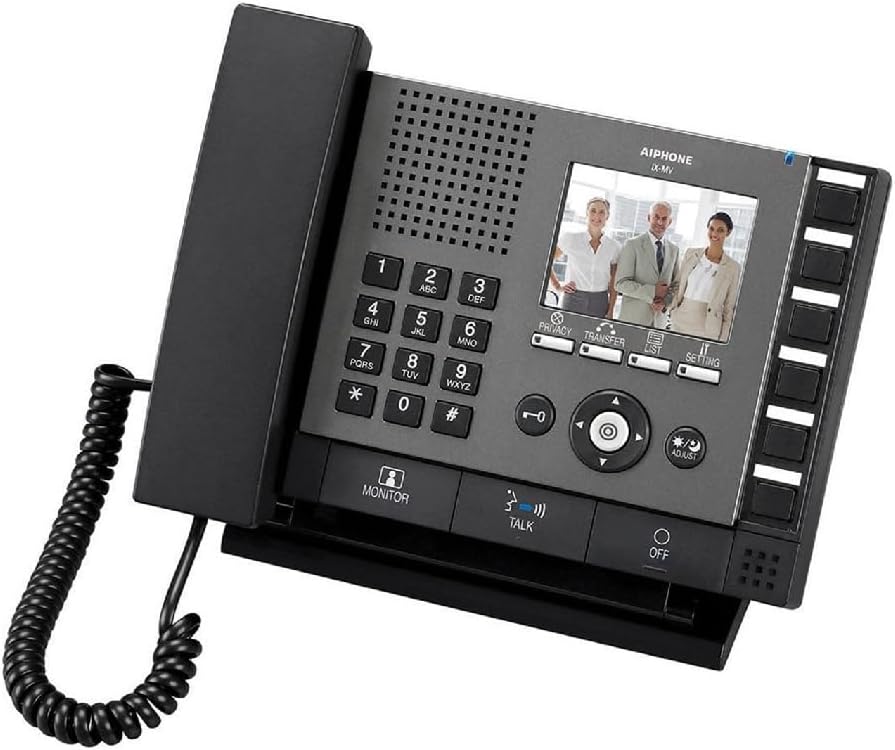
Figure 3.1: Aiphone IX-MV IP Direct Video Master Station
This image displays the Aiphone IX-MV unit, a black IP video master station. It features a traditional telephone handset on the left, connected by a coiled cord. The main console includes a numeric keypad (0-9, *, #), a speaker grille, and a color LCD screen showing three people. Below the screen are control buttons for 'PRIVACY', 'TRANSFER', 'LIST', and 'SETTING'. A central navigation cluster with directional arrows and an 'OK' button is present, along with 'ADJUST' and 'MONITOR' buttons. At the bottom, there are 'TALK' and 'OFF' buttons. On the right side, there is a column of unlabeled programmable buttons.
3.1 Негизги компоненттер
- Телефон: Жеке аудио байланыш үчүн.
- Сандык баскычтоп: Used for dialing and data entry.
- LCD экран: Displays video feeds, menus, and status information.
- Функция баскычтары: Dedicated buttons for Privacy, Transfer, List, Setting, Monitor, Talk, and Off.
- Чабыттоо баскычтары: Менюда навигация жана тандоо үчүн.
- Программалануучу баскычтар: Located on the right side, these can be configured for quick access to specific functions or contacts.
4. Орнотуу
4.1 Пакеттин мазмуну
- Aiphone IX-MV IP Direct Video Master Station
- Капталган шнур менен телефон
- Mounting bracket (if applicable, not explicitly stated but common)
- Ыкчам баштоо колдонмосу (бул колдонмодо камтылган эмес)
4.2 Орнотуу
- Монтаждоо: Securely mount the master station in a suitable location, typically on a desk or wall using the provided bracket.
- Тармак туташуусу: Connect an Ethernet cable from your network switch (with PoE support) to the LAN port on the back of the IX-MV unit. The unit is Ethernet-based for power.
- Handset Connection: Plug the coiled cord of the handset into the designated port on the side of the unit.
- Күйгүзүү: Once connected to a PoE-enabled network, the unit will power on automatically.
- Баштапкы конфигурация: Refer to the network administrator guide for initial IP address configuration and system integration.
5. Иштөө нускамалары
5.1 Чалуу
- Телефонду көтөрүңүз же басыңыз СҮЙЛӨШҮҮ баскычы.
- Dial the desired extension or station number using the numeric keypad.
- басыңыз СҮЙЛӨШҮҮ button again to initiate the call, or wait for automatic connection if configured.
- Чакырууну аяктоо үчүн телефонду алмаштырыңыз же басыңыз ӨЧҮРҮҮ баскычы.
5.2 Чалууларды кабыл алуу
- When the unit rings, lift the handset or press the СҮЙЛӨШҮҮ жооп берүү үчүн баскыч.
- Чакырууну аяктоо үчүн телефонду алмаштырыңыз же басыңыз ӨЧҮРҮҮ баскычы.
5.3 Видео мониторинг
- басыңыз МОНИТОР баскычына view video from a designated camera or door station.
- Use the navigation buttons to switch between different camera feeds if multiple are configured.
- Басыңыз МОНИТОР again to exit monitoring mode.
5.4 Орнотууларды тууралоо
- басыңыз ЖӨНДӨӨ button to access the system menu.
- Use the navigation buttons to scroll through options and the central OK тандоо үчүн баскыч.
- The ЖӨНДӨӨ button may be used for quick adjustments like volume or brightness, depending on context.
- Refer to the system administration guide for advanced configuration options.
6. Техникалык тейлөө
- Тазалоо: Түзмөктү жумшак, кургак чүпүрөк менен сүртүңүз. Өтө кир болсо, бир аз сүртүңүзamp cloth with mild soap, then wipe dry. Do not use abrasive cleaners or solvents.
- Телефондун шнуру: Мезгил-мезгили менен ийилген шнурда эскирүү же бузулуу белгилерин текшерип туруңуз.
- Программалык камсыздоо жаңыртуулары: Ensure the unit's firmware is kept up-to-date as recommended by Aiphone. This typically requires network administrator intervention.
7. Кыйынчылыктарды
| Көйгөй | Мүмкүн себеп | Чечим |
|---|---|---|
| Аппаратка кубат жок. | Ethernet cable disconnected or no PoE from network switch. | Check Ethernet cable connection. Verify network switch provides PoE. |
| Чалууларды кабыл алуу же жасоо мүмкүн эмес. | Incorrect network configuration or system error. | Verify network settings. Contact your system administrator. |
| No video displayed. | Camera not connected, configured incorrectly, or network issue. | Check camera connections and configuration. Ensure network connectivity. |
| Аудио сапаты начар. | Loose handset connection, network interference, or volume setting. | Ensure handset cord is securely plugged in. Check network for interference. Adjust volume using the ЖӨНДӨӨ button or settings menu. |
8. Техникалык шарттар
- Бренд: Aiphone
- Модел: IX-MV
- Түсү: Кара
- Телефон түрү: жоон
- Кубат булагы: Ethernet-based (PoE - Power over Ethernet)
- Терүүчү түрү: Тоналдык терүү
- Жооп берүү системасынын түрү: Санарип
- Элемент Салмагы: 3.3 фунт (болжол менен 1.5 кг)
- Пакеттин өлчөмдөрү: 10.16 x 9.21 x 3.54 дюйм (25.8 x 23.4 x 9 см)
- Шайкеш түзмөктөр: Networks, computer systems, and other communication devices supporting Web, SNMP, Telnet protocols and 802.3af PoE power standard.
- Көп линия операциясы: Бир линиялык операция
- Чалуучунун идентификациясы: Ооба
- Биринчи жеткиликтүү датасы: 17-апрель, 2016-жыл
9. Кепилдик жана колдоо
For warranty information and technical support, please refer to the official Aiphone website or contact your authorized Aiphone dealer. Keep your purchase receipt as proof of purchase for warranty claims.
Айфондун расмий сайты Webсайт: www.aiphone.com


