1. Киришүү
This manual provides essential information for the installation, operation, maintenance, and troubleshooting of your Seagate Barracuda Pro 1TB 2.5-inch Internal SATA Hard Drive, model ST1000LM049. This drive is designed for high-performance computing applications, offering reliable storage with a 7200 RPM spin speed and 6Gb/s interface.
2. Пакеттин мазмуну
Пакетиңизде төмөнкү заттар бар экенин текшериңиз:
- Seagate Barracuda Pro 1TB 2.5-inch Internal SATA Hard Drive (ST1000LM049)
Note: Additional cables or mounting hardware are typically supplied with your computer system or purchased separately.
3. Орнотуу жана орнотуу
Proper installation is crucial for optimal performance and data integrity. Always handle the hard drive with care to avoid physical damage or electrostatic discharge (ESD).
3.1 Баштоодон мурун
- Маалыматтын камдык көчүрмөсү: If replacing an existing drive, ensure all critical data is backed up.
- Өчүрүү: Shut down your computer and disconnect the power cable.
- Негиз да: Use an anti-static wrist strap or periodically touch a grounded metal object to prevent ESD.
- Куралдар: You may need a Phillips head screwdriver and mounting screws.
3.2 Физикалык орнотуу
- Drive Bay жайгашкан: Open your computer case or laptop and identify an available 2.5-inch drive bay.
- Драйвды орнотуу: Gently slide the Barracuda Pro drive into the bay. Secure it with screws if required by your system's design.
- Кабелдерди туташтыруу: Attach the SATA data cable from the motherboard to the drive's SATA data port. Connect a SATA power cable from the power supply unit (PSU) to the drive's SATA power port.

Сүрөт 3.2.1: Фронт view of the Seagate Barracuda Pro 1TB 2.5-inch internal hard drive, showing the product label with model number ST1000LM049 and capacity.
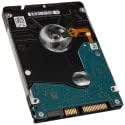
Сүрөт 3.2.2: Төмөнкү view of the Seagate Barracuda Pro 1TB 2.5-inch internal hard drive, illustrating the printed circuit board (PCB) and the SATA data and power connectors.
3.3 Дискти инициализациялоо жана форматтоо
After physical installation, the drive must be initialized and formatted by your operating system.
- Күйгүзүү: Reconnect the power cable and turn on your computer.
- Дискти башкарууга кирүү:
- Windows: Right-click 'This PC' or 'My Computer', select 'Manage', then 'Disk Management'.
- MacOS: "Тиркемелер" > "Утилиталар" > "Диск утилитасы" бөлүмүнө өтүңүз.
- Linux: Use a disk utility like GParted or the `fdisk`/`mkfs` commands.
- Дискти инициализациялоо: The new drive should appear as 'Unallocated Space'. Right-click it and select 'Initialize Disk' (Windows) or 'Erase' (macOS). Choose the appropriate partition style (e.g., GPT for modern systems).
- Create Volume: Create a new simple volume (Windows) or partition (macOS/Linux), assign a drive letter (Windows), and format it with a suitable file system (e.g., NTFS for Windows, APFS/HFS+ for macOS, Ext4 for Linux).
4. Иштөө нускамалары
Once installed and formatted, your Seagate Barracuda Pro drive functions as standard internal storage. It is compatible with various systems including creative professional workstations, desktop PCs, all-in-one PCs, home servers, and entry-level direct-attached storage (DAS) devices.
- Маалыматтарды сактоо: Use the drive to store operating systems, applications, documents, media fileс жана башка маалыматтар.
- File өткөрүүсү: Сүйрөп барып таштаңыз files, copy and paste, or use file management software to move data to and from the drive.
- Аткаруу: The 7200 RPM spin speed and 128MB cache provide fast data access and sustained throughput for demanding applications.
5. Техникалык тейлөө
To ensure the longevity and reliability of your hard drive, consider the following maintenance practices:
- Кадимки камдык көчүрмөлөр: Periodically back up critical data to another storage device. This is the most important step to prevent data loss.
- Туура өчүрүү: Компьютериңизди ар дайым туура өчүрүңүз. Күтүлбөгөн жерден электр кубатын жоготпоңуз, бул дискке зыян келтириши мүмкүн.
- Физикалык коргоо: While installed, ensure the computer is not subjected to excessive shock or vibration.
- Температураны көзөмөлдөө: Компьютериңиздин ысып кетишине жол бербөө үчүн, анын ичинде жетиштүү аба айланышын камсыз кылыңыз.
- Программалык камсыздоонун жаңыртуулары: Seagate колдоосун текшериңиз website for any available firmware updates for your drive model. Follow instructions carefully if performing an update.
6. Кыйынчылыктарды
If you encounter issues with your Barracuda Pro hard drive, try the following steps:
6.1 Диск аныкталган жок
- Кабелдерди текшерүү: Ensure SATA data and power cables are securely connected to both the drive and the motherboard/PSU.
- BIOS/UEFI Орнотуулары: Системаңыздын BIOS/UEFI жөндөөлөрүндө диск туташкан SATA порту иштетилгенин текшериңиз.
- Электр камсыздоо: Кубат менен камсыздоо блогуңузда (PSU) жетиштүү ват бар экенин ырастаңызtage to power all components, including the new drive.
- Башка порт/кабелди байкап көрүңүз: Дискти башка SATA маалымат кабели, кубат кабели же энелик платанын SATA порту менен текшериңиз.
- Дискти башкаруу: Check 'Disk Management' (Windows) or 'Disk Utility' (macOS) to see if the drive is detected but uninitialized/unformatted.
6.2 Жай аткаруу
- Дисктин ден соолугун текшерүү: Use S.M.A.R.T. (Self-Monitoring, Analysis and Reporting Technology) tools (available in many operating systems or third-party utilities) to check the drive's health status.
- Дефрагментация: For traditional hard drives, regular defragmentation can improve performance. (Not applicable for SSDs).
- Системалык ресурстар: Тутумуңузда жетиштүү RAM жана CPU ресурстары бар экенин текшериңиз, анткени алар дисктин иштешине таасир этиши мүмкүн.
- Драйвер жаңыртуулары: Сиздин энелик платаңыздын SATA контроллерунун драйверлери жаңыртылганын текшериңиз.
6.3 Өзгөчө ызы-чуу
- Identify Noise: A clicking, grinding, or repetitive scraping sound often indicates a mechanical failure.
- Тез арада чара көрүү: If you hear unusual noises, immediately back up any accessible data and consider replacing the drive. Continued use may lead to further data loss.
7. Техникалык шарттар
Key technical specifications for the Seagate Barracuda Pro 1TB 2.5-inch Internal SATA Hard Drive (ST1000LM049):
| Өзгөчөлүк | Спецификация |
|---|---|
| Модель номери | ST1000LM049 |
| Санариптик сактоо сыйымдуулугу | 1 ТБ |
| Катуу диск форма фактору | 2.5 дюйм |
| Катуу дисктин айлануу ылдамдыгы | 7200 RPM |
| Интерфейс | SATA 6 Гб/с |
| Кэш | 128 MB |
| Элемент Салмагы | 2.99 унция |
| Продукциянын өлчөмдөрү (LxWxH) | 3.95 x 2.75 x 0.28 дюйм |
| Шайкеш түзмөктөр | Иш такта, ноутбук |
8. Кепилдик жана колдоо
8.1 Продукциянын кепилдиги
The Seagate Barracuda Pro ST1000LM049 is backed by a Продукциянын 5 жылдык чектелген кепилдиги. This warranty covers defects in materials and workmanship under normal use. For full details and terms, please refer to the official Seagate warranty statement available on their webсайт.
8.2 Seagate Rescue Data Recovery Services
This drive includes 2 years of Seagate Rescue Data Recovery Services. This service provides professional data recovery assistance in the event of mechanical failure, accidental damage, or natural disaster. Activation and terms for this service can be found on the Seagate website or through the product registration process.
8.3 Техникалык колдоо
For technical assistance, driver downloads, or further information, please visit the official Seagate support website. Have your product model number (ST1000LM049) and serial number ready when contacting support.


