1. Продукт бүтүп калдыview
The Secukey SK6-X is a robust standalone access controller designed for secure door access. It supports both card and PIN entry, offering versatile access control solutions. Its durable, waterproof design makes it suitable for outdoor use.
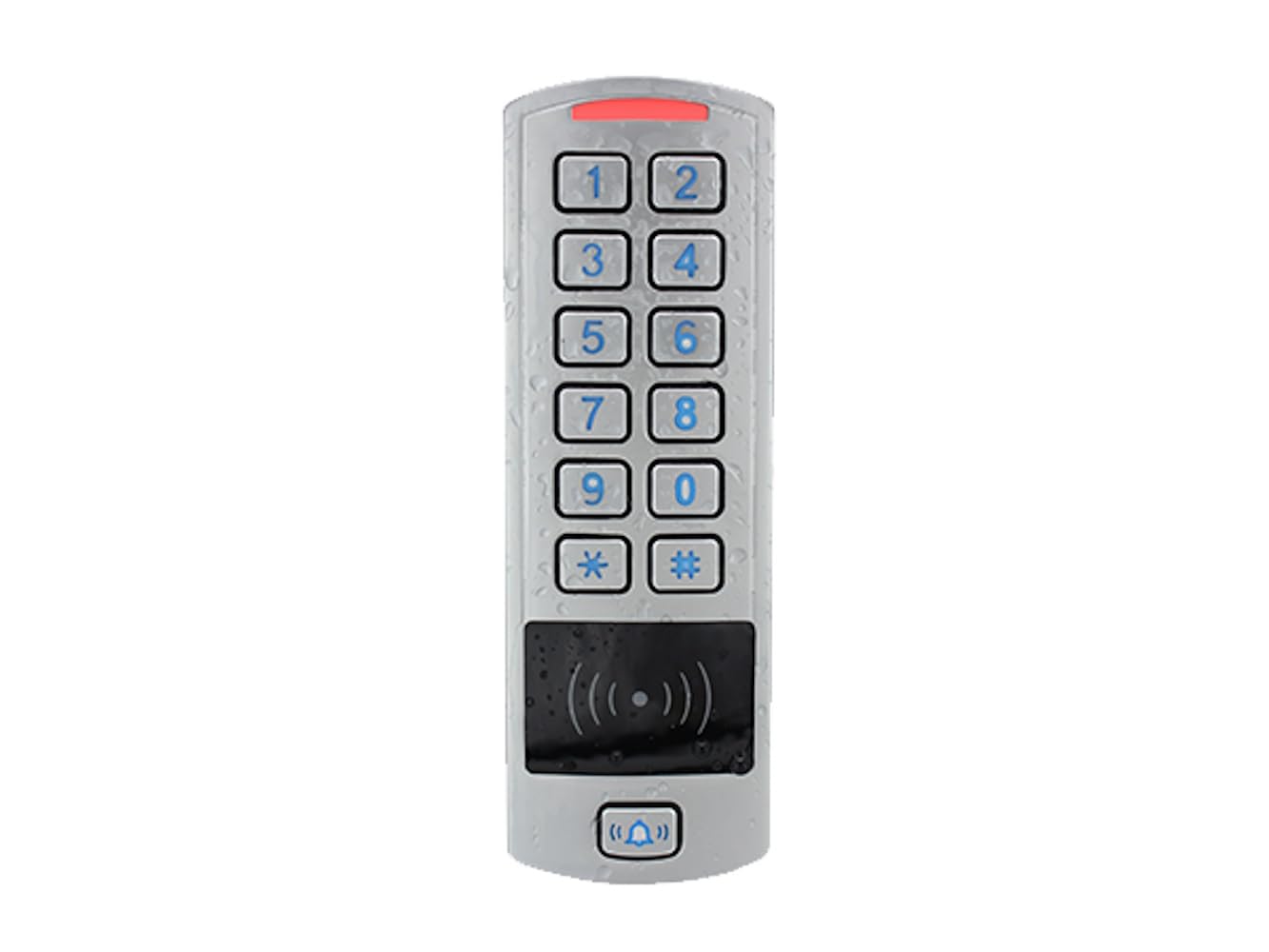
1-сүрөт: Фронт view of the Secukey SK6-X Standalone Access Controller. This image shows the keypad, RFID reader area, and the bell button, highlighting its sleek silver design and robust build.
2. Негизги өзгөчөлүктөрү
- Суу өткөрбөйт дизайн: IP66 protection rating, suitable for outdoor installation.
- Колдонуучунун сыйымдуулугу: Manages up to 600 users (598 standard users + 2 alarm users for silent alarm).
- Бир нече кирүү режимдери: Supports Card Only, PIN Only, and Card + PIN access.
- Карта шайкештиги: RFID reader supports EM 125 KHz, HID 125 KHz, and Mifare (1k) 13.56 MHz cards.
- ПИН код: Configurable 4 to 6 digit PIN codes.
- Программалануучу реле: One NO, NC, Com relay with adjustable output time from 1 to 99 seconds (5 seconds default).
- Wiegand интерфейси: Wiegand 26-37 bits input and output for integration with external devices (e.g., external relay, SBOARD, exit button, external alarm, door open contact).
- Өркүндөтүлгөн функциялар: Pulse mode, Toggle mode, and Interlock function (requires two SK6-X devices).
- Wide Voltage диапазону: Operates on 12~28V AC/DC power supply.
- Туруктуу курулуш: Цинк эритмеси casinг порошок менен капталган.

2-сүрөт: Key features of the SK6-X, illustrating its compatibility with EM, HID, and Mifare cards, anti-vandal design, IP66 weatherproofing, and wide operating temperature range.
3. Техникалык шарттар
| Спецификация | Нарк |
|---|---|
| Модель номери | SK6-X |
| Өндүрүүчү | Secukey |
| Өлчөмдөрү (H x L x D) | 12.2 x 5.0 x 2.1 см |
| Салмагы | 500 г |
| Коргоо рейтинги | IP66 |
| Электр камсыздоо | 12 ~ 28V AC / DC |
| Output Load жүктөө | 2 Ampэрес макс |
| Колдонуучунун кубаттуулугу | 600 (598 standard, 2 alarm) |
| PIN коддун узундугу | 4ден 6го чейин цифралар |
| Колдоого алынган карта түрлөрү | EM 125 KHz, HID 125 KHz, Mifare (1k) 13.56 MHz |
| Wiegand Interface | 26-37 bits Input & Output |
| Температура диапазону | -40 °C ~ 60 °C (-40 F ~ 140 F) |
| Нымдуулук | 0% RH ~ 98% RH |
| Casing Материал | Zinc alloy with powder coating |
| Түс | Silver |
4. Пакеттин мазмуну
Таңгактан чыгаргандан кийин, төмөндө көрсөтүлгөн нерселердин бардыгы бар экенин жана жакшы абалда экендигин текшериңиз:
- 1 x Secukey SK6-X Standalone RFID/MF/PIN Access Controller
- 1 x Master Add картасы
- 1 x Негизги өчүрүү картасы
- 1 x User Manual
Note: Power supply is not included and must be purchased separately.
5. Орнотуу жана орнотуу
5.1 Аппаратты орнотуу
Choose a suitable location for installation, ensuring it is secure and accessible. Use appropriate screws and anchors for mounting the device to the wall or door frame. Ensure the device is level and firmly attached.

3-сүрөт: Арткы view of the SK6-X access controller, illustrating the wiring connections and mounting points for installation.
5.2 Электр өткөргүч схемасы
Connect the SK6-X to your power supply and locking mechanism according to the wiring diagram. Pay close attention to polarity and ensure all connections are secure to prevent damage or malfunction.

4-сүрөт: Wiring diagram showing how the SK6-X can be connected to an external alarm panel via its LED control wires, as well as standard power and lock connections.
5.3 Электр энергиясы
The SK6-X operates within a wide voltage range of 12V to 28V, supporting both AC and DC power inputs. Ensure your power supply meets these requirements and provides stable power.

5-сүрөт: The SK6-X supports a wide voltage range of 12-28 Volts, compatible with both AC and DC power sources.
6. Иштөө режимдери
The SK6-X offers three distinct operating modes to suit various access control requirements:
- Өз алдынча режим: The device functions as an independent access controller, managing users and access directly.
- Контроллер режими: The device acts as a controller, typically receiving input from a separate reader and managing the lock.
- Окурман режими: The device functions purely as a reader, sending Wiegand data to an external controller for access decisions.

6-сүрөт: Illustration of the three working modes (Standalone, Controller, Reader) and their interaction with Wiegand 26-37 bits input and output.
7. Programming and User Management
The SK6-X allows for easy programming of user cards and PINs. Refer to the detailed programming instructions in the included user manual for specific steps on adding/deleting users, changing PINs, and configuring access modes.
7.1 Master Cards
The package includes a Master Add Card and a Master Delete Card. These cards are essential for quickly adding new user cards or removing existing ones without needing to enter programming mode via the keypad.
7.2 Кирүү режимдери
You can configure the device to grant access based on:
- Card Only: Users gain access by presenting a registered card.
- PIN Only: Users gain access by entering a valid PIN code.
- Card + PIN: Users must present a registered card and then enter their corresponding PIN code for enhanced security.
8. Өркүндөтүлгөн функциялар
8.1 Wiegand Input/Output
The Wiegand 26-37 bits input and output allows the SK6-X to integrate with other access control systems or external devices, providing flexibility in complex security setups.
8.2 Pulse Mode and Toggle Mode
The programmable relay can be configured for:
- Импульс режими: The relay activates for a set duration (1-99 seconds) upon valid access.
- Которуу режими: The relay switches state (on/off) with each valid access, suitable for applications requiring continuous lock/unlock.
8.3 Interlock Function
When two SK6-X devices are used, an interlock function can be configured. This ensures that the second door cannot be opened until the first door is securely closed, enhancing security in sensitive areas.
9. Техникалык тейлөө
To ensure the longevity and optimal performance of your SK6-X access controller, follow these maintenance guidelines:
- Тазалоо: Regularly wipe the device surface with a soft, damp cloth. Avoid abrasive cleaners or solvents that could damage the casing or keypad.
- Экологиялык шарттар: While IP66 rated, avoid prolonged exposure to extreme conditions beyond the specified temperature and humidity ranges.
- Кабелдик текшерүү: Periodically check all wiring connections for signs of wear, corrosion, or damage. Ensure they remain secure.
- Программалык камсыздоонун жаңыртуулары: Өндүрүүчүнү текшериңиз webсайтында иштин натыйжалуулугун жакшыртуучу же функцияларды кошуучу ар кандай жеткиликтүү программалык камсыздоо жаңыртуулары жөнүндө маалымат бар.
10. Кыйынчылыктарды
If you encounter issues with your SK6-X, refer to the following common problems and solutions:
- Түзмөк күйбөй жатат:
- Check the power supply connection and ensure it is within the 12-28V AC/DC range.
- Verify that the power source is active and providing sufficient current. - Карта таанылбайт:
- Ensure the card type (EM, HID, Mifare) is compatible with the SK6-X.
- Confirm the card has been properly enrolled and is active.
- Try presenting the card closer to the reader area. - PIN код иштебейт:
- Verify that the correct PIN code is being entered.
- Ensure the user associated with the PIN is active and has the correct access permissions.
- Check if the device is in the correct access mode (e.g., PIN Only or Card + PIN). - Эшик ачылбай жатат:
- Check the wiring to the electric lock and ensure it is correctly connected (NO/NC/COM).
- Verify the lock output load does not exceed 2 Amperes.
- Ensure the relay output time is set correctly (1-99 seconds). - Баскычтоп жооп бербейт:
- Check for any physical damage or debris on the keypad.
- If the device is exposed to extreme cold, allow it to warm up slightly within its operating temperature range.
For issues not covered here, please consult the full user manual or contact Secukey customer support.
11. Кепилдик жана колдоо
Specific warranty information for the Secukey SK6-X is typically provided at the point of purchase or within the product packaging. Please retain your proof of purchase for warranty claims.
For technical support, troubleshooting assistance, or inquiries regarding spare parts, please contact Secukey customer service directly. Contact details can usually be found on the manufacturer's official webсайтында же продуктуңузга кошулган документтерде.


