1. Киришүү
Сатып алганыңыз үчүн рахматasing the Capello Play it All Bluetooth Wireless Home Stereo Speaker CI302. This device offers versatile audio playback options including Bluetooth wireless streaming, CD player functionality, and FM digital radio. This manual provides detailed instructions for setup, operation, maintenance, and troubleshooting to ensure optimal performance and longevity of your speaker system.
2. Коопсуздук боюнча маанилүү маалымат
- Аппаратты иштетүүдөн мурун бардык нускамаларды окуп чыгыңыз.
- Бул колдонмону келечекте маалымат алуу үчүн сактаңыз.
- Өрт же шок коркунучун болтурбоо үчүн аппаратты жамгырга же нымга тийгизбеңиз.
- туура желдетүүнү камсыз кылуу; вентиляция тешиктерин жаап салбаңыз.
- Агрегатты туруктуу, тегиз бетке коюңуз.
- Өндүрүүчү белгилеген тиркемелерди/аксессуарларды гана колдонуңуз.
- Чагылган бороондо же узак убакыт бою колдонбогондо, розеткадан ажыратыңыз.
- Бардык тейлөөлөрдү квалификациялуу тейлөө кызматкерлерине тапшырыңыз.
3. Пакеттин мазмуну
Сураныч, бардык элементтер бар экенин текшериңиз:
- Capello Play it All Bluetooth Wireless Home Stereo Speaker CI302
- Алыстан башкаруу
- AC кубат адаптери
- Колдонуучунун Колдонмосу (бул документ)
4. Продукт бүтүп калдыview
Familiarize yourself with the main components and controls of your Capello Play it All speaker.
Фронт View

4.1-сүрөт: Фронт view of the Capello Play it All speaker, showing the speaker grille, digital clock display, and subtle branding.
Жогорку панелдин башкаруу элементтери

4.2-сүрөт: Top panel of the Capello Play it All speaker, illustrating the CD compartment, 'capello' logo, and various control buttons including PRESET, MODE, PAIRING, PROGRAM/CLOCK SET, SKIP, PLAY/PAUSE, STOP, REPEAT, and VOLUME.
- PRESET +/-: Navigate through saved FM radio stations.
- РЕЖИМ: Switch between Bluetooth, CD, FM Radio, and Line-In modes.
- ЖУПТОО: Bluetooth жупташтыруу режимин ишке киргизиңиз.
- PROGRAM/CLOCK SET: Program CD tracks or set the clock.
- SKIP ◀◀ / ▶▶: Skip tracks on CD or adjust FM frequency.
- PLAY/PAUSE ▶▶: Play or pause CD playback.
- STOP ■: Stop CD playback.
- КАЙТАЛОО: Repeat current track or all tracks on CD.
- VOL +/-: Үндүн деңгээлин тууралаңыз.
- АЧЫК ЖАБЫК: Open or close the CD compartment.
- ЖАНЫМДА БОЛ: Power on/off the unit.
Rear Panel (Typical)
The rear panel typically includes the AC power input, FM antenna connection, and Line-In jack.
5. Орнотуу
5.1 Кубат туташтыруу
- Connect the AC power adapter to the DC IN jack on the rear of the speaker.
- Адаптердин экинчи учун стандарттуу розеткага сайыңыз.
- The unit will enter standby mode, and the digital clock display will illuminate.
5.2 FM Antenna Setup
For optimal FM radio reception, extend the FM wire antenna fully and position it for the best signal. Avoid placing it near other electronic devices that may cause interference.
5.3 Саатты орнотуу
- Күтүү режиминде басып, кармап туруңуз PROGRAM/CLOCK SET баскычы.
- The hour digits will begin to flash. Use the SKIP ◀◀ / ▶▶ саатты тууралоо үчүн баскычтар.
- Басыңыз PROGRAM/CLOCK SET саатты ырастоо үчүн дагы.
- The minute digits will flash. Use the SKIP ◀◀ / ▶▶ мүнөттөрдү тууралоо үчүн баскычтар.
- Басыңыз PROGRAM/CLOCK SET one last time to save the setting.
6. Иштөө нускамалары
6.1 Күйгүзүү/өчүрүү жана режимди тандоо
- басыңыз ЖАНЫМДА БОЛ button on the unit or the remote control to turn the speaker on or off.
- басыңыз РЕЖИМ button repeatedly to cycle through available modes: Bluetooth, CD, FM Radio, and Line-In.
6.2 Bluetooth зымсыз агымы
- Динамикти күйгүзүп, Bluetooth режимин тандаңыз РЕЖИМ button. The display will show 'BT' and flash, indicating it's in pairing mode.
- Bluetooth иштетилген түзмөгүңүздө (смартфон, планшет, компьютер) Bluetooth иштетиңиз жана жеткиликтүү түзмөктөрдү издеңиз.
- Select 'Capello CI302' (or similar) from the list of devices.
- Once paired, the speaker will emit a confirmation tone, and 'BT' on the display will stop flashing.
- You can now play audio from your device through the speaker. Use your device or the speaker's controls for volume and track navigation.
6.3 CD ойнотуу
- басыңыз АЧУУ/ЖАБУУ button to open the CD compartment.
- Carefully place an audio CD (CD, CD-R/-RW) with the label side facing up into the compartment.
- Close the CD compartment. The unit will read the disc.
- Эгер CD режиминде эмес болсоңуз, баскычын басыңыз РЕЖИМ баскычын басып, CD режимин тандаңыз.
- басыңыз ОЙНОО/ТЫНЫТТЫРУ ойнотууну баштоо үчүн
- Колдонуу SKIP ◀◀ / ▶▶ to skip tracks, ТОКТОТУУ ■ to stop, and КАЙТАЛОО to cycle through repeat options.
6.4 FM Digital Radio
- басыңыз РЕЖИМ button to select FM radio mode. The current frequency will be displayed.
- Авто сканерлөө: басып, кармап туруңуз ОЙНОО/ТЫНЫТТЫРУ button to automatically scan and save available FM stations as presets.
- Кол менен жөндөө: Басыңыз SKIP ◀◀ / ▶▶ briefly to fine-tune the frequency. Press and hold to scan for the next strong station.
- Accessing Presets: колдонуу АЛДЫН АЛА +/- Сакталган станцияларды аралап өтүү үчүн баскычтарды басыңыз.
6.5 Line-In Operation
- Connect an audio cable (not included) from the headphone jack or line-out of an external audio device to the LINE-IN jack on the speaker.
- басыңыз РЕЖИМ button to select Line-In mode.
- Play audio from your connected device. Volume can be controlled via the speaker or the external device.
6.6 USB кубаттоо
The speaker features a USB port for charging compatible devices (e.g., smartphones, tablets). Connect your device's USB charging cable (not included) to the USB port on the speaker. The speaker does not need to be in a specific mode for USB charging to function.
6.7 Алыстан башкарууну колдонуу
The included remote control provides convenient access to all functions. Ensure the remote has working batteries and is pointed towards the front of the speaker.
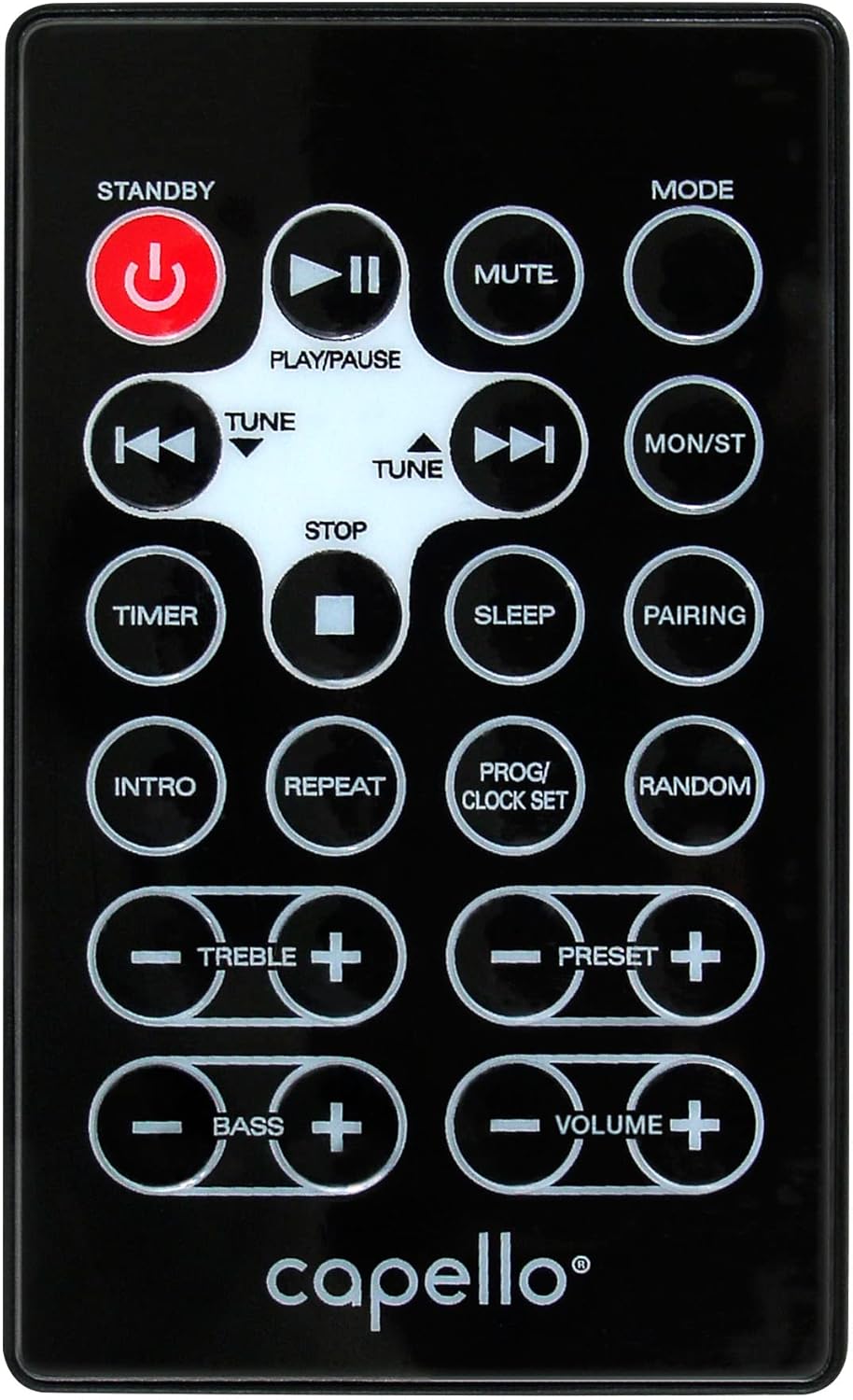
6.1-сүрөт: Layout of the remote control for the Capello Play it All speaker, showing buttons for Standby, Play/Pause, Mute, Mode, Skip/Tune, Stop, Timer, Sleep, Pairing, Intro, Repeat, Program/Clock Set, Random, Treble, Bass, and Volume controls.
- ЖАНЫМДА БОЛ: Күйгүзүү/өчүрүү.
- ОЙНОО/ТЫНДЫРУУ: Аудиону ойнотуу же тындыруу.
- Үнсүз: Аудионун үнүн өчүрүү же ачуу.
- РЕЖИМ: Cycle through input modes.
- SKIP/TUNE ◀◀ / ▶▶: Skip tracks or tune radio frequency.
- ТОКТОТУУ: Ойнотууну токтотуу.
- ТАЙМЕР: Уйку таймерин коюу.
- УЙКУ: Activate sleep function.
- ЖУПТОО: Bluetooth жупташтырууну баштаңыз.
- INTRO: Play the first few seconds of each CD track.
- КАЙТАЛОО: Учурдагы тректи же бардык тректерди кайталаңыз.
- PROG/CLOCK SET: Program CD tracks or set clock.
- КОКУС: Play CD tracks in random order.
- TREBLE +/-: Жогорку жыштыктардын деңгээлин тууралаңыз.
- BASS +/-: Басс деңгээлин тууралаңыз.
- VOLUME +/-: Жалпы үндү тууралаңыз.
7. Техникалык тейлөө
7.1 Тазалоо
- Тазалоодон мурун аны дайыма электр розеткасынан сууруп алыңыз.
- Сырткы беттерди сүртүү үчүн жумшак, кургак чүпүрөктү колдонуңуз.
- Абразивдүү тазалагычтарды, момдорду же эриткичтерди колдонбоңуз, анткени алар финишке зыян келтириши мүмкүн.
- CD линзасы үчүн атайын CD линзасын тазалоочу дискти колдонуңуз.
7.2 Сактоо
If storing the unit for an extended period, unplug it from the power source and store it in a cool, dry place away from direct sunlight and extreme temperatures.
8. Кыйынчылыктарды
| Көйгөй | Мүмкүн себеп | Чечим |
|---|---|---|
| Күч жок | Электр зымы туташкан эмес; розетка активдүү эмес. | Ensure power cord is securely plugged in; try a different outlet. |
| Үн жок | Volume too low; incorrect mode selected; external device muted. | Increase volume; select correct input mode; check external device volume/mute. |
| CD ойнотулбай жатат же ойнотулбай жатат | Dirty or scratched CD; CD inserted incorrectly; dirty CD lens. | Clean or replace CD; insert CD label-side up; use a CD lens cleaner. |
| Bluetooth жупташтыруу ишке ашпай калды | Device too far; Bluetooth not enabled on device; speaker not in pairing mode. | Move device closer; enable Bluetooth; ensure speaker is in BT pairing mode. |
| FM кабыл алуу начар | Антенна узартылган эмес; тоскоолдук бар. | Fully extend and reposition FM antenna; move away from other electronics. |
| Пульт иштебей жатат | Batteries depleted; obstruction; not pointed at sensor. | Replace batteries; remove obstructions; point remote directly at the unit. |
9. Техникалык шарттар
| Өзгөчөлүк | Спецификация |
|---|---|
| Бренд | Капелло |
| Модель номери | CI302 |
| Байланыш технологиясы | Bluetooth |
| Динамик түрү | Стерео |
| Аудио чыгаруу режими | Стерео |
| Колдоого алынган аудио форматтары | CD, MP3 |
| Динамиктердин номиналдык чыгаруу күчү | 10 Ватт |
| Динамиктердин максималдуу чыгаруу күчү | 10 Ватт |
| Динамиктин айланасындагы үн каналынын конфигурациясы | 2.0 |
| Кубат булагынын түрү | Электр зымдары |
| Шайкеш түзмөктөр | Ноутбук, смартфон, планшет |
| Өзгөчөлүктөр | Digital Display, Portable, USB Port |
| Материалдын түрү | Пластик |
| Монтаж түрү | Үстөлдүн үстү |
| Элемент Салмагы | 2.57 килограмм |
| Пакеттин өлчөмдөрү | 38.3 x 24.2 x 18.5 см |
| Батареялар камтылган | Жок |
| Батареялар талап кылынат | Жок |
10. Кепилдик жана колдоо
This product is covered by a limited warranty. Please refer to the warranty card included in your package for specific terms and conditions. For technical support or customer service inquiries, please contact Capello customer support through their official webсайт же сатып алуу документтери менен камсыз байланыш маалыматы.


