1. Киришүү
Thank you for choosing the MXT Tri-Articulated TV Wall Mount. This manual provides detailed instructions for the safe and proper installation, operation, and maintenance of your new TV mount. Please read this manual thoroughly before installation and keep it for future reference.
This mount is designed to securely hold one TV or monitor, compatible with LCD, LED, and Plasma displays. It supports VESA patterns up to 400x400 and can hold up to 35 kg. Its compact design helps save space.
2. Коопсуздук маалыматы
ЭСКЕРТҮҮ: Failure to read and follow all instructions may result in personal injury, property damage, or voiding of warranty. If you have any questions, please contact customer support.
- Do not install into drywall alone. Ensure the mount is secured to a solid wall stud (wood) or concrete/brick wall.
- Verify the weight capacity of the mount (35 kg) and the VESA compatibility (up to 400x400) before attaching your TV.
- Орнотуу учурунда тиешелүү коопсуздук каражаттарын, анын ичинде көздү коргоочу каражаттарды колдонуңуз.
- Бардык бурамалар бекем бекемделгенин текшериңиз, бирок ашыкча тартпаңыз.
- Орнотуу учурунда балдарды жана үй жаныбарларын алыс кармаңыз.
- Бул продукт ички колдонуу үчүн гана арналган.
3. Бөлүктөр тизмеси
Before beginning installation, ensure all parts are present and undamaged. Refer to the diagram below for identification.
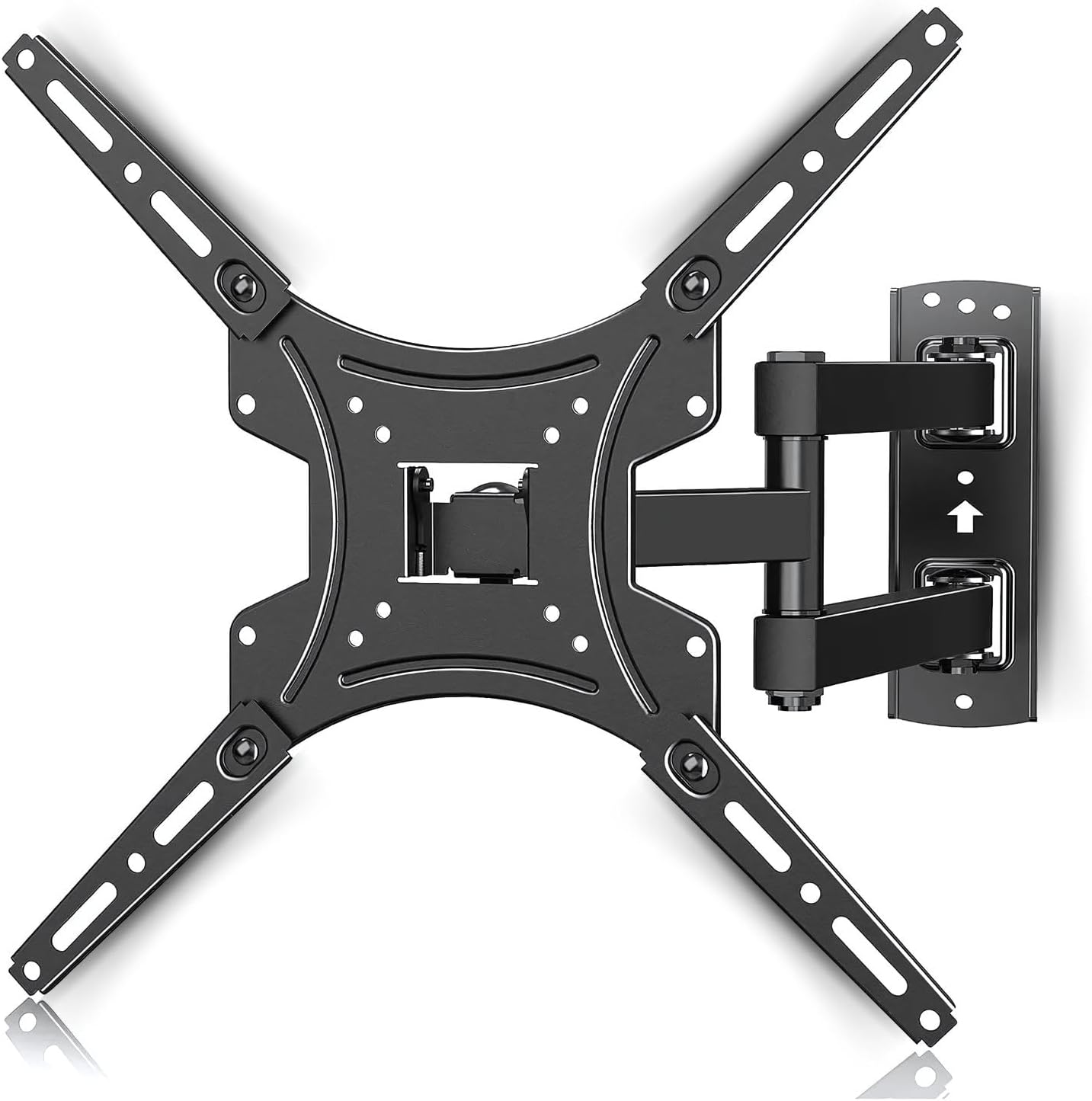
Сүрөт: бүттүview of the MXT Tri-Articulated TV Wall Mount, showing the wall plate, articulated arm, and TV mounting plate. This image illustrates the main components of the mount.
- Wall Plate Assembly (with articulated arm)
- TV Mounting Plate (Vesa compatible arms)
- Wall Anchors and Screws (for concrete/brick)
- Wood Stud Screws
- Various TV Screws (M4, M6, M8) and Spacers
- Деңгээл
- Wrenches/Tools (may be included or required separately)
4. Орнотуу жана орнотуу
Follow these steps carefully for proper installation. It is recommended to have two people for installation, especially when mounting the TV.
4.1. Check TV Compatibility and VESA Pattern
This mount is compatible with TVs from 23 to 65 inches and supports a maximum weight of 35 kg. Verify your TV's VESA mounting pattern. The mount supports VESA patterns including 75x75, 100x100, 200x100, 200x200, 400x200, 300x300, and 400x400 mm.

Image: Diagram illustrating various VESA mounting patterns (75x75, 100x100, 200x100, 200x200, 400x200, 300x300, 400x400) supported by the mount. This helps users identify if their TV is compatible.

Image: Graphic indicating compatibility for TVs ranging from 23 to 65 inches and a maximum weight capacity of 35 kg. This visually confirms the product's supported range.
4.2. Кадам-кадам орнотуу
Refer to the installation diagram for visual guidance.

Image: A three-step visual guide for installation. Step 1 shows attaching the front panel to the TV. Step 2 shows installing the wall mount to a wooden beam or concrete/brick wall. Step 3 shows attaching the TV to the mount.
- Step 1: Install the TV Mounting Plate to your TV.
Carefully place your TV face down on a soft, clean surface. Attach the TV mounting plate (the VESA compatible arms) to the back of your TV using the appropriate screws and spacers. Ensure the plate is oriented correctly, usually with the larger opening facing upwards for easier attachment to the wall plate.
- Step 2: Install the Wall Plate Assembly to the Wall.
Choose a suitable location on your wall. Use a stud finder to locate wood studs if installing on drywall. For concrete or brick walls, use a masonry drill bit and the provided wall anchors. Mark the drilling points using the wall plate as a template. Drill pilot holes, then secure the wall plate assembly firmly to the wall using the appropriate screws. Ensure the mount is level.
- Step 3: Attach the TV to the Wall Mount.
With assistance, carefully lift the TV with the attached mounting plate. Align the TV mounting plate with the wall plate assembly and slide it into place. Ensure the TV is securely hooked onto the wall mount. Tighten any safety screws or locking mechanisms to prevent accidental dislodgement.
5. Тоону иштетүү
This tri-articulated mount offers flexible viewбурчтар.
5.1. Adjusting Distance from Wall
The mount allows you to extend your TV from the wall or push it back for a compact profile. The minimum distance from the wall is approximately 55 mm, and the maximum extension is approximately 430 mm.

Image: Illustration showing the adjustable distance of the TV from the wall, ranging from a minimum of 55 mm to a maximum of 430 mm. This highlights the mount's flexibility.
5.2. Айлануучуну тууралоо
The articulated arm allows for significant left and right swivel, up to 90 degrees in each direction, depending on TV size and wall clearance. Gently push or pull the TV to achieve your desired viewбурч.

Image: Depiction of the TV mount's ability to swivel the TV up to 90 degrees horizontally. This demonstrates the wide range of motion for optimal viewing.
5.3. жантайып тууралоо
The mount features a tilt function, allowing you to adjust the vertical angle of your TV. It can tilt downwards by -5 degrees and upwards by +15 degrees to reduce glare or optimize viewар кандай бийиктиктерден.

Image: Visual representation of the TV mount's tilt range, showing a downward tilt of -5 degrees and an upward tilt of +15 degrees. This illustrates the vertical angle adjustment feature.
6. Техникалык тейлөө
Үзгүлтүксүз техникалык тейлөө сыналгы монтажыңыздын узак мөөнөттүү жана коопсуз иштешин камсыз кылат.
- Тазалоо: монтажды жумшак, кургак чүпүрөк менен сүртүңүз. Абразивдүү тазалагычтарды же эриткичтерди колдонбоңуз.
- Мезгилдүү текшерүүлөр: Мезгил-мезгили менен бардык бурамалар менен байланыштарды текшерип туруңуз, алар бекем жана бекем бойдон калууда. Керек болсо кайра тартыңыз.
- Кыймыл: If the articulated arm becomes stiff or loose, check the pivot points for any debris or adjust the tension screws if available (refer to specific product diagrams if provided).
- Зыян: If any part of the mount appears damaged or worn, discontinue use immediately and contact customer support for replacement parts or advice.
7. Кыйынчылыктарды
Бул бөлүм сиз кабылышы мүмкүн болгон жалпы көйгөйлөрдү карайт.
| Көйгөй | Мүмкүн себеп | Чечим |
|---|---|---|
| Орнотуудан кийин сыналгы түз эмес. | Wall plate not installed level; TV mounting plate not aligned correctly. | Remove TV, re-level wall plate, or adjust TV mounting plate if it has fine-tuning level adjustments. |
| Тоо туруксуз же солкулдаган сезилет. | Screws not fully tightened; incorrect wall anchors used; wall structure not strong enough. | Ensure all screws are securely tightened. Verify wall type and use appropriate anchors. Consult a professional if unsure about wall strength. |
| Articulated arm is too stiff or too loose. | Pivot point tension needs adjustment. | Some mounts have adjustable tension screws on the pivot points. Refer to the specific diagram for your model or contact support. |
| Cannot find correct screws for TV. | TV requires specific screw size not included; spacers needed. | Consult your TV's manual for required screw size. Purchase appropriate screws and spacers if necessary. |
8. Техникалык шарттар
- Модел: AR-E15SB
- Бренд: MXT
- Шайкеш сыналгы өлчөмдөрү: 23ден 65 дюймга чейин
- Максималдуу Салмак сыйымдуулугу: 35 кг (77 фунт)
- VESA шайкештиги: 75x75, 100x100, 200x100, 200x200, 400x200, 300x300, 400x400 mm
- Жантайма диапазону: -5°тан +15°ка чейин
- Айлануу диапазону: Up to 90° left/right (depending on TV size)
- Дубалга чейинки аралык: 55 mm (min) to 430 mm (max)
- Материал: Steel, ABS, Aluminum
- Продукт Салмагы: Болжол менен 2.02 кг
- Түсү: Кара
9. Кепилдик жана колдоо
Кепилдик: This product comes with a manufacturer's warranty of 2 years from the date of purchase. This warranty covers defects in materials and workmanship under normal use. It does not cover damage caused by improper installation, misuse, accidents, or unauthorized modifications.
Кардарларды колдоо: For technical assistance, missing parts, or warranty claims, please contact MXT customer support. Refer to the product packaging or the MXT official webбайланыш маалыматы үчүн сайт.
Сураныч, кепилдик максаттары үчүн сатып алганыңыздын далилин сактап коюңуз.
10. Кошумча ресурстар
For visual guidance, you may find the following video helpful. Please note that video content may vary slightly from your specific model but provides general installation principles.
Video: A user-submitted video demonstrating the installation and articulation of a similar TV mount. This video shows the product's movement and ease of installation, providing a practical visual aid for users.


