Introduction
This manual provides instructions for the operation and maintenance of your Timex Expedition Digital Chrono Alarm Timer 33mm Watch, Model TW4B13100. This digital outdoor watch features a chronograph, alarm, and timer, designed for everyday use.

1-сүрөт: Фронт view of the Timex Expedition Digital Watch. The watch features a black case, a clear digital display showing the time and date, and a durable gray and blue striped fabric strap. Buttons for 'SET', 'MODE', 'START/SPLIT', and 'STOP/RESET' are visible on the sides of the watch case.
Жайгашуу
Баштапкы активдештирүү жана убакытты коюу
Upon first use, or after a battery replacement, you may need to activate the watch and set the time and date.
- If a plastic guard is present under the SET button, remove it.
- басып, кармап туруңуз SET button until the display flashes, indicating time setting mode.
- колдонуу БАШТОО/БӨЛҮҮ button to adjust the flashing segment (e.g., hours, minutes).
- басыңыз РЕЖИМ button to advance to the next segment (e.g., minutes, AM/PM, month, day, year).
- Бардык керектүү жөндөөлөр конфигурацияланганга чейин 3 жана 4-кадамдарды кайталаңыз.
- басыңыз SET Убакытты орнотуу режиминен чыгуу үчүн баскычын кайра басыңыз.
Батарея маалыматы
Your watch comes with one product-specific battery included. When the display dims or functions become erratic, it may be time to replace the battery. Timex recommends having battery replacement performed by a qualified service center to maintain water resistance.
Иштөө режимдери
Саат аркылуу жеткиликтүү бир нече режимдер бар РЕЖИМ баскычы.

2-сүрөт: Side view of the Timex Expedition Digital Watch. This image highlights the textured buttons on the right side of the watch case, labeled 'START/SPLIT' and 'STOP/RESET', which are used for various functions across different modes.
Убакыт режими
This is the default display mode, showing the current time, day of the week, and date.
Хронограф (Секундомер)
The chronograph measures elapsed time.
- Убакыт режиминен баскычын басыңыз РЕЖИМ until "CHRONO" or a similar indicator appears.
- Басыңыз БАШТОО/БӨЛҮҮ убакытты баштоо үчүн.
- Басыңыз БАШТОО/БӨЛҮҮ again to record a split time (the display will freeze, but timing continues in the background). Press БАШТОО/БӨЛҮҮ again to return to current elapsed time.
- Басыңыз ТОКТОТ/КАЛЫПТАҢЫР хронографты тындыруу.
- With the chronograph paused, press ТОКТОТ/КАЛЫПТАҢЫР again to reset it to zero.
Таймер (артка санак)
The countdown timer allows you to set a specific duration, after which an alarm will sound.
- Убакыт режиминен баскычын басыңыз РЕЖИМ until "TIMER" or a similar indicator appears.
- Басып кармап туруңуз SET дисплей жаркыраганча.
- Колдонуу БАШТОО/БӨЛҮҮ to adjust the hours, minutes, or seconds.
- Басыңыз РЕЖИМ сааттар, мүнөттөр жана секундалар арасында жылдыруу.
- Басыңыз SET таймер орнотууну ырастоо үчүн.
- Басыңыз БАШТОО/БӨЛҮҮ артка санаууну баштоо үчүн.
- Басыңыз ТОКТОТ/КАЛЫПТАҢЫР to pause or resume the timer.
- When the timer reaches zero, an alarm will sound. Press any button to silence it.
Ойготкуч
The watch features an alarm function to alert you at a set time.
- Убакыт режиминен баскычын басыңыз РЕЖИМ until "ALARM" or a similar indicator appears.
- Басып кармап туруңуз SET until the alarm time flashes.
- Колдонуу БАШТОО/БӨЛҮҮ to adjust the hours and minutes.
- Басыңыз РЕЖИМ to move between hours, minutes, and AM/PM.
- Басыңыз SET ойготкуч убактысын ырастоо үчүн.
- Ойготкучту иштетүү/өчүрүү үчүн, басыңыз БАШТОО/БӨЛҮҮ Сигнализация режиминде турганда (коңгуроо сүрөтчөсү, адатта, активацияны билдирет).
- When the alarm sounds, press any button to silence it.
INDIGLO Night-Light
The INDIGLO night-light illuminates the watch display for visibility in low-light conditions.
- басыңыз ИНДИГЛО button (typically located on the front of the watch, below the display) to activate the backlight.
- The light will remain on for a few seconds.
Техникалык тейлөө
Суу каршылык
This watch is water resistant to 100 meters (330 feet). This means it is suitable for showering, swimming, and snorkeling. It is not suitable for scuba diving.
- Do not press any buttons while the watch is wet or submerged.
- Avoid exposing the watch to extreme temperature changes (e.g., hot shower then cold water).
- Туздуу сууга түшкөндөн кийин, саатты таза суу менен чайкап, жакшылап кургатыңыз.
Тазалоо
Clean your watch regularly to remove dirt and debris.
- For the case and crystal, use a soft, damp кездеме.
- For the fabric strap, it can be gently hand-washed with mild soap and water. Ensure it is completely dry before wearing.
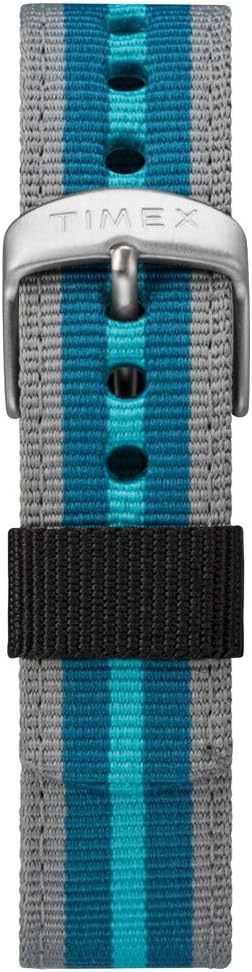
3-сүрөт: Жакын план view of the Timex Expedition watch's fabric strap. The strap features alternating stripes of gray and two shades of blue, secured by a silver-colored buckle with the Timex logo.
Проблемаларды чечүү
| Көйгөй | Мүмкүн себеп | Чечим |
|---|---|---|
| Дисплей бош же күңүрт. | Батарея аз же өлүк. | Батареяны алмаштырыңыз. |
| Баскычтар жооп бербейт. | Watch may be in a locked mode or internal error. | Try pressing all buttons simultaneously for a few seconds to reset (if applicable). If problem persists, consult service. |
| Убакыт туура эмес. | Убакыт туура коюлган эмес же батарея аз. | Re-set the time and date. If issue recurs, replace battery. |
Техникалык шарттар
- Бренд: Timex
- Модель номери: TW4B13100
- Дисплей түрү: Санарип
- Иштин диаметри: 33мм
- Суу каршылык: 100 метр (330 фут)
- Өзгөчөлүктөрү: Chronograph, Alarm, Timer, INDIGLO Night-Light
- Боонун материалы: Кездеме
- Батарея: 1 Продукттун өзгөчө батареясы (кошулган)
- Бөлүм: Unisex-чоңдор
Продукт бүттүview Video
For a visual guide on the Timex Expedition Digital watch, please refer to the video below.
Видео 1: An overview of the Timex Expedition Digital 33mm Nylon Strap watch. This video demonstrates the watch's design and features, providing a visual understanding of its appearance and basic functionalities.
Кепилдик жана колдоо
Timex watches are manufactured to high standards and are backed by a limited warranty. For specific warranty details, registration, or support inquiries, please refer to the official Timex website or contact Timex customer service.
You can visit the official Timex store for more information: Timex Store on Amazon


