1. Киришүү
Сатып алганыңыз үчүн рахматasing the Sharp HT-SBW110 2.1 Bluetooth Soundbar System. This manual provides essential information for setting up, operating, and maintaining your soundbar system. Please read it thoroughly before use to ensure proper functionality and safety.
The HT-SBW110 is a powerful 2.1 channel soundbar system designed to enhance your audio experience, featuring 180W total RMS power, a dedicated wireless subwoofer, and versatile connectivity options including Bluetooth, HDMI ARC, Optical, and AUX inputs.

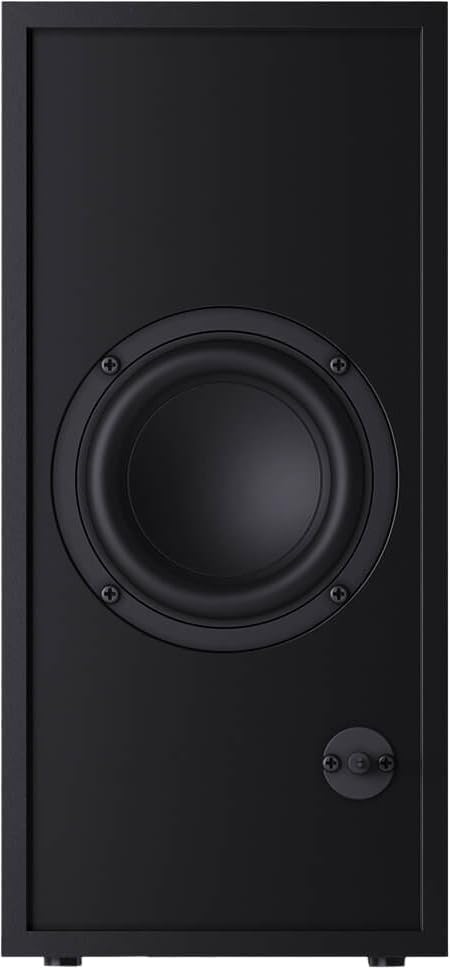
Figure 1.1: Sharp HT-SBW110 Soundbar and Subwoofer
This image displays the Sharp HT-SBW110 soundbar and its accompanying separate subwoofer, showcasing алардын жаркыраган кара дизайны.
2. Пакеттин мазмуну
Пакетте бардык буюмдар бар экенин текшериңиз:
- Sharp HT-SBW110 Soundbar
- Зымсыз сабвуфер
- Алыстан башкаруу
- Soundbar үчүн электр кабели
- Сабвуфер үчүн электр кабели
- Колдонуучунун Колдонмосу (бул документ)
- Batteries for Remote Control (1 x CR2)
3. Коопсуздук маалыматы
Always follow basic safety precautions when using this product to reduce the risk of fire, electric shock, or injury:
- Бул шайманга тамчылатып же чачыраткан нерселерди тийгизбеңиз.
- Ваза сыяктуу суюктуктар толтурулган нерселерди аппараттын үстүнө койбоңуз.
- Адекваттуу вентиляцияны камсыз кылыңыз. Эч кандай желдетүүчү тешиктерди жаап албаңыз.
- Do not place the soundbar or subwoofer near heat sources such as radiators, heat registers, stoves, or other apparatus (including ampкөтөргүчтөр) жылуулукту пайда кылуучу.
- Өндүрүүчү белгилеген тиркемелерди/аксессуарларды гана колдонуңуз.
- Бул аппаратты чагылгандуу бороондордо же узак убакыт бою колдонбогондо электр розеткасынан ажыратыңыз.
- Бардык тейлөөлөрдү квалификациялуу тейлөө кызматкерлерине тапшырыңыз.
4. Орнотуу
4.1 Орнотуу
Саундбар: Place the soundbar on a flat, stable surface directly in front of your TV, centered for optimal sound dispersion. Ensure there are no obstructions in front of the soundbar's speakers.
ЛГурченко: The wireless subwoofer can be placed anywhere in the room, ideally within 5-10 meters of the soundbar, for best bass response. Avoid placing it in enclosed spaces that might muffle the sound.
The soundbar is also wall-mountable. Refer to the included wall-mounting template (if provided) for proper installation.
4.2 Байланыштар
Connect your soundbar to your TV or other audio sources using one of the following methods:

4.1-сүрөт: Саундбардын арткы панелинин туташуулары
This image shows the rear panel of the Sharp HT-SBW110 soundbar, highlighting the various input ports including HDMI ARC, Optical, and AUX.
- HDMI ARC (сунушталат):
Connect an HDMI cable from the HDMI ARC port on your soundbar to the HDMI ARC port on your TV. This allows audio from your TV to be sent to the soundbar and enables control of the soundbar volume using your TV remote (if your TV supports HDMI CEC).
- Оптикалык:
Connect an optical audio cable from the OPTICAL input on your soundbar to the optical digital audio output on your TV or other audio source.
- AUX:
Connect a 3.5mm audio cable from the AUX input on your soundbar to the headphone jack or audio output of your device (e.g., smartphone, MP3 player).
- Кубат туташуу:
Connect the power cables to the soundbar and subwoofer, then plug them into a wall outlet (AC 220-240V, 50Hz).
The subwoofer will automatically pair with the soundbar once both are powered on. A blue indicator light on the subwoofer will confirm a successful connection.
5. Иштөө нускамалары
5.1 Алыстан башкарууview
5.1-сүрөт: Алыстан башкаруу
This image displays the sleek, minimalist remote control for the Sharp HT-SBW110 soundbar, showing its various buttons for power, input selection, volume, bass, treble, and EQ modes.
The remote control allows you to manage all functions of your soundbar system. Insert the provided CR2 battery into the remote control before first use.
- Кубат баскычы (⏷): Turns the soundbar On/Off.
- Киргизүү/Булак баскычы (↵): Switches between HDMI ARC, Optical, AUX, and Bluetooth inputs.
- Үндү жогорулатуу/төмөндөтүү (+/-): Башкы үн деңгээлин тууралайт.
- Үнсүз баскычы (🔇): Үндүн үнүн өчүрөт же ачат.
- Бас +/-: Adjusts the bass level of the subwoofer.
- Требл +/-: Үчтүк деңгээлди тууралайт.
- EQ баскычы: Cycles through preset equalizer modes: Music, Film, Talk.
- Bluetooth баскычы (Ⓘ): Bluetooth жупташтыруу режимине кирет.
5.2 Негизги операция
- Күйгүзүү/өчүрүү: Press the Power button on the remote or on the soundbar's top panel.
- Киргизүүнү тандоо: Press the Input/Source button repeatedly to cycle through available inputs (HDMI ARC, Optical, AUX, Bluetooth). The LED indicator on the soundbar will change color to indicate the selected input.
- Үндү тууралоо: Use the Volume +/- buttons on the remote or the soundbar to adjust the listening level.
- Change EQ Mode: Press the EQ button to select between Music, Film, or Talk sound modes.
5.3 Bluetooth жупташтыруу
- Press the Input/Source button on the soundbar or remote until the Bluetooth input is selected (usually indicated by a blue LED).
- The soundbar will automatically enter pairing mode, and the Bluetooth LED will flash.
- Bluetooth түзмөгүңүздө (смартфон, планшет ж.б.) Bluetooth иштетиңиз жана жеткиликтүү түзмөктөрдү издеңиз.
- Select "SHARP HT-SBW110" from the list of devices.
- Once paired, the Bluetooth LED on the soundbar will stop flashing and remain solid blue. You can now play audio from your device through the soundbar.
6. Техникалык тейлөө
- Тазалоо: Саундбардын жана сабвуфердин беттерин тазалоо үчүн жумшак, кургак чүпүрөктү колдонуңуз. Суюк тазалоочу каражаттарды же аэрозоль чачыраткычтарын колдонбоңуз.
- Вентиляция: Ensure that the ventilation openings on the soundbar and subwoofer are not blocked by dust or debris.
- Сактагыч: Эгерде аппаратты узак убакытка сактасаңыз, аны розеткадан сууруп, салкын, кургак жерде сактаңыз.
7. Кыйынчылыктарды
| Көйгөй | Мүмкүн себеп | Чечим |
|---|---|---|
| Күч жок | Электр кабели туташкан эмес; Электр розеткалары активдүү эмес. | Ensure power cables are securely connected to the soundbar, subwoofer, and wall outlet. Try a different outlet. |
| Үн жок | Туура эмес киргизүү тандалды; Үнү өтө төмөн; Кабелдер туура туташкан эмес. | Туура киргизүү булагын тандаңыз. Үнүн жогорулатуу. Бардык аудио кабелдик байланыштарды текшериңиз. Сыналгынын аудио чыгышы тышкы динамиктерге коюлганын текшериңиз. |
| Bluetooth жупташтыруу ишке ашпай калды | Soundbar жупташтыруу режиминде эмес; Аппарат өтө алыс; Интерференция. | Ensure soundbar is in Bluetooth pairing mode (flashing blue LED). Move device closer to soundbar. Avoid strong electromagnetic interference. Try unpairing and re-pairing. |
| Пульт иштебей жатат | Батареялар түгөнгөн; Пульт менен үн панелинин ортосундагы тоскоолдук. | Replace batteries. Ensure clear line of sight between remote and soundbar's IR receiver. |
Эгерде көйгөй чечилбесе, кошумча жардам алуу үчүн Кепилдик жана колдоо бөлүмүн караңыз.
8. Техникалык шарттар
| Аудио каналдар | 2.1 канал |
| Жалпы RMS кубаттуулугу | 180 Вт |
| Soundbar RMS Power | 30 Вт |
| Сабвуфердин RMS Power | 30 Вт |
| Жыштык диапазону | 60 - 20000 Гц |
| Байланыш технологиясы | Зымдуу & Зымсыз |
| Bluetooth версиясы | 4.2 |
| HDMI порттору | 1 (ARC) |
| Оптикалык аудио киргизүү | 1 |
| AUX киргизүү | Ооба |
| AC Input Voltage | 220 - 240 В |
| AC киргизүү жыштыгы | 50 Гц |
| Типтүү электр керектөө | 30 Вт |
| Күтүү режиминде энергия керектөө | 0.5 Вт |
| Soundbar Dimensions (W x D x H) | 800 x 60 x 60 мм (31.5 x 2.4 x 2.4 дюйм) |
| Soundbar Салмагы | 1.3 кг (2.9 фунт) |
| Subwoofer Dimensions (W x D x H) | 150 x 320 x 220 мм (5.9 x 12.6 x 8.7 дюйм) |
| Сабвуфердин салмагы | 2.7 кг (6 фунт) |
| Түс | Кара |
| Дубалга орнотулган | Ооба |
| Алыстан башкаруу | камтылган |
| Сертификаттар | CE (EMC), CB (Safety), ErP (Energy) |
9. Кепилдик жана колдоо
This Sharp HT-SBW110 Soundbar System comes with a limited warranty. Please refer to the warranty card included in your package for specific terms and conditions.
Spare parts availability is guaranteed for 1 year from the date of purchase.
For technical support, troubleshooting beyond this manual, or warranty claims, please contact Sharp customer service or visit the official Sharp website for your region. Contact information can typically be found on the product packaging or Sharp's official webсайт.


