1. Киришүү
This user manual provides comprehensive instructions for the installation, operation, maintenance, and troubleshooting of the IP-COM G3224P 24-Port Managed PoE Switch. Please read this manual thoroughly before using the device to ensure proper and safe operation.
The IP-COM G3224P is a high-performance managed Power over Ethernet (PoE) switch designed for small to medium-sized businesses and enterprise networks. It offers 24 Gigabit Ethernet ports with PoE+ capabilities and additional SFP ports for fiber uplinks, providing flexible and scalable network solutions.
2. Продукт бүтүп калдыview
2.1 Пакеттин мазмуну
- IP-COM G3224P 24-Port Managed PoE Switch
- Электр кабели
- Rackmount комплект (кронштейндер жана бурамалар)
- Резина буттар (үстөлдөргө жайгаштыруу үчүн)
- Ыкчам орнотуу колдонмосу
2.2 Алдыңкы панелдин сүрөттөлүшү
The front panel of the IP-COM G3224P switch features various ports and LED indicators for status monitoring.
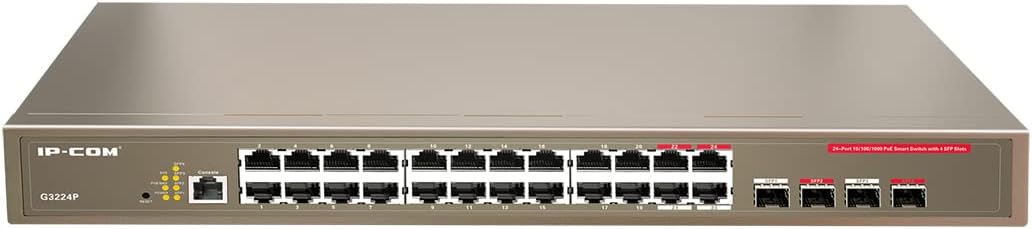
Figure 2.1: IP-COM G3224P Front Panel Layout
This image displays the front panel of the IP-COM G3224P switch. On the left, the IP-COM logo and model number G3224P are visible. To the right, there are LED indicators for SYS, PoE MAX, and individual port status. A console port is also present. The main section features 24 Gigabit Ethernet RJ45 ports, arranged in two rows, with port numbers 1 through 24. On the far right, there are four SFP ports labeled SFP1, SFP2, SFP3, and SFP4, which are used for fiber optic uplinks.
2.3 LED көрсөткүчтөрү
| LED көрсөткүч | Статус | Description |
|---|---|---|
| SYS | Жашыл (Катуу) | Система нормалдуу иштеп жатат. |
| SYS | Жашыл (Жаркылдаган) | System is booting up or firmware is being upgraded. |
| PoE MAX | Кызыл (Катуу) | PoE power budget is nearing or exceeding its limit. |
| Шилтеме/Акт (ар бир порт үчүн) | Жашыл (Катуу) | Порт байланыштырылган. |
| Шилтеме/Акт (ар бир порт үчүн) | Жашыл (Жаркылдаган) | Port is transmitting or receiving data. |
| PoE (ар бир порт үчүн) | Сары (катуу) | PoE power is being supplied to the connected device. |
3. Орнотуу жана орнотуу
3.1 Коопсуздук чаралары
- электр менен жабдууну камсыз кылуу voltage matches the switch's requirements (240V as per specifications).
- Желдетүүчү тешиктерди жаппаңыз.
- Аппаратты суудан, оттон жана жогорку температурадан алыс кармаңыз.
- Аппаратты өзүңүз ачууга же оңдоого аракет кылбаңыз.
3.2 Rackmount орнотуу
- Attach the provided rackmount brackets to the sides of the switch using the included screws.
- Которгучту стандарттуу 19 дюймдук жабдуу стойкасына ылайыктуу стойка бурамалар менен бекитиңиз (кошумча эмес).
- Ensure adequate airflow around the switch for proper cooling.
3.3 Desktop орнотуу
- Берилген резина буттарды өчүргүчтүн түбүнө бекитиңиз.
- Place the switch on a flat, stable surface with sufficient ventilation.
3.4 Которгучту туташтыруу
- Кубат туташуу: Connect the power cord to the power inlet on the rear panel of the switch and then to a grounded power outlet.
- Тармак түзмөктөрү: Connect network devices (e.g., computers, servers, IP cameras, VoIP phones) to the RJ45 ports (1-24) on the front panel using standard Ethernet cables.
- PoE түзмөктөрү: For PoE-powered devices, simply connect them to any of the RJ45 ports. The switch will automatically detect and provide power if the device is PoE compliant.
- Uplink байланыштары: Use the SFP ports (SFP1-SFP4) for fiber optic uplinks to other network devices or the core network. Insert compatible SFP transceivers into the SFP slots before connecting fiber optic cables.
- Консоль туташуусу (милдеттүү эмес): For initial configuration or advanced management, connect a console cable from your computer to the console port on the switch.
4. Иштөө нускамалары
4.1 Баштапкы күйгүзүү
After connecting the power cord, the switch will automatically power on. Observe the SYS LED indicator. It will blink during boot-up and turn solid green once the system is ready.
4.2 Негизги тармактык байланыш
Once powered on, the switch will automatically detect connected devices. The Link/Act LED for each connected port will illuminate solid green, indicating a successful link. It will blink when data is being transmitted or received.
4.3 PoE Operation
When a PoE-compatible device is connected to a port, the switch will negotiate power delivery. The PoE LED for that port will turn yellow, indicating that power is being supplied. Monitor the PoE MAX LED; if it turns red, the total PoE power budget is being approached or exceeded, and you may need to reduce the number of PoE devices or use a higher-capacity power source.
4.4 Башкаруу мүмкүнчүлүгү
The IP-COM G3224P is a managed switch, offering various configuration options via a web-based GUI, CLI (Command Line Interface) via the console port, or SNMP. Refer to the detailed management guide (usually available on the manufacturer's website) for advanced configuration, including VLANs, QoS, port mirroring, and security settings.
- Web GUI: Коммутаторго кирүү web interface by typing its default IP address (check the Quick Installation Guide or manufacturer's documentation) into a web браузер.
- CLI: Connect via the console port using a terminal emulator (e.g., PuTTY) with appropriate serial port settings.
5. Техникалык тейлөө
5.1 Тазалоо
- Regularly clean the exterior of the switch with a soft, dry cloth.
- Суюктук же аэрозолдук тазалоочу каражаттарды колдонбоңуз.
- Вентиляция тешиктери чаңдан жана тоскоолдуктардан таза болушун камсыз кылыңыз.
5.2 Микропрограмма жаңыртуулары
Periodically check the IP-COM official webмикропрограммалык камсыздоону жаңыртуу сайты. Микропрограмманы жаңыртып туруу оптималдуу иштөөнү, коопсуздукту жана жаңы функцияларга жетүүнү камсыз кылат. Микропрограммалык камсыздоону жаңыртуу топтому менен берилген көрсөтмөлөрдү кылдаттык менен аткарыңыз.
5.3 Айлана-чөйрөнү коргоо
Ensure the switch operates within its specified environmental conditions (temperature, humidity) to prevent damage and ensure longevity.
6. Кыйынчылыктарды
| Көйгөй | Мүмкүн себеп | Чечим |
|---|---|---|
| No power / SYS LED off | Power cord not connected or power outlet faulty. | Электр шнурунун туташуусун текшериңиз. Башка электр розеткасын колдонуп көрүңүз. |
| No link on a port (Link/Act LED off) | Cable issue, device off, or incorrect port. | Check Ethernet cable. Ensure connected device is powered on. Try a different port or cable. |
| PoE device not powering on (PoE LED off) | Device not PoE compliant, cable issue, or power budget exceeded. | Verify device is PoE compliant. Check cable. Check PoE MAX LED; if red, reduce PoE load. |
| Network performance issues | Cable quality, network congestion, or incorrect configuration. | Use high-quality Ethernet cables. Check for network loops. Review switch configuration (VLANs, QoS). |
| Кирүү мүмкүн эмес web башкаруу интерфейси | Incorrect IP address, network settings, or firewall. | Verify the switch's IP address. Ensure your computer is on the same subnet. Disable temporary firewalls. |
If problems persist, consult the full product documentation or contact IP-COM technical support.
7. Техникалык шарттар
| Өзгөчөлүк | Деталь |
|---|---|
| Модел | G3224P |
| Порттар | 24 x 10/100/1000Base-T (RJ45) with PoE+, 4 x 1000Base-X (SFP) |
| Switching Capacity | 56 Гбит/сек |
| Багыттоо баасы | 41.66 Mpps |
| PoE стандарты | IEEE 802.3af / боюнча |
| Киргизүү көлөмүtage | 240 вольт |
| Өлчөмдөрү (L x W x Y) | 29 x 44 x 44 см |
| Салмагы | 15 килограмм |
| стойка | Ооба |
| Башкаруу | Башкарылган (Web GUI, CLI, SNMP) |
Эскертүү: Техникалык мүнөздөмөлөр алдын ала эскертүүсүз өзгөртүлүшү мүмкүн.
8. Кепилдик жана техникалык колдоо
8.1 Кепилдик маалыматы
IP-COM products typically come with a limited warranty. Please refer to the warranty card included with your product or visit the official IP-COM webаймагыңызга жана сатып алуу күнүнө тиешелүү кепилдиктин толук шарттары жана эрежелери үчүн сайтты караңыз.
8.2 Техникалык колдоо
For technical assistance, product inquiries, or troubleshooting beyond the scope of this manual, please contact IP-COM technical support. Support contact information can usually be found on the official IP-COM webсайтында же продуктунун таңгагында көрсөтүлүшү мүмкүн.
IP-COM Official Webсайт: www.ip-com.com.cn


